Picture is freezing when activating Mic | 1.9.0

Hey everyone,

I recently updated my RM1 to the new version 1.9.0.

I've encountered an issue where the video stream in my browser freezes as soon as I activate the microphone. Mouse clicks are still being registered, which I can confirm after reloading the page.

Since I rely on the microphone, I had to roll back to version 1.8.2, where everything works without any problems. Has anyone else experienced this?

Updated my RM1 to v1.9.0.

Cannot get microphone recording anything in Win11.

Video sound volume decreases significantly when microphone enabled, and video appears as you say more unstable.

Your computer doesn’t like a USB device that has dynamic microphone switching. You can manually restart RM1 after enabling the microphone, just as what it used to be in older versions.
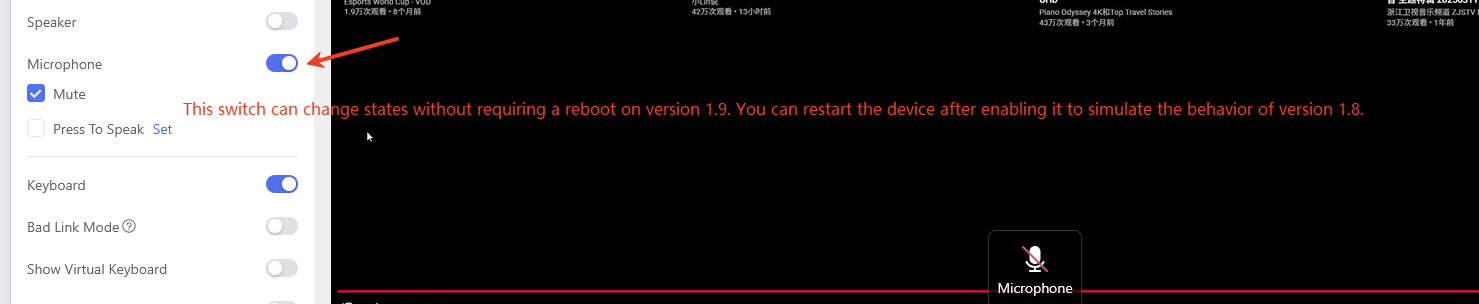
I dont’t understand? With Version 1.8 i had no problems with my setting.
When i Restart my RM1 the MIC is deactivatet again.

I’m having this same issue when muting/unmuting my mic. It makes it so I can’t hear calls for 1 second or so and the screen freezes and skips. I’ve reverted back to 1.8.2 in the meantime and no issues on 1.8.2.

So, it is keep unusable, or it just temporary unwork and recover later?

It only temporarily freezes and then starts working shortly after. But if you’re on a call and frequently use the KVM mute instead of Teams/Discord/etc, it’s very intrusive because everything freezes (the screen and the audio), so you might miss some of what’s said or what is playing.

This issue will be resolved in the next version. Thank you for your feedback

2 Likes

@rondout I’m connect to a Mac.
Doesn’t even have the option to Update to 1.9.0 my other GL-Comet Pro is on 1.9.0.

However, when I activate microphone and speaker, keyboard and mouse goes inactive.

try change usb identity

Awesome. Thank you very much!