Hello,
If some messages need PM, let’s updates in this PM channel, please do not create new PM channel.
I just checked your VPN server (call it BE9300-Server). The WireGuard server configuration is fine. But I found you have manually added some AllowedIPs to the profile.
I assume you exported these profiles and then imported to the VPN client (for example, another BE9300, call it BE9300-Client) and connected it to the VPN server (BE9300-Server).
In firmware v4.8.x, the VPN dashboard features updated/changed some policies:
the VPN client no longer support AllowedIPs in the profile. You need to change the AllowedIPs in the VPN client’s profile (BE9300-Client) to 0.0.0.0/0 and save.
And, input the AllowedIPs into the to list on the VPN dashboard, to enforce which destination IP or subnets should go to the VPN tunnel.
I temporarily created a profile on the VPN server (BE9300-Server), only to verify whether the point device be able to access the VPN client (BE9300-Client) LAN devices.
My PC connected to the BE9300-Server and verify it, it works properly:
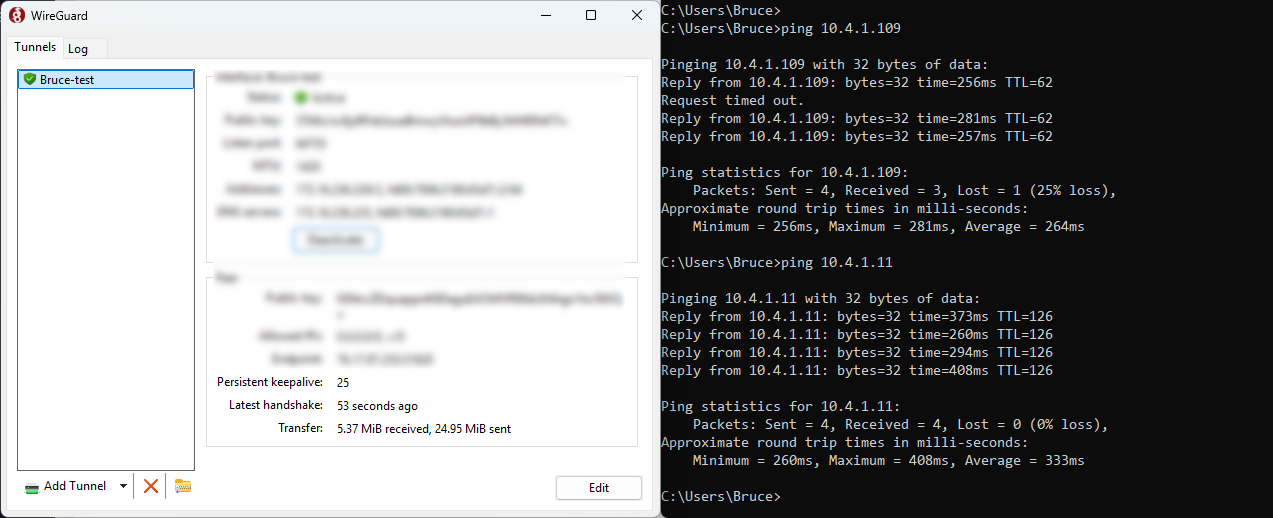
After verification, the temporary profile was removed.
I only checked on BE9300-Client unit and confirmed they were fine. I don't have remote access to the other VPN client routers, so you'll need to modify them yourself.
If the other routers are working properly, you can stop sharing all.