With a large domain list configured for VPN policy routing, elevated DNS query rates can severely degrade router performance, disrupt internet connectivity, and make SSH access difficult.
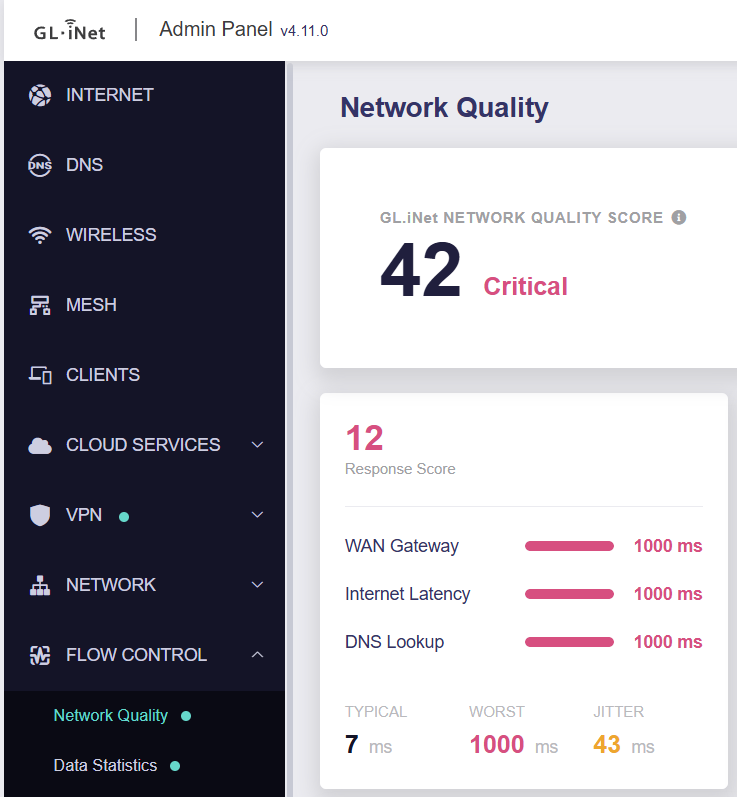
This is observed on a Flint 4 with two WireGuard tunnels. One tunnel has 29,220 domain entries and 19 IP CIDR entries configured for policy routing. In this configuration, DNS query rates above approximately 300 queries per second caused severe router performance degradation.
Although a domain list of this size may be uncommon, the results suggest a potential denial-of-service issue that becomes more pronounced as the list grows.
DNS load test and observed behavior
I used dnsload-lan.py to generate DNS queries from the LAN to the router:
python3 ./dnsload-lan.py flood 192.168.8.1 53 500 10
flood: offered=500qps secs=10.0 sent=5000 answered=3024 answered_rate=302qps loss=39.5%
dnsload-lan.py
#!/usr/bin/env python3
"""DNS load generator for the dns-mark VM test.

latency <host> <port> <count>            closed loop, one query in flight
flood   <host> <port> <rate_qps> <secs>  open loop at a fixed send rate
"""
import random
import socket
import statistics
import struct
import sys
import time


def query(qid, name):
    hdr = struct.pack(">HHHHHH", qid, 0x0100, 1, 0, 0, 0)
    q = b"".join(bytes([len(p)]) + p.encode() for p in name.split(".")) + b"\0"
    return hdr + q + struct.pack(">HH", 1, 1)


def rname():
    a = "abcdefghijklmnopqrstuvwxyz"
    return "www." + "".join(random.choice(a) for _ in range(10)) + ".lan"


def latency(host, port, count):
    s = socket.socket(socket.AF_INET, socket.SOCK_DGRAM)
    s.settimeout(1.0)
    rtts, lost = [], 0
    for i in range(count):
        qid = i & 0xFFFF
        t0 = time.perf_counter()
        s.sendto(query(qid, rname()), (host, port))
        try:
            while True:
                d, _ = s.recvfrom(4096)
                if struct.unpack(">H", d[:2])[0] == qid:
                    break
            rtts.append((time.perf_counter() - t0) * 1e3)
        except socket.timeout:
            lost += 1
    rtts.sort()
    p = lambda q: rtts[min(len(rtts) - 1, int(q * len(rtts)))] if rtts else float("nan")
    print(f"latency: n={count} lost={lost} median={statistics.median(rtts):.3f}ms "
          f"p90={p(0.90):.3f}ms p99={p(0.99):.3f}ms max={rtts[-1]:.3f}ms")


def flood(host, port, rate, secs):
    s = socket.socket(socket.AF_INET, socket.SOCK_DGRAM)
    s.setsockopt(socket.SOL_SOCKET, socket.SO_RCVBUF, 4 << 20)
    s.setblocking(False)
    sent = recv = 0
    interval = 1.0 / rate
    t_start = time.perf_counter()
    nxt = t_start
    end = t_start + secs
    while True:
        now = time.perf_counter()
        if now >= end:
            break
        while nxt <= now:
            try:
                s.sendto(query(sent & 0xFFFF, rname()), (host, port))
                sent += 1
            except BlockingIOError:
                pass
            nxt += interval
        try:
            while True:
                s.recvfrom(4096)
                recv += 1
        except BlockingIOError:
            pass
        time.sleep(0.0002)
    drain_end = time.perf_counter() + 1.0
    while time.perf_counter() < drain_end:
        try:
            s.recvfrom(4096)
            recv += 1
        except BlockingIOError:
            time.sleep(0.001)
    print(f"flood: offered={rate}qps secs={secs} sent={sent} answered={recv} "
          f"answered_rate={recv / secs:.0f}qps loss={100 * (1 - recv / max(sent, 1)):.1f}%")


if __name__ == "__main__":
    mode, host, port = sys.argv[1], sys.argv[2], int(sys.argv[3])
    if mode == "latency":
        latency(host, port, int(sys.argv[4]))
    else:
        flood(host, port, int(sys.argv[4]), float(sys.argv[5]))
During this test, a LAN client makes 500 DNS queries to www.<random>.lan domains per second to the router, for 10 seconds:
- Only approximately 302 queries per second received responses, with 39.5% query loss.
- Internet connectivity stalled.
- SSH access became difficult.
- System load increased dramatically (peaked to 9).
The impact therefore extended beyond DNS resolution and affected the router’s overall responsiveness and traffic forwarding.
Suspected cause
The suspected bottleneck is domain matching in the gl-sdk4-dns-mark kernel module (dns_mark.ko).
It appears that each .lan query in the test triggers a linear scan of the policy domain list, potentially checking approximately 29,220 entries per query. This could make DNS processing increasingly expensive as the domain list grows.
The hypothesis is that dns_mark.ko processing consumes enough CPU time in the networking softirq path to delay other network processing, including WAN forwarding, NAT, and VPN traffic.
My setup
board information
root@GL-BE14000:~# ubus call system board
{
        "kernel": "6.12.94",
        "hostname": "GL-BE14000",
        "system": "ARMv8 Processor rev 0",
        "model": "GL.iNet GL-BE14000",
        "board_name": "glinet,gl-be14000",
        "rootfs_type": "squashfs",
        "release": {
                "distribution": "OpenWrt",
                "version": "25.12-SNAPSHOT",
                "firmware_url": "https://downloads.openwrt.org/",
                "revision": "r32295+914-c25265953b",
                "target": "mediatek/filogic",
                "description": "OpenWrt 25.12-SNAPSHOT r32295+914-c25265953b",
                "builddate": "1791807460"
        }
}
uci show route_policy
root@GL-BE14000:~# uci show route_policy
route_policy.global=policy
route_policy.global.enabled='1'
route_policy.global.mode='0'
route_policy.global.append_source_if='iot'
route_policy.global.instance_on='1'
route_policy.global.use_fw4='1'
route_policy.global.service_policy_en='0'
route_policy.@default[0]=default
route_policy.@default[0].type='default'
route_policy.@default[0].via='novpn'
route_policy.@default[0].name='last sort default policy'
route_policy.@default[0].from_type='device'
route_policy.@default[0].tunnel_id='100'
route_policy.@default[0].enabled='1'
route_policy.@default[0].mark='0x8000'
route_policy.gl_process=rule_process
route_policy.gl_process.name='process policy'
route_policy.gl_process.from_type='process_gid'
route_policy.gl_process.from='10000'
route_policy.gl_process.tunnel_id='201'
route_policy.gl_process.enabled='1'
route_policy.gl_process.via='novpn'
route_policy.gl_process.mark='0x8000'
route_policy.gl_process_vpn=rule_process
route_policy.gl_process_vpn.name='process policy'
route_policy.gl_process_vpn.from_type='process_gid'
route_policy.gl_process_vpn.from='20000'
route_policy.gl_process_vpn.tunnel_id='10100'
route_policy.gl_process_vpn.enabled='1'
route_policy.gl_process_vpn.mark='0x2000'
route_policy.gl_process_vpn.via='wgclient2'
route_policy.@rule[0]=rule
route_policy.@rule[0].name='Tunnel 1'
route_policy.@rule[0].tunnel_id='1174'
route_policy.@rule[0].enabled='1'
route_policy.@rule[0].killswitch='1'
route_policy.@rule[0].via_type='wireguard'
route_policy.@rule[0].group_id='5470'
route_policy.@rule[0].peer_id='2001'
route_policy.@rule[0].profiles='/etc/vpn_profiles.d/profile1174'
route_policy.@rule[0].from_type='interface'
route_policy.@rule[0].from='lan'
route_policy.@rule[0].to_type='ipset'
route_policy.@rule[0].to_manual='1'
route_policy.@rule[0].to='dst_net1174'
route_policy.@rule[0].to_list_external='/etc/domain_mac_list/dst_net1174'
route_policy.@rule[0].local_access='1'
route_policy.@rule[0].via='wgclient2'
route_policy.@rule[0].options_in_used='1'
route_policy.@rule[0].mark='0x2000'
route_policy.@rule[1]=rule
route_policy.@rule[1].name='Tunnel 2'
route_policy.@rule[1].tunnel_id='3774'
route_policy.@rule[1].enabled='1'
route_policy.@rule[1].killswitch='1'
route_policy.@rule[1].via_type='wireguard'
route_policy.@rule[1].group_id='5470'
route_policy.@rule[1].peer_id='2002'
route_policy.@rule[1].profiles='/etc/vpn_profiles.d/profile3774'
route_policy.@rule[1].from_type='interface'
route_policy.@rule[1].from='lan'
route_policy.@rule[1].to_type='ipset'
route_policy.@rule[1].to_manual='1'
route_policy.@rule[1].to='dst_net3774'
route_policy.@rule[1].to_list_external='/etc/domain_mac_list/dst_net3774'
route_policy.@rule[1].local_access='1'
route_policy.@rule[1].via='wgclient1'
route_policy.@rule[1].options_in_used='1'
route_policy.@rule[1].mark='0x1000'
policy-list counts and sample entries
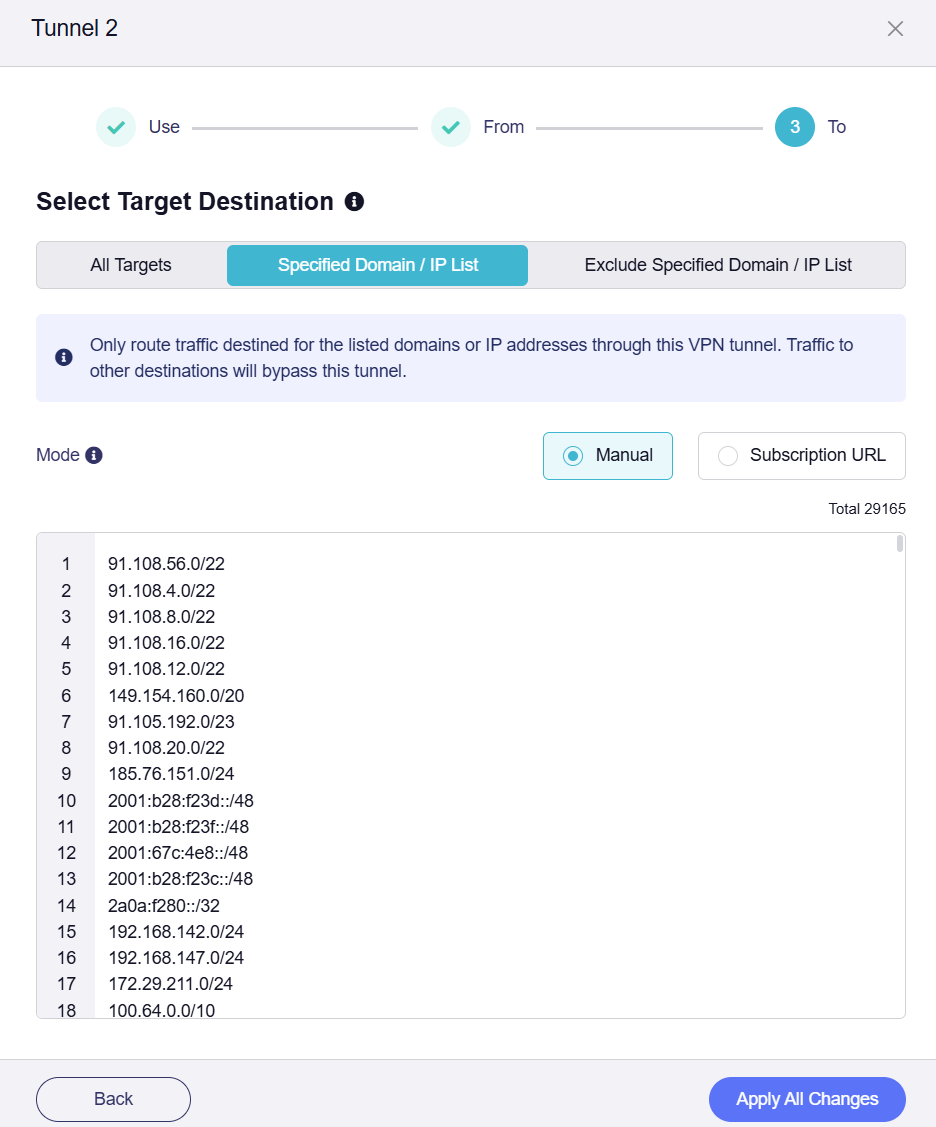
Note: the policy routing web interface rejects top-level TLDs. So I manually added some top level TLDs via SSH, and the policy routing for TLDs works. Hence the entity number mismatch between web and terminal, 29165 vs 29239.
root@GL-BE14000:~# wc -l /etc/domain_mac_list/dst_net1174
39 /etc/domain_mac_list/dst_net1174

root@GL-BE14000:~# wc -l /etc/domain_mac_list/dst_net3774
29239 /etc/domain_mac_list/dst_net3774

root@GL-BE14000:~# head -n 20 /etc/domain_mac_list/dst_net3774
91.108.56.0/22
91.108.4.0/22
91.108.8.0/22
91.108.16.0/22
91.108.12.0/22
149.154.160.0/20
91.105.192.0/23
91.108.20.0/22
185.76.151.0/24
2001:b28:f23d::/48
2001:b28:f23f::/48
2001:67c:4e8::/48
2001:b28:f23c::/48
2a0a:f280::/32
192.168.142.0/24
192.168.147.0/24
172.29.211.0/24
100.64.0.0/10
fd7a:115c:a1e0::/48
tailscale.com

root@GL-BE14000:~# wc -l /tmp/dnsmasq.d/via_domain
29220 /tmp/dnsmasq.d/via_domain
DNS-mark rules reported by /proc/dns_mark/dump
root@GL-BE14000:~# cat /proc/dns_mark/dump | head
DNS Mark Rules:
Rule 1174:
  Ifnames:
    br-lan
  MACs (blacklist=1):
  Domains (blacklist=0):
    netflix.com
    netflix.net
    nflximg.com
    nflximg.net

root@GL-BE14000:~# cat /proc/dns_mark/dump | wc -l
29297