I notice GL.iNet’s page VPN Client setup page for PureVPN states:
”GL.iNet routers don't support the dedicated IP feature of PureVPN, because it needs PPTP”
That’s not true. PureVPN just don’t advertise it. It works over PPTP, L2TP, IKEV2/IPSEC and, relevant for GL.iNet routers:
IT WORKS over OpenVPN TCP / UDP as well. AND Port Forwarding works when you do this.
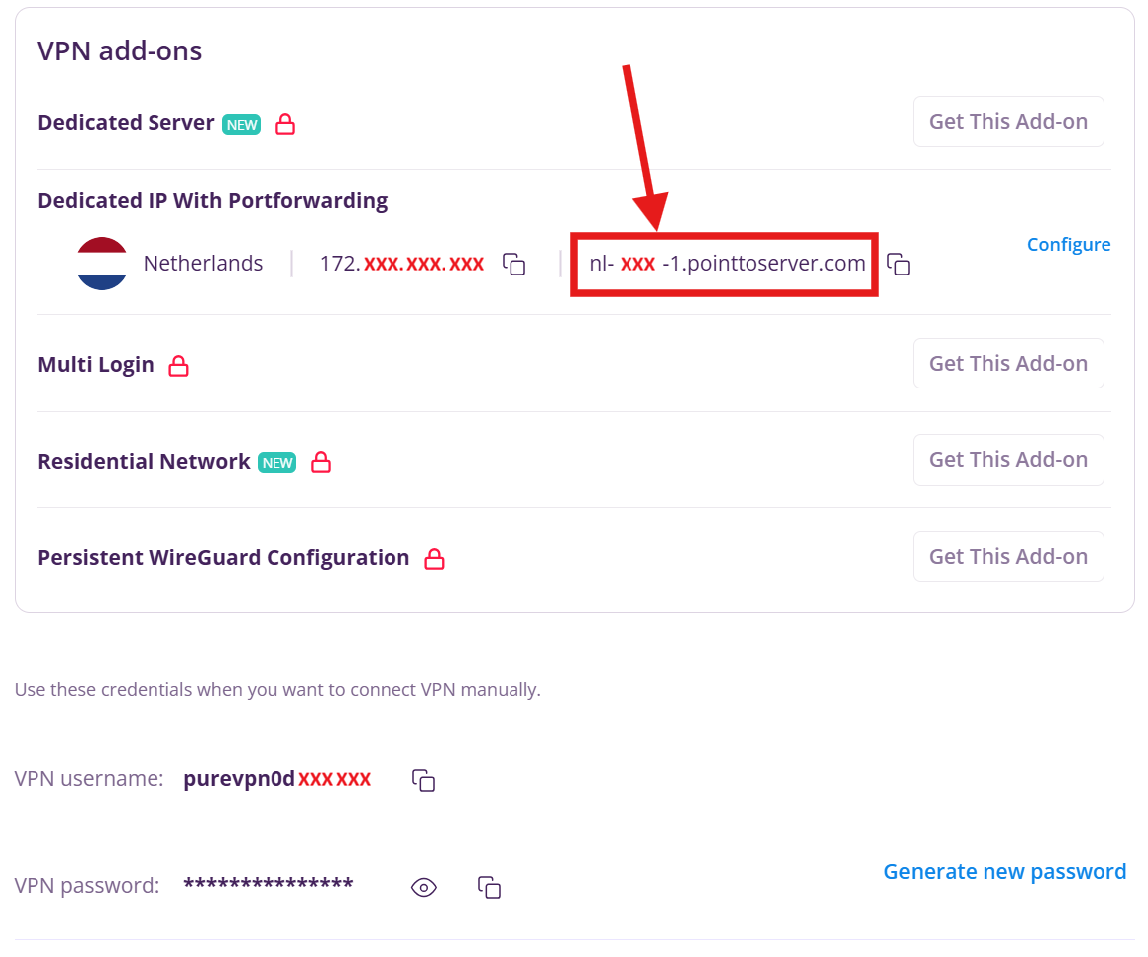
With the Dedicated IP + Port Forwarding package, you are given both the static IP AND a DNS address viewable by clicking “Subscriptions” in the left hand navigation pane on their site.
See attached image for what the Subscriptions page looks like. (I’ve redacted my details here in red).
Step 1) Click “Subscriptions” on the left. Make a note of the DNS address shown.
Step 2) Click “Manual Configuration” on the left.
Step 3) Choose a server, any server, it’s irrelevant and click the “Download” button.
Step 4) Choose “TCP” for OpenVPN TCP or “UDP” for OpenVPN UDP and click “Download” again.
Step 5) Edit the last line of the file
TCP files will have a last line that looks like this:
remote 149.11.59.77 80
UPD files will have a last line that looks like this:
remote 212.77.33.77 15021
All you do is swap out the IP (just the middle bit) with your personal DNS server address from step one. Ensure you leave the the word “remote” at the beginning and the port number at the end as they are.
TCP should look like this:
remote nl-xxxx-1.pointtoserver.com 80
UDP should look like this:
remote nl-xxxx-1.pointtoserver.com 15021
That’s it. Connect. You’ll now be using your dedicated IP. And yes, inbound port forwarding works on dedicated IPs as well. Just disconnect before opening any new ports on the the PureVPN site (Subscriptions page > Configure). Then reconnect the OpenVPN client.
For what it’s worth, PureVPN seem to have configure most of their OpenVPN server connection policies to “Client defined”. What I mean is that if you change your .ovpn file from the default configuration, say if you wanted to “disable compression”, the server allows it. Encryption can be changed too as can many other settings.
Finally, on performance… UDP is faster than TCP.
if you want a drop in block to increase the tunnel bandwidth by 3-5x, here it is:
PureVPN UDP .ovpn files typically begin:
client
verb 1
dev tun
auth-user-pass
persist-key
persist-tun
nobind
compress
-----BEGIN CERTIFICATE-----
swap it out with:
client
verb 3
dev tun
auth-user-pass
persist-key
persist-tun
nobind
pull-filter ignore "compress"
pull-filter ignore "comp-lzo"
allow-compression no
data-ciphers AES-256-GCM:AES-128-GCM:CHACHA20-POLY1305
data-ciphers-fallback AES-256-GCM
-----BEGIN CERTIFICATE-----
I have a 5Gbps WAN. I was getting 40 Mbps with OpenVPN UDP .ovpn standard configuration.
Swapping that header block above now results in a consistent, stable 170 Mbps.
I use this setup for VPN cascading on my GL-AXT1800 which is configured as a WireGuard Server.
It doesn’t even break a sweat with the cascading VPNs.
 Working
 Not working
 Untested