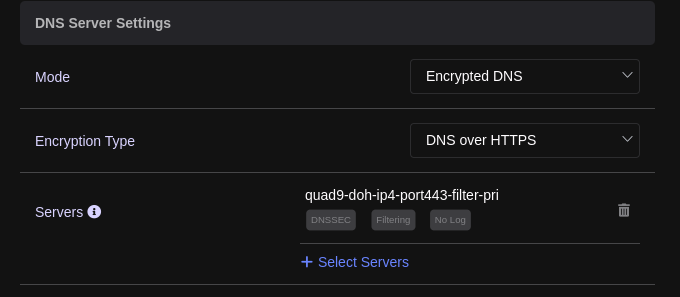
It would be super nice to have an option to set-up Quad9 TLS as the DNS provider as their servers are quite often much "closer" to the user, especially this matters for travel routers.
Example:
❯ ping 9.9.9.9
PING 9.9.9.9 (9.9.9.9): 56 data bytes
64 bytes from 9.9.9.9: icmp_seq=0 ttl=58 time=6.909 ms
64 bytes from 9.9.9.9: icmp_seq=1 ttl=58 time=7.038 ms
64 bytes from 9.9.9.9: icmp_seq=2 ttl=58 time=6.933 ms
64 bytes from 9.9.9.9: icmp_seq=3 ttl=58 time=7.894 ms
^C
--- 9.9.9.9 ping statistics ---
4 packets transmitted, 4 packets received, 0.0% packet loss
round-trip min/avg/max/stddev = 6.909/7.194/7.894/0.407 ms
❯ ping 1.1.1.1
PING 1.1.1.1 (1.1.1.1): 56 data bytes
64 bytes from 1.1.1.1: icmp_seq=0 ttl=57 time=28.076 ms
64 bytes from 1.1.1.1: icmp_seq=1 ttl=57 time=27.463 ms
64 bytes from 1.1.1.1: icmp_seq=2 ttl=57 time=27.283 ms
64 bytes from 1.1.1.1: icmp_seq=3 ttl=57 time=29.169 ms
^C
--- 1.1.1.1 ping statistics ---
4 packets transmitted, 4 packets received, 0.0% packet loss
round-trip min/avg/max/stddev = 27.283/27.998/29.169/0.737 ms
❯ ping 8.8.8.8
PING 8.8.8.8 (8.8.8.8): 56 data bytes
64 bytes from 8.8.8.8: icmp_seq=0 ttl=104 time=99.528 ms
64 bytes from 8.8.8.8: icmp_seq=1 ttl=104 time=99.566 ms
64 bytes from 8.8.8.8: icmp_seq=2 ttl=104 time=99.071 ms
64 bytes from 8.8.8.8: icmp_seq=3 ttl=104 time=100.154 ms
^C
--- 8.8.8.8 ping statistics ---
4 packets transmitted, 4 packets received, 0.0% packet loss
round-trip min/avg/max/stddev = 99.071/99.580/100.154/0.385 ms
Currently, I'm using CloudFlare as it gives best results, but 7ms v/s 27ms for dns lookups makes really noticeable boost in UX.
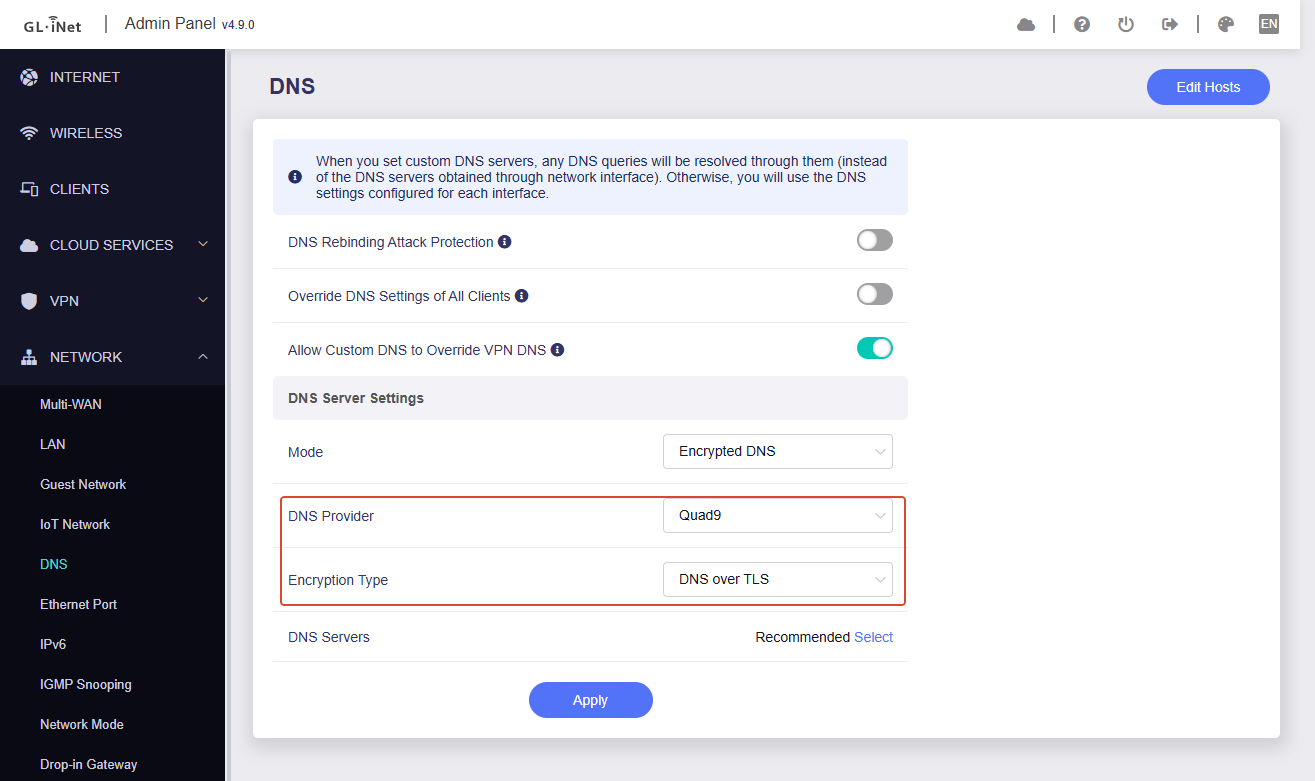
GL firmware supported the DNS server Quad9, you can select manual DNS and choose it in GL GUI > Network > DNS > DNS Serve1 > Pop the list > Quad9 Security:
Thanks for the reply, but the topic is regarding DoT, DNS Over TLS.
P.S. Some ISPs, like Telkomsel in Bali (and most likely the rest Indonesia), force to use their DNS servers by DNS hijacking and time to time response with their server IP for some domains where they show advertisement — sick! and very annoying. They also seem to block DoH (at least it didn't work for me), but DoT works pretty well.
@bruce and @Stan I think there is an easier way. Using an SSH session, you can add resolvers using UCI commands rather than editing the stubby config file. For Quad 9:
uci add stubby resolver
uci set stubby.@resolver[-1].address="2620:fe::9"
uci set stubby.@resolver[-1].tls_auth_name="dns.quad9.net"
uci add stubby resolver
uci set stubby.@resolver[-1].address="2620:fe::fe"
uci set stubby.@resolver[-1].tls_auth_name="dns.quad9.net"
uci add stubby resolver
uci set stubby.@resolver[-1].address="9.9.9.9"
uci set stubby.@resolver[-1].tls_auth_name="dns.quad9.net"
uci add stubby resolver
uci set stubby.@resolver[-1].address="149.112.112.112"
uci set stubby.@resolver[-1].tls_auth_name="dns.quad9.net"
uci commit stubby
service stubby restart
@bruce thanks! worked like a charm! however, it would be very convenient to have Quad9 TLS support in the UI so it would be quicker to jump between Quad9 and Cloudflare instead of using ssh+vi each time I need to change Cloudflare to Quad9.
@Dondi yep, these commands also work, but before adding new resolvers previous should be deleted.
I don't know if it was already discussed, but will you add officially support for DNS.SB in DNS-over-TLS (DoT) encrypted recursive DNS drop-down list as well?
DNS.SB is a free public DNS recursive resolver created by the German IT company xTom.
Thank you to all GL.iNet team for your hard work to make wonderful home and travel routers such as Flint 3 and Slate 7.
Mode: Encrypted DNS
Encryption Type: DNS over TLS
DNS Provider: Cloudflare
-> Apply
SSH to the router, and execute these:
uci del stubby.@resolver[0]
uci del stubby.@resolver[0]
uci del stubby.@resolver[0]
uci del stubby.@resolver[0]
uci add stubby resolver
uci set stubby.@resolver[-1].address="185.222.222.222"
uci set stubby.@resolver[-1].tls_port="853"
uci set stubby.@resolver[-1].tls_auth_name="dot.sb"
uci add stubby resolver
uci set stubby.@resolver[-1].address="45.11.45.11"
uci set stubby.@resolver[-1].tls_port="853"
uci set stubby.@resolver[-1].tls_auth_name="dot.sb"
uci add stubby resolver
uci set stubby.@resolver[-1].address="2a09::"
uci set stubby.@resolver[-1].tls_port="853"
uci set stubby.@resolver[-1].tls_auth_name="dot.sb"
uci add stubby resolver
uci set stubby.@resolver[-1].address="2a11::"
uci set stubby.@resolver[-1].tls_port="853"
uci set stubby.@resolver[-1].tls_auth_name="dot.sb"
uci commit stubby
/etc/init.d/stubby restart
/etc/init.d/dnsmasq restart
probably no plan to join dns.sb as a DoT provider for the time being, as 9b9e... mentioned, it is supported in the DoH list.
I have tried this exact process but cannot get quad9 to work. Cloudflare works fine however my Network access hub which translates the fibre connection to ethernet for my router hijacks unencrypted DNS requests over port 53 and redirects them to the ISP DNS, there is no way to disable this other than using encrypted DoT.
Cloudflare works perfectly but when I arrange my /etc/config/stubby file with quad9 config as shown above, the DNS servers are back to my ISP. This is very frustrating. Can you help me diagnose the issue?
Do you know how to make this DNS config change persist? Every time I restart the router it resets to the original config. Or is there something else I need to fix that’s causing this issue?