Remote Work Configuration Recommendations?

Hi Everyone,
We’re headed to South America to help my husband’s family take care of his mother.
I’m a remote worker, and use my own laptop, but want to keep my location looking like Texas. I mostly use MS Office applications, Google web-applications, Zoom, and extremely rarely VPN into work from my Mac.

I have a Creta (GL-AR750), a Shadow (GL-AR300M16-Ext), and was given a XiaoMi 4A Gigabit router that has OpenWRT on it (I’ve tried to configure OpenWRT, but struggled).

I’d appreciate any advice on my setup and help with my hardware before we leave.

My sister in Plano has offered to let me plug a device into her router, but she doesn’t know much about router configuration.

We’ll mainly be at my mother-in-law’s, but we will also be staying in some hotels, and traveling a little, so I’d like to set up a “fixed” travel router as a VPN client and WIFI at my mother-in-law’s apartment, and have a small travel router for when we’re traveling. I was also thinking that it would be smart to have a backup travel router in case the small travel router breaks or is lost, etc.

I’m removing everything work-related from my iPhone, so I can’t see my work calendar or answer email on the go. So, to get around that, I was thinking of bringing an old android phone w/out a SIM card and an always-on wireguard client to use with hotspot or over non-captive wifi just for work email and calendar.

Questions:

  1. Any problems with this plan, or things we haven’t thought of?
  2. How can I most easily set up the VPN server behind my sister’s router? (somehow without port forwarding? Something else?)
  3. What hardware should I use for the various routers?
    I was thinking maybe the XiaoMi with OpenWRT as the “Fixed” travel router at my mother-in-law’s for Wifi and VPN client, my Creta as my 2nd travel router when away from the apartment, the shadow with an external antenna as the backup travel router, and buying another shadow without an external antenna for the VPN server at my sister’s house.
  4. I’m struggling with the OpenWRT, I haven’t been able to set it up as a travel VPN client. Any advice, or should I use it as a VPN server at my sister’s?
  5. Are the internet-controlled power switches overkill? I just wanted to be able to power cycle anything from a web-app like TP-Link’s Kasa.

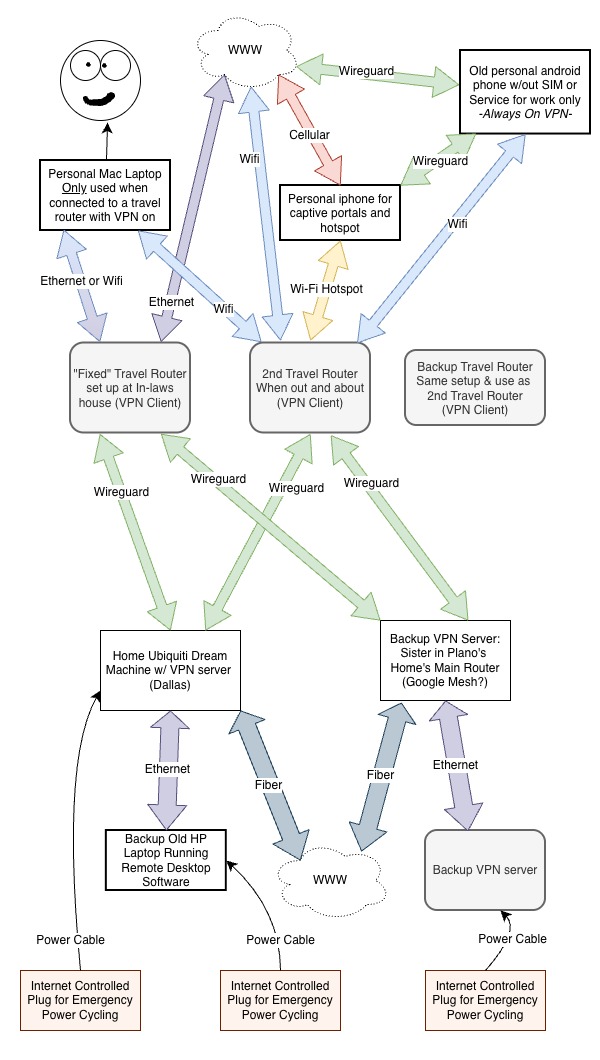
I tried to make this diagram.
Any help would mean a lot,
Lane
EEEK! sounds complicated!

  1. The first thing is that your sister in Plano needs a public IP address if you are going to connect from outside. Then she has, no doubt, an ISP-provided router. It might or might not have a bridge to one of its LAN ports, but it needs to be configurable to port-forward to a device on the LAN. It might even be configurable with its own VPN server. If you have all that, then you can VPN into that router, or a router behind a router. Then you can also have your old HP laptop as the device that VPNs into work, assuming your employer allows that. If all that is the case, then you can set up a router at your in-laws to be the client. I'd also dispense with the interim hop and when you are traveling, VPN straight into Plano.
  2. If you can't VPN into Plano, then you have to have Plano VPN into your inlaws. Another possibility is to set up a free tier Oracle server to act as the VPN server.
  3. Not sure what Dallas is doing there. But somewhere in there Plano must be connecting into work?
  4. I find the internet power switches really convenient for rebooting computers.
  5. Wireguard will drive you crazy with several hops like your diagram seems to have. You might think about zerotier, etc
1 Like

Thank you @elorimer! This is so helpful!

I have seen lots of people write about how they’re working remotely by using a GL.iNet travel router and a VPN server to their home, but it’s less common to talk about the nuances of using their personal phone for captive portals, having a backup VPN server at a family’s house, etc. so I’m trying to understand all of that.

I’m sorry, I think my description was confusing.

My employer doesn’t care what devices I use, as long as they seem to be in Texas (Dallas Texas or Plano Texas). I use my personal Mac for all of my work from our home in Dallas. Even when I’m not using a VPN in to work, they use Google Cloud IPs, etc. to determine location. I don’t use the old personal HP at all right now. I just thought I’d leave the old HP laptop set up back home in case my Mac was broken or stolen. Then I could remote desktop to the HP from a loaner and make do for a bit. (Or I could Remote Desktop into it from my personal phone while traveling if need be)

My most common workflows would be:

A) Use my personal Mac at my in-laws’, connected to the “fixed” travel router, which is connected via WireGuard to my home in Dallas, so it looks like I’m in Dallas

B) Use my phone to connect to a captive portal and the 2nd travel router to connect back to Dallas then connect my Mac laptop once the VPN is established.

Everything else is just backup/redundancy. My sister’s house would be only if/when the power, internet, or VPN server went down at my home while I was gone.

I will have to look into this. I think they have Fiber and a Google Nest Mesh. It sounds like if I can’t do port forwarding at my sister’s house, then I can use Zerotier and set her house as an exit node. I’m guessing the Gl.inet travel routers can run Zerotier?

Do you have any Internet power switches that you really like? My husband set up a Kasa one for our Christmas tree last year, so we have that.

I’m trying to figure out what hardware to use where.

A) Is a Shadow sufficient for my sister’s house, or are the VPN speeds too slow for Zoom?

B) should I set up the Xiaomi 4A router as the “Fixed” router at my in-laws’ or not struggle with OpenWRT and get something else?

Thank you @elorimer!

- Lane

On your question about the Shadow and the Creta. For the last five years I have been traveling full-time, and I have spent a lot of time in Mexico, Central America, and South America, always using a VPN into the United States from hotels and Airbnbs. I have multiple physical and cloud based VPN servers, and I use Shadows as my VPN servers at 2 locations because my family members have slow upload speeds, so installing something faster would not help me. They are on the low end for doing Zoom or other video calls, but from South America it may work for you because the latency is not that bad. However, these devices are weak by today’s standards. I do not use GL iNet firmware on the Shadows anymore because I feel the 4.x firmware is crap on these routers, so I moved from GL iNet 3.x firmware to OpenWrt.

The Creta uses about the same processor as the Shadow and is no longer supported by GL iNet. Until a year ago, I used the original Slate, the AR750S, which is only slightly faster than the Creta, as my travel router. For me it was fast enough, but between the distance, the Shadow VPN servers, the places I stayed, and the AR750S, most of the time my speeds were 20 Mbps or less using Wireguard, and even worse using OpenVPN. It worked for me, but it was not great.

When GL iNet dropped support for the AR750S, I replaced it with a non GL iNet travel router that is smaller and has much more memory, storage, and CPU power. It allows me to connect to the US at more than 10x the speed of the AR750S when I am not using one of the Shadows as my VPN server. My recommendation is that unless this is a one time situation, using old technology like the Shadow and the Creta is not a great idea. You may want to use these devices as backup routers, because you should always be prepared for hardware failure, and then look at buying a router that runs the GL iNet 4.8.x firmware. Not all GL iNet routers receive the latest firmware, so choose carefully. I refuse to recommend a GL iNet product that I do not own, and I do not own anything that supports the newer 4.8.x firmware.

Also, if you decide to use Zerotier, Tailscale, or Netbird to get around port forwarding, the Shadow and the Creta do not have enough storage to support these packages.

Lastly, all of this is difficult. I spend a lot of time working on my travel routers and on physical and VPS based VPNs, because working on computer gear and software is both a job and a hobby. Doing it correctly and with enough redundancy is hard, and you will likely run into some obscure networking problem. If you are short on time, you may want to look at services that can set this all up for you.

1 Like

Clearer now. I think you may want to try and avoid daisy chaining (VPN into inlaws, VPN from there to Dallas, from there to work) and consider using just Dallas as a hub, with a backup in Plano. VPN directly from the Mac and not a router at the inlaws, unless you have several devices. Running your traffic over three tunnels means two servers will be each encrypting/decrypting/encrypting.

  1. I would have thought Zoom you would do direct from your laptop or phone, without running through your setup, so throughput would not be an issue.
  2. It sounds like you can first set up Dallas, replicate it in Plano and then your inlaws place. Just remember that testing your setup within your network isn't a real test. You want to test from outside your network, like the local library.
  3. So first is Dallas. I assume from that location you already have what you need for the work connection, So you want to connect in to that router to use the existing setup. Do you have a public IP there with adequate upload/download speeds? Let's start there.
  4. As a total aside, I use my laptop as a backup, and I have Dell Optiplex in each hub that I use with RDP. So the VPN workhorses are the Mac and the Dell, not the routers. You might consider an 8th or 9th gen Dell off lease.
1 Like

Thank you @elorimer, I’m sorry the diagram isn’t more clear this is my first time trying this out.

I took your advice and tried it out from a restaurant with a captive portal! I could get the Creta and the Shadow to clone my personal iPhone’s MAC address and then connect with WireGuard (and OpenVPN) to our home in Dallas! That is a huge win! The speeds were good! More than triple what I might need for basic Zoom, etc. for work.

Good point! I don’t need to VPN into the in-laws’ for sure, that’s just a waste.

Plano is just a backup, I hope to not have to use it at all!

I don’t really have multiple devices, but occasionally I need to VPN into a work VPN server from my Mac laptop, so keeping the VPN to Dallas at the travel-router-hardware-level allows for that while still looking like I’m in Texas.

I guess I’m concerned about work pulling IP records from Zoom, or whatever.

Wow, I hadn’t thought of that. I think because I still use Zoom from my Mac and want the Texas IP for that it might not be as good, but maybe you do camera feed forwarding too?

I appreciate any other advice or thoughts about specific hardware or other parts of the idea! Is it safe to use Zoom not over VPN or would not doing travel-hardware-level-VPN add risk?

- Lane

@eric, Thank you for weighing in with your experience, it’s so helpful to hear it can be successful (even if a bit of work)!

Thank you! This may be a 1-off thing for a couple of months, or it could, sadly, be more regular (or maybe we could travel for fun someday). We will probably know more by the end of the summer I think.

-

Do you mean not capable at either end, or just behind my sister’s router in Plano? If it’s anywhere in the system, then I’d need to upgrade everything, or get port forwarding to work. Do you use port forwarding on them all or do TailScale/ZeroTier/Netbird?

Thank you for the pointer, I’ll look at the GL.iNet 4.8x firmware supported options, but you’ve also got me curious what other hardware you use…

Thank you for the advice, it’s really helpful, definitely uncovering lots of things I haven’t thought of!

- Lane

Yes, camera and mike over RDP work reasonably well. There can be lag at times. It ends up being double-encrypted: once for the tunnel, and once for RDP itself.

I'm not sure what kind of risk we are talking about, and I don't know exactly how zoom works, but I thought that everyone logged in to zoom's own server, so it depends more on whether zoom provides IP sources to the account owner. The traffic itself is encrypted.

1 Like

Zerotier, Tailscale, or Netbird can run on the router as a VPN server, or on a Mac, Windows PC, or a phone. Since your sister’s place does not have anything other than a VPN server, it would have to run on the router unless you add another device. The Creta and the Shadows (the AR300M16 models), only have 16 MB of storage, which is not enough to load both the GL iNet firmware and these programs

Because of issues with family members changing things like internet providers while I am out of the country, my two Shadows no longer rely on port forwarding. Instead, on boot they create a tunnel to my own cloud server, which has a public static IP address. It works very well for me, but it was complicated to configure

I think any GL iNet router that runs the 4.8.x firmware will be ten times faster than your Creta or Shadow. All of their newer routers use ARM based processors, just like my current router. I simply do not like the form factor of the newer GL iNet models because they are much larger than a Creta or a Shadow, and I find the GL iNet firmware too restrictive. I am using a very small ARM based server running Debian as my travel router. It allows me to run other VPN protocols like SoftEther, which is very good for stealth, and this design totally avoids the new FCC rules on foreign produced consumer routers because it is not classified as a router.

1 Like

I would always leave a terminal at home connected to a KVM via which I can do some work from home as a backup just in case all goes tits up!

1 Like

Thank you @Lastimosa! Do you use a comet KVM, or a Remote Desktop (like RealVNC, RDP, TeamViewer, NoMachine, etc.? I’ve only done Remote Desktop software in the past.

I did more testing from the library and a hotel lobby today with the Creta and Shadow back to the Ubiquiti Dream Machine VPN server. I got both to work, but it took me awhile to get the hang of things and the shadow was a bit flaky. One of the external antennas was a little lose, maybe that why?

I think I got DDNS set up! (I guess we’ll find out when my home IP eventually changes)

It sounds like the Beryl7 might be a good go-to for the main travel router on our trip and/or at my sister’s? It’s got the latest firmware of the lot. The old Slate is a bit cheaper, but lower firmware.

@eric, I’m impressed with your setup, but you’re right, it does sound like an investment of time and money. Im already struggling a little with the Xiaomi with OpenWRT, so it might be over my head to get too advanced. I’ll see what I could do with port forwarding, since that might be easier. The Xiaomi router with OpenWRT has 128mb of ram, maybe it would be sufficient for the backup at my sister’s?

Xiaomi 4A gigabit: Mi Router 4A Gigabit Edition Specs

Does anyone have any internet power switch recommendations? TheTPlink WiFi Kasa ones have worked well enough, but Ethernet connected might be better. Open to suggestions!

Thank you all for your help, it means a lot!

I've used Vesync in the US and Meross in EU with good experience. I used the 15A versions.

1 Like

The A1300 Slate is a dead product, as GL iNet recently posted it will never go beyond firmware 4.5. There are a lot of fixes that it will never get.

2 Likes

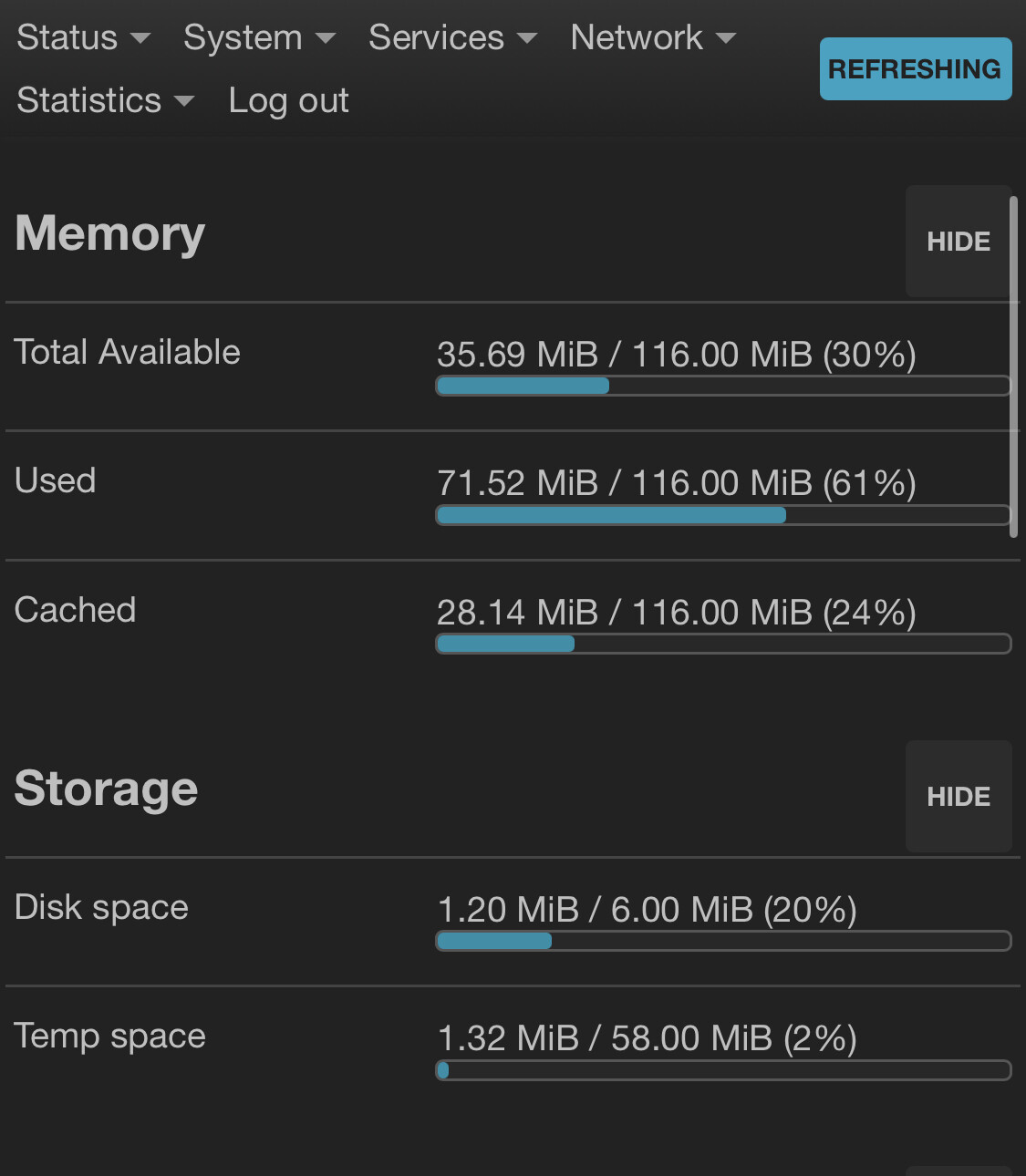
It is not RAM that is the problem, it is the flash space. Per the specs I see on the OpenWRT page, the Xiaomi only has 16 MB of flash. There are some special compressed version of Tailscale that may work, but I would really recommend having a minimum of 128 MB of flash if you want to run Zerotier, Tailscale, or Netbird, as these programs take up multiple megabytes of flash.

Verify the flash space on your Xiaomi, as I’m not a 100% sure I am looking at your exact model.

2 Likes

Thank you @eric and @elorimer!

This has been really helpful and I feel much more on top of things now!

I successfully reset the Xiaomi OpenWRT, and carefully got it set up now as a VPN client. I followed 2 guides and had to change the default DNS to cloudflare for it to work, but it is working.

OpenWRT question:

I’m not sure if I should have any IPv6 connections if my WireGuard doesn’t support it, so in the Network/Firewall/Wireguard_VPN_Client settings should I “restrict to address family” to IPv4 only or leave it as IPv4 and IPv6?

Similarly, in Network/Interfaces/ should I remove the WAN6 network interface?

More good news: I’ve tried out the Creta at a few more places and feel pretty comfortable with it via WireGuard or OpenVPN to my home and ExpressVPN.

Here is the OpenWRT status page, but since the Xiaomi will work well as a VPN client it sounds like either I get port forwarding set up or use a Beryl7 are my best bets.

@elorimer, thank you for the recommendation, I’ll check out Vesync!

Question: Should I consider a Dell Optiplex at my sister’s instead of a Berly7 or similar VPN server? It could run as a Remote Desktop AND the Zerotier, Tailscale, or Netbird vPN server all in one (this is probably more important if we end up needing to spend a lot longer there or go back frequently). If I go this route what are some minimum specs you’d recommend to work for the next couple of years as a backup Remote Desktop/VPN server?

Thank you again,

- Lane

I think you should consider what your workflow requirements are and what you are trying to accomplish. I am dependent on heavy use of the Office suite and big documents, NetDocuments, OneDrive plus Teams and Zoom. I had a bad experience years ago dropping a Dell laptop six inches on its corner deplaning at the start of a two week trip, and it was toast. Theft is a possibility, so I'm reluctant to be dependent on one device. That's why I have an Optiplex in each of two locations that I use over RDP from essentially disposable, easily replaceable laptops I travel with. The work is on the desktops. My cell phone plans are not unlimited, so it helps also to hold down costs. (Also, an Oracle instance I can fire up as necessary.) So I have layers of redundancy using VPNs but I don't need the complexity of Zerotier, etc. I use my travel routers as just that. You can get an Optiplex from $80 to $250 off lease, with a cost jump now dependent on 8gb or 16gb of memory. If I am cut off from the Internet in a pinch I can work on the laptop, and I don't have a company VPN or its policies in my mix. And while everything is connected site to site, I don't need to be accessing more than one location at a time, so I don't need zerotier for that.

But your workflow may be different. I'd start there.

On to specifics:

  1. I don't have IPv6 connections, but I've left it enabled because I'm not sure if my packages will interact reliably. I've moved my Mango on to vanilla OpenWRT with travelmate, wireguard, and pbr. I've spun up a firmware image that deletes other things, so I have more room in the 16MB Mango than you do with the Xiaomi. Disabling IPv6 doesn't save much. But the Beryl AX I've left on stock because the Gl-iNet interface is easier.
  2. I wouldn't do the Dell primarily for the VPN server. If you are going to RDP, you aren't generating much traffic unless you have to do zoom that way. I'm reluctant to expose the Dell directly via port forwarding. If you are jumping to the Beryl 7 you are likely to be maxing out your bandwidth anyway; if not the Dell could supply the processing power.
  3. If you go the Dell way, the specs are driven by what your workflow is.
1 Like

Thank you @elorimer, it sounds like our workflows are similar. Maybe I have more Google drive and Google sheets/docs, but not a ton of big compute.

I didn’t understand what you mean by this, could you expand?

Thank you again!

This feels like a big cloud of uncertainty is being lifted.

- Lane

I meant, the Beryl 7 can do wireguard at 1gbps, so offloading the VPN function to a desktop isn't likely to increase speed--I'm on on 600/20 in one place and 1g symmetrical at another.

1 Like

Thank you @elorimer, that makes sense!

I’ve been doing more testing and got the XiaoMi reliably serving as a VPN client that can Ethernet into the LAN port of my in-laws home router and provide good wired speed (and wireless if I need it) for when I’m at my in-laws overseas.

I was testing things out yesterday and realized I have a problem I’m confused by.

I don’t know how to use my personal iPhone as a hotspot for my Creta or other travel router and to log in and configure/make changes to the travel router at the same time.

I went out to use my laptop from my car as a practice. I plugged in my travel router and then made a hotspot on my phone.

I wasn’t sure if the Creta travel router would connect, but eventually it did, and I could use the slider switch to turn on the VPN, but there was no way to check if that was working before connecting my work laptop to it because I only had the 2 devices, my phone as the hotspot and the work laptop.

Do people keep a third device? Do they setup their travel router to auto connect to their personal hotspot? Do they use Gl.iNet’s web administration of the travel routers? Is there another way?

Thank you,

Lane

I've kind of lost the thread of where your setup is at the moment.

Typically, one would have a VPN server attached to the home LAN. Then, you would have a travel router with you that has a VPN client that would connect over its WAN connection to that server. The missing link is what that WAN connection would be: WWAN (connected to your iPhone hotspot), ethernet, tethered iPhone. Then, your laptop would connect to your travel router's wifi or ethernet. So from your laptop, you could then have acces to the travel router's GUI and to the VPN server and its LAN. So if you wanted to see if your travel router was working, you could tell from its GUI or the fact that you could reach the VPN server.