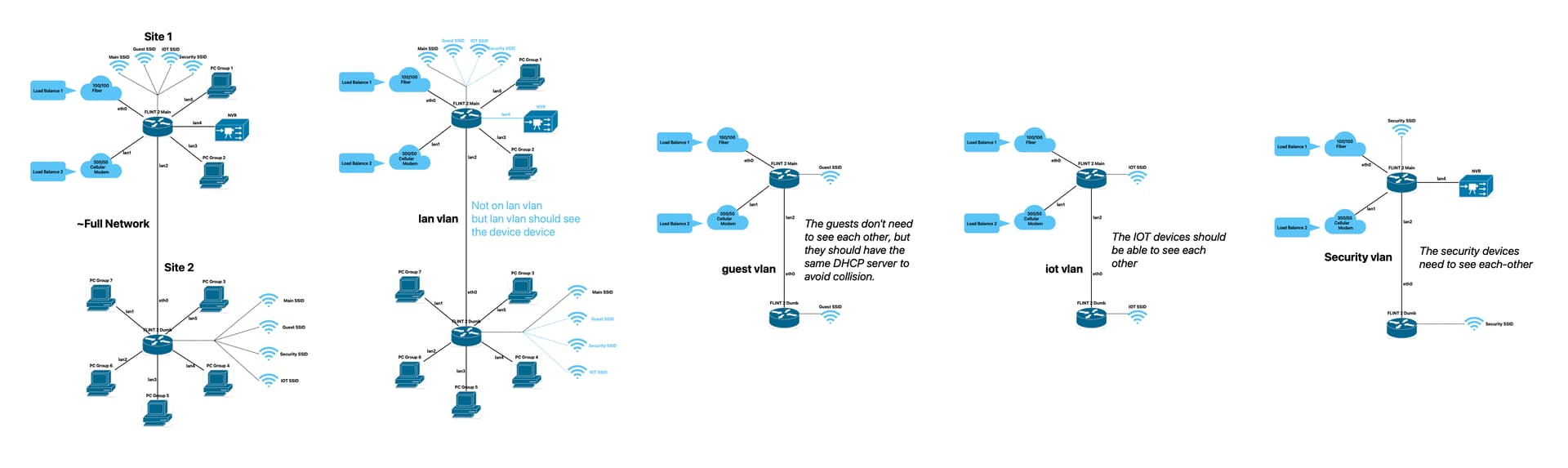
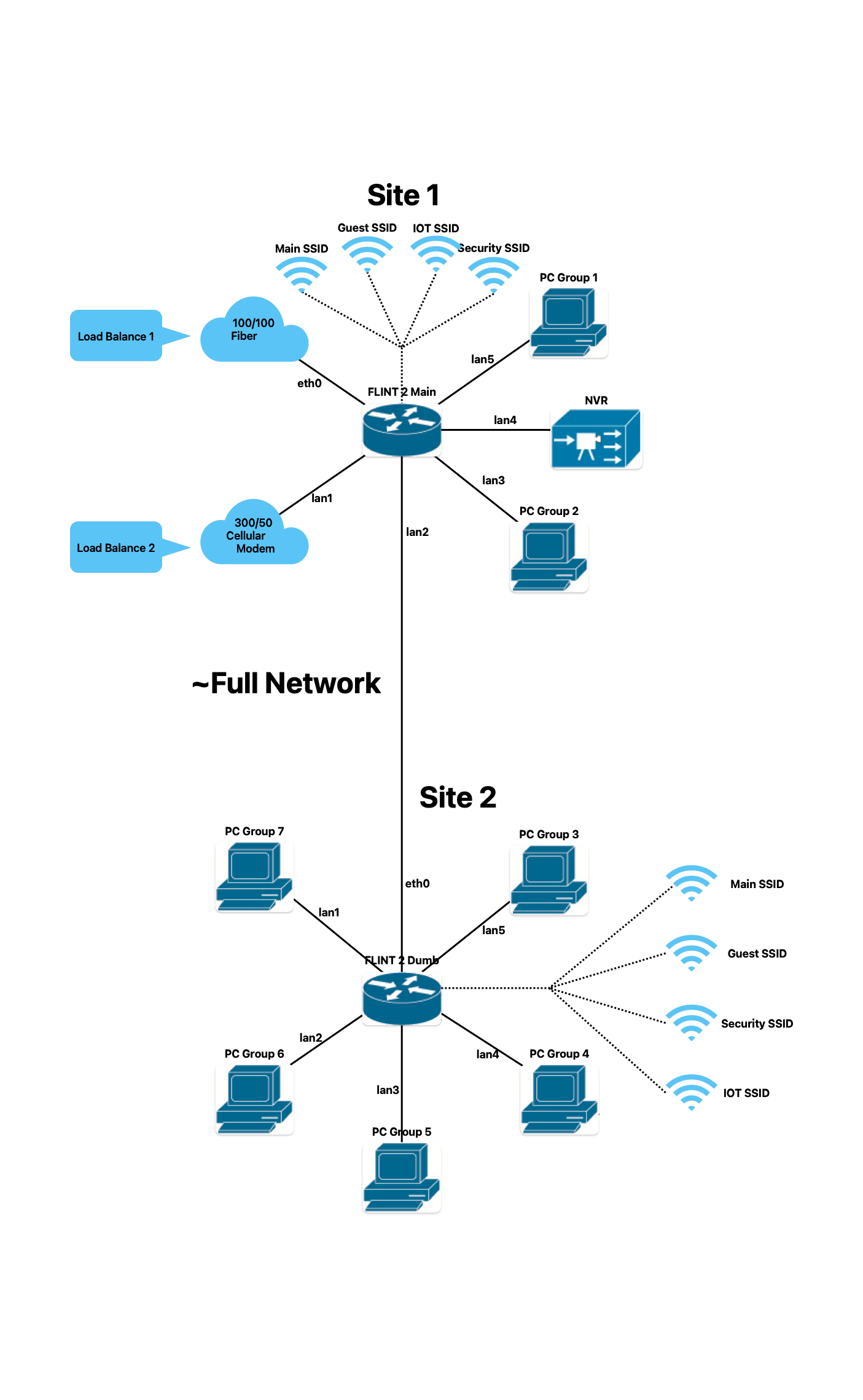
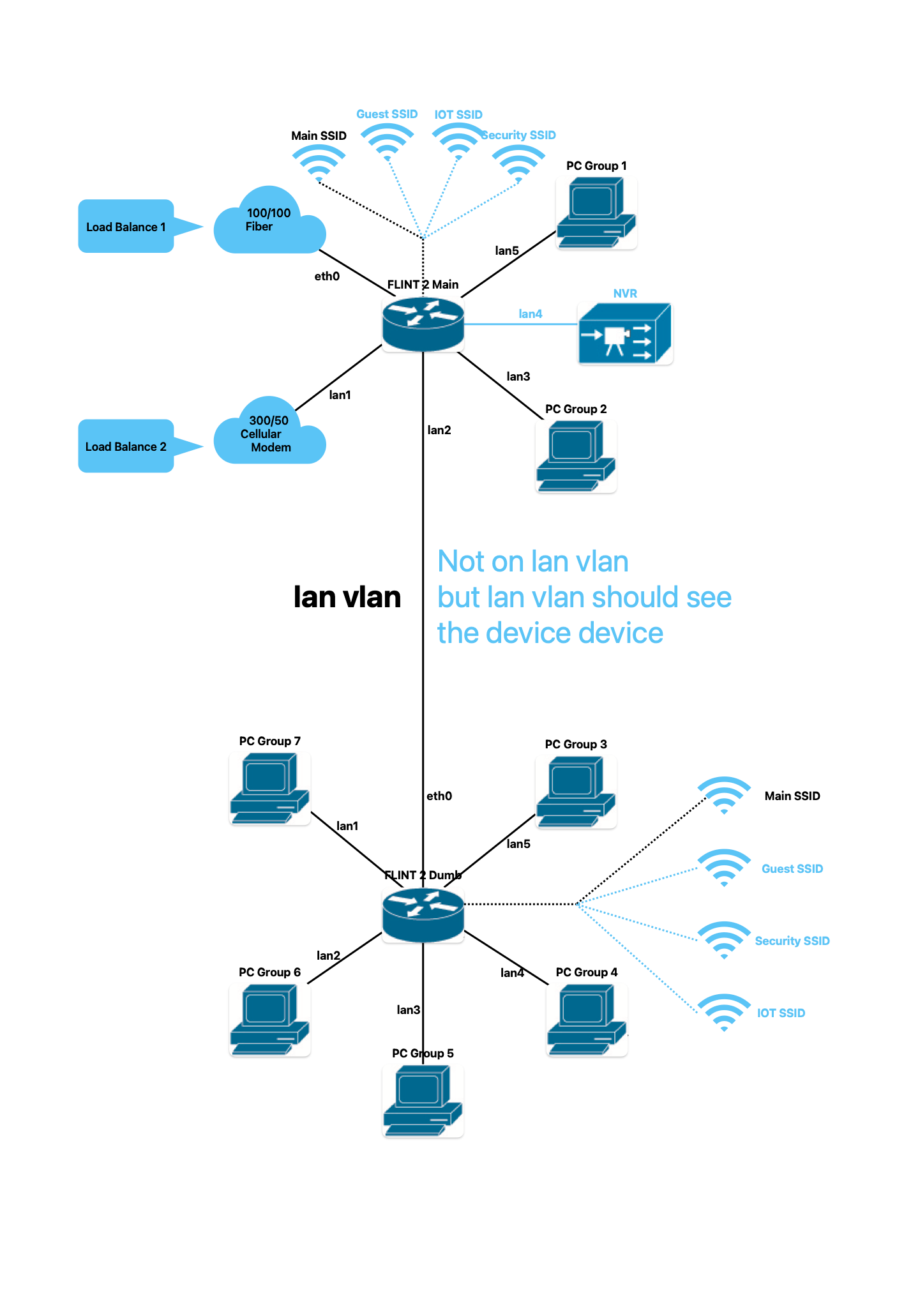
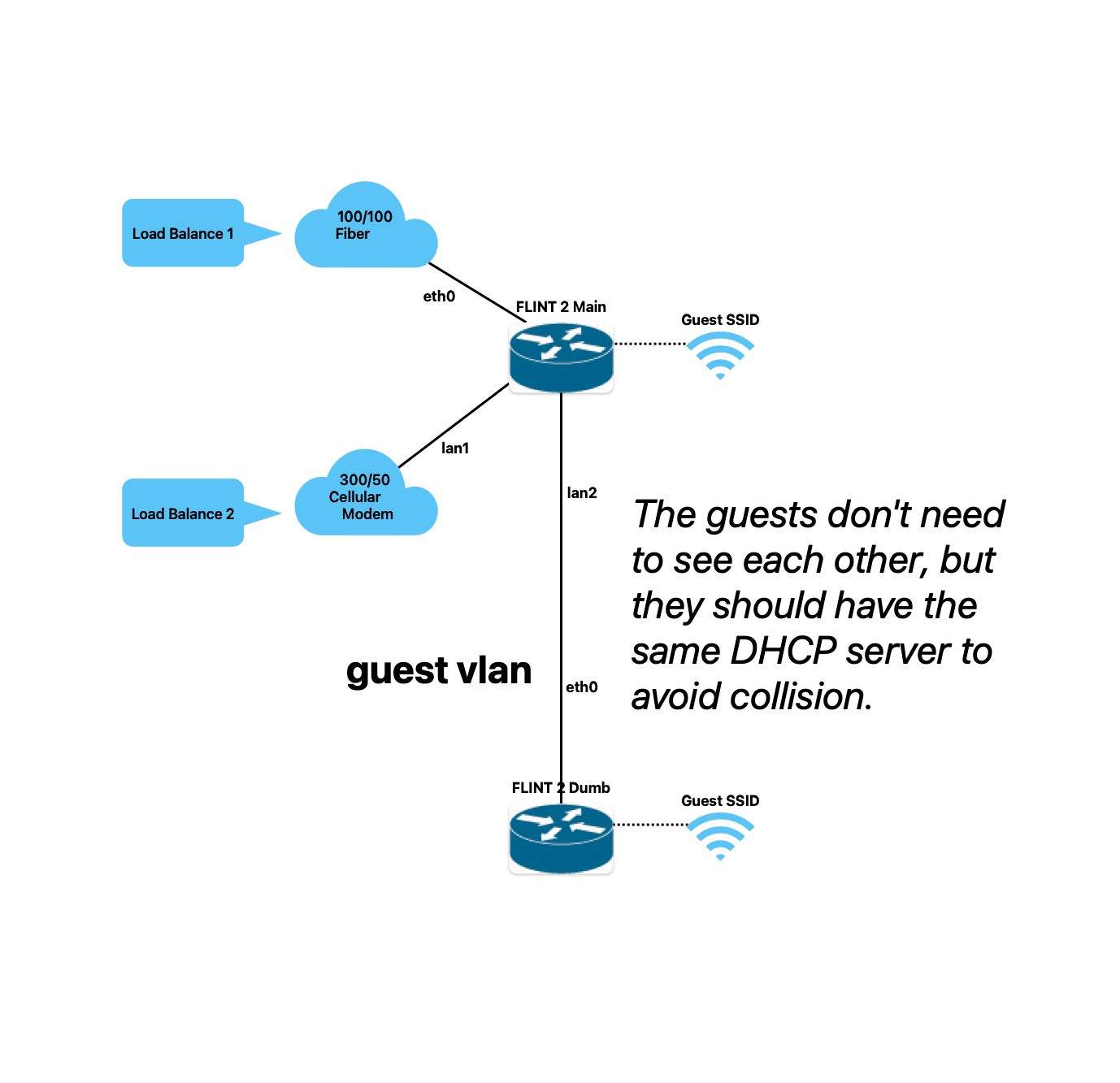
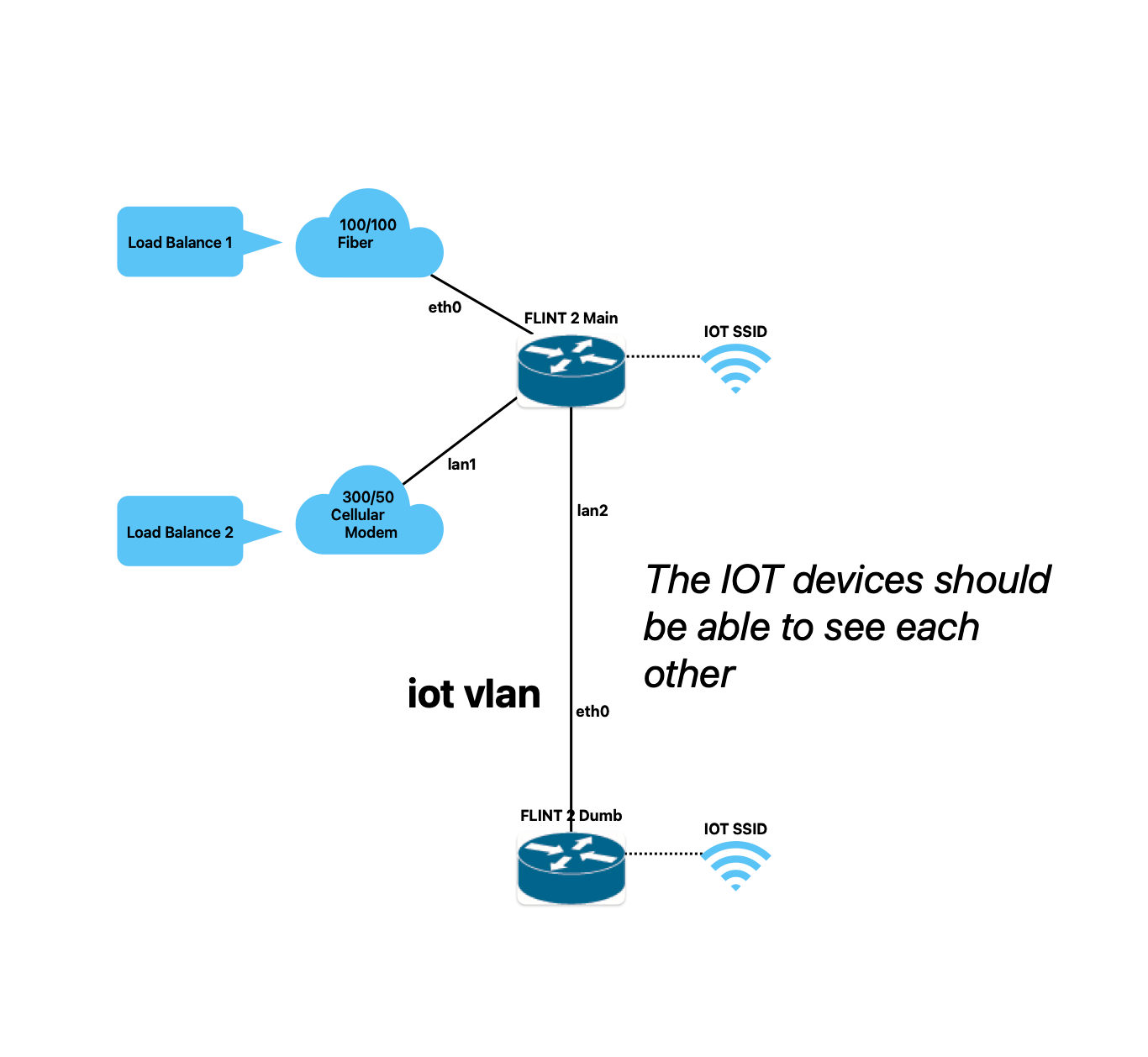
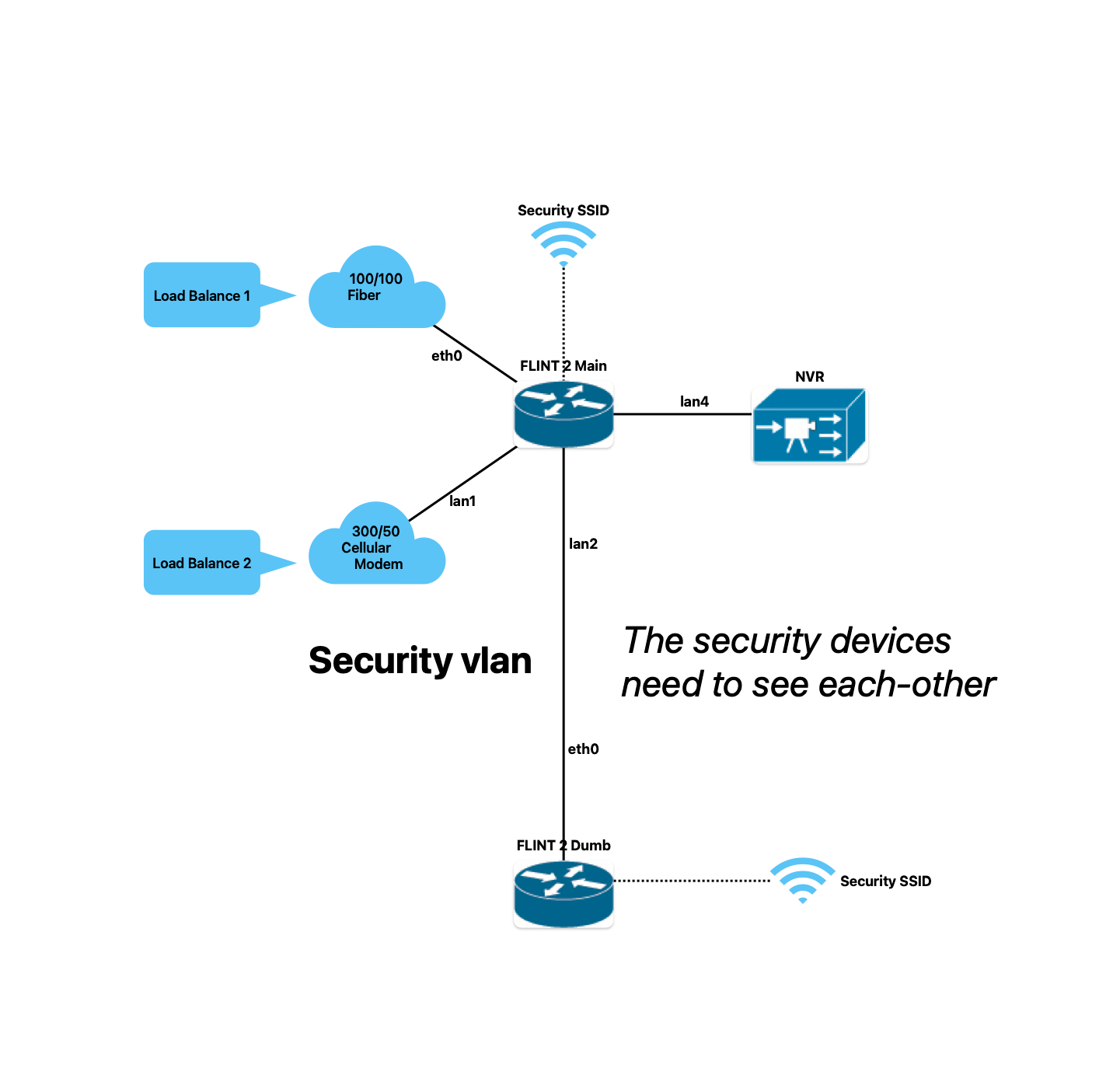
I have been trying to set this up for a few days now and I feel like I have been getting nowhere. I have a sneaking suspicion that it is because I have a dual wan setup.
Attached are my diagrams for my network. I am trying to make 4 vlans.
One for lan, which I have assigned vlan 1, (br-lan.1)
One for guest, which I have assigned vlan 9, (br-lan.9)
One for iot, vlan x, (br-lan.x)
and One for my security system, vlan y, (br-lan.y)
where x and y are vlan id's numerically larger than 9.
I am not sure why but I cannot get my traffic to exit to the internet without having it travel through a VPN first.
I can get to the router from the internet via TailScale, I can get to the router from my network via br-lan.1, but I can't for the life of me get from br-lan.1 to the internet unless I whitelist the domain/public ip in the VPN dashboard.
The only real difference between my setup and all the other examples I can find online is that my setup has a dual wan configuration. One for redundancy and two for increased download speeds.
I do not want to use Vanilla OpenWRT and use the GLiNet OpenWRT if possible. Mostly because my VPN setup is quite complex and I really don't want to mimic the setup in Vanilla when GLiNet makes it so simple in their GUI.
I would really like it if I can make this work. If anyone can help me, it would be greatly appreciated. My network diagrams are posted below.
I can change the colors and contrast if needed.
Thank you in advance for any help anyone provides.
Please let me know if there is anything else I can provide to help get a better understanding of my network.
Are these the config's you are referring to?
etc/config/{firewall/network/dhcp}?
Please let me know if there is a specific command you would like me to run or what files to share. I know how to use a terminal and use ssh/sftp, but I am not very familiar with OpenWRT/GLiNET or advanced networking.
etc/config/firewall
config defaults
	option input 'ACCEPT'
	option output 'ACCEPT'
	option forward 'REJECT'
	option synflood_protect '1'

config zone
	option name 'lan'
	option input 'ACCEPT'
	option output 'ACCEPT'
	option forward 'ACCEPT'
	list network 'lan'

config zone
	option name 'wan'
	option output 'ACCEPT'
	option forward 'REJECT'
	option masq '1'
	option mtu_fix '1'
	option input 'DROP'
	list network 'wan'
	list network 'wan6'
	list network 'wwan'
	list network 'secondwan'
	option masq6 '1'

config forwarding
	option src 'lan'
	option dest 'wan'
	option enabled '0'

config rule
	option name 'Allow-DHCP-Renew'
	option src 'wan'
	option proto 'udp'
	option dest_port '68'
	option target 'ACCEPT'
	option family 'ipv4'

config rule
	option name 'Allow-IGMP'
	option src 'wan'
	option proto 'igmp'
	option family 'ipv4'
	option target 'ACCEPT'

config rule
	option name 'Allow-DHCPv6'
	option src 'wan'
	option proto 'udp'
	option dest_port '546'
	option family 'ipv6'
	option target 'ACCEPT'

config rule
	option name 'Allow-MLD'
	option src 'wan'
	option proto 'icmp'
	option src_ip 'fe80::/10'
	list icmp_type '130/0'
	list icmp_type '131/0'
	list icmp_type '132/0'
	list icmp_type '143/0'
	option family 'ipv6'
	option target 'ACCEPT'

config rule
	option name 'Allow-ICMPv6-Input'
	option src 'wan'
	option proto 'icmp'
	list icmp_type 'echo-request'
	list icmp_type 'echo-reply'
	list icmp_type 'destination-unreachable'
	list icmp_type 'packet-too-big'
	list icmp_type 'time-exceeded'
	list icmp_type 'bad-header'
	list icmp_type 'unknown-header-type'
	list icmp_type 'router-solicitation'
	list icmp_type 'neighbour-solicitation'
	list icmp_type 'router-advertisement'
	list icmp_type 'neighbour-advertisement'
	option limit '1000/sec'
	option family 'ipv6'
	option target 'ACCEPT'

config rule
	option name 'Allow-ICMPv6-Forward'
	option src 'wan'
	option dest '*'
	option proto 'icmp'
	list icmp_type 'echo-request'
	list icmp_type 'echo-reply'
	list icmp_type 'destination-unreachable'
	list icmp_type 'packet-too-big'
	list icmp_type 'time-exceeded'
	list icmp_type 'bad-header'
	list icmp_type 'unknown-header-type'
	option limit '1000/sec'
	option family 'ipv6'
	option target 'ACCEPT'

config rule
	option name 'Allow-IPSec-ESP'
	option src 'wan'
	option dest 'lan'
	option proto 'esp'
	option target 'ACCEPT'

config rule
	option name 'Allow-ISAKMP'
	option src 'wan'
	option dest 'lan'
	option dest_port '500'
	option proto 'udp'
	option target 'ACCEPT'

config rule
	option name 'Support-UDP-Traceroute'
	option src 'wan'
	option dest_port '33434:33689'
	option proto 'udp'
	option family 'ipv4'
	option target 'REJECT'
	option enabled 'false'

config include
	option path '/etc/firewall.user'

config zone
	option name 'guest'
	option forward 'REJECT'
	option output 'ACCEPT'
	option input 'REJECT'
	list network 'guest'

config forwarding
	option src 'guest'
	option dest 'wan'
	option enabled '0'

config rule
	option name 'Allow-DHCP'
	option src 'guest'
	option target 'ACCEPT'
	option proto 'udp'
	option dest_port '67-68'

config rule
	option name 'Allow-DNS'
	option src 'guest'
	option target 'ACCEPT'
	option proto 'tcp udp'
	option dest_port '53'

config include 'nat6'
	option path '/etc/firewall.nat6'
	option reload '1'

config rule 'process_mark'
	option name 'process_mark'
	option dest '*'
	option proto 'all'
	option extra '-m owner --gid-owner 65533'
	option target 'MARK'
	option set_xmark '0x8000/0xc000'

config rule 'process_mark_dns'
	option name 'process_mark_dns'
	option dest '*'
	option proto 'all'
	option extra '-m owner --gid-owner 453'
	option target 'MARK'
	option set_xmark '0x8000/0xc000'

config rule 'process_mark_stubby'
	option name 'process_mark_stubby'
	option dest '*'
	option proto 'all'
	option extra '-m owner --gid-owner 410'
	option target 'MARK'
	option set_xmark '0x8000/0xc000'

config rule 'process_explict_vpn'
	option name 'process_explict_vpn'
	option dest '*'
	option proto 'all'
	option extra '-m owner --gid-owner 20000'
	option target 'MARK'
	option set_xmark '0x20000/0x20000'

config rule 'wan_in_conn_mark'
	option name 'wan_in_conn_mark'
	option src 'wan'
	option dest '*'
	option proto 'tcp udp icmp'
	option set_xmark '0x8000/0xc000'
	option target 'MARK'
	option extra '-m mark --mark 0x0/0x3f00 -j CONNMARK --set-xmark 0x8000/0xc000'
	option enabled '1'

config rule 'lan_in_conn_mark_restore'
	option name 'lan_in_conn_mark_restore'
	option src 'lan'
	option dest '*'
	option proto 'tcp udp icmp'
	option set_xmark '0x8000/0xc000'
	option target 'MARK'
	option extra '-m connmark --mark 0x8000/0xc000 -j CONNMARK --restore-mark --nfmask 0xc000 --ctmask 0xc000'
	option enabled '1'

config rule 'out_conn_mark_restore'
	option name 'out_conn_mark_restore'
	option dest '*'
	option proto 'tcp udp icmp'
	option set_xmark '0x8000/0xc000'
	option target 'MARK'
	option extra '-m connmark --mark 0x8000/0xc000 -j CONNMARK --restore-mark --nfmask 0xc000 --ctmask 0xc000'
	option enabled '1'

config include 'swap_wan_in_conn_mark'
	option type 'script'
	option reload '1'
	option path '/etc/firewall.swap_wan_in_conn_mark.sh'
	option enabled '1'

config include 'vpn_client_deal_leak'
	option type 'script'
	option reload '1'
	option path '/etc/firewall.vpn_client_deal_leak.sh'
	option enabled '1'

config include 'glblock'
	option type 'script'
	option path '/usr/bin/gl_block.sh'
	option reload '1'

config include 'vpn_server_policy'
	option type 'script'
	option path '/etc/firewall.vpn_server_policy.sh'
	option reload '1'
	option enabled '1'

config forwarding 'ovpnserver2wgclient'
	option src 'ovpnserver'
	option dest 'wgclient'
	option enabled '0'

config forwarding 'ovpnserver2ovpnclient'
	option src 'ovpnserver'
	option dest 'ovpnclient'
	option enabled '0'

config rule 'ovpnserver_allow'
	option name 'ovpnserver_allow'
	option target 'ACCEPT'
	option src 'wan'
	option proto 'udp'
	option family 'ipv4'
	option dest_port '1194'
	option enabled '1'

config zone 'ovpnserver'
	option name 'ovpnserver'
	option output 'ACCEPT'
	option mtu_fix '1'
	option masq '1'
	option masq6 '1'
	option enabled '1'
	option input 'ACCEPT'
	list network 'ovpnserver'
	option forward 'REJECT'

config forwarding 'ovpnserver2wan'
	option src 'ovpnserver'
	option dest 'wan'
	option enabled '1'

config forwarding 'lan2ovpnserver'
	option src 'lan'
	option dest 'ovpnserver'
	option enabled '1'

config forwarding 'ovpnserver2lan'
	option src 'ovpnserver'
	option dest 'lan'
	option enabled '1'

config zone 'wgclient'
	option name 'wgclient'
	option forward 'DROP'
	option output 'ACCEPT'
	option mtu_fix '1'
	option enabled '1'
	option input 'DROP'
	option masq '1'
	option masq6 '1'
	list network 'wgclient'

config forwarding 'wgclient2wan'
	option src 'wgclient'
	option dest 'wan'
	option enabled '1'

config forwarding 'lan2wgclient'
	option src 'lan'
	option dest 'wgclient'
	option enabled '1'

config forwarding 'guest2wgclient'
	option src 'guest'
	option dest 'wgclient'
	option enabled '1'

config redirect 'dns_vpn'
	option name 'dns for vpn'
	option src 'lan'
	option src_dport '53'
	option dest 'lan'
	option dest_port '1653'
	option mark '!0x8000/0xc000'
	list proto 'tcp'
	list proto 'udp'
	option extra '-m addrtype --dst-type LOCAL'
	option family 'any'
	option enabled '0'

config redirect 'dns_vpn_guest'
	option name 'dns for vpn guest'
	option src 'guest'
	option src_dport '53'
	option dest 'guest'
	option dest_port '1653'
	option mark '!0x8000/0xc000'
	list proto 'tcp'
	list proto 'udp'
	option extra '-m addrtype --dst-type LOCAL'
	option family 'any'
	option enabled '0'

config zone
	option name 'iot'
	option input 'ACCEPT'
	option output 'ACCEPT'
	option forward 'REJECT'
	list network 'iot'

config zone
	option name 'security'
	option input 'ACCEPT'
	option output 'ACCEPT'
	option forward 'REJECT'
	list network 'security'

config forwarding
	option src 'iot'
	option dest 'wan'
	option enabled '1'

config forwarding
	option src 'lan'
	option dest 'iot'
	option enabled '1'

config forwarding
	option src 'security'
	option dest 'wan'
	option enabled '1'

config forwarding
	option src 'lan'
	option dest 'security'
	option enabled '1'

config forwarding
	option src 'ovpnserver'
	option dest 'security'

config forwarding
	option src 'ovpnserver'
	option dest 'iot'

config rule
	option name 'allow-dhcp'
	list proto 'udp'
	option src 'iot'
	option target 'ACCEPT'
	option src_port '67-68'

config rule
	option name 'allow-dhcp'
	list proto 'udp'
	option src 'security'
	option src_port '67-68'
	option target 'ACCEPT'

config rule
	option name 'allow-dns'
	option src 'iot'
	option src_port '53'
	option target 'ACCEPT'

config rule
	option name 'allow-dns'
	option src 'security'
	option src_port '53'
	option target 'ACCEPT'

config rule 'sambasharewan'
	option src 'wan'
	option dest_port '137 138 139 445'
	option dest_proto 'tcpudp'
	option target 'DROP'

config rule 'sambasharelan'
	option src 'lan'
	option dest_port '137 138 139 445'
	option dest_proto 'tcpudp'
	option target 'ACCEPT'

config rule 'glnas_ser'
	option src 'wan'
	option dest_port '6000-6002'
	option dest_proto 'tcp'
	option target 'DROP'

config rule 'webdav_wan'
	option src 'wan'
	option dest_port '6008'
	option dest_proto 'tcp'
	option target 'DROP'

config rule 'glipv6_guest_dhcp'
	option name 'Allow-DHCP-IPV6'
	option src 'guest'
	option target 'ACCEPT'
	option proto 'udp'
	option dest_port '546:547'
	option family 'ipv6'

config rule 'glipv6_guest_icmp'
	option name 'Allow-ICMP-IPV6'
	option src 'guest'
	option target 'ACCEPT'
	option proto 'icmp'
	option dest_port '58'
	option family 'ipv6'
I have made a discovery, on the VPN Dashboard, I have a VPN client enabled for Proxy mode with Based on the Target Domain or IP. When I turn off the VPN client, my custom VLANs can now reach the internet.
But I do want to have those VPN client rules works still even when my VLANs are up. Is that possible with the GLiNet firmware 4.7.7?
Is there something in the configuration that I should set or interface I should have traffic route through to make this work?