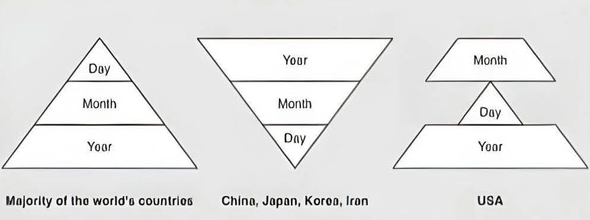
Just switched my new device on and it is showing a US date format i.e. 01/11/2026.
Yes I know a minor thing but it offends my sensibilities to have the American wrong date format when we use the correct one in the UK (like the rest of the world). I’d be happier even with 2026/01/11.
Anyway, can’t find a simple way to change it, anybody know how?
I had to go look at the screen on my unit. Mine is not showing an “American” format. Mine shows month/day, followed by year (larger font) on a separate line:
01/11

2026
Surprisingly, since the year is on a completely different line, I don’t find it confusing like either 01/11/2026 or 11/01/2026 would be.
However, my preference is always a standard ISO format (2026-01-11).
To the OP where in the UI do you even see the date? So far the only place I see it is in the terminal.
date
And looking at date brings my attention to timezones.
ls -l /etc/localtime
Any non :00 timezones (eg :15 or :30 or :45) timezones can't be set in the gl-inet UI which means about 20% of the world's population can't set their correct timezone.
You could change the symlink but I haven't tested if it breaks anything.
Haha oh yea. I never look at the thing, it is remote from me. I forgot it has a display.
Because you can't correctly set a timezone it will be wrong for any timezone that observes daylight savings.
This makes for another 35% of the world's population which have issues even setting the right time on their RM10.
So 54% of the world can't set the right timezone.
And 95% of the world that have the wrong date format.
Edit:
Ok now I have read POSIX timezones that are used in Linux are inverse of ISO. -10 is +10 and +10 is actually -10. You normally set your timezone by the names and don't see the quirk.
Still :15,:30,:45 and daylight saving timezone issues remain.
This adjustment is scheduled for version 1.9.0. We just released version 1.8.0 today, and development on version 1.9.0 will begin next. A version typically takes about two months to develop.