I have an RM10 connected to a mini PC with uses my Sony 4K TV as a monitor. I am accessing the KVM using my Windows 11 laptop with a touchpad.
Previously I was using the Rustdesk remote access system to connect. In the Rustdesk system, scrolling on the remote PC was as smooth as scrolling on my local laptop. With the KVM, touchpad scrolling seems to be very jumpy compared to the input of the touchpad. Is there anything I can do to improve this?
I currently connect using a Chrome browser connecting the KVM on the same LAN. I haven’t progressed to trying it remotely yet. Using the KVM app to connect to the KVM results in a noticeable lag, even though host and client are on the same LAN. I am guessing there is a remote server involved.
It is best to access via the local area network IP within the LAN. Currently, neither the desktop nor mobile apps are optimized for local network conditions. This means that even if you are accessing through the LAN, keyboard and mouse data will still be relayed through the server (video will not).
Perhaps this situation will be optimized in the future.
So…that kind of kills the use of this device for me. I wish this was something I knew before I apparently wasted my money. What’s the return policy from the Kickstarter campaign?
Hi @mrschwarz@UnkindPostage We wonder if the mouse scrolling is smooth when accessing the RM10 using its LAN IP. Has this issue been resolved? If not, could you share some details (e.g., network connection and cable connections) to identify the issue?
I have removed it from the system, but it was connected to the network via wifi. I tried connecting via the lan IP without any different result. I’ll try it again to confirm.
I updated the firmware on the RM10 to the latest (V1.7.2 release 1). I already had the latest Windows version.
I reconnected the device. To insure the most stable connection, I connected it to an ethernet cable instead of wifi. It took a while and some rebooting to get it to connect to the Windows app on my laptop and the Sony 4k TV I use as a monitor for the PC. As far as the connection to the app is concerned, the app says I’m connected to the RM10 via its local lan IP address.
Using Firefox, I accessed the lan IP on my laptop and using the default connections I couldn’t see the monitor on the web page. I messed with the settings and when I changed the ‘Transfer’ setting to ‘Direct‘, it showed video in my web browser. There was such a time lag (30-40 seconds) between mouse movement and video, it was unusable.
Using the app on my laptop, I am connected to the KVM in my living room, viewing the monitor (Sony TV) directly, and using my laptop keyboard and touchpad to control the mini-desktop PC that is controlled by the KVM. The keyboard and video work just fine. Moving the mouse cursor around the screen works fine. I can move it as slowly and rapidly as I want and it follows the touchpad quickly and efficiently. Left and right clicking on the touchpad is fast and responsive.
Here’s the problem: When using the two-finger method on the touchpad to scroll, the scroll movement is herky jerky. I am using Firefox on the host PC (the one connected to the KVM and monitor) for testing. If I slowly and smoothly scroll using the laptop’s touchpad, the desktop PC’s browser window doesn’t start to scroll until I have moved my fingers some distance on the touchpad. Then the browser leaps ahead to catch up to the touchpad and stops again. After a little more distance on the touchpad, the browser window leaps ahead again and so on. It’s not Firefox. It does the same thing scrolling the Start Menu in Windows and using the Microsoft Edge browser.
This inability to scroll smoothly makes the KVM unusable for me. When I am traveling and have to access the desktop PC from a remote location, I am guessing this problem will be magnified.
If you need any more information about Windows or hardware, please let me know. For now, the KVM is still installed.
I have the Comet (MacOS as the host device) and Comet Pro (Ubuntu as the host device). They are on LAN and are not connected to the Internet. The Comet is wired and Comet Pro is connected wirelessly. My LAN is very fast. The issue is observed on different controlling devices across Safari and Chrome on iOS, iPadOS and MacOS.
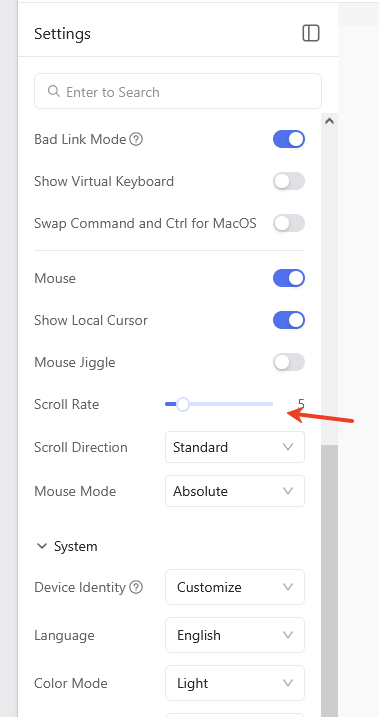
Do not use direct h264, as it is a fallback mode. In this mode, you may encounter more latency issues. You should try using the WEBRTC mode instead. For the problem of scrolling not being smooth, it is recommended that you adjust the scroll wheel speed.
In summary, there shouldn't be any issues with scrolling smoothness in a wired environment. If you're in a Wi-Fi environment, you might need the WEBRTC FEC mode on version 1.8.
Thanks for the response. I did some further testing. Here are the results.
When starting the KVM app, I get a ‘User account control’ message from Windows each time I start the app.
When starting, after clicking ‘yes’ in the UAC, there is no icon on the taskbar and no window for the app. The original solution was to uninstall the app, then reinstall it. After closing it once, it reopened successfully. The second time I tried to reopen it, I got the same behavior that I did before uninstalling the app. I went into the task manager and killed the GLKVM processes. The app started properly after that.
For the times that the app started successfully, using the working EDID for the Sony TV (1920/ASUS/60HZ) displayed in the app, but not the TV. In fact scrolling through all of the EDID settings resulted in the TV not sensing and input. I wasn’t until I rebooted the KVM that I got any input to the TV.
Scrolling is herky jerky no matter what the mouse scroll rate is set to. It just speeds up or slows down.
For my use case, I use the KVM as well as a Logitech wireless keyboard/touchpad directly connected to the desktop PC. When using the Logitech keyboard and not the KVM, the cursor continually jumps to what appears to be the last position it was during the KVM use, even though the KVM app is not running and there is no web connection to the KVM. When I exit the app on my laptop, there are 4 GLKVM processes still running. I killed the processes and will report back if this eliminated the cursor movement.
Thanks for the info. It is a much better experience without the app. Video starts right up without a problem.
Mouse movement is still herky jerky. The cursor tries to find its last connection when no connected to the KVM. I tried adjusting the mouse speed with no improvement. While using the PC without being connected to the KVM, it appears to have rebooted itself. The screen went to white noise, then came back blinking a few times before stabilizing.
I don’t know what an OTG cable is. If you mean the cable between the KVM and PC, yes I have disconnected it. Since the jumpy cursor only appears when the PC is being controlled by the KVM, mouse movement is smooth when controlled by the Logitech keyboard. I also remote into the PC using Rustdesk. Mouse movement is smooth when controlled by the remote computer using Rustdesk.
Smooth movement by other controlling sources (Rustdesk, Logitech touchpad) occurs whether or not the KVM is connected.
Here are the connections I have:
USB-A connection (for keyboard and mouse) on the PC to USB-C on the KVM
That sounds strange. Could you provide a screen recording to show the issue you're currently encountering? Because such problems are often difficult to identify from debug logs.
I uploaded a video I shot showing my touchpad and the screen. Hopefully. you can see my smooth two-finger movement and the browser window jumping. When looking at the desktop PC’s monitor (TV), the motion is the same. Let me know if you need anything else.
I have tried to do that multiple times. While the cursor jumps at different speeds at different the scroll rates, it NEVER moves smoothly. I can shoot videos of the different scroll rates and the jumping cursor if you wish, but I don’t know why changing the scroll rate would smooth it out.