We are excited to announce the opening of our public beta for firmware based on SDK v4.11!
This milestone update brings a suite of powerful network visibility tools, proactive security features, and refined management workflows to your router. We are looking for community members to test this firmware across real-world home, travel, and office setups and help us fine-tune the final release.
What's New in SDK v4.11
Network Quality: Easily track your Network Score by real-time latency, jitter, packet loss, throughput, speed test metrics, and Bufferbloat grade in a single view.
Security Scan: Quickly evaluate Wi-Fi security levels, WAN exposure risks, application vulnerabilities, and firmware updates from a unified security dashboard.
Native VLAN: Create IEEE 802.1Q-based segmented networks to isolate IoT devices, guest access, remote work terminals, or management traffic.
Mesh: Deploy EasyMesh-compatible local networks to seamlessly extend your Home Wi-Fi Network.
Optimized Flow Control: Experience cleaner active-state indicators, intuitive SQM/QoS workflows, and detailed data consumption statistics.
How to Participate
Supported Models: The first phase will support Flint 2 / GL-MT6000 and Beryl AX / GL-MT3000, with additional models to be supported later.
Context: Date/time of occurrence, network topology, and exact step-by-step reproduction guide
Results: Expected behavior vs. actual behavior (attach screenshots or short screen recordings if applicable).
System Logs: Attach exported system logs.
Important Notice & Disclaimer
This is Beta Firmware. It may contain unexpected functional defects, compatibility issues, or configuration reset risks. We suggest you back up your router configuration from Luci before upgrading.
Thank you all so much for your continued support and contributions to GL.iNet Router software!
Happy testing!
Just updated. All settings (2 wi-fi network, primary and guest with wireguard vpn) worked ok.
But web admin panel doesn't working, just connection reset.
Device Info: Flint 2, mt6000-4.11.0_beta1-1112-0904-1788511909
Context: web panel doesnt working, the connection reset. The router subnet was 192.168.10.0/x, therefore the panel was on the 192.168.10.1 before update.
Also please tell me how to rollback to 4.9.1 without the web panel? ^-^
Hello, 4.11.0 installed on x 2 GL-MT3000 and running happily but I am unable to see any of the new features listed in the release notes.
I am interest in testing : Mesh: Adds EasyMesh-compliant networking using local Mesh Nodes. But I can not see the settings on the web interface. I am running 4.9.0 on my Flint 3 and can see the Mesh setup window but not on the two Beryl AX routers.
Thanks for all your hard work. Looking forward to testing
And this is the detailed docs for Mesh: Mesh - GL.iNet Router Docs 4
Router features shall be configed on the Main Router, and the Mesh Node is acting as WiFi bridge/repeater.
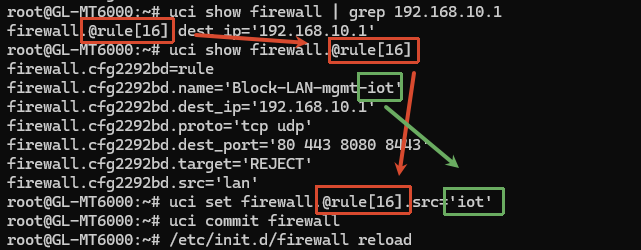
There is currently an issue where, if the LAN IP address was set to 192.168.9.1 or 192.168.10.1 and the configuration was preserved during the upgrade, an incorrect firewall rule will block access to both the Admin Panel and LuCI.
The SSH access should still be available. Please connect to the router via SSH and run the following commands to correct the rule:
I have found a fix. Upgrading the firmware to 4.11.0 beta 1 did not show the new features in the web interface. So I factory reset the Beryl AX x 2 and reinstalled 4.11.0 beta 1 and the new Mesh settings and features appeared and now I have 2 x Beryl AX as Mesh nodes connected to the Flint 3
Yes, we’re working on this, including smart connect and band steering. If you have any cool ideas or feedback on how we should implement this, feel free to hit us up anytime!
I just updated my Beryl AX to v4.11. The GUI has changed. DNS now has its own dedicated page. What does "Apply Manual DNS to Router itself" do and whether I want it on or not? I'm currently using Control D with the Beryl AX.
 What's New in SDK v4.11
 How to Participate
 What Suggest to Include in Bug Report
 Important Notice & Disclaimer