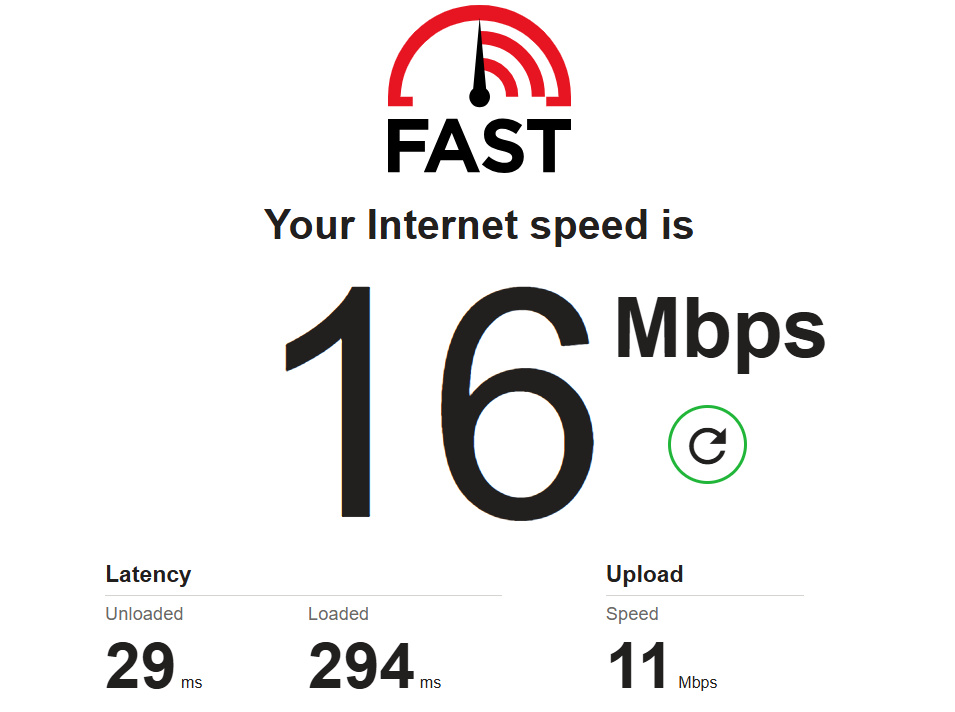
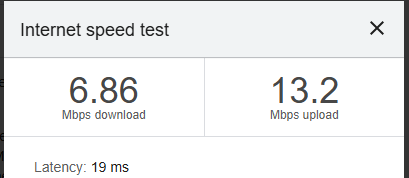
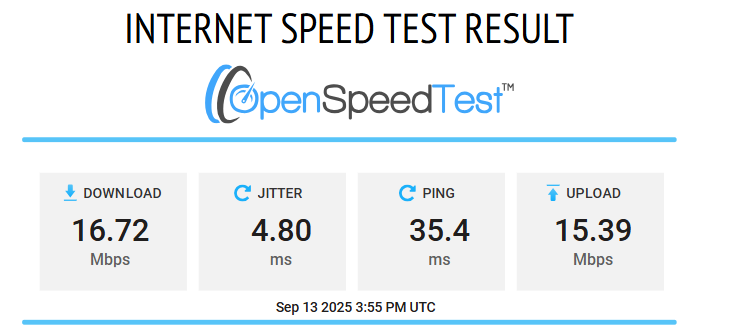
I am facing very slow speeds when using my travel router (5mb up/ 5 mb down in speed tests, less than 1mb up for both upload and download on the laptop using zscaler) regardless of how good the connection I am using is.
Due to CGNAT I am using a tunnel in tunnel configuration (Zero Tier + wireguard). After doing some research, I started wondering whether replacing my current travel router with one with stronger CPU performance (single thread, especially) would make a significant difference? Alternatively, what could I improve while keeping in mind that I am bound to use an LTE connection on my home router?
I have tried to use tailscale rather than zero tier, but the few times that I have managed to use my home router as a exit-node, the setting won't survive a reboot. I understand that I would have to create a script to automatically re-expose the exit note and re-enable it, but I don't know how to do it.
My configuration is as follows:
# home router
GL-AX1800
fw: 4.7.8 release 8
I am using a 4g usb stick plugged into the router for my connectivity. Speeds are good for my use and I do not experience any issues when connected to the main router.
# travel router
GL-A1300
Fw: 4.5.22 release 1
Full cone NAT enabled
UPnP and NAT-PNP enabled as suggested on the Zerotier website.
The travel router is either used as a repeater or with a 5G device plugged into it for connectivity.
I would be happy to achieve 15mb download / 10 mb upload.
Q1: would replacing my current travel router with a flint 2 be worth it? Alternatively, what other device or solution would you suggest?
Q2: what changes would you make to my configuration? Please note that LTE connectivity on the home router is likely to stay for the time being.
Your Slate Plus is rated to 170 Mbps over WireGuard. Your Flint v1 should be able handle around triple that. TailScale is a WG-based SDN as is Netbird so the rates shouldn't be far off I would think but I don't use them so YMMV. IIRC ZeroTeir is TLS-based but I don't use that one either but I'd think that'd be even less of a concern for throughout put losses due to encryption overhead.
I think you'll find your limitation/choke points is the upstream/WAN/WWAN/LTE connectivity you're using. Post your raw WAN/Internet rates. Run a speed test three to five times from three speed testing services to get the mean. CDNs & endpoint location can impact the results so it's best to sample from various services:
I don't use TailScale but unless things have drastically changed in the last few years getting your GL device to act as a exit node isn't difficult but it does need some customization on bootup to be applied. I'm pretty sure the latest GL firmware releases makes it even easier. One thing at a time, as it were.
In my experience, Tailscale is a lot slower than the GLi devices’ rated Wireguard speed, I think because packets are passed back & forth from userspace, unlike with bare Wireguard which is handled entirely in the kernel.
That's an excellent point but 5 Mbps up/down? That sounds like it's some sort of hotel/motel captive portal than anything on the router(s). I can't imagine a userland process being that brutal to performance. Then again IDK how well those SDNs client are programmed but damn.
Why don't you post the full setting/command used to set the TS exit node? I'll whip up a quick script for you.
@9b9e69c2-4b75-4420 please find attached the results as you asked. No other devices were connected to the network bar the laptop I am using to type this.
IDK why I didn't catch that the first time I read your OP. IDK if ZeroTeir is single threaded or not. WG is multi. That could easily be your choke point in such a set up. There might be a decrease given TailScale in userland but it shouldn't result in such low rates as seen above.
If you can determine proper command for the TS exit note you can add it to your device startup @ LuCI -> System -> Startup -> Local Startup