RouterPilot 2.0 — Windows desktop companion for GL.iNet Flint 2 / GL-MT6000

Hi everyone :waving_hand:

I've been working on a Windows desktop application called RouterPilot, originally as a personal project for managing and monitoring my GL.iNet router and AdGuard Home without constantly jumping between different web interfaces.

It gradually grew into something much larger, and I've now released RouterPilot v2.0.0.

RouterPilot is a free Windows desktop companion for GL.iNet routers, currently developed and tested primarily with my Flint 2 / GL-MT6000.

It brings router monitoring, clients, network management, VPN, AdGuard Home and GL.iNet Data Statistics together into one desktop application.

:sparkles: Some of the main features

:house: Dashboard & monitoring

  • Router and Internet status

  • WAN/public IP information

  • CPU and memory monitoring

  • Traffic information

  • Configurable dashboard cards

  • Quick Actions

  • Internet reliability information

  • Network instability alerts

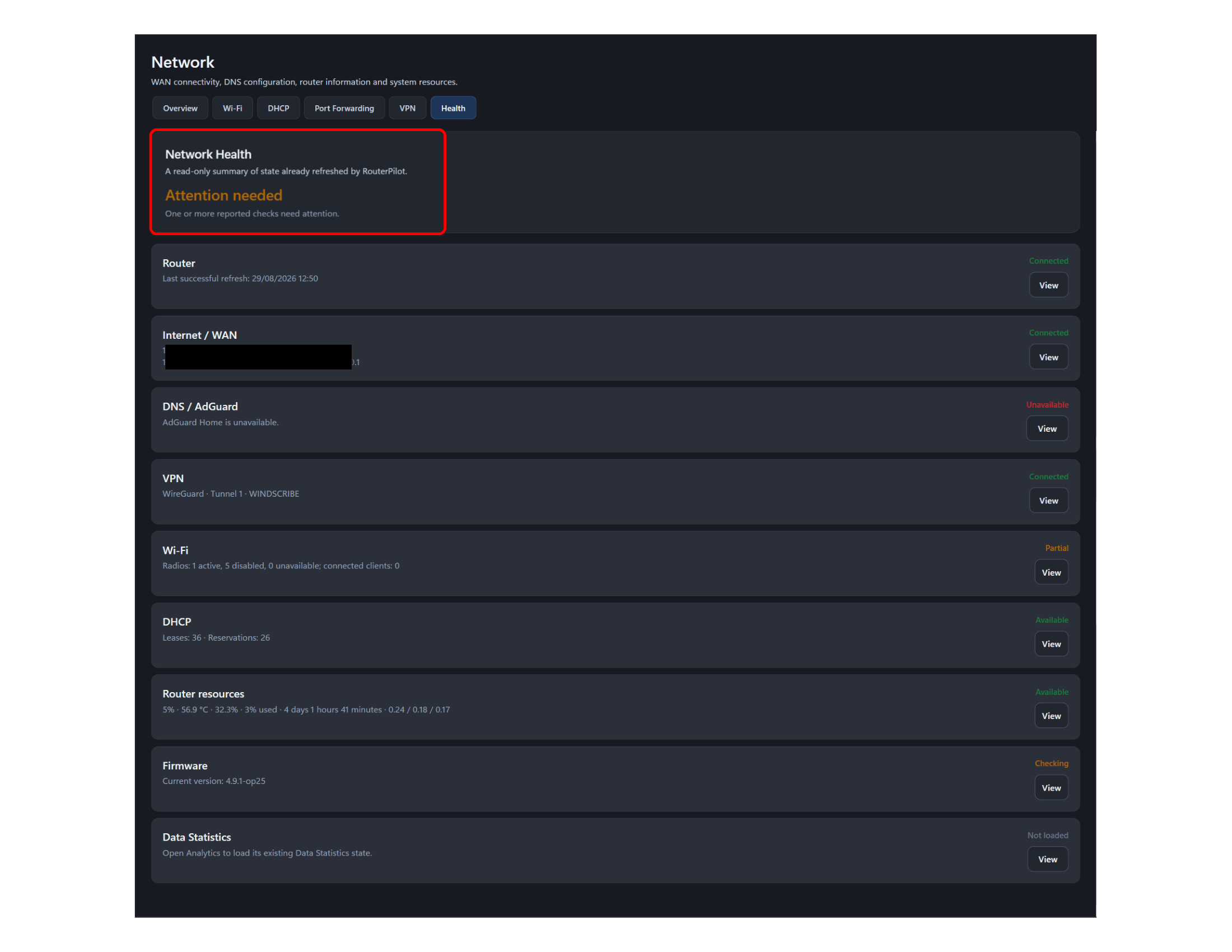
:stethoscope: Network Health

A read-only health overview covering:

  • Router connectivity

  • WAN / Internet

  • DNS / AdGuard Home

  • VPN

  • Wi-Fi

  • DHCP

  • Router resources

  • GL.iNet firmware

  • Data Statistics

The idea is to quickly answer:

“Is something actually wrong with my network, and if so, where?”

:laptop: Clients & devices

  • Connected clients

  • Known/offline devices

  • Client Details

  • Device favourites

  • Presence history

  • Wi-Fi information

  • DHCP information

  • DNS activity

  • Direct navigation between related router information

:globe_with_meridians: Network management

  • DHCP reservations

  • DHCP scope information

  • Port forwarding

  • Client-aware rule creation

  • Validation and readback of supported changes

:locked_with_key: VPN

  • GL.iNet VPN tunnel/profile management

  • OpenVPN / WireGuard information

  • Live VPN connection status

  • Traffic information

  • Diagnostics

  • Local VPN schedules while RouterPilot is running

:bar_chart: GL.iNet Data Statistics / DPI

This became one of my favourite parts of the project, which I’m really pleased to share.

On supported GL.iNet firmware RouterPilot can display:

  • Application traffic statistics

  • Top applications

  • Full application list

  • Traffic graphs

  • Application details

  • Per-device application traffic

  • Packet/traffic information

  • Application blocking where supported

So, for example, you can open an application and see which devices on your network are responsible for its traffic.

:shield: AdGuard Home

RouterPilot also integrates with AdGuard Home for:

  • Protection status

  • DNS activity

  • Statistics / insights

  • Filters

  • Custom filtering rules

  • Blocked services

  • DNS rewrites

  • Safe Browsing

  • Parental controls

  • Safe Search

  • Client DNS information

:wrench: Other tools

There are also features including:

  • Internet Speed Test + history

  • Global Search

  • Notifications

  • Timeline/history

  • Backup/restore

  • Maintenance tools

  • Sanitised network snapshot export

  • Firmware awareness


:package: Download / Source Code

RouterPilot is available on GitHub:

GitHub:
https://github.com/TCDemo777/RouterPilot

For most Windows users, download:

RouterPilot-2.0.0-x64.msi

from the latest GitHub Release.

There is also a portable Windows x64 ZIP:

RouterPilot-2.0.0-win-x64.zip

SHA-256 checksums are provided with the release in:

SHA256SUMS.txt


:desktop_computer: Requirements

RouterPilot is a Windows desktop application.

Development and testing has primarily been done against my:

GL.iNet Flint 2 / GL-MT6000

Some functionality depends on the capabilities exposed by the router and installed GL.iNet firmware.

Features such as Data Statistics / DPI in particular require compatible GL.iNet firmware/support.

AdGuard Home features naturally require AdGuard Home to be available on the router.


:warning: Important disclaimer

RouterPilot is an independent community project.

It is not an official GL.iNet application, is not produced by GL.iNet, and is not affiliated with or endorsed by GL.iNet.

The application communicates with functionality exposed by the router and AdGuard Home, so firmware changes may occasionally affect individual features.

Although I've tested the management functions carefully, I'd still recommend the usual caution when using anything that modifies router configuration.

The project and source code are available on GitHub so anyone interested can inspect how it works.


:speech_balloon: Feedback / testing

I'd really like to hear from other GL.iNet users.

In particular, I'm interested in:

  • How it behaves on other Flint 2 setups

  • Different GL.iNet firmware versions

  • Different VPN configurations

  • Larger client lists

  • Different AdGuard Home configurations

  • Data Statistics / DPI behaviour

  • Bugs or strange edge cases

  • Features that would genuinely be useful

And if anyone tries RouterPilot on another GL.iNet model, I'd be very interested to hear what works and what doesn't.

I've been developing it against my own setup, so getting some real-world testing outside of my network would be extremely useful.

Bug reports, suggestions and constructive criticism are all welcome.

:backhand_index_pointing_right: RouterPilot on GitHub:
https://github.com/TCDemo777/RouterPilot

Thanks for taking a look! :slightly_smiling_face: - Tristan

3 Likes

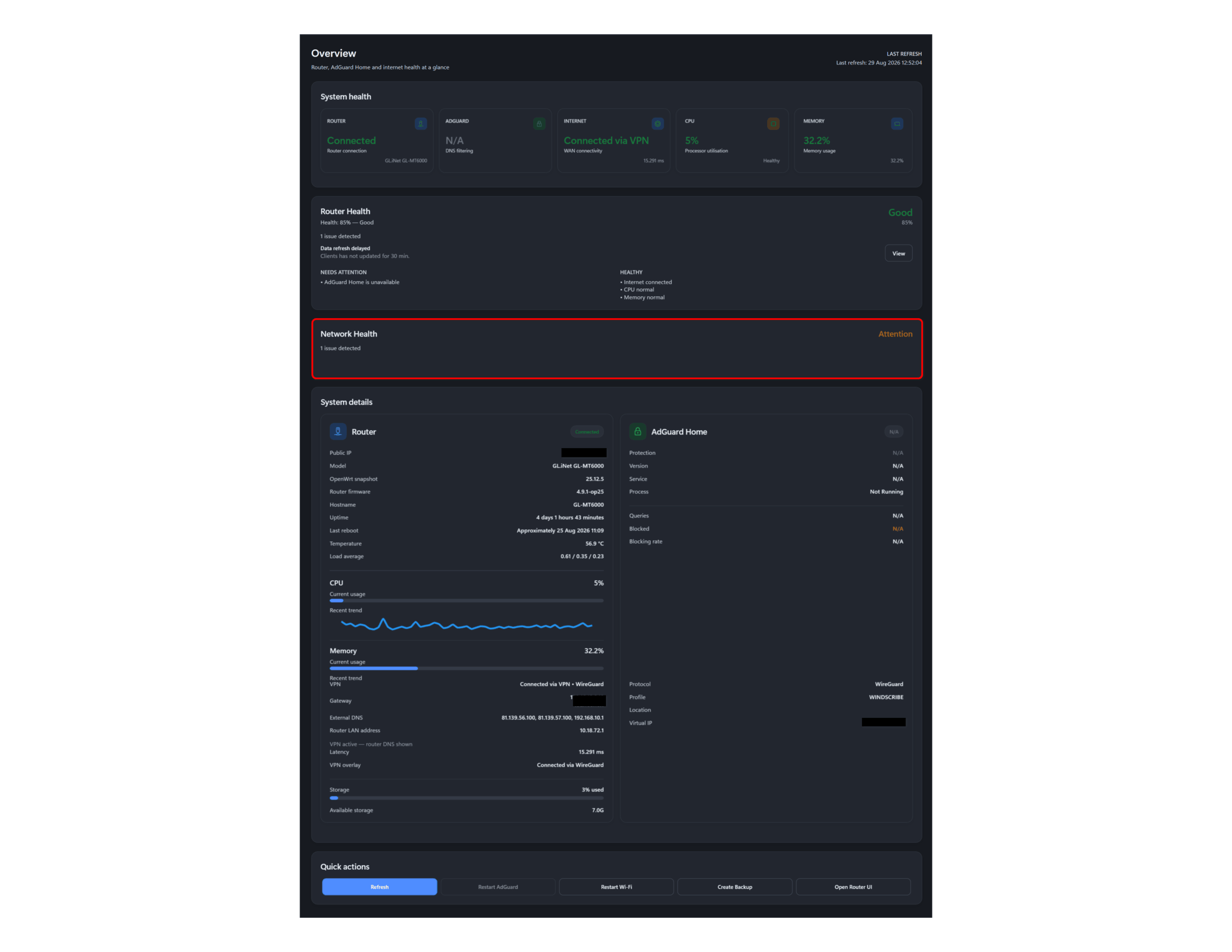
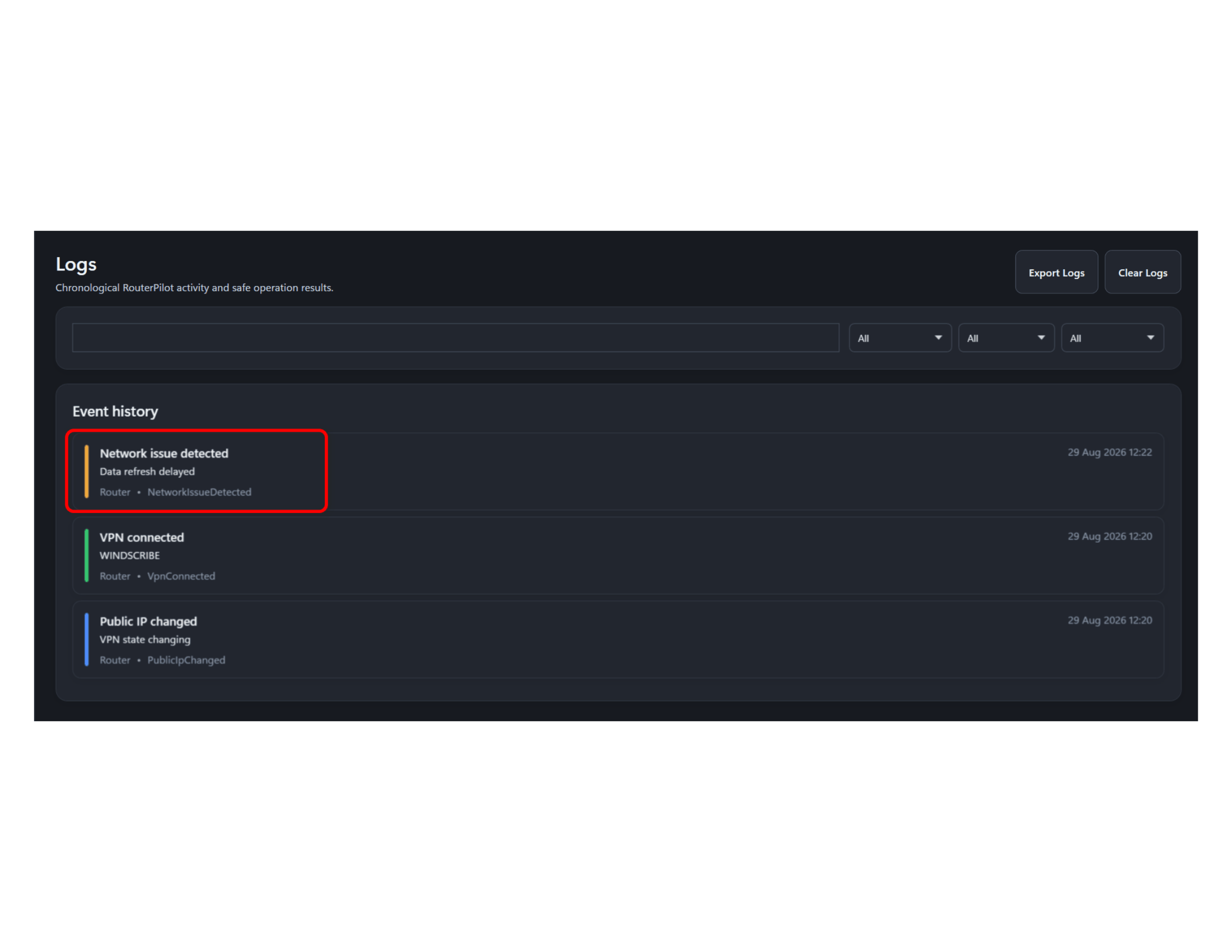
Thanks a lot for your work. Sounds really interesting. I have just tried it and getting some useful stats but unsure how to interpret or troubleshoot the issue highlighted in theses screenshots:

1 Like

Thank you for testing, I’m pleased you find it useful. The items you’ve highlighted appear to be small bugs, which I’ll iron out. The Router Health is a bit misleading, as you are not running Adguard, so I will have an option to include Adguard within the Router Health. The Data Refresh delayed is the network clients data gathering, but it’s slightly misleading, if needed at all, so I’ll improve that. Likewise with the firmware details on the Health tab, this isn’t updating the same way it does on the firmware update card. I’ll have all this in v2.0.3 asap - Thanks again so much for the feedback and for testing!

Edit: v2.0.3 is now released, with these fixes and a couple other bugs I found. Thanks again!

1 Like

This looks interesting. Could not test it, mainly because I'm not using the standard SSH port, or password (using ssh-key). Maybe in the future you would be able to add those 2 settings as well. Thanks for now for a great addition and contribution to the community!

Thank you for the feedback. I’ll add these features and test in 2.1 development, to allow a custom SSH port and SSH authentication method for advanced users in settings. Thanks again.

Edit: I’ve got a working custom SSH port and private key. I’m also working on options for multiple router selection, which will need testing as I only have a Flint 2 so this will likely be buggy for a while until I can get some feedback or my hands on another router for testing.

I’ll commit to v2.1 development. Will need compling.

1 Like

I have a working SSH port and Private Key option, along with router switching in v2.1 development if anyone wants to compile and test. I do this in my spare time, so I appreciate all your support, feedback and testing. Thank you.

1 Like

It’s very late here, but v2.1 is released, please report any bugs. Amongst other bug fixes and small improvements, I have working per-router SSH ports and authentication methods, including password and private-key authentication.

1 Like

Thanks again for testing. I dropped v2.1.1 this morning with some tiny bugs squashed.

1 Like

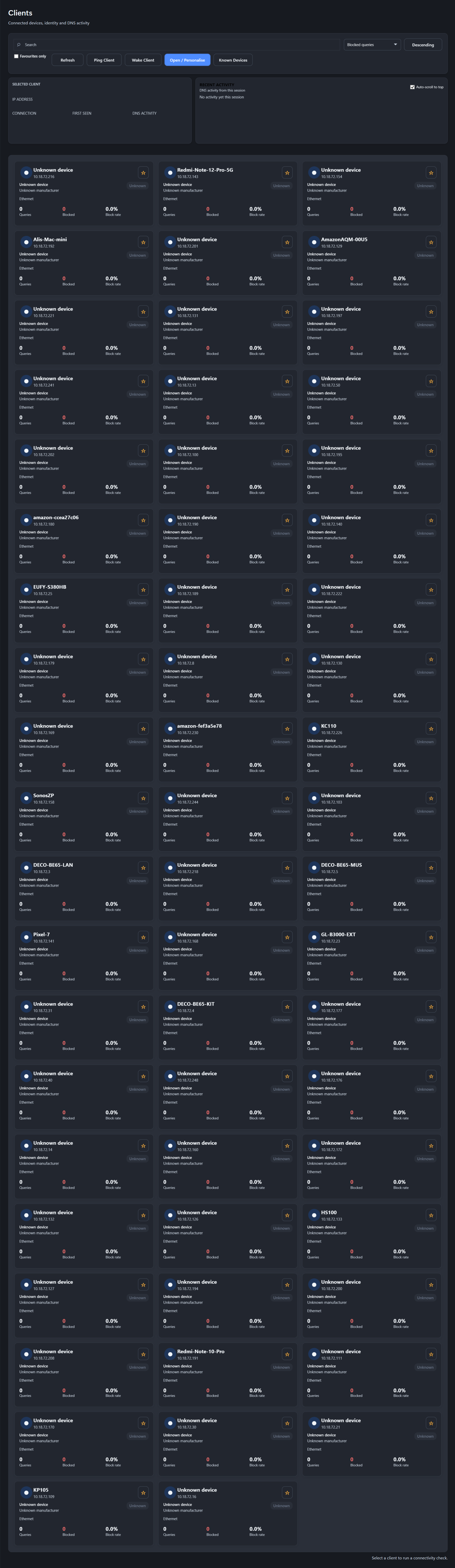
Thank you again for all the updates. My client devices are not displaying any stats individually and I am wondering if this is a bug or is it likely because I am using encrypted DNS:

Thank you for testing and reporting. I’m certain this is because you are using encrypted DNS. If the device itself talks directly to Cloudflare/Google/NextDNS/etc. over DoH/DoT, RouterPilot's statistics won’t have anything to list. If the router receives the client's ordinary DNS request and then uses DoH/DoT upstream, encrypted DNS then this shouldn't prevent RouterPilot from seeing per-client activity. I’ll take a deeper dive into how the router handles this for a potential fix. Thanks again

Edit: Quick question, are you using Adguard on your router?

1 Like

Thank you. I wasn’t when I tried the first iteration of your software, but I have been since, just to see how it works with RouterPilot. My AdGuard upstream DNS servers are encrypted.

Thank you, I'm looking into how the router handles this and I'll implement adguard/none adguard dns details on the clients cards if its possible in v2.2 development.

I’m also looking into adding tailscale information as the router exposes this.

Will be read only until I've had a chance to test it before allowing edits, but it’s a worthwhile addition.

I have adguard running with recursive dns and the clients expose details, so I'll switch to encryption and replicate the instance to try and find a solution.

Thanks again for testing. All helps.

Edit: if you are happy to.dm me your adguard settings I can amend mine to match for a quicker solution

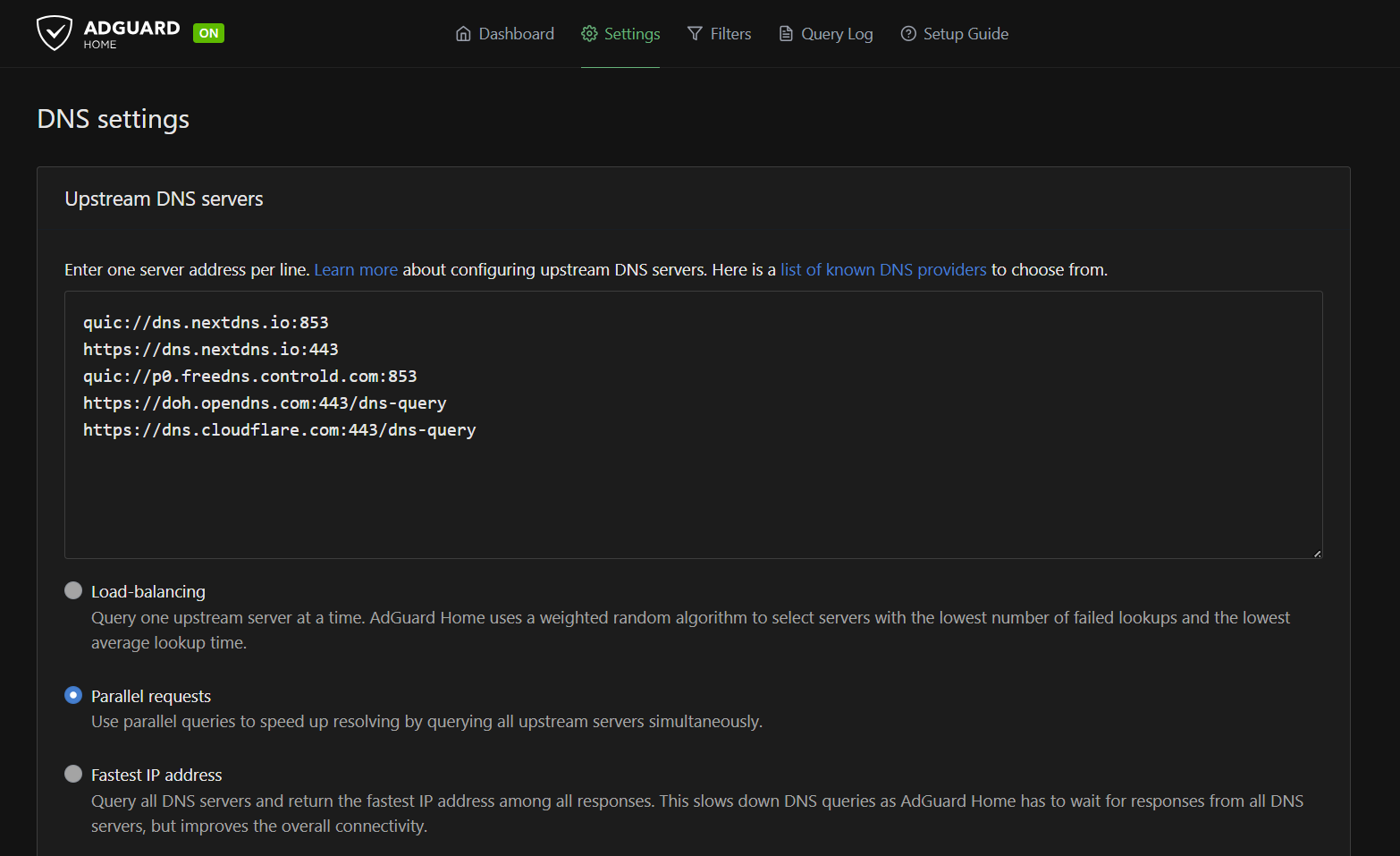
No problem at all. Adding Tailscale stats and info is such a good idea. Would be great as well if it is easy for you to move the router’s temperature to the top part of the overview section (system health) to make it more easily visible. Here are my AdGuard DNS settings:

All clients are showing: localhost (127.0.0.1) for their DNS activity.

1 Like

Your work is really impressive and aesthetically pleasing. It gives me some UniFi router vibes, especially with all the stats and information available at a glance, and I think it has great potential to grow into something really special.

I hope others here, like @rthco and @phantasm22, who have also created some real magic, will take a look at your work. It would be fantastic to see if you could somehow join forces and combine your ideas and talents.

Thanks again for sharing this — really impressive work!

I really appreciate the feedback. What started as a personal side project has turned out to be better than Id initially thought. On the point of the temp, if I’ve got space, I’ll give it a card at the top of overview as it’s more fitting as a stat, if not then I may have room to the foot of the overall window, space is a premium there, especially with VPN connected so I’ll come up with something that works. Thanks for your adguard settings, I’ll replicate that and do some digging. I’ll check out @rthco and @phantasm22 work as well, I suspect they’ll have got some really useful insights into the workings of the Flint 2 amongst other things that they’d be willing to share.

1 Like

@Lastimosa - I’ve got clients details working with the same Adguard upstream settings you kindly shared, but v2.1.1 is also working with this configuration meaning I’m struggling to replicate your instance. It must be the Adguard DNS Encryption settings, but I can’t lock it down.

I do have basic tailscale read only connection status, IPv4 and IPv6 address, device name, dns name, version and peers / online in development so will work more on that as a feature.

I’ve also added the router temp card in the overview panel using <65°C Green, 65-79.9°C Yellow and finally >= 80°C shown in Red.

I hope to get this client encrypted issue sorted then I can compile a v2.2 for testing.

Thank you again for testing and for the superb feedback and kind words.

1 Like

@Lastimosa - Trying to narrow down the client encryption. Can you help with the following please.

  1. AdGuard Home version
  2. Bootstrap DNS servers
  3. Fallback DNS servers
  4. Upstream mode — Parallel, Load-balancing, Fastest IP, etc.
  5. Private reverse DNS settings
  6. Whether Client settings contains manually configured clients
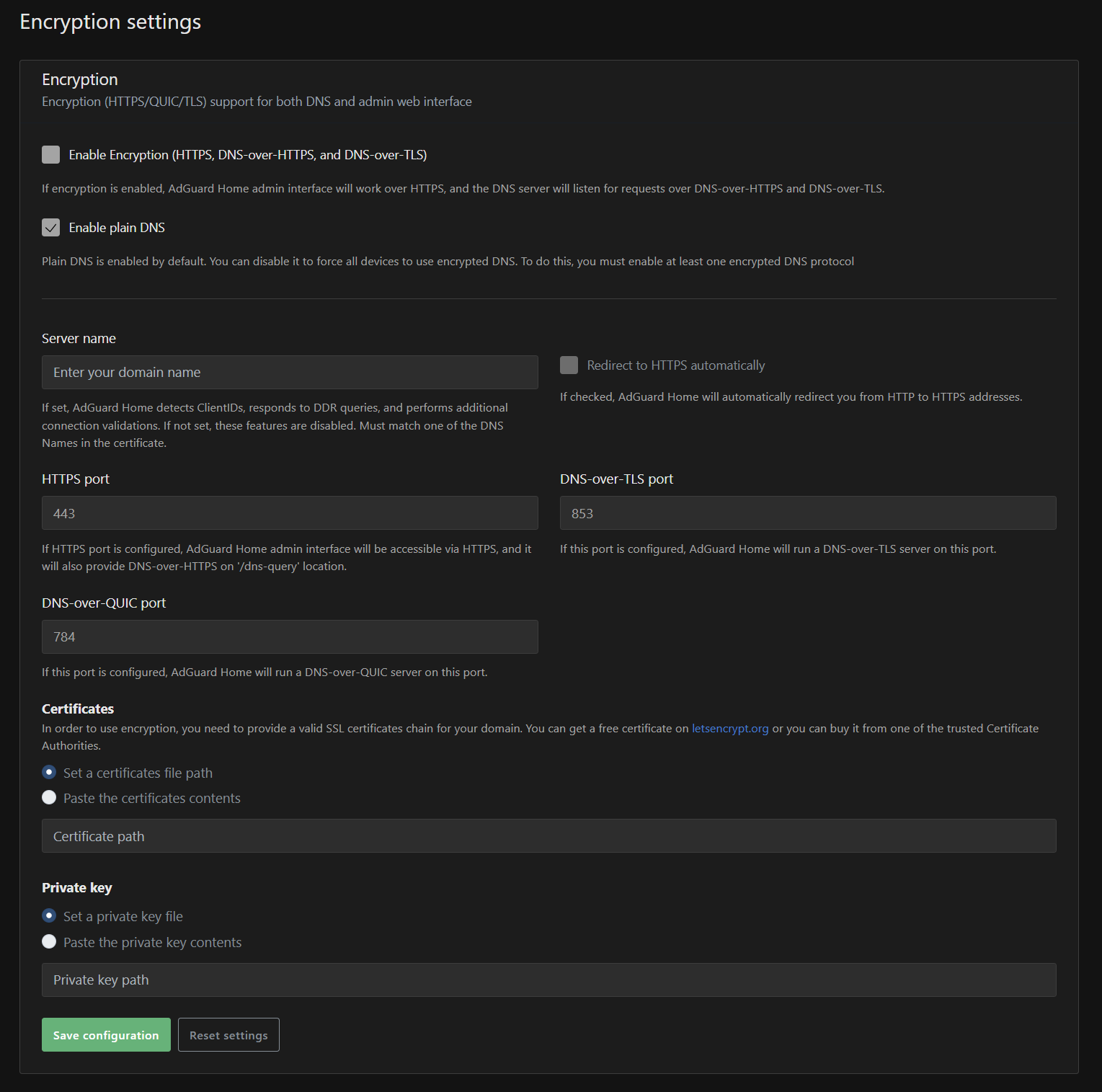
  7. Whether AdGuard Encryption settings are enabled for client → AdGuard DoH/DoT/DoQ
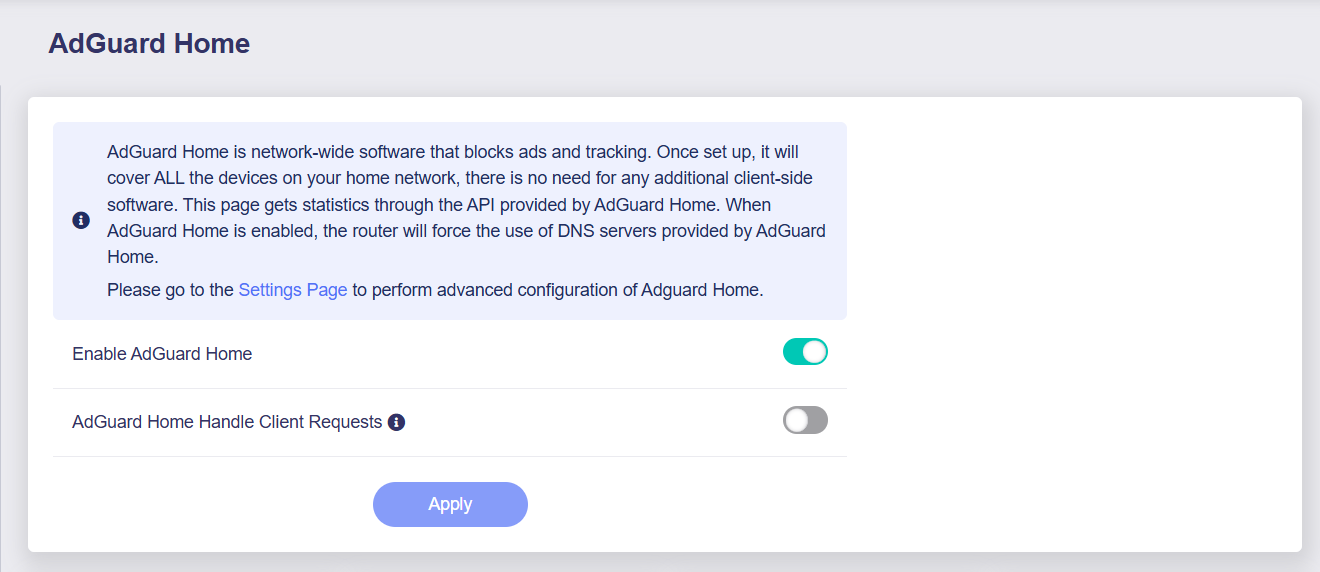
  8. Whether the GL.iNet router is configured so AdGuard handles client requests rather than clients being represented to AdGuard as the router itself

Don’t worry if you are unable to answer some/all of the above, I’ve tried to get the most information without risking any privacy. Thank you again for your help with this.

No problems at all @TCDemo777 . Here are the details of my setup:

  1. AdGuard Version: 0.107.73
  2. Are the default: 9.9.9.10, 149.112.112.10, 2620:fe::10, 2620:fe::fe:10
  3. Left blank as per default settings.
  4. Parallel.
  5. Left blank as per default settings.
  6. Not sure what you mean here but all I have are some clients with reserved IPs.

AdGuard encryption settings are unchanged from default:

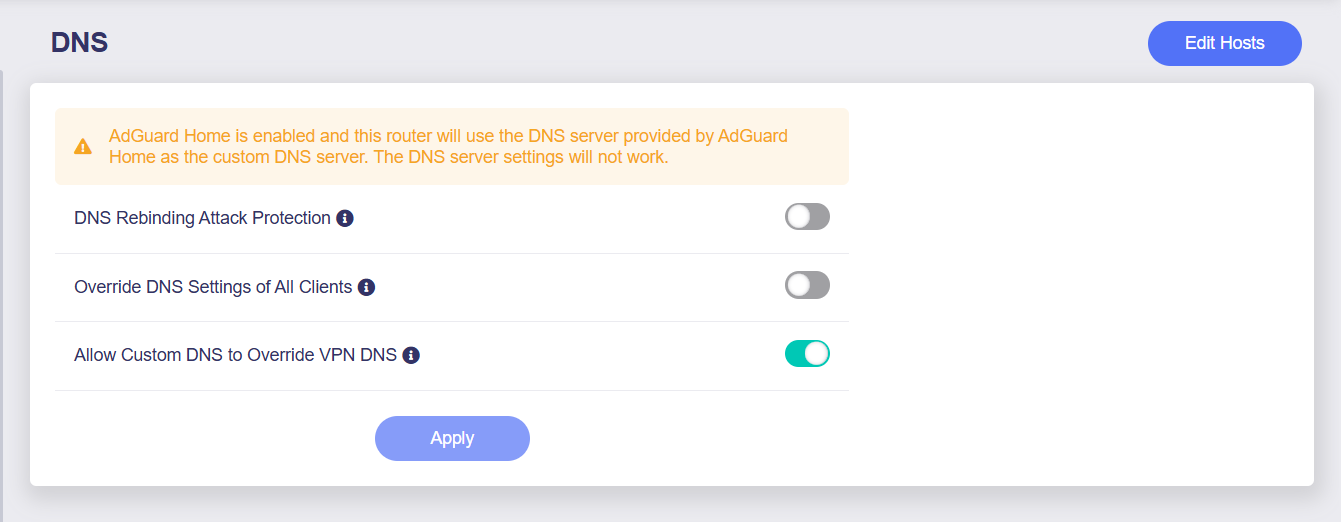
My network DNS settings are:

and

I have Windscribe VPN client always on if that makes any difference.

Hope you find this of some help.

1 Like

Thankyou, I genuinely appreciate the feedback. Having Winscribe always on shouldn’t matter as you have allow custom DNS to override VPN DNS, therefore whatever the custom DNS is, thats controlling all DNS as far as I can see from your set up, which may be the issue here. I wonder, if you set Adguard Home Handle Client Requests to ON (point 8 of my list) it would display the details in clients as I pull the details from Adguard for the clients in the current build and how I have mine set.

Other than that, it all looks standard.

1 Like

You are spot on. Enabling AdGuard Home to handle client requests and the client stats started immediately working (but obviously breaks Policy-Based Routing for my VPN).

1 Like