I’ve been using my Opal router as Wireguard server and accessing internet through my home network connection while abroad just fine. I set up port forwarding on my ISP router so no problems here.
Now I’m trying set up WG server abroad where I am and trying to run WG client in my opal router.
So both ends will be running WG server and client providing tunnel connection on each end.
I transfer WG config so it’s conneting. Giving timeout error in the logs.
I opened another port 41495 in my ISP router which sits in front of opal router. This is the port in WG client config
I opened port forwaring also in my away router which is keenetic.
Any idea why it’s not working?
Or is there any easier way to achieve what I’m trying to do?
REKEY-TIMEOUT usually means: WireGuard sent handshake packets but did not receive a valid reply. So this is almost always routing/NAT/port/key mismatch, not an “authentication login” problem.
The biggest thing: do not think of the WireGuard client port as something you must forward. The port you forward is the server/listener’s UDP port.
For this setup, do this:
Pick only one side as the reachable “server”
Example: Away/Keenetic side runs WG server on UDP 41495.
Home/Opal runs WG client and connects to away-public-ip:41495.
On the away/Keenetic router:
Forward UDP 41495, not TCP.
Forward it to the actual WireGuard server device.
Confirm the Keenetic WAN IP is a real public IP, not CGNAT.
On the Opal WG client config:
Endpoint = away-public-ip-or-ddns:41495
PersistentKeepalive = 25
AllowedIPs should include only what you want routed through the away side.
Do not run two competing WG tunnels for the same routes
If both ends are “server and client” at the same time, you can create routing conflicts.
For site-to-site, one tunnel is enough. WireGuard is peer-to-peer; “server/client” is mostly UI language.
Check subnet conflicts
If both homes use 192.168.1.0/24, routing will break or behave strangely.
Change one side to something like 192.168.50.0/24.
Verify public reachability
On the Keenetic side, compare WAN IP with whatismyip.
If they differ, the away side is behind CGNAT. Port forwarding will not work.
In that case use Tailscale/ZeroTier, or a VPS WireGuard relay.
Most likely mistake in the pasted case: they opened port 41495 on the ISP router in front of the Opal because it appears in the WG client config. That is not useful if Opal is the client. The port must be forwarded on the side being used as the WireGuard Endpoint/server.
Easiest clean solution: make only one side the WG server, make the other side the WG client, enable PersistentKeepalive = 25, and avoid overlapping LAN subnets.
I understand WG is actually a tunnel and I was wishful. I connected a wireless client to Opal but traffic didn’t route through WG tunnel. Is there any way to make this happen?
Or can I add another peer to WG connection on Keenetic side?
I’m actually trying to bypass Netflix household restriction for my apple tv here so netflix will see as it’s coming out of other location.
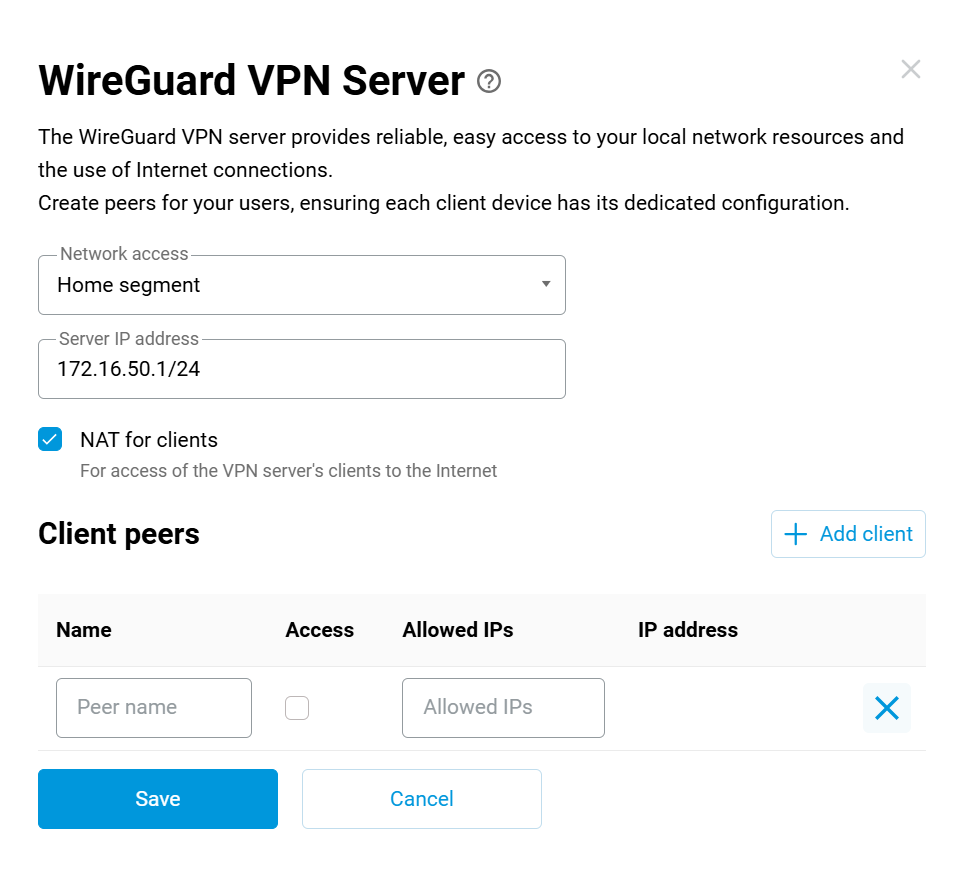
This is what I have for keenetic wg server configuration - very limited.
I’m a little unclear on what you are trying to do. If I follow, when you are abroad you can connect to the home Opal WG server and access the internet (not sure what the peer you are using for that). Now you want to set up a router abroad to connect to the home Opal WG server and route the TV through that to the home Opal WG server? What device are you proposing to use for that?
I do this now with two Asus routers connected site to site with split tunneling, and it is really finicky to set up. It’s easy to lose control of the remote site. I found it useful to have an OpenVPN server on the remote site to connect to so as to fix the WG setup on that side.
Also, from your screenshot, I’m not sure 172.16.50.1/24 is right. All WG peers share the same subnet. Try 172.16.50.1, or 172.16.50.1/32 for the Server IP.
So I have Keenetic Titan on remote location. I’m running VPN client here to connect to internet via my home network with ISP + Opal sitting behind it.
Opal is running WG server and Keenetic Titan is running as client. I also opened port forwarding on ISP router for Opal so it’s running all OK.
What I want to do is if I connect a wifi client to Opal (for example my apple tv), I want it go to internet via Keenetic Titan’s internet connection.
So I want it to run vice versa.
I haven’t managed to do that so far. From what I understand, I don’t have a public IP on Keenetic side as IP on the router and checking from internet is different.
And I tried to set up WG server on keenetic side but had zero luck. But if I configure server on Opal it’s a breeze.
I understand that wireguard is a tunnel rather than server - client so I should be able to achieve this.
Do I need to configure a custom route for WG server on Opal?
Regarding IP addresses, if I turn on WG server on keenetic, it creates a random private subnet. I can’t use the existing tunnel subnet as it’s clashing.
Got it. So you have two problems on the keenetic side: you can’t reach it inbound, and peers have to be on the same subnet and the keenetic doesn’t allow that. And on the Opal side, the UI is likely to want to configure things on the assumption that the tunnel is only going one way.
You might try as a first approximation configuring the Opal to send all traffic over the tunnel. You want the Allowed IPs on the Opal WG server to be 0.0.0.0/0. I know that isn’t what you want permanently, but that would set up WG itself to send all traffic over the tunnel. The UI might still prevent traffic on the Opal LAN from being sent to WG. Another possibility is to go into Luci and set up a Wireguard interface that way. Luci doesn’t do the server/client thing. Make sure you do this with physical access to the Opal, since fooling with the routing tables could mean you lose remote access.
I don’t at the moment have access to my GL-iNet routers to look at this.
Sure, the WG client is required to forward traffic from the WG server to the client, ensuring internet access is routed through the tunnel rather than the WAN interface.
I may have misinterpreted your needs, though.
Are you trying to use the Opal as a VPN server, but while routing Opal Wi-Fi client (Apple TV) traffic to the Keenetic(as a VPN client)?
If so, the routing configuration would be unnecessarily complex. It would be much simpler to configure the Keenetic as the VPN server and the Opal as the VPN client. This would allow the Opal to route its traffic to the Keenetic.
Is it possible that the Keenetic lacks a public IP?
It doesn’t really matter which side is server or client to me as long as I can forward traffic to each end.
“Are you trying to use the Opal as a VPN server, but while routing Opal Wi-Fi client (Apple TV) traffic to the Keenetic(as a VPN client)?” Yes exactly.
Basically what I need:
My work laptop –> Keneetic router –> VPN tunnel (wireguard in this instance) –> Opal –> Internet connection through ISP.
Apple TV –> Opal –> ISP router connected to Opal –>VPN tunnel –> Keenetic –> Internet throught ISP
So basically I’ currently away (keenetic side) and using WG to connect to my home network and use internet from my ISP.
What I also want to achieve is vice versa but for my apple tv. I want to connect my apple tv to Opal and use any sort of VPN to connect to the network and use internet from far side (Keenetic side)
So far, it’s very straight forward to set up Opal as WG server and Keenetic as WG client and it’s been working okay.
I tried to set up Keenetic as Open VPN server and it’s not working. Neither WG server works. I think it’s due to keenetic side ISP having CG-NAT. I believe home ISP uses MAP-T.
Because IP address on keenetic interface is different from what I see on the web.
I tried to use openconnect (cisco anyconnect). Opal doesn’t support this natively so I installed packages etc but had no luck.
That would be quite difficult to achieve. The simplest way is to set up a separate VPN link for your Apple TV (with new devices Opal 2 + Keenetic 2), which would allow you to route Apple TV to the Keenetic side.
While configuring multiple dedicated static routes over a single VPN link may be feasible, we have not validated this particular topology or use case, and therefore cannot confirm its viability.