Setup Validation: Full-Tunnel WireGuard (Flint 2 Client) Routing All Traffic Through Home Flint 2 — Fixed, Permanent Setup

Hi everyone,

I’m running a permanent, fixed WireGuard setup between two GL.iNet Flint 2 routers located in two different U.S. states, and I’d like to validate that my configuration follows best practices. The goal is simply for all devices behind the Travel Flint 2 to route their outbound traffic through the Home Flint 2’s WAN connection.

One of the devices behind the Travel router uses Citrix Workspace for remote access, so I want to ensure the routing setup is correct for stable outbound connectivity.

Here is a full outline of my configuration.

1. Hardware Locations

**•	Home Flint 2 (WireGuard Server)**

• Permanently installed at my residence

• Will not be moved or changed

**•	Travel Flint 2 (WireGuard Client)**

• Permanently installed at a second fixed location in another U.S. state

• Not mobile, not roaming, not being relocated

This is a stable two-site, point-to-point design.

2. Home Flint 2 – WireGuard Server Configuration

**•	WireGuard Server enabled**

**•	Listen port: UDP 51820**

**•	WG IPs assigned (e.g., server** 10.0.0.1**, client** 10.0.0.2**)**

**•	UDP 51820 forwarded from ISP router → Home Flint 2**

**•	GL.iNet DDNS enabled (so the Travel router can always find the server)**

**•	Default DNS is sufficient**

3. Travel Flint 2 – WireGuard Client Configuration

**•	Imported WG client config generated by the Home router**

**•	AllowedIPs = 0.0.0.0/0 (full tunnel)**

**•	Global Proxy enabled**

**•	Kill Switch (Block Non-VPN Traffic) enabled**

**•	PersistentKeepAlive = 25**

**•	MTU \~1420 (adjustable depending on ISP/hotels)**

**•	Running behind a standard ISP router (double NAT, acceptable for outbound-only use)**

4. Traffic Flow Diagram (Full-Tunnel Path)

(1) Local Device (IGEL OS / Laptop)

      │

      │  Normal LAN traffic (DHCP, IPv4, no VPN on device)

      ▼

(2) Travel Flint 2 — WireGuard Client

      │

      │  Applies Global Proxy + Kill Switch

      │  Encapsulates all packets inside WireGuard

      ▼

(3) Encrypted WireGuard Tunnel (UDP 51820)

      │

      │  Uses server public key + DDNS hostname

      ▼

(4) HOME Flint 2 — WireGuard Server

      │

      │  Decrypts packets and routes them out via the home ISP

      ▼

(5) Internet (HOME public IP)

      │

      │  All traffic now appears as coming from HOME

      ▼

(6) Destination Services (Citrix / Work VDI / Web / Apps)

This is the exact behavior I want to validate.

5. Expected Behavior

**•	Devices behind Travel Flint 2 get LAN IPs (192.168.x.x)**

**•	All traffic encrypted → sent to Home Flint 2 → exits via Home WAN IP**

**•	DNS queries also routed through the tunnel**

**•	No inbound connections needed at Travel site**

**•	Citrix Workspace and other applications should simply use the Home WAN for all outbound sessions**

6. Optional Enhancements Enabled

**•	Custom DNS (1.1.1.1) on Travel router**

**•	SQM / Cake QoS on Home router**

**•	Reserved WG IP for cleaner management**

7. My Questions for Validation

1\. Does this Flint-to-Flint full-tunnel WireGuard configuration follow GL.iNet best practices?

2\. Since the routers are permanently installed in two U.S. states, is anything recommended for long-term stability?

3\. Is double NAT acceptable for an outbound-only WireGuard client setup?

4\. Any recommended performance optimizations for WireGuard on Flint 2 hardware?

5\. Does the traffic flow diagram above look correct for devices that rely on stable outbound connectivity (e.g., Citrix Workspace)?

Thank you to anyone who can confirm or suggest improvements!
Hi

It seems there's nothing that needs improving here — it's a very common yet reliable setup.

Regarding your questions:

  1. The current configuration largely aligns with our recommended VPN setup. You can refer to the following link for more information: Build your own WireGuard home server - GL.iNet Router Docs 4.

  2. Enabling GoodCloud for remote troubleshooting in case of unexpected issues could be an improvement.

  3. Yes, double NAT is irrelevant here.

  4. WireGuard is designed for simplified configuration, so the default setup should suffice. If you encounter speed issues, try adjusting the MTU.

  5. Yes, it should be correct.

1 Like

Before I connect any corporate work-related device (IGEL OS 12), I want to make sure that my home-to-home network tunnel is fully stable and performing as expected.

What tests should I run using only my personal devices (e.g., Wireshark packet captures, latency measurements, MTU discovery, iperf3 throughput tests, DNS checks, tracepath/traceroute) to verify that

The tunnel is behaving normally? and traffic is routed through the client-side router correctly?

The client location is receiving the server-side public IP address and the whole setup functions like a standard extended home network?

For reference, once an IGEL OS 12 thin client connects, the desktop shows information such as:

Name: ITXXXXXX •

IP Address: 192.168.X.X •

Public IP: X.X.X.X •

Device Type: 15ZXXXX •

IGEL OS: 12.6.0 •

Uptime: 9h 16m 0s

To confirm that a VPN client is working properly, a simple test is usually sufficient: after enabling the VPN, visit an IP detection site such as ipinfo.io and verify that the displayed IP address matches your home network’s public IP.

The tools you mentioned are generally used for performance measurement or troubleshooting when problems occur.

1 Like

One more thing, I have noticed. I did setup the Flint2-Flint2.

But, not using it for work right now, l'm in USA in my work assigned location.

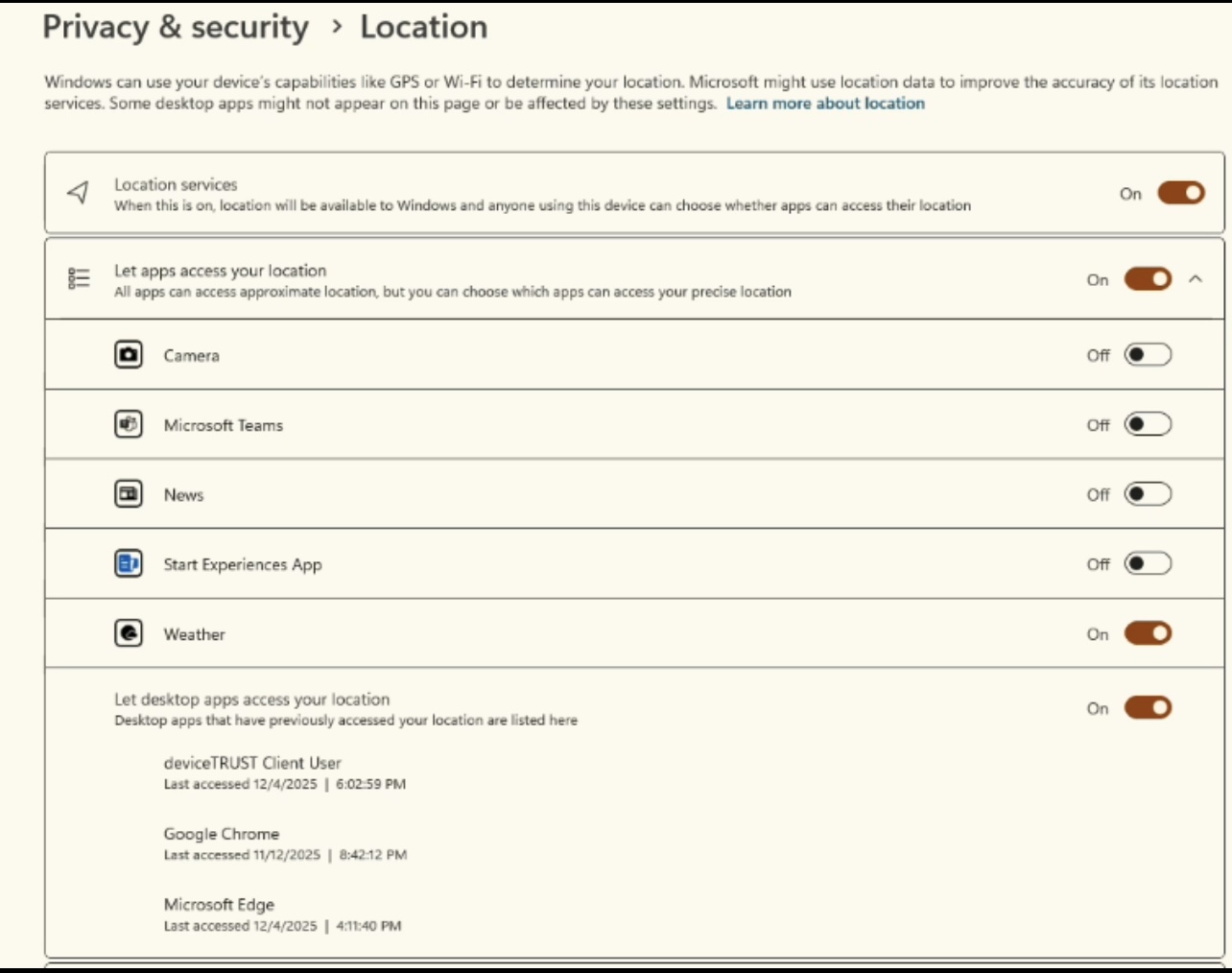
But when I connect to my Mini PC through Wi-Fi and launch Citrix Workspace, I see something strange in the Windows Location Services panel:

Under Privacy and Security > Location> 'Let desktop apps access your location', I see:

  • deviceTRUST Client User » Last accessed a few minutes ago

  • Chrome, Edge also accessed location

  • Location Services is ON at OS level

I never installed anything called deviceTRUST myself.

okay. I checked my system thoroughly and confirmed that I do not have the full DeviceTRUST client installed —

Citrix Workspace LTSR simply includes the lightweight DeviceTRUST ICA Client Extension, which only runs inside the ICA session.

PowerShell shows the two bundled modules (x64/x86 2507 LTSR), and there are no services, processes, or registry entries for a standalone client.

PowerShell shows exactly what’s installed with Citrix:
deviceTRUST ICA Client Extension x64 2507 LTSR
deviceTRUST ICA Client Extension x86 2507 LTSR

So the Windows message “deviceTRUST Client User accessed your location” is coming from the Citrix plug-in during session startup, not from any OS-level agent. With that clarified,

My remaining question is: when using the Travel Flint 2 → Home Flint 2 VPN setup, how can I ensure that deviceTRUST sees only the Home router’s details — both on my

1.personal laptop and ??

2.on the corporate IGEL laptop?

We are not familiar with the internal workings of the “deviceTRUST” mechanism.

From a network standpoint, your current configuration already ensures that all client traffic is routed through the home router. However, if “deviceTRUST” relies on additional methods—such as GPS-based geolocation or location data obtained from nearby Wi-Fi networks—there may be no practical way to bypass those checks.

Thanks, Will — this clarifies the network-side behavior.

To confirm my understanding:

1\. **With my Travel Flint 2 → Home Flint 2 WireGuard tunnel, all traffic from both:**

**•	my personal Windows laptop, and**

**•	my corporate IGEL OS laptop**

is definitely being routed through the Home Flint 2 public IP, including the traffic that Citrix Workspace and DeviceTRUST send during session startup — correct?

2\. So from a ***pure networking***** perspective, DeviceTRUST should only see:**

**•	Home Flint 2 public IP**

**•	Home Flint 2 gateway/DHCP**

**•	Home Flint 2 DNS resolver**

And none of the real location details of my travel environment (hotel, coworking space, public Wi-Fi, etc.).

I understand your point about non-network sensors like:

**•	GPS (not present/enabled on IGEL or my laptop)**

**•	Wi-Fi SSID scanning (disabled on both devices)**

Just wanted to confirm that as long as Wi-Fi and Bluetooth radios are OFF on both devices, and all routing is through the WireGuard tunnel, the only location information DeviceTRUST can receive is the Home router’s metadata.

Does this match your understanding?

Yes, that is correct, provided the devices are connected only to the travel router.

Software with sufficient permissions will still see the travel router’s private IP, gateway, and DNS information.

However, the public IP and all DNS queries will be routed through your home network when the WireGuard tunnel is active.

Regarding the non-network sensors you mentioned, we are not familiar with the internal mechanisms of DeviceTRUST. Therefore, we are unable to confirm whether it relies solely on network metadata when Wi-Fi and Bluetooth are disabled.