Hello everyone,
I'm completely stumped by a WireGuard speed issue. My router-as-client setup has a >10x slower upload speed compared to using the WireGuard app on my phone. Download speeds are Ok on the router but better on the phone.
Here is my setup:
-
Site B (Server - Asia)
- Router: GL.iNet Slate (AXT1800) running as a WireGuard server.
- ISP: 150 Mbps (Up/Down) Symmetrical.
- Network: The ISP uses CGNAT, so I am using an IPv6-only DDNS endpoint for the server. The router is in
NativeIPv6 mode and is fully reachable.
-
Site A (Client - US)
- ISP: Spectrum (600 Mbps Down / 22 Mbps Up)
- Router: GL.iNet Flint 2 (MT6000) running as a WireGuard client.
- Network: The Flint 2 is connected via Ethernet (1Gbps link) to the main Spectrum router (Double NAT).
- IPv6: I've enabled IPv6 on the Flint 2 to connect to the server.
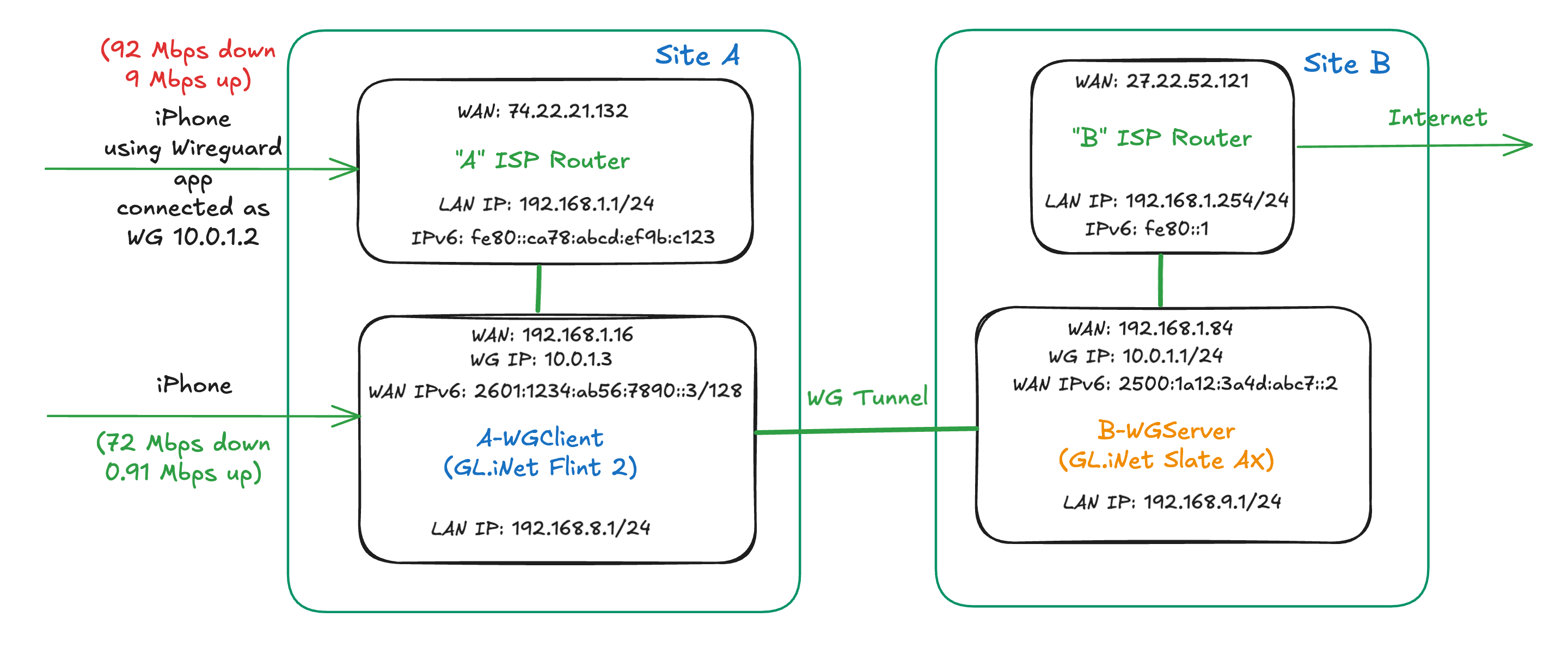
The Problem
I've run two tests, and the results are night and day.
Test 1: Router-as-Client (The "Slow Upload" Test)
- I connect my iPhone via Wi-Fi to my Flint 2 (Client Router).
- The Flint 2 is running its WireGuard client, connected to the Site B server.
- Speed Test Result: Download is Ok (~72 Mbps), but the Upload speed is unusable: ~0.9 Mbps.
Test 2: Phone-as-Client (The "Good" Control Test)
- I connect my iPhone via Wi-Fi directly to my main Spectrum router.
- I open the WireGuard app on my phone and connect to the exact same Site B server (using the same IPv6 endpoint).
- Speed Test Result: ~92.6 Mbps Download / ~9 Mbps Upload. (Latency is ~374ms, which is expected).
My Goal: I need the Flint 2 (Test 1) to get the same speeds that my iPhone gets directly (Test 2).
What I've Already Tried (With No Success):
- MTU: I tried setting the MTU on both the client (Flint 2) and server (Slate) from 1420 down to 1320. The abysmal upload speed did not change. (My iPhone test worked perfectly with the default 1420 MTU).
- IPv6 Mode: On the Flint 2, I have tried both
NativeandPassthroughIPv6 modes. Neither fixed the upload speed. - Double NAT (DMZ): I put the Flint 2 in the Spectrum router's DMZ (with a reserved IP). This did not fix the upload speed.
- Physical Link: The Flint 2 is connected to the Spectrum router at 1000 Mbps full duplex.
What could possibly be throttling the upload speed of a powerful Flint 2 router, when a simple iPhone app on the exact same network can get 10x the speed?
I am completely stuck and would appreciate any ideas. Thank you!