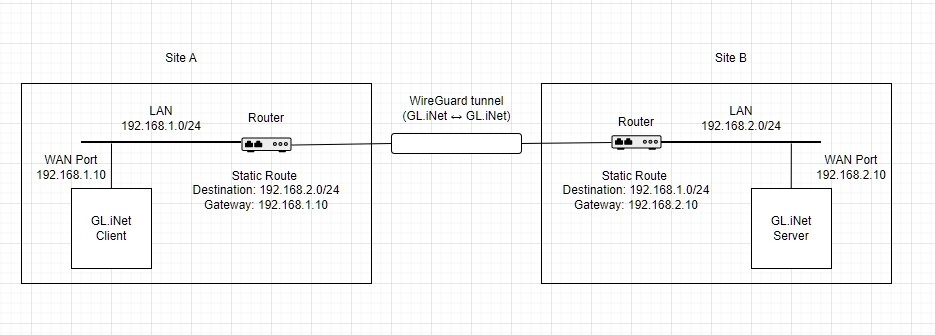
I am using two GL.iNet Mango routers with WireGuard.
For the site-to-site connection Site B acts as the WireGuard server
In parallel, a PC connects as a WireGuard client to Site B
Both WireGuard tunnels are up (handshake OK)
Current behavior:
From the PC via WireGuard, I can access devices in Site B’s LAN
Via the site-to-site tunnel, devices in Site A’s LAN cannot access devices in Site B’s LAN
I read that:
Masquerading (NAT) is usually required for PC clients
Masquerading must be disabled for a proper site-to-site setup
Questions:
Is this assumption correct and what is the best-practice approach to support both requirements?
Please refer to the following tutorial to configure a WireGuard client device to access a WireGuard server's LAN device.
This depends on whether the device can correctly handle subnet routing and whether firewall/permission management is required based on actual LAN addresses.
Typically, Masquerading (NAT) can simplify configuration or resolve routing-related issues, but it changes the source address from the actual accessing LAN device to the WireGuard IP, which complicate firewall/permission management.