Please upgrade back to 4.7.1 firmware and follow the steps below to replace the BDF file and test again to see if it works properly:
- Download WinSCP tool
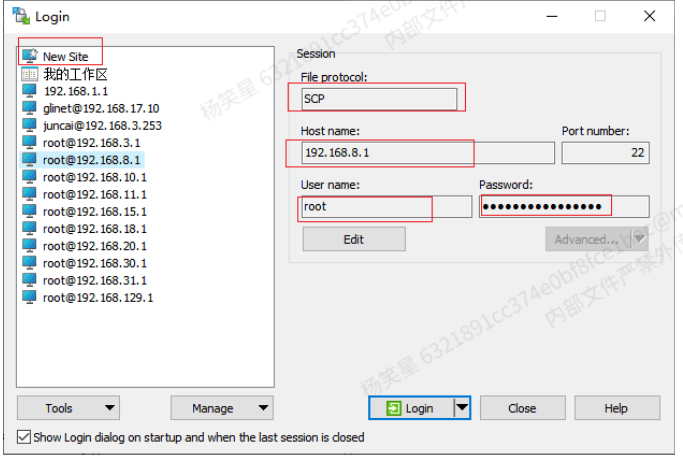
- Log in to the device backend, select NewSite, select SCP for file protocol, enter the device hostname, username
and Password (page password), and click Login
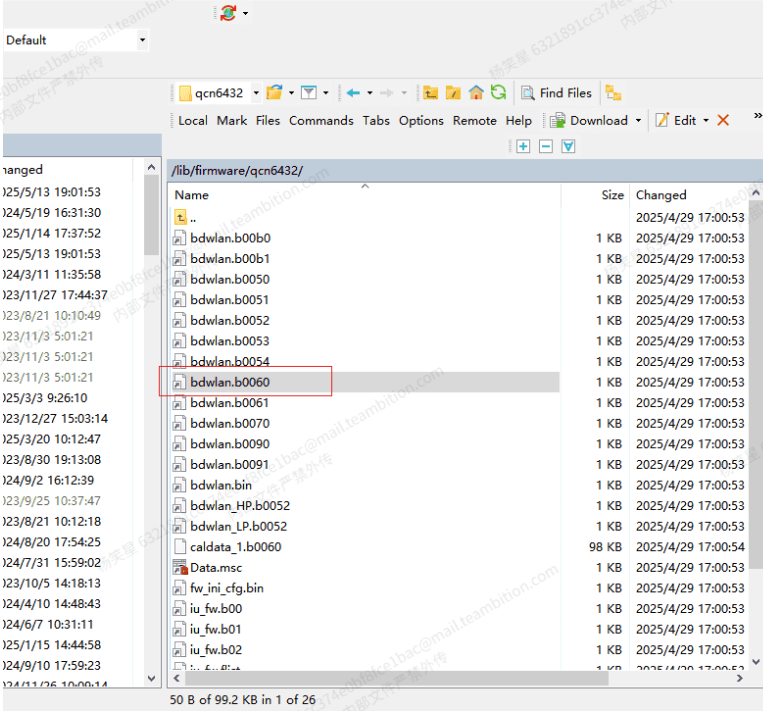
- Select the /lib/firmware/qcn6432/ folder on the right and delete the original bdwlan.b0060 file
4.Copy the new bdwlan.b0060 file to the /lib/firmware/qcn6432/ folder, then restart using the reboot command or by clicking on the page. Do not power off router to restart.
5.After restarting, check the md5 value of bdwlan.b0060. If the value is as follows, the replacement is successful.

Replaced bdwlan.b0060:
bdwlan.zip (6.2 KB)