I have two of these routers that I’m using around the house they have the latest firmware as of this writing.
One is in AP mode and the other is in repeater mode off that AP.
DHCP is done by a non-wireless ISP router on the wired network.
When I first configure everything (done it twice), everything is fine.
The first night the following schedules trigger on both routers:
Wifi Off: 23:00
Wifi On: 06:00
Router Reboot: 06:05
I use WiMan App to see signals and the next day (7 hours after the 06:00 schedule) there is no radio signal from the Repeater mode device. The radio is off or down for the repeater mode device. In the meantime, the AP functions fine.
When I touch the screen I can interact and it says it is in Extender Node, IP: 192.168.16.1 (which is the network address I gave it.
If I disconnect and reconnect power - then the radio comes back online and I can see the AP with wiman.
This last time I was exceedingly careful to create a schedule to turn back on.
So two problems:
When I do the last step of setting the one device to repeater mode I lose all ability to configure it. It does not even seem to give out addresses on the LAN port via hardwire - but does pass me through if repeater mode is functioning. This complicates trying various configurations to resolve the radio problem. The display says “Extender Node; IP: 192.168.16.1” - but there is no DHCP address in the house router for the repeater and it does not seem accessible at 192.168.16.1 - even if direct connected.
This also limits my ability to send logs. If anyone knows how to access the admin ui again, I’d appreciate knowing!
repeater mode is unresponsive after overnight. My above description ASSUMES it might be related to scheduling of the radios - but due to the difficulty in testing it, it could be unrelated to schedules and just dropping radio operations for some reason.
Has anyone seen this before?
Does anyone know if the radios shutdown in extender mode if they can’t join the target network by a specific timeout? Seems like they’d retry.
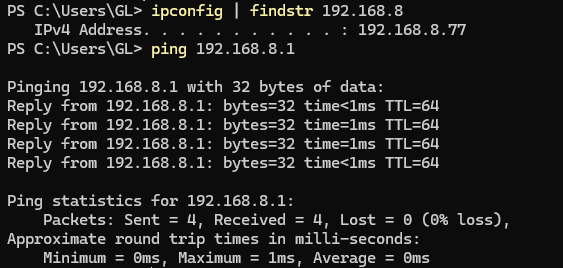
Regarding Question 1: To access the router while it is in Extender mode, you will need to manually assign your PC a static IP address within the router’s original LAN subnet.
Example: If your router’s LAN IP is 192.168.8.1, connect your PC to the router's LAN port and manually set your PC’s IP address to 192.168.8.77 (with a subnet mask of 255.255.255.0). You should then be able to reach the Admin Panel at 192.168.8.1.
BE3600 in extender mode with upstream network 192.168.121.0 and LAN IP address 192.168.8.1:
For Question 2: We tested the BE3600 locally using firmware v4.8.1 in Extender mode with a Wi-Fi Status Schedule enabled, but we were unable to reproduce the issue.
To help us analyze why it isn't working on your end, please use the access method described above to log in to the Admin Panel and check the following:
Internet Status: Does the Internet page still show as connected to the upstream Wi-Fi?
Wireless Settings: Are the 2.4GHz and 5GHz radios showing as "Enabled" in the Wireless menu?
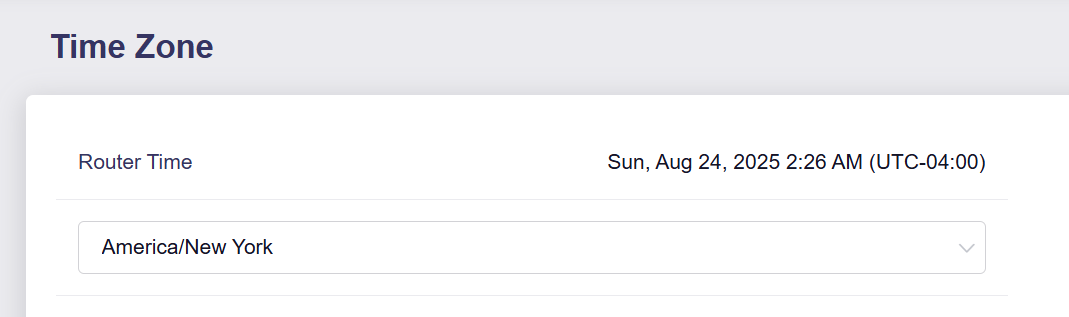
System Time: Is the time displayed in System > Time Zone correct? The schedule relies on the correct local time to function.
Logs: Please export the device logs (System > Log) and send them to us via private message for review.
The firmware version is 4.8.1. THe radio shows “off”. The timezone is correct, but the time itself is way off. The below screenshot was taken at 10:04AM ET.
I set the timezone to a wrong one and back and got the sync button and pressed it. It is correct now - but I’m concerned about why it would not be correct on it’s own. Log was sent as requested.
It seems that the issue relates to the failure of time synchronisation, which is causing the Wi-Fi schedule to not work as expected.
As the logs lack information relating to the NTP process used for time synchronisation, we cannot check why it failed.
Please SSH into the router and execute the following command to write NTP logs to syslog and If you continue to encounter problems afterwards, please send us the logs again for analysis.