I am experiencing an issue with Tailscale exit node routing on a GL.iNet Slate 7 router, and I would appreciate any guidance.
Device / Firmware
Device: GL.iNet Slate 7
Firmware Version: 4.8.3
OpenWrt Version: OpenWrt 23.05-SNAPSHOT
Tailscale Setup
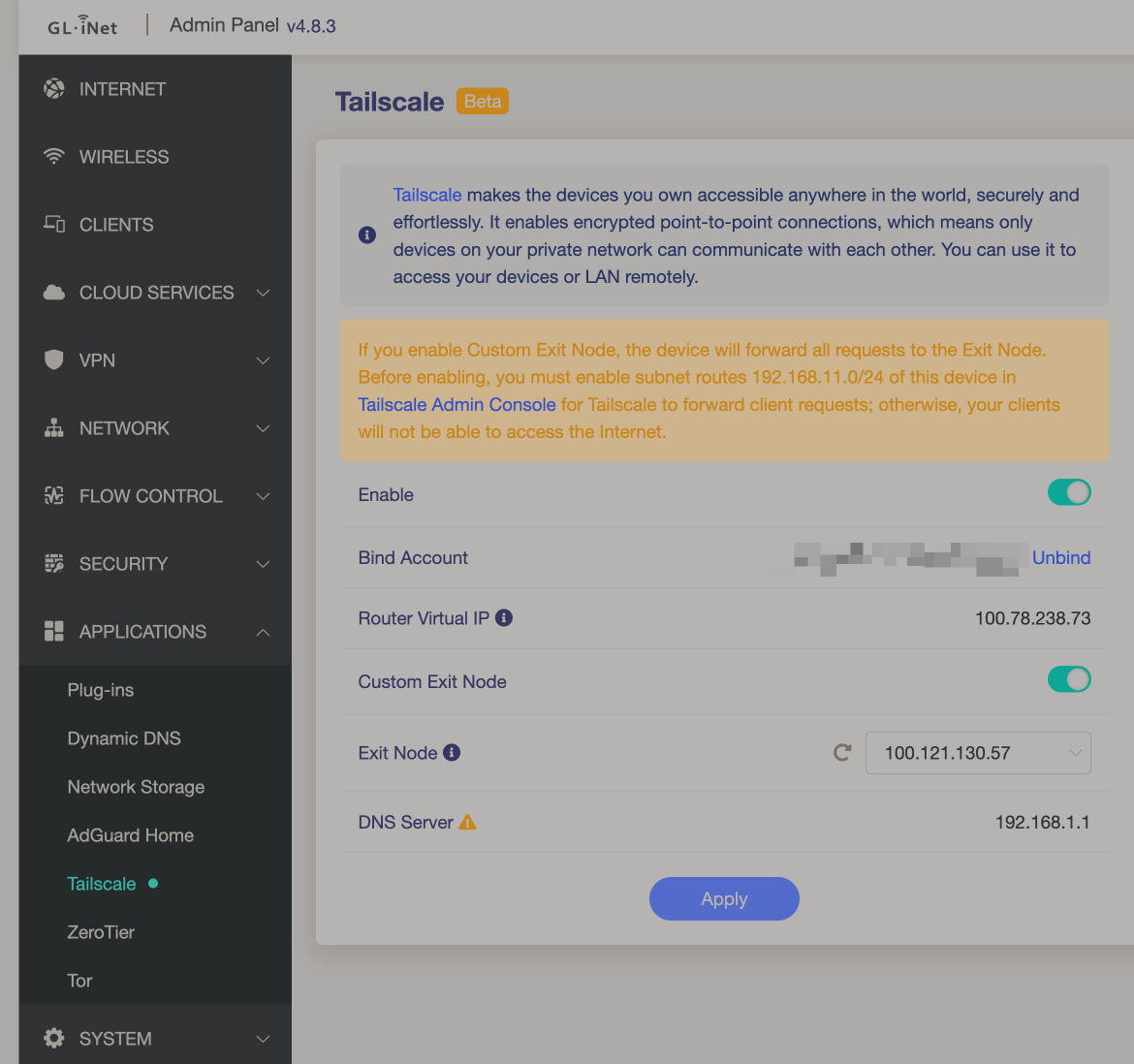
The router is connected to my Tailscale tailnet.
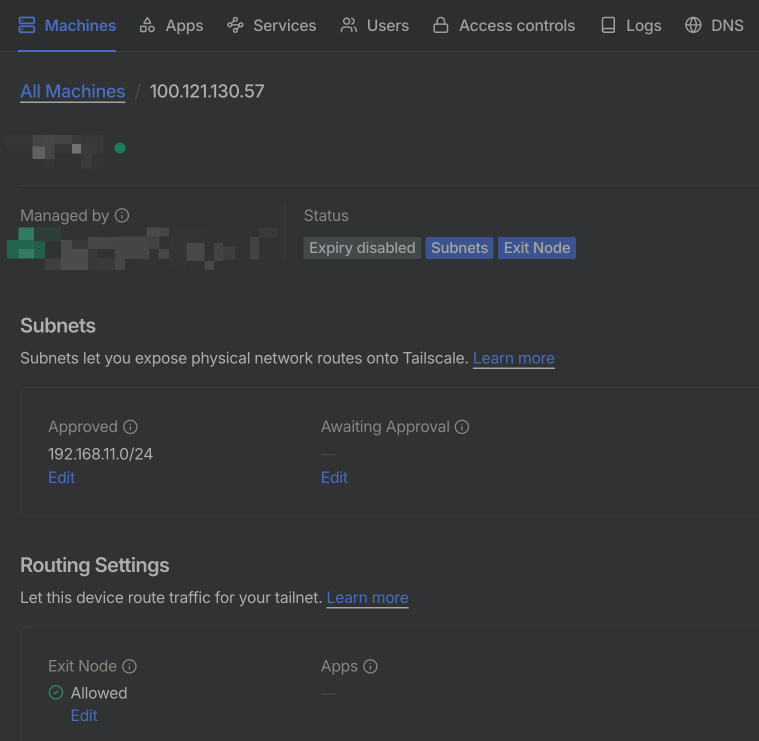
All subnet route access is granted.
I enabled the Custom Exit Node feature on the router and selected my exit node hosted on a VPS.
Intended Use Case
One of the main reasons I purchased this router was to use Tailscale at the router level, so that all devices connected to the router can use my Tailscale network and exit node, even if those devices do not have Tailscale installed.
Current Environment
I am currently traveling in China, and the exit node is hosted on a VPS outside the country.
Because of this, routing traffic through the exit node is important for accessing services that are otherwise restricted or unreliable when using the local network.
Behavior When Using Tailscale Directly on Devices
When I connect to the same tailnet using the Tailscale app on mobile or desktop devices, and select the same VPS exit node:
Traffic routes correctly through the exit node.
My public IP reflects the VPS exit node IP.
Behavior When Using Tailscale on the Slate 7 Router
When I enable Custom Exit Node on the Slate 7 router and select the same exit node:
Expected behavior
All traffic from devices connected to the router should route through the selected exit node.
Actual behavior
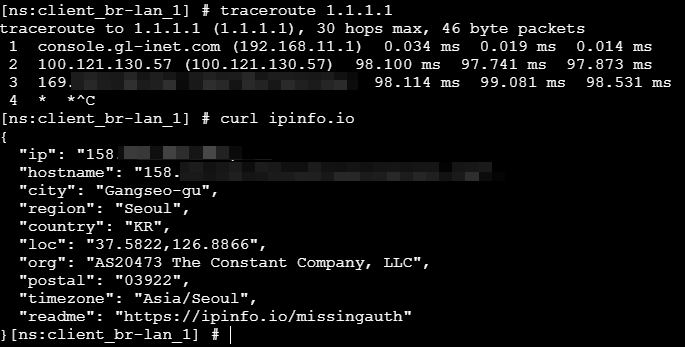
The public IP detected from devices connected to the router remains my local ISP IP, not the VPS exit node IP.
This suggests that traffic is not being routed through the exit node, even though it is selected in the router interface.
Additional Information
Subnet route access is fully granted on the tailnet.
The same exit node works correctly when used directly from other devices.
The issue only occurs when using the exit node through the Slate 7 router interface.
Question
Is there any additional configuration required on the Slate 7 for the Custom Exit Node feature to properly route LAN client traffic through the exit node?
Or could this be a firmware issue with the Tailscale integration?
Any suggestions or troubleshooting steps would be greatly appreciated.
Here is the result of running the commands on my laptop:
(base) yp@MacBookPro ~ % nslookup google.com
Server:		100.100.100.100
Address:	100.100.100.100#53

Non-authoritative answer:
Name:	google.com
Address: 142.250.198.78

(base) yp@MacBookPro ~ % traceroute 8.8.8.8
traceroute to 8.8.8.8 (8.8.8.8), 64 hops max, 40 byte packets
 1  console.gl-inet.com (192.168.11.1)  5.489 ms  2.753 ms *
 2  192.168.1.1 (192.168.1.1)  4.925 ms  2.886 ms  3.028 ms
 3  100.105.0.1 (100.105.0.1)  5.267 ms  5.307 ms  5.203 ms
 4   (117.135.50.157)  6.295 ms  5.399 ms  5.502 ms
 5  221.183.139.1 (221.183.139.1)  6.895 ms
    221.183.53.225 (221.183.53.225)  5.379 ms  9.330 ms
 6  221.183.89.45 (221.183.89.45)  7.257 ms *
    221.183.89.13 (221.183.89.13)  8.202 ms
 7  221.183.89.70 (221.183.89.70)  7.994 ms *  10.228 ms
 8  * 221.183.89.173 (221.183.89.173)  12.361 ms *
 9  223.120.3.185 (223.120.3.185)  49.978 ms
    223.120.22.105 (223.120.22.105)  38.523 ms
    223.120.3.197 (223.120.3.197)  36.847 ms
10  223.120.2.118 (223.120.2.118)  37.391 ms
    223.120.2.58 (223.120.2.58)  39.006 ms  36.216 ms
11  * * *
12  * * *
13  dns.google (8.8.8.8)  36.905 ms  35.523 ms  36.338 ms
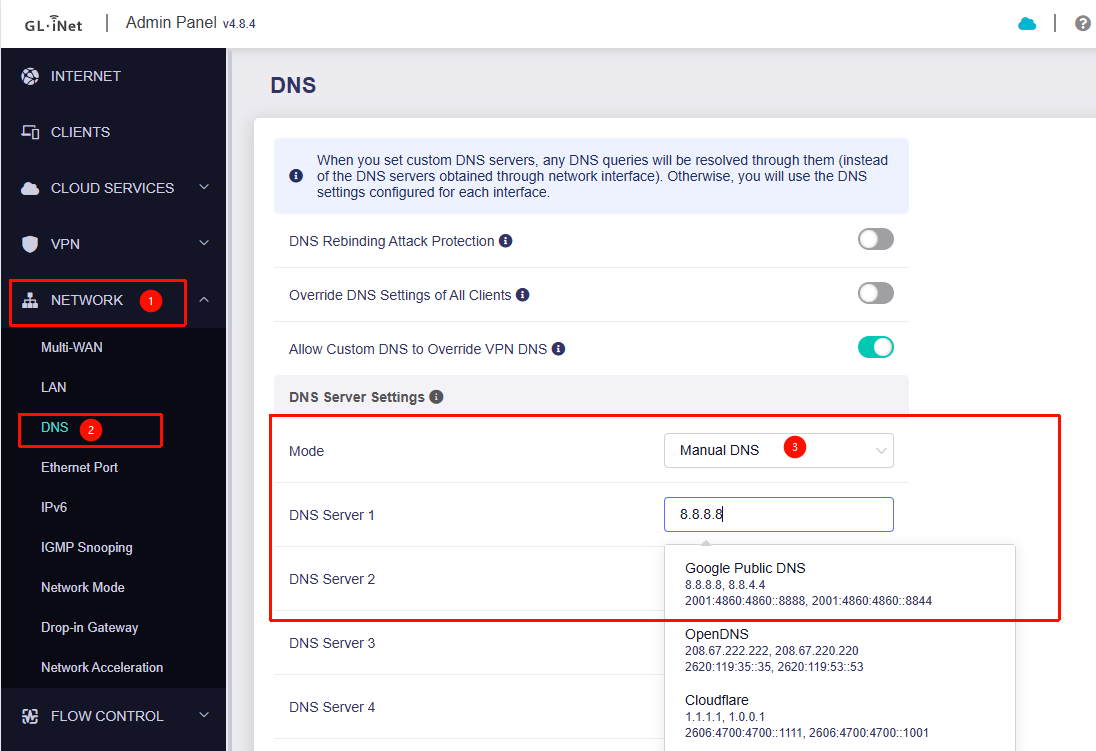
I've also changed DNS Server Settings as you suggested - Opted for OpenDNS one though.
Yet, I still cannot connect to google.com while accessing baidu is not a problem. And my local IP shows up, instead of the IP of my exit node.
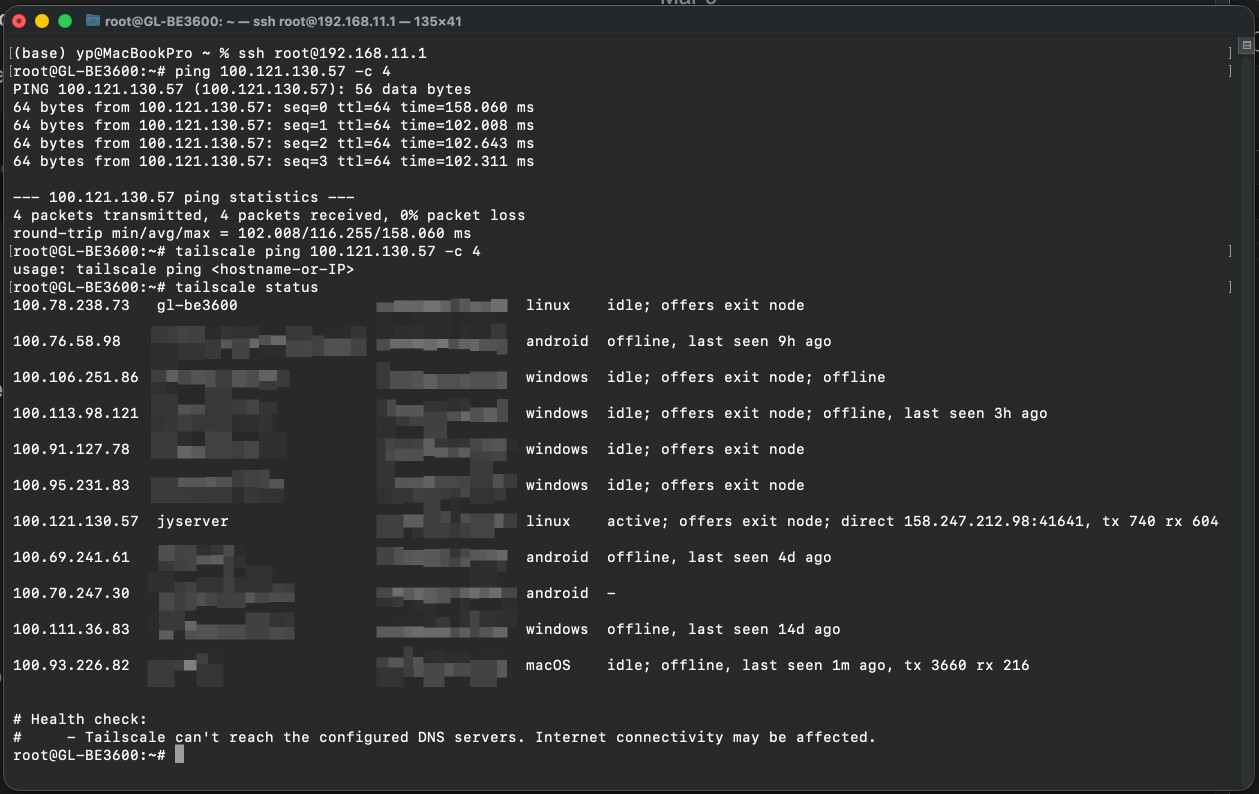
I noticed the health check warning message.
The thing is, I see the same message on the android app on my phone, on which I have no problem using the same exit node..
I would appreciate any advice to get this exit node feature work on Slate 7 router.
During the remote check, we found that /usr/bin/gl_tailscale had been manually modified with --advertise-exit-node, which conflicts with the --exit-node option (the Custom Exit Node feature in the GL UI).
We have restored /usr/bin/gl_tailscale to the version included with the firmware.
In addition, we noticed that jyserver (Tailscale IP: 100.121.130.57) is also advertising the route 192.168.11.0/24, which is the same as the Slate 7’s LAN subnet.
This appears to have caused the LAN subnet route advertised by Slate 7 to become ineffective.
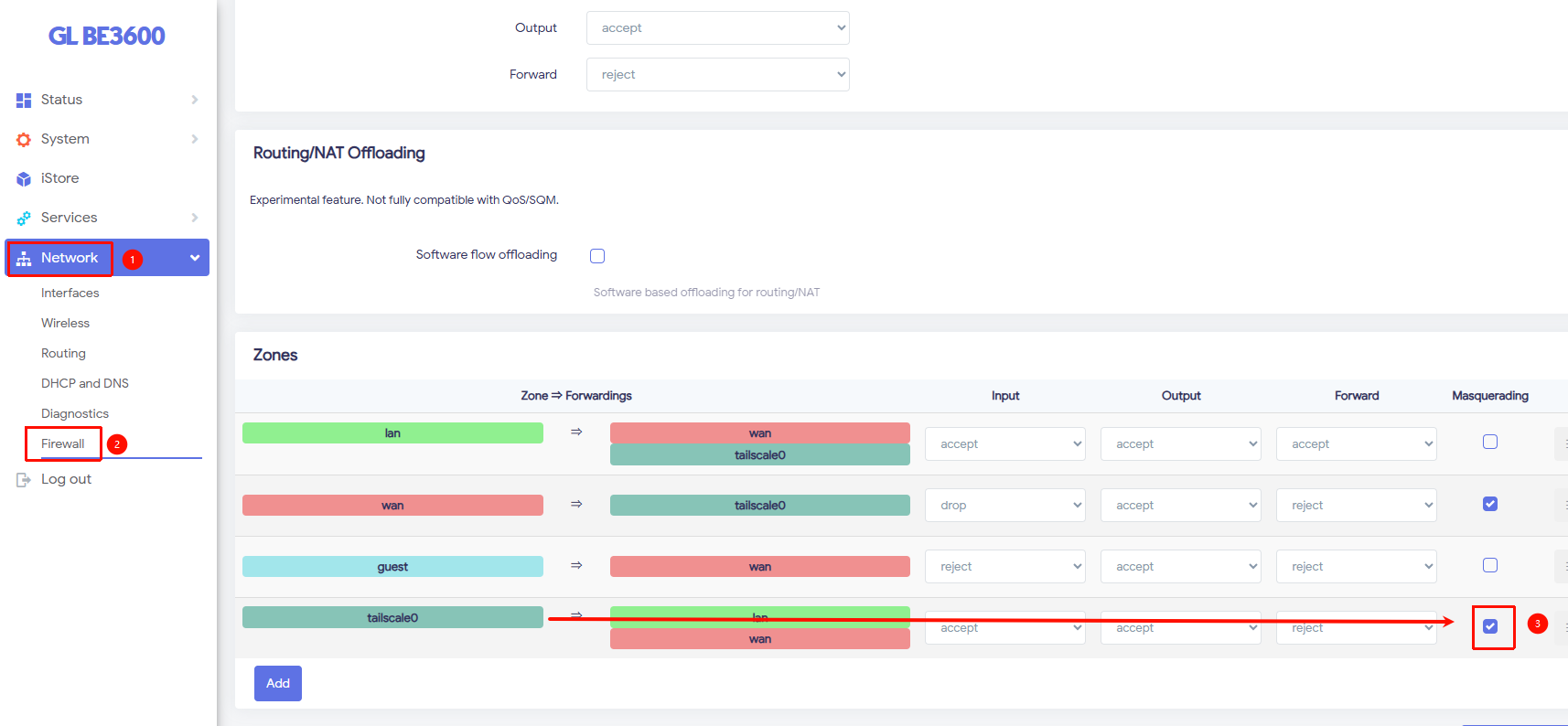
To work around the routing issue, we enabled Masquerading for the Tailscale zone in LuCI → Network → Firewall
I just checked, and everything seems to work as intended.
Also, I appreciate the detailed explanations. Now I know how to get this working if I were to do this after router reset or something similar.
I have another question, though.
The reason I modified /usr/bin/gl_tailscale is because I would also want to use this Slate 7 router as an exit node in the future. Is there a way to make this work without conflicting with the GL UI feature?
At the moment, there isn’t a simple method. You would need to modify the handling logic in /usr/bin/gl_tailscale so that when the Custom Exit Node feature is enabled in the GL UI, the --advertise-exit-node option is automatically removed.
Alternatively, you could wait for v4.9, where we plan to add built-in support for allowing the router to advertise itself as a Tailscale exit node.