After install 4.8.2 i loose the possibility to get multi ssid on the router in accès point mode. To working back in née to fall back to 4.6.11. Any help on Thatcher?
Hi
Could you please provide us with more details about the multiple SSIDs in Access Point (AP) mode?
In AP mode, only the main Wi-Fi network should be available, as the router is designed to extend a single network.
Ok, if understand, in the newer version no muti SSID possibility. I condamned to stay to older version of firmware for m'y 3 slate ax. I like this little router to put in POE no big consumption of power. But the New reality, A Short life for that router.
An other question, this is the same thing for future all gl.inet router?
For your information, to add SSID i use LuCi wireless option.
If the SSID was added using the Luci, it should work as expected.
Did you encounter any specific issues or error messages after you added it?
As an alternative troubleshooting step, have you tried creating the it using the uci command-line interface?
uci set wireless.wifi5g2=wifi-iface
uci set wireless.wifi5g2.device='wifi1'
uci set wireless.wifi5g2.network='lan'
uci set wireless.wifi5g2.mode='ap'
uci set wireless.wifi5g2.ssid='GL Router-Custom-5G'
uci set wireless.wifi5g2.encryption='psk2+ccmp'
uci set wireless.wifi5g2.key='goodlife'
uci set wireless.wifi5g2.wds='1'
uci set wireless.wifi5g2.isolate='0'
uci set wireless.wifi5g2.hidden='0'
uci set wireless.wifi5g2.ifname='wlan15'
uci set wireless.wifi5g2.ieee80211k='1'
uci set wireless.wifi5g2.bss_transition='1'
uci set wireless.wifi5g2.sae='0'
uci set wireless.wifi5g2.disabled='0'

uci set wireless.wifi2g2=wifi-iface
uci set wireless.wifi2g2.device='wifi0'
uci set wireless.wifi2g2.network='lan'
uci set wireless.wifi2g2.mode='ap'
uci set wireless.wifi2g2.ssid='GL Router-Custom-2.4G'
uci set wireless.wifi2g2.encryption='psk2+ccmp'
uci set wireless.wifi2g2.key='goodlife'
uci set wireless.wifi2g2.wds='1'
uci set wireless.wifi2g2.isolate='0'
uci set wireless.wifi2g2.hidden='0'
uci set wireless.wifi2g2.ifname='wlan05'
uci set wireless.wifi2g2.ieee80211k='1'
uci set wireless.wifi2g2.bss_transition='1'
uci set wireless.wifi2g2.sae='0'
uci set wireless.wifi2g2.disabled='0'

uci commit
reboot
I try in ssh session but no ssid appear and router go problem and need to reset firmware and if i create in LuCI i loose all ssid from client and the original ssid. if i delete the New ssid the original come ok.
Sorry — the command provided earlier was incorrect.
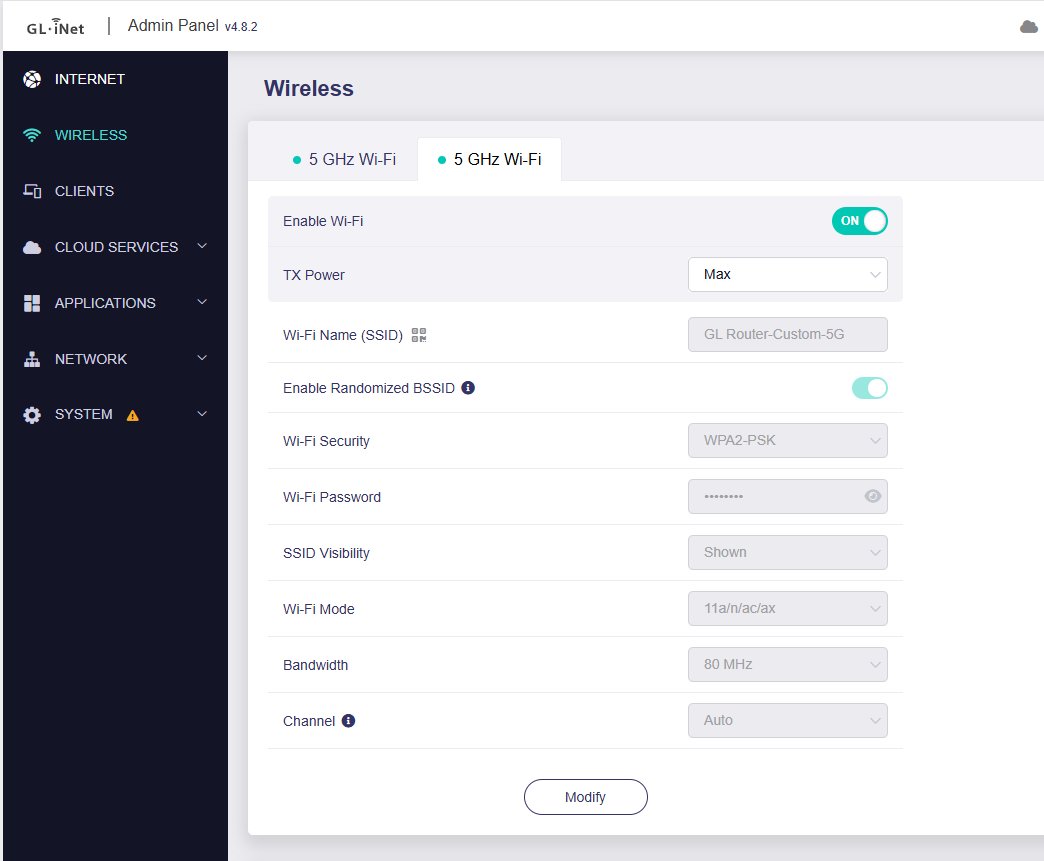
Please try the following command to create a new SSID; we have tested it on Slate AX with firmware 4.8.2 and it works correctly.
uci set wireless.wifi5g2=wifi-iface
uci set wireless.wifi5g2.device='radio0'
uci set wireless.wifi5g2.network='lan'
uci set wireless.wifi5g2.mode='ap'
uci set wireless.wifi5g2.ifname='wlan1-1'
uci set wireless.wifi5g2.encryption='psk2'
uci set wireless.wifi5g2.key='goodlife'
uci set wireless.wifi5g2.ssid='GL Router-Custom-5G'
uci set wireless.wifi5g2.disabled='0'
uci set wireless.wifi5g2.wds='1'
uci set wireless.wifi5g2.isolate='0'

uci set wireless.wifi2g2=wifi-iface
uci set wireless.wifi2g2.device='radio1'
uci set wireless.wifi2g2.network='lan'
uci set wireless.wifi2g2.mode='ap'
uci set wireless.wifi2g2.ifname='wlan0-1'
uci set wireless.wifi2g2.encryption='psk2'
uci set wireless.wifi2g2.key='goodlife'
uci set wireless.wifi2g2.ssid='GL Router-Custom-2.4G'
uci set wireless.wifi2g2.disabled='0'
uci set wireless.wifi2g2.wds='1'
uci set wireless.wifi2g2.isolate='0'

uci commit
reboot
2 Likes
Tumbs Up's… The SSH Script working perfectly.
This topic was automatically closed 30 days after the last reply. New replies are no longer allowed.