Spitz AX 3000 keeps stalling and only works after reset

My Spitz AX 3000 works until it doesn’t and will need a reset every night to get things up and running again. Recently, it has starting happening during the day as well. I was searching the forums but can’t determine what is the latest module/firmware I should be on to resolve this issue.

Module: RM520NGLAAR03A03M4G

Firmware: 4.0

Is there a different module I should flash to resolve this issue?

I’m using TMO US SIM

Thanks

Hello,

Is the X3000 does not work mentioned that you can't access the X3000 GL GUI either? Or is ping [router LAN IP] (like ping 192.168.8.1) not reachable?

Hi Bruce,

Sorry for the late response.

Yes, I’m able to reach the GUI during this time. Other than the extreme buffer, the device seems to operate fine. I just have to reset the device whenever I experience extreme buffer.

When "extreme buffer" appears, is there any serious packet loss or delay using ICMP ping www.google.com to test?

Was this issue ever resolved? I have basically the same issue that requires daily reboot to resolve. I am running the latest firmware update available.

Hello,

Please share some logs so we can investigate the possible cause of the stalling.

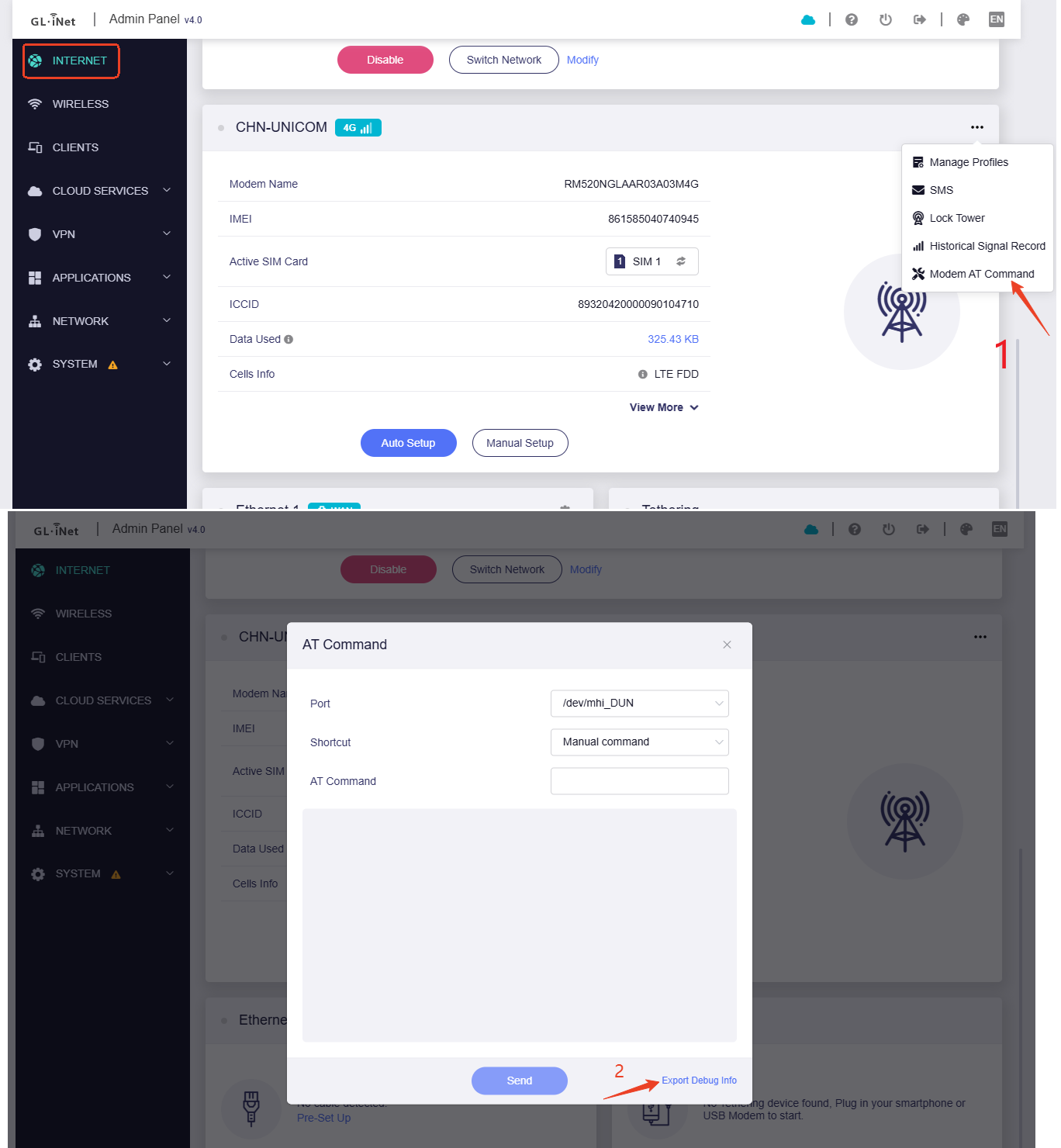
  1. Please check the modem status and SIM status using following AT commands in Admin Panel > Internet > Modem > ··· > Modem AT command:
AT+CFUN? 
AT+CSQ
AT+COPS?
  1. Please export modem-debug info from Admin Panel > Internet > Modem > ··· > Modem AT command:

  1. Please export the system log (logread.tar) from Admin Panel > SYSTEM > Log
  2. Your use region and SIM card operator name

Here is the information:

1: Modem & SIM Staus

AT+CFUN?

+CFUN: 1

OK

AT+CSQ

+CSQ: 99,99

OK

AT+COPS?

+COPS: 0,0,"T-Mobile",11

OK

{
"msgs": [
{
"cmd": "ATI",
"result": "\r\nQuectel\r\nRM520N-GL\r\nRevision: RM520NGLAAR03A03M4G\r\n\r\nOK\r\n"
},
{
"cmd": "AT+GMI",
"result": "\r\nQuectel\r\n\r\nOK\r\n"
},
{
"cmd": "AT+CIMI",
"result": "\r\n310260422104641\r\n\r\nOK\r\n"
},
{
"cmd": "AT+CPIN?",
"result": "\r\n+CPIN: READY\r\n\r\nOK\r\n"
},
{
"cmd": "AT+CREG",
"result": "\r\nOK\r\n"
},
{
"cmd": "AT+CSQ",
"result": "\r\n+CSQ: 99,99\r\n\r\nOK\r\n"
},
{
"cmd": "AT+GSN",
"result": "\r\n016442000141602\r\n\r\nOK\r\n"
},
{
"cmd": "AT+COPS?",
"result": "\r\n+COPS: 0,0,"T-Mobile",11\r\n\r\nOK\r\n"
},
{
"cmd": "AT+QGMR",
"result": "\r\nRM520NGLAAR03A03M4G_01.201.01.201\r\n\r\nOK\r\n"
},
{
"cmd": "AT+CSUB",
"result": "\r\nSubEdition: V04\r\n\r\nOK\r\n"
},
{
"cmd": "AT+QMBNCFG="list"",
"result": "\r\n+QMBNCFG: "List",0,1,1,"Commercial-TMO",0x0A01050F,202402061\r\n+QMBNCFG: "List",1,0,0,"CDMAless-Verizon",0x0A010126,202304251\r\n+QMBNCFG: "List",2,0,0,"Volte_OpenMkt-Commercial-CMCC",0x0A012010,202209221\r\n+QMBNCFG: "List",3,0,0,"VoLTE-CU",0x0A011561,202310181\r\n+QMBNCFG: "List",4,0,0,"ROW_Commercial",0x0A010809,202401151\r\n+QMBNCFG: "List",5,0,0,"ROW_Generic_3GPP_PTCRB_GCF",0x0A01FF09,202203161\r\n+QMBNCFG: "List",6,0,0,"TEF_Spain_Commercial",0x0A010C00,202302071\r\n+QMBNCFG: "List",7,0,0,"FirstNet",0x0A015300,202206171\r\n+QMBNCFG: "List",8,0,0,"Rogers_Canada",0x0A014800,202303141\r\n+QMBNCFG: "List",9,0,0,"Bell_Canada",0x0A014700,202111051\r\n+QMBNCFG: "List",10,0,0,"Telus_Jasper_Canada",0x0A01F900,202304281\r\n+QMBNCFG: "List",11,0,0,"Telus_Consumer_Canada",0x0A01FA00,202304281\r\n+QMBNCFG: "List",12,0,0,"Commercial-Sprint",0x0A010204,202111051\r\n+QMBNCFG: "List",13,0,0,"VoLTE-ATT",0x0A010335,202206171\r\n+QMBNCFG: "List",14,0,0,"CDMAless_Private-Verizon",0x0A01FD28,202304271\r\n+QMBNCFG: "List",15,0,0,"Swiss-Comm",0x0A010411,202304261\r\n+QMBNCFG: "List",16,0,0,"Telia_Sweden",0x0A012400,202111051\r\n+QMBNCFG: "List",17,0,0,"TIM_Italy_Commercial",0x0A012B00,202111051\r\n+QMBNCFG: "List",18,0,0,"France-Commercial-Orange",0x0A010B21,202401081\r\n+QMBNCFG: "List",19,0,0,"Commercial-DT-VOLTE",0x0A011F1F,202212061\r\n+QMBNCFG: "List",20,0,0,"Germany-VoLTE-Vodafone",0x0A010449,202401201\r\n+QMBNCFG: "List",21,0,0,"UK-VoLTE-Vodafone",0x0A010426,202401201\r\n+QMBNCFG: "List",22,0,0,"Commercial-EE",0x0A01220B,202111051\r\n+QMBNCFG: "List",23,0,0,"Optus_Australia_Commercial",0x0A014400,202111051\r\n+QMBNCFG: "List",24,0,0,"Telstra_Australia_Commercial",0x0A010F00,202311071\r\n+QMBNCFG: "List",25,0,0,"Commercial-LGU",0x0A012608,202111051\r\n+QMBNCFG: "List",26,0,0,"Commercial-KT",0x0A01280B,202308031\r\n+QMBNCFG: "List",27,0,0,"Commercial-SKT",0x0A01270A,202111051\r\n+QMBNCFG: "List",28,0,0,"Commercial-Reliance",0x0A011B0C,202210211\r\n+QMBNCFG: "List",29,0,0,"Commercial-SBM",0x0A011C0B,202401231\r\n+QMBNCFG: "List",30,0,0,"Commercial-KDDI",0x0A010709,202401191\r\n+QMBNCFG: "List",31,0,0,"Commercial-DCM",0x0A010D0D,202312201\r\n+QMBNCFG: "List",32,0,0,"VoLTE_OPNMKT_CT",0x0A0113E0,202312141\r\n\r\nOK\r\n"
},
{
"cmd": "AT+QENG="servingcell"",
"result": "\r\n+QENG: "servingcell","NOCONN","NR5G-SA","TDD",310,260,1870D112E,690,850500,520110,41,12,-91,-10,18,1,-\r\n\r\nOK\r\n"
},
{
"cmd": "AT+QENG="neighbourcell"",
"result": "\r\nOK\r\n"
},
{
"cmd": "AT+QCFG="usbnet"",
"result": "\r\n+QCFG: "usbnet",0\r\n\r\nOK\r\n"
},
{
"cmd": "AT+QNWPREFCFG="mode_pref"",
"result": "\r\n+QNWPREFCFG: "mode_pref",AUTO\r\n\r\nOK\r\n"
},
{
"cmd": "AT+QNWPREFCFG="nsa_nr5g_band"",
"result": "\r\n+QNWPREFCFG: "nsa_nr5g_band",1:2:3:5:7:8:12:13:14:18:20:25:26:28:29:30:38:40:41:48:66:70:71:75:76:77:78:79\r\n\r\nOK\r\n"
},
{
"cmd": "AT+QCFG="pcie/mode"",
"result": "\r\n+QCFG: "pcie/mode",0\r\n\r\nOK\r\n"
},
{
"cmd": "AT+QCFG="data_interface"",
"result": "\r\n+QCFG: "data_interface",1,0\r\n\r\nOK\r\n"
},
{
"cmd": "AT+QNETRC?",
"result": "\r\n+QNETRC: "emm_cause",0\r\n+QNETRC: "esm_cause",0\r\n+QNETRC: "5gmm_cause",0\r\n\r\nOK\r\n"
},
{
"cmd": "AT+CGDCONT?",
"result": "\r\n+CGDCONT: 1,"IPV4V6","fast.t-mobile.com","0.0.0.0.0.0.0.0.0.0.0.0.0.0.0.0",0,0,0,0,,,,,,,,,"",,,,0\r\n+CGDCONT: 2,"IPV4V6","ims","0.0.0.0.0.0.0.0.0.0.0.0.0.0.0.0",0,0,0,0,,,,,,,,,"",,,,1\r\n+CGDCONT: 3,"IPV4V6","sos","0.0.0.0.0.0.0.0.0.0.0.0.0.0.0.0",0,0,0,1,,,,,,,,,"",,,,1\r\n+CGDCONT: 4,"IPV4V6","tmus","0.0.0.0.0.0.0.0.0.0.0.0.0.0.0.0",0,0,0,0,,,,,,,,,"",,,,0\r\n+CGDCONT: 5,"IPV4V6","h2g2","0.0.0.0.0.0.0.0.0.0.0.0.0.0.0.0",0,0,0,0,,,,,,,,,"",,,,0\r\n+CGDCONT: 6,"IPV4V6","pcweb.tmobile.com","0.0.0.0.0.0.0.0.0.0.0.0.0.0.0.0",0,0,0,0,,,,,,,,,"",,,,0\r\n\r\nOK\r\n"
},
{
"cmd": "AT+CGPADDR",
"result": "\r\n+CGPADDR: 1,"38.7.251.145.140.138.128.100.10.212.33.87.130.152.205.107"\r\n+CGPADDR: 2,"0.0.0.0","0.0.0.0.0.0.0.0.0.0.0.0.0.0.0.0"\r\n+CGPADDR: 3,"0.0.0.0","0.0.0.0.0.0.0.0.0.0.0.0.0.0.0.0"\r\n+CGPADDR: 4,"0.0.0.0","0.0.0.0.0.0.0.0.0.0.0.0.0.0.0.0"\r\n+CGPADDR: 5,"0.0.0.0","0.0.0.0.0.0.0.0.0.0.0.0.0.0.0.0"\r\n+CGPADDR: 6,"0.0.0.0","0.0.0.0.0.0.0.0.0.0.0.0.0.0.0.0"\r\n\r\nOK\r\n"
},
{
"cmd": "AT+QCAINFO",
"result": "\r\n+QCAINFO: "PCC",520110,12,"NR5G BAND 41",690\r\n+QCAINFO: "SCC",397230,2,"NR5G BAND 25",1,148,0,-,-\r\n\r\nOK\r\n"
},
{
"cmd": "AT+CEREG?",
"result": "\r\n+CEREG: 0,0\r\n\r\nOK\r\n"
}
]
}

logread.tar (502.5 KB)

  1. Hopefully this is what you need: Region is southeast and the SIM is T-Mobile provided by Calyx Institute
Thanks for your detailed information. Just to confirm, when issue happens, could you access the admin panel? Are both wired and wireless clients unable to access the network?

We don’t have any wired clients, they are all wifi. I can typically get into the panel to initiate a reboot after which speed goes back to normal. I find that the upload speeds go to almost zero and downloads reduce substantially but not to zero.

I’m having what appears to be the identical issue, a Puli AX 3000 (XE3000), also using a Calyx SIM for Internet. I’ve had it installed about 2 weeks now, and have had to reboot or power off and on about 4 times, twice 1 day. Speeds are good until they aren’t, then average about 2 down, 0.4 up. After restart, speeds are good again. One wired connection (an ASUS router that connects my whole house) and one wireless (my phone). I too can reach the admin panel and reboot. Would you like the same info as Vettenuts provided, or something less?
Rob Jacobson

@Vettenuts @RobJ Does your data plan have any speed limits? Alternatively, there may be network throttling occurring. You can try the following configurations:

  1. Switch to a different frequency band. Check the current frequency band on the cell info page, then enable the Band Masking option in the manual setup. Set it to "block" mode and select the current frequency band. Save and apply the settings. This will force the device to connect using other available frequency bands
  2. In the Manual Setup, modify the TTL configuration and set it to 65.

Thank you for a quick response. It doesn’t look like throttling to me, but I have little expertise in this area. My current speed is 300.3 down, 88.1 up, 75 ms ping, and 30.0ms jitter, the best numbers I’ve seen. The last restart was 2 days ago, twice that day. RobJ

I am now aware of any speed limits, however I will send an email to Calyx and try and obtain any information. Upon reboot, my downloads speed in my current location are typically in the 70-80 range. When I need to reboot the speeds slow considerably and upload speed is almost non-existent.

Just pulled the paragraph below from the Calyx website. If you have further questions I will contact them directly:

If you’re wondering just how unlimited the Calyx Institute unlimited internet is, we want to reassure you—there is no limit.

Our contract with Mobile Citizen stipulates that there will be “no throttling, suspension, or overage charges after 30GB.”

We are authorized by Mobile Citizen to describe the service as “unlimited” because there is truly no limit to the amount of data you can use, and there never has been.

The Calyx Internet membership program provides unlimited data on T-mobile’s network. Our hotspots’ data is subject to any standard network management that T-Mobile may apply to commercial broadband data-only account holders. T-Mobile reserves the right to do “network deprioritization” to any of its lines of service, and what that means is that if there is network crowding in a particular area or time, T-Mobile can slow data down to ease that crowding. Calyx members shouldn’t experience this deprioritization unless they are:

  1. on a crowded network, and

  2. over 100GB of data use.

The slowdown may be caused by congestion in the current used frequency band or channel. Restarting the device will allow it to re-search and reconnect to the network. Can you monitor whether the decrease in speed occurs during specific time periods or coincides with peak usage hours?

Will do. I have started running a speed test more regularly and have some from the past. That should allow me to track when the slowdowns occur. Will report back.

It’s now 4 full days since my last slowdown and restart. Speed down has stayed in the 200’s, speed up has varied from 11.6 to 93.6, currently 36.1, with 3 tests showing in the 14’s. Whether 14 or 11, I never noticed any slowing in my usage, was fine. Unfortunately, I’ve been using Fing, utterly pathetic in scheduling and logging speed tests, or I could provide better data. I think the slowdowns occur mostly during day, not night, and weekdays, not weekends, but cannot confirm that.

I had thought, if I could spare the time, that when the next unusable speed occurred, I would wait and see if it improved when demand should have decreased - but haven’t had the opportunity yet.

By the way, if it really is a congestion or throttling issue, can you add a configurable switch for auto restart of the channel search and connection process? Would be quicker than a reboot. You would need to detect overly long responses somehow. You obviously can’t do constant speed tests, and monitoring throughput is pointless. When these episodes occurred, my speed up dropped below 1.0 (0, 0.1, 0.3, 0.5).