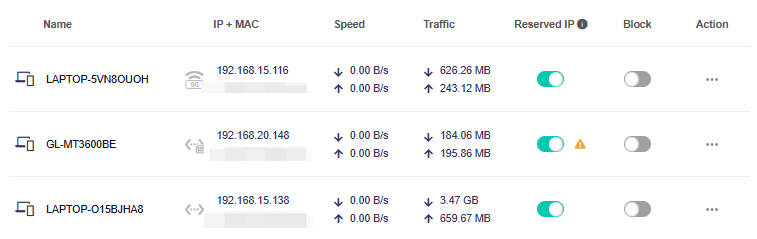
My Spitz AX is running a latest firmware. I use it as a primary router with Guest Network and Flint as a repeater for downstairs.
Flint acts just as a repeater and its not configurable as expected and works fine.
Spitz AX at the same time while trying to get configured it keeps dropping the web interface and client list is invisible. only after a reboot the clint list shows up then disappears all together.
Also I have reserved one or two IP address that I use and I keep getting a warning >The reserved IP is not in the same segment as the current IP, the configuration does not take effect>. The reserved ip is on the guest network and withing diffrent gatway address so should be no conflict at all. Seems like a bug in the software. Can you please take a look at it? thank You
To help us investigate the issue, could you please help us with the following checks?
Could you please confirm the firmware versions on both routers: is your Spitz AX (GL-X3000) running v4.8.3 Release or v4.11.0 Beta 3, and which firmware version is your Flint running?
How is your device connected to the X3000 when you access its web admin panel? When the issue occurs, could you connect a computer directly to the X3000’s LAN port via Ethernet and continuously ping its LAN gateway IP to check for high latency, packet loss, or timeouts?
Is your Flint connected to the X3000 using the Repeater function in Router mode, or is it configured in another network mode, such as Extender or WDS?
When the issue occurs, please export the logs from System → Log → Export Log before rebooting, and send them to us via private message.
This warning may appear when reserving an IP address for a device on a network other than the main LAN, such as the Guest network. The IP reservation has been applied successfully, and this display issue does not affect normal use.
The Spitz AX is the main router and Flint is the repeater. I can log in to both gateways, flint or spitz but even when connected to just Spitz I can access flint by using its IP address. No lan just wireless repeater.
Hi martinp, thank you for sending the logs and clarifying how your Flint connects to the Spitz AX.
We found that the Spitz AX timed out twice while loading the client list, which matches what you saw in the admin panel.
We’ll share these logs with our engineering team to investigate what caused the timeouts.
To check whether the admin panel timeout also occurs over Ethernet, could you connect a computer directly to the Spitz AX’s LAN port, turn off Wi-Fi on that computer, and keep a ping running to 192.168.8.1 while using the admin panel?
If the timeout happens again, please let us know the time, which page you were using, whether any ping requests timed out, and whether you could still access the internet?