Hello all, got a flint 2, my first non ISP provided router and most things have been easy enough to figure out on my own, but i’m having an issue with split tunneled apps ignoring adguard and resolving to cloudflare and google dns, i’ve been using firefox within vpn and waterfox outside vpn for consistent testing. I’ve had the router a grand total of 20 hours, so apologies if I forget to include anything pertinent. **
Setup:**
Client: Debian with KDE plasma
Router: GL.iNet Flint 2 (OpenWrt), AdGuard Home enabled
Hello,
Since making that post I have been trying to run the vpn on flint2, rather than the desktop client.
When using the desktop client the only exceptions were set in the protonvpn gui>split tunneling list
Currently using router level vpn and having a more fundamental issue where packets reach my router but somewhere in the adguard + vpn chain they get dropped before reaching my desktop
The router vpn dashboard shows “
From: Debian desktop MAC
To: All targets
Via: ProtonVPN /
Also since creating this thread, I have submitted a support ticket and set up goodcloud, provided support with my router MAC and temp admin credentials to facilitate people more knowledgeable than myself having eyes on what im stumbling over.
Our technical support team is currently looking into your inquiry.
As a supplementary note, when testing and verifying the VPN tunnel issue in the router SSH, you will need to create a virtual client by netns_client.sh -c br-lan 1.
This is necessary as SSH from the router itself do not go to the VPN tunnel, instead to the WAN. By creating a virtual client in the SSH, it can go to the VPN tunnel, similar to how a LAN client (like an Ubuntu machine) would.
Note: If you have "Specified" or "Exclude Specified Devices" rules configured, please ensure that this virtual client is included in your VPN tunnel policy in the VPN Dashboard.
I enable WireGuard to my home network and I can ping IPs in that 192.168.22.x network and everything else goes directly out (in Policy Mode). note that my WireGuard conf does not have a DNS line.
with AdGuard enabled though, DNS queries fail. pings to home network and the world still work fine. I am using the same 1.1.1.1 DNS server in AdGuard. I have tried all the toggles in the GL.iNet interface.
I have tried setting a static route to 1.1.1.1 in LuCI to wwan and wan… no go.
I have tried adding an IP rule via the shell ‘ip rule add to 1.1.1.1 lookup main pref 100’. this actually got the AdGuard test for upstream servers working, but clients still weren’t getting responses.
I hope there is a solution because I got the Slate 7 to do the split tunneling while traveling. I didn’t even think about AdGuard not working, but browsing without it is a non-starter.
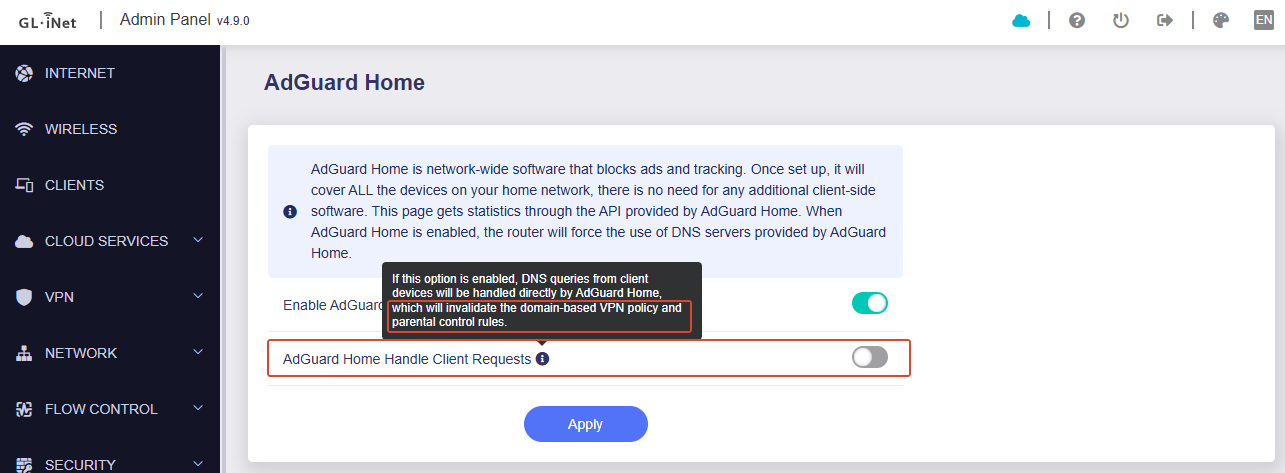
If so, you can use ADG, but please keep toggle 'Handle Client Requests' disabled. The latter will affect the resolution of the domain name configured in the VPN policy.
I am not using domain based routing. I only have a Wireguard tunnel to a /24 for my home network and the rest routes out directly. I use IP numbers for home services so no DNS needed for that route. I have tried with the “AdGuard Home Handle Client Requests” setting on and off and it did not make a difference.
Please share your router with us via GoodCloud, I would like to remote check this issue in your router, since I did not reproduce this issue in my router.
Please PM me your router MAC address and the Admin Panel password.
Yeah, I assume that yes, tunnel split is working without issue.
But I need some more detailed information to confirm or to help me reproduce this issue if it does exist.
I would like to check your VPN tunnel configuration, DNS configuration, etc.
Edit:
If your VPN server does not allow access to non-"/24 for my home network" (or say the VPN tunnel can only access "/24 for my home network" and not allow to access Internet, probably you maybe encounter the same situation as below:
I changed the procd_set_param group to ‘nonevpn’ instead of ‘explict_vpn’ and restarted AdGuard and I was able to get to my home /24 by IP and DNS was working to the outside world.
 Override DNS settings for ALL clients