I have a Flint 2 router and a 1 Gbps/300 Mbps connection.
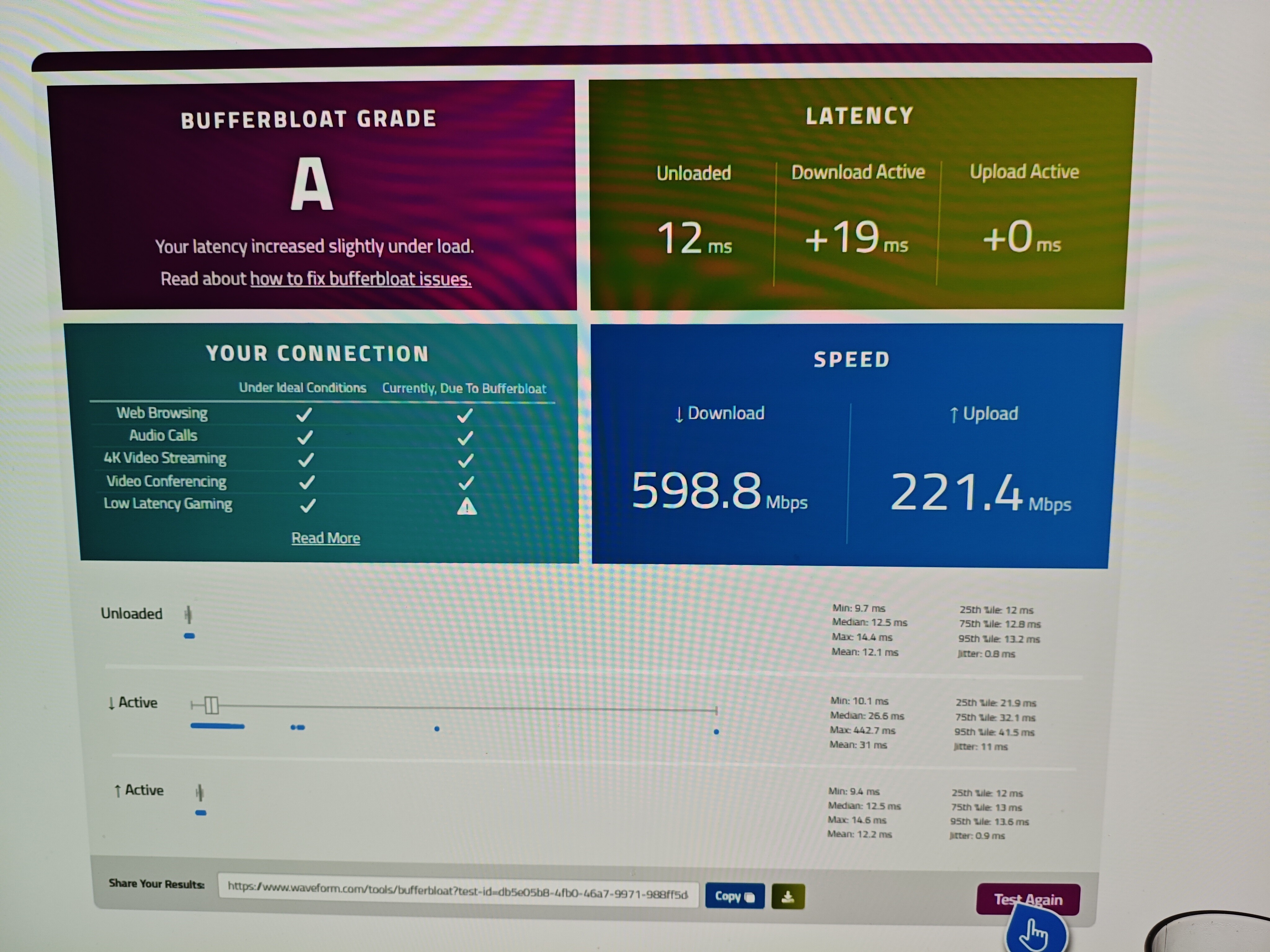
I have SQM installed; it works fine on my PC, but unfortunately it doesn't work on the Xbox Series X. I've tried everything—changing LAN ports, cables, various SQM settings, and different speeds—but the result is always the same: it doesn't work on the Xbox.
When you say it doesn’t work do you mean upload or download or both? Can you confirm from the screenshot what you consider is not working and what you consider working on the PC. This would help get a better picture on what you believe is the issue.
Can you share also more about the setup.
Is the Flint the main router or behind another router.
What do speed tests look like in each device with SQM disabled (Speedtest.net)
What speeds look like with SQM enabled (Speedtest.net)
Is the internet connection DHCP or PPPoE
Is the internet connection using VLAN
What speeds you configure for upload and download and other SQM settings you are using
If you visit ifconfig.co on both browsers do they show the same public IP address? (Not sure how browsing on Xbox works and if they add some kind of security layer in the browser that may alter the results in this test)
Sorry, I presume you mean it’s the same IP for both but just want to be certain as it’s is ambiguous in the way you are writing the messages. Both have the same public IP?
@PawelP - FYI, these bufferbloat sites are very misleading. In the real world, the only time this would come into play is if you have a bunch of other people on your network at the same time you’re gaming and you’re maxing out your connection (the test the site emulates).
Under normal conditions you’re entire home network is likely using <100 Mbps. Even CoD on max resolution doesn’t use more than 7 Mbps. When your network is not loaded up, then there is not bandwidth contention or bufferbloat, and SQM isn’t doing anything for you.
On the inverse, SQM is adding a slight bit of extra processing on every packet. It may help smooth out a connection if you have an unstable network with high jitter, but that’s about it. Unless you have other people on your network running a bittorrent seedbox on your network while you’re gaming, then this tuning isn’t going to produce any actual in-game benefits.
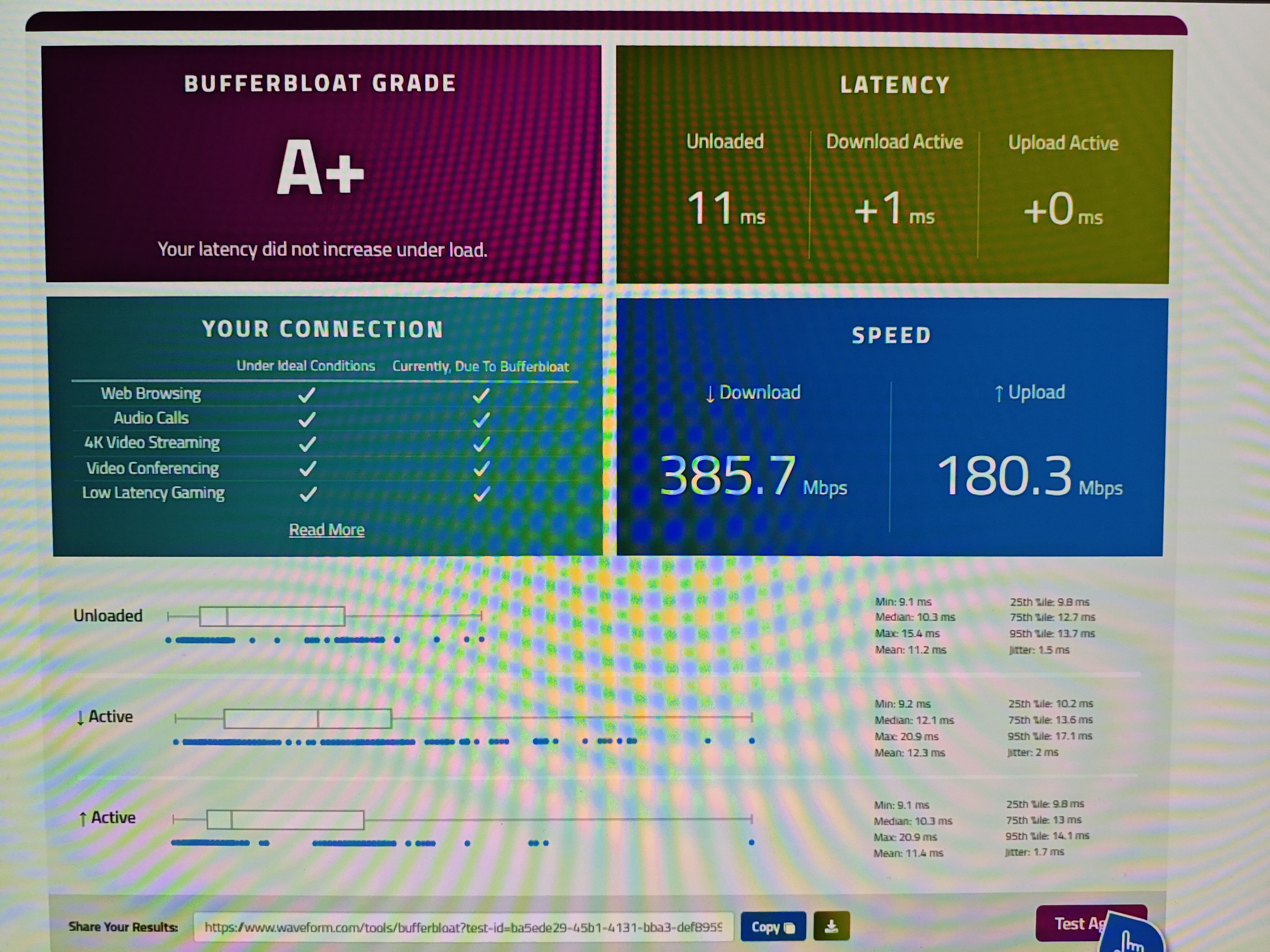
I understand what you're saying; I also have an old Netduma R3 router with QoS. Below is a test from the Netduma—please note the “Active” section and compare it with the test a few posts above (from Xbox).
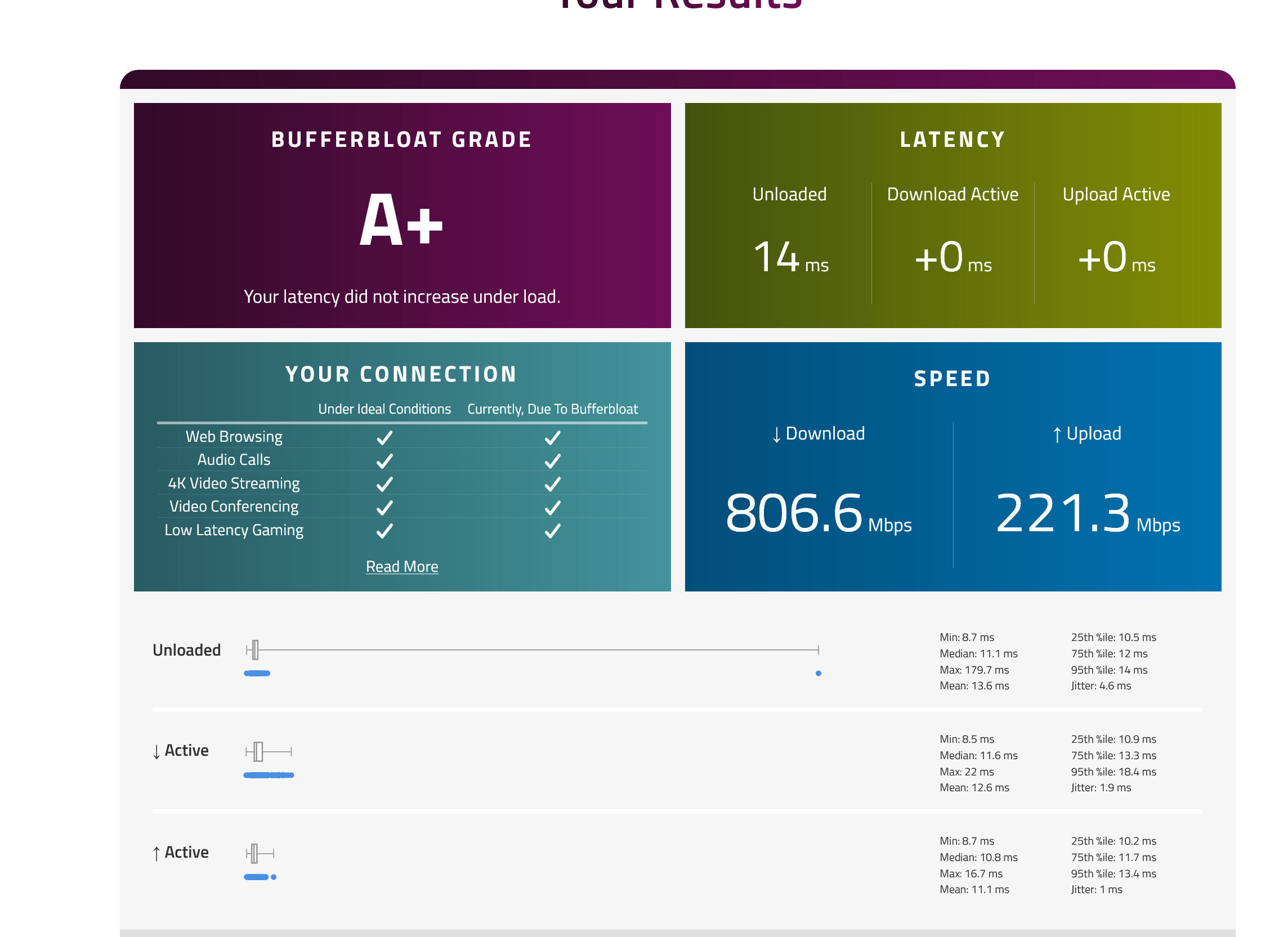
It looks like this latest one has the bandwidth clamped down much further - 385 vs 598 on the Flint.. so you’ve traded less “bufferbloat” at the expense of a 30% reduction in your bandwidth.
Although SQM is most noticeable when there is a heavy user, it’s actually having an effect any time data is transferred at all. Not only can it reduce bloat, but it can actually also speed up uploads/downloads (depending which end of a link SQM is running) by mitigating buffer overruns, in this case on most home routers we are particularly talking about upstream.
e.g. FTTP ONTs have extremely small buffers, if you have a service with a 100Mbps upload, it doesn’t matter if your devices are only using 100Mbps as an average, they (your PC console etc) transmit the bits at whatever the physical connection rate of the device is.
e.g. If you have a 1Gbps network port on your PC or Console, it transmits any data it sends at 1Gbps. The average rate is 100Mbps because it only transmitted for 1/10th of a second, but the physical links always transmit the bits at the physical line rate of 1Gbps. Because of this, there is always ‘congestion’ and time a device sends data as for the period of time the device was transmitting the link was maxed out.
When this traffic hits the ONT, which has a lower physical underlying rate on the PON, it can not transit everything it received, if the quantity of data was large enough not only will you see bloat, but in addition, some of it will get dropped by the ONT tiny buffer being full and you have packet loss.
By introducing SQM on the router towards the ONT, it will now space out the quantity of data at an average rate of 100Mbps (still transmitted towards the ONT physically at 1Gbps) to spread the rate the ethernet frames with that data arrive at the ONT and stop the ONT buffer being overloaded. This reduces packet loss as well as reducing the bloat. Reducing the packet loss will smooth out and improve the TCP congestion control and actually speeds up download over higher latency paths. (In the same way that SQM introduces packet loss to get the connections to slow down)
Where the fancy part of SQM comes in is that the way it decides what to transmit is intelligent vs using a traditional dumb shaper or shaper with random drop which would drop unintelligently to try and avoid congestion and cause loss on things you don’t want to drop.
The benefits of shaping with things like XGS-PON where the ONT may have a 2.5G or 10Gbps ethernet port and you only have a 100Mbps upstream service are even greater as the data arrives and fills the ONT buffers even faster, you really need shaping, and SQM is the best way to shape.
TLDR everyone would benefit at all times running SQM because it’s a shaper, not just because it’s an intelligent shaper.
For the most part you seem to have things set correctly. Speed wise I would normally recommend 900/270 as very safe values for your connection. You do not need any overhead adjustments and should be able to leave everything else as default. However, specifically around the downstream you are fighting a bit of a losing battle and you have the following issues to contend with.
The flint2 will not be capable of running SQM at Gigabit speeds at this time. SQM is single threaded (This is not strictly true with the very latest linux kernel but will avoid that bleeding edge discussion for now) and the CPU will max out at around 500-600Mbps usually. If you are willing to give up 50% of your download speed you can mitigate this to some extent, but you can not fully control the rate that the upstream ISP network send data towards you, so the router can still receive burst of traffic at a rate higher than the CPU can handle which is going to cause issues.
In addition, SQM can only control congestion caused by your own internet circuit being maxed out, if there is congestion and bloat inside the ISP network SQM will not be able to correct this. This will be quite common and further reduces the benefit of SQM downstream when latency and bloat is out of your control.
Generally if you can run SQM downstream I would recommend it, but in your case you will be giving up nearly 50% of the connection you pay for, to still have some issues caused at peak times by ISP congestion. With this in mind, I would personally recommend setting the download speed to 0 and disabling SQM in the downstream direction in your case.
If you want to leave it enabled I would suggest trying something like 550/270 for the speeds. Once that’s set we can continue to try and see why the Xbox is having issues, but if its wired into the router the same as the PC and the PC is working at those speeds then it is possible that there is some behaviour with the browser itself on the xbox rather than actually correctly reporting the behaviour you would see with gaming traffic.
Fundamentally the console still needs to process the browser traffic correctly and you could be seeing an issue with the way it processes the speed test.
Another way to test would be to run a constant ping from the PC while you run a speedtest on the PC, and then again with the built in speedtest or another speedtest site on the console and watch the ping times. This would help prove the router is behaving correctly regardless of what the Xbox browser is reporting.
I did as you said, i.e. ran `ping -t 8.8.8.8` and tested it on the PC, and it was fine. On the Xbox, I ran the test and checked the ping on the PC; the ping was 8ms, but during the test it went up to 26ms.
@oorweeg - microbursts are real, but they don't trigger SQM. CoDel only drops packets when sojourn time exceeds 5ms sustained for 100ms A few-ms burst never reaches that threshold. And bufferbloat.net defines bufferbloat as "high latency that occurs when there's other traffic on your network". It's a congestion phenomenon, not a background tax. At 10-20 Mbps over a 100+ Mbps link the queue stays empty and SQM has nothing to act on.
Also, downstream SQM (what Waveform measures) is the weaker direction. The router can't throttle what the ISP sends, only drop after arrival. Your practical advice to @PawelP above is the useful direction.
@PawelP - your ping test is the real sign. 8ms>26ms during Xbox saturation privdes an 18ms delta. Waveform on Xbox reported +442ms for the same. Those don't agree. Waveforms own docs note the test intentionally saturates the connection "because that's a sure way to trigger bufferbloat visibility". This is an intentional adversarial test (artificially created), not normal use. The 18ms your PC measured is the number of substance. Games don't push the link like a speed test does, so in-game you'll sit well under that.
It’s still a shaper though, and should still be queuing even if the queue isn’t full enough to be dropping. This has significant real world benefits besides the active queue management.
Also, downstream SQM (what Waveform measures) is the weaker direction. The router can't throttle what the ISP sends, only drop after arrival. Your practical advice to @PawelP above is the useful direction.
But there is still a benefit downstream even without full control. It will still have an effect on fairness across multiple streams and reduce congestion and bloat. Not in a fully controlled and intelligent way but even if not always able to fully eliminate all issues there will be measurable improvement. It is still worth having than not having, if the device is capable of processing the throughput.
@oorweeg. The "still queuing even when not dropping" framing isn't quite there my friend. SQM's shaper (HTB) is a token bucket. It only engages when traffic hits the configured rate. Below that the packets pass through without added delay/reshaping. There is zero persistent "shaping action" on an un-saturated link.
The fair queuing across flows is a legitimate (narrow) benefit; but again, only under contention, which is the congestion case again. A lightly loaded single-stream link has nothing for fq_codel to arbitrate on.
Your "IF the device is capable of processing the throughput" qualifier statement is legit truth here.. meaning especially your advice to consider just disabling downstream SQM on the Flint 2.
For most lightly-loaded residential connections, people are better off leaving SQM off. The useful envelope is very narrow. You really do need actual saturation or multi-flow contention and hardware capable of shaping at line rate before it produces gain. The numbers in this thread show it. SQM enabled cost ~12% on download and ~33% on upload. In exchange for a benefit that may not apply to their normal traffic pattern in the first place. On a Flint 2@ 1 Gbps that's a real throughput cost for a situational payoff they’ll likely never realize.
TL:DR; quit shooting yourself in the foot and leave SQM alone. Most “gamer lore” around it is straight hallucination and the bufferbloat sites are propogating/capitalizing on it with their scores that apply to almost nothing. Git gud.
Will have to agree to disagree and leave it here. Not shaping has serious negative effects, especially for a single stream (this is why speedtest are multi-stream now and many modern fast home internet can’t hit the paid-for performance with a single stream speedtest).
Dumb shaping has its own problems if you can’t limit the queue depth and do congestion avoidance. SQM solves both these issues and upstream, as I said originally, has real benefits for literally everyone because it's shaping, not because of latency reductions.
Use it or not, up to an individual, but most people will benefit even if they don’t realise it.