Thank you again to all power users in the community for your continued attention and hard-core discussions on this issue. We attach great importance to the pain point that everyone mentioned that "the LAN subnet cannot be directly accessed in tailscale".
About technical stance: The R&D team’s previous concerns were mainly that masquerade would lead to source address NAT, which would make it impossible to trace the source of traffic during network auditing and fine-grained ACL control. In order to ensure the lowest security limit of the firmware, we have always been cautious.
Our improvement plan: But we see that in everyone’s actual usage scenarios, the convenience of connection has a high priority. Everyone’s suggestion to “let users choose” is a very pertinent suggestion.
Short-term solution: We will post a quick CLI command in the Forum, so that friends who need this function can open it.
Long-term solution: I have formally fed back this requirement to the R&D team. Let us evaluate if add an optional to enable Masquerade to the Tailscale settings page.
This is where the power of the community lies. Thanks to everyone for helping make GL.iNet firmware better through lively discussions.
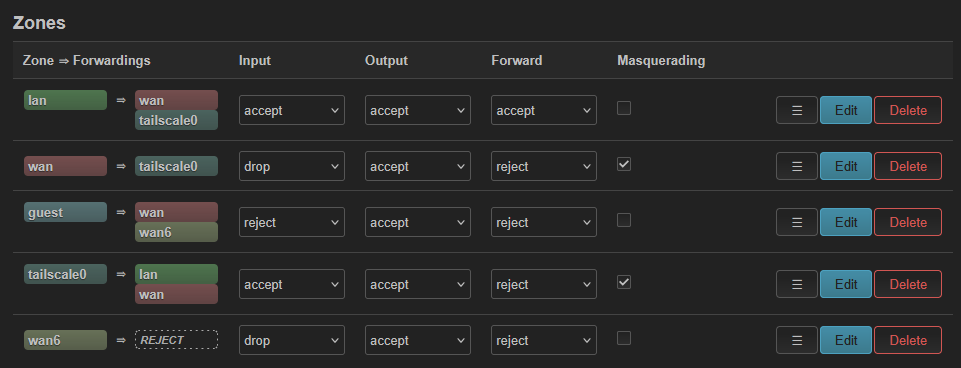
I’m trying to follow this topic, but not 100% sure I’m in the right place. Sometimes when connected to tailscale I can remote into the devices connected to it (that aren’t on tailscale) and sometimes I cannot. Today I cannot again, though I can still connect to the router itself at its local IP of 192.168.1.1 when connected to tailscale from a remote location. I can’t access any other device using the local IP provided by the Flint 3 though. I did not have Masquerading enabled on tailscale→lan like the comment above, but changing that doesn’t let me connect to those devices.
This is what I have now:
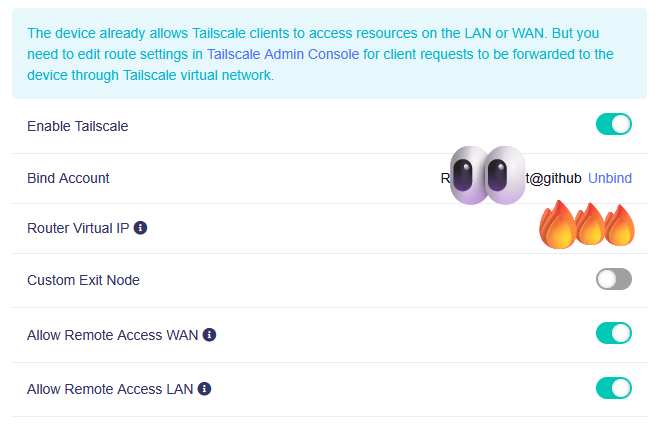
I have the following settings in the tailscale portion of the Flint 3, with the message at the top (though I’ve quadruple checked that I have route settings in the Tailscale Admin Console, and as mentioned previously sometimes it seems to work and sometimes not for some reason)
One of the tricky things with subnet routing (tailscale adverting connected private networks) when you are roaming around different locations, is that its VERY common for your network at home to use the same IP address range as the network in your remote location.
e.g. if you use 192.168.1.0/24 at home because that was the default on the router, guess what, that’s the default on lots of routers. So when you try to connect to 192.168.1.10 it will try to connect to the local device in the network in your guest wifi cafe and not at the other end of tailscale because the cafe router also used 192.168.1.0/24.
My advice, if you want to leverage this tailscale feature, step 1 is to pick as random IP range as possible to use at home. e.g. 192.168.147.0/24. Whatever is as random you can think of. This eliminates that common first problem with overlapping IP ranges. This could be why it sometimes works for you and sometimes does not.
The masquerade setting kinda helps here, but kinda doesn’t, as it hides all the devices either side behind the 100.64.x.x address. However this will also stop you from being able to connect to things inside one of the networks for different reasons so doesn’t really solve your problem if its caused by overlapping IPs
That’s good advice and a good thought on what could be happening, but I’m only ever accessing it from one secondary location and everything there is on a 10.x.x.x range, so I don’t think that’s the problem I’m having.
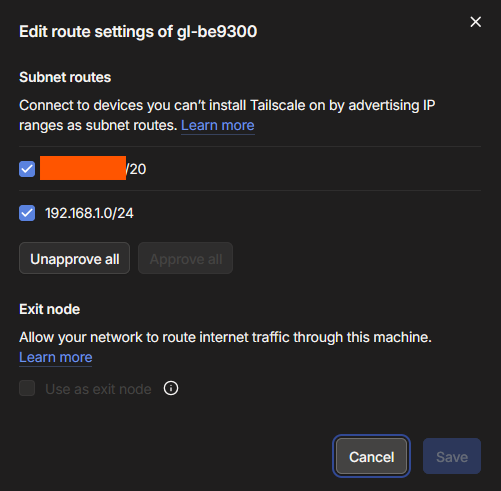
I notice you have two routes advertised and accepted and one is blocked out? It seems like that should only be the 192.168.1.0/24 range that you need if that is the LAN range behind the router? The other options you shared looks fine.
The TS client on Windows should be set to accept the subnet routes in the settings there as well but if it works sometimes it probably is set correctly.
Aside from not knowing what that second route being advertised is (maybe the public IP which you dont need to accept in the dashboard and probably shouldn’t) it looks like it should be fine.
Interesting, thanks! I think that the one I covered up is my tailscale network - I’ll double check the IP and uncheck that one and turn masquerading off. Hopefully that will fix it!
EDIT: Nope, you were right - it was the public IP of the router
Hope it works but can try and help more if not and I am sure others will pitch in as well.
For what it’s worth, I personally moved away from subnet routing on tailscale and installed it directly on all my devices that need remote access instead. Now that’s not going to work in every scenario for everyone but it is also a good option for having an easy life depending on exactly what it is you want to reach from remote
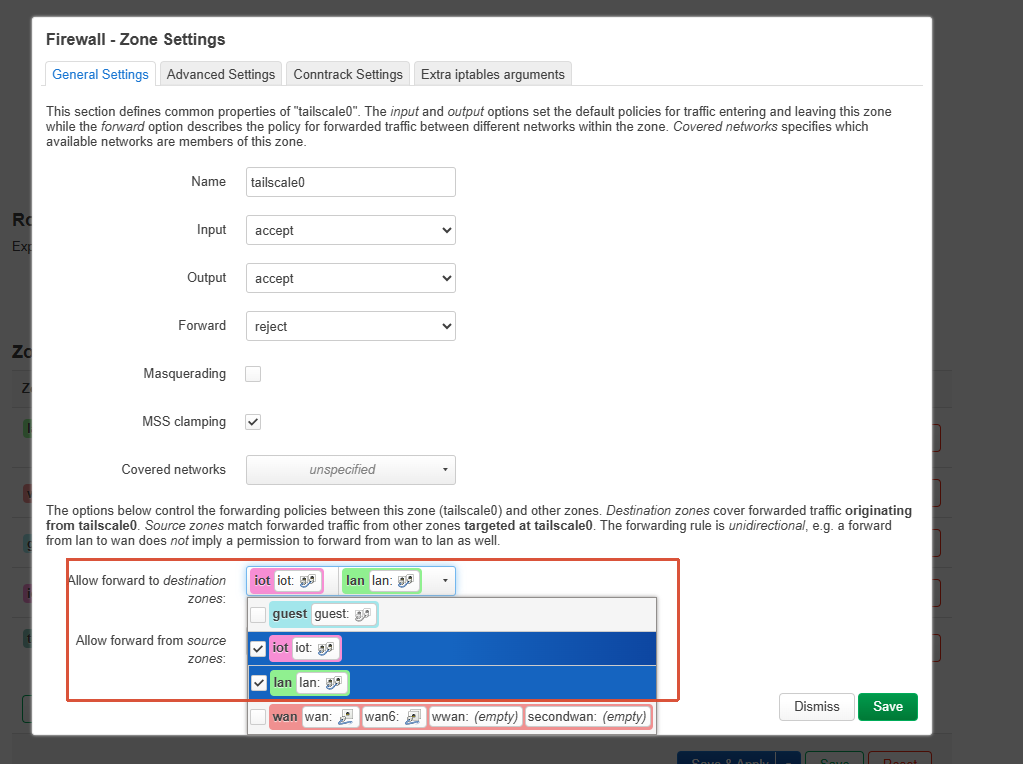
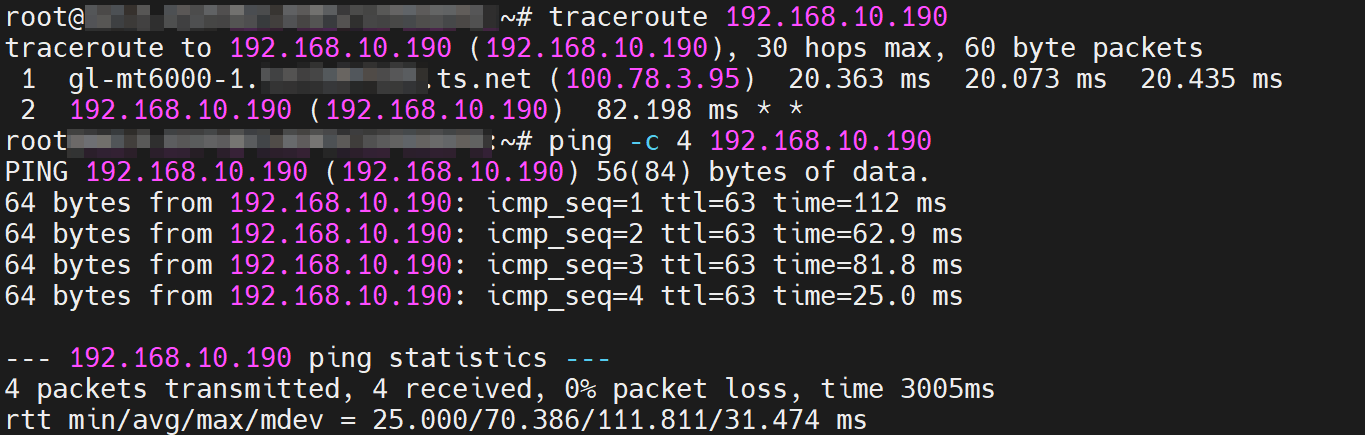
I had the same failure on v4.9.0 after creating the new “IoT” network. Connecting to the router remotely from the WAN via Tailscale did not allow access to the new IoT net at 192.168.10.0/24. Seems like a fairly major oversight. I was able to force it to advertise the route so that the Tailscale Machines admin page could see it (and I could approve it) with commands run through SSH but it never fully functioned properly and I had to give up on the entire project, and go back to a flat network. v4.9.0 is half-baked - not ready for prime time IMO.
We do not currently provide official support for accessing the IoT network remotely via Tailscale. We will discuss with the product team whether this behavior can be improved in future releases.
For now, you may be able to achieve this with the following workaround: