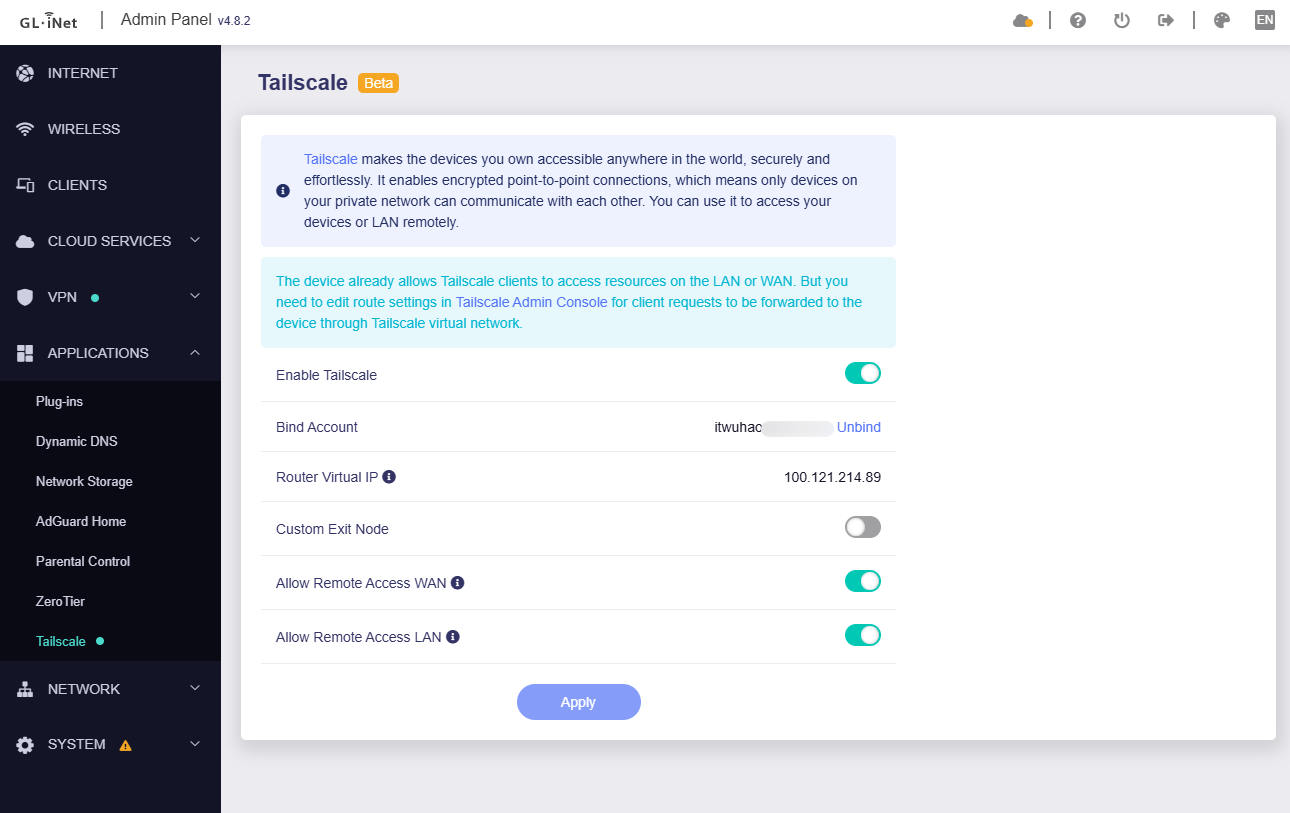
Sorry, maybe I misunderstood your question.
It would be great if now it works fine.
But this issue is strange. I think we need to check to how the TV is routed (traceroute) to further locate the issue.
Sorry, maybe I misunderstood your question.
It would be great if now it works fine.
But this issue is strange. I think we need to check to how the TV is routed (traceroute) to further locate the issue.
It’s still not configured properly. Out of the box on a Beryl AX on 4.8.1, after connecting a Tailnet, the Beryl doesnt install any available subnet routes. That doesnt really make any sense……right???
It’s the default behavior on all other devices/OS’s/etc that run Tailscale. Advertised routes get installed and are available simply by connecting. It’s part of the simplicity of the product.
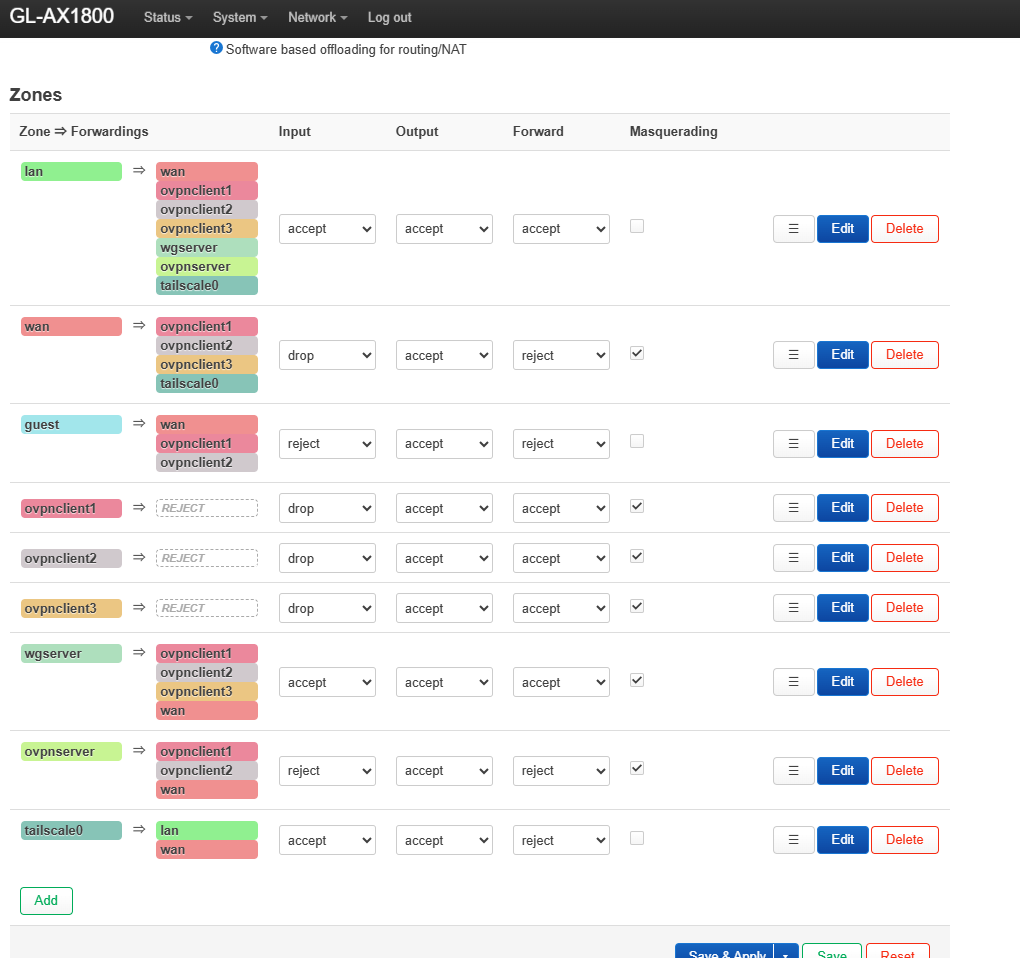
I still had to go in and manually change LuCi firewall zone rules, as others have noted. We shouldnt have to do that, it essentially handicaps the TS implementation on a GliNet device unless manual user override is involved.
I’d argue it defeats the entire purpose of having Tailscale for a large population of TS users. We dont know our Tailnet IPs, hell we dont even know the device names, but know what we do know? Our LAN IP or LAN DNS record for it.
If I cant just reach 192.168.1.0/24 by simply connecting, then what exactly are we running here?
I’d understand if there was a subnet conflict with the WAN or GliNet LAN, but in this example (192.168.8.0/24 GliNet LAN refusing to install a TS subnet route to 192.168.1.0/24), there’s zero conflicts.
Hoping you guys get this implemented to the intended spec.
Hello,
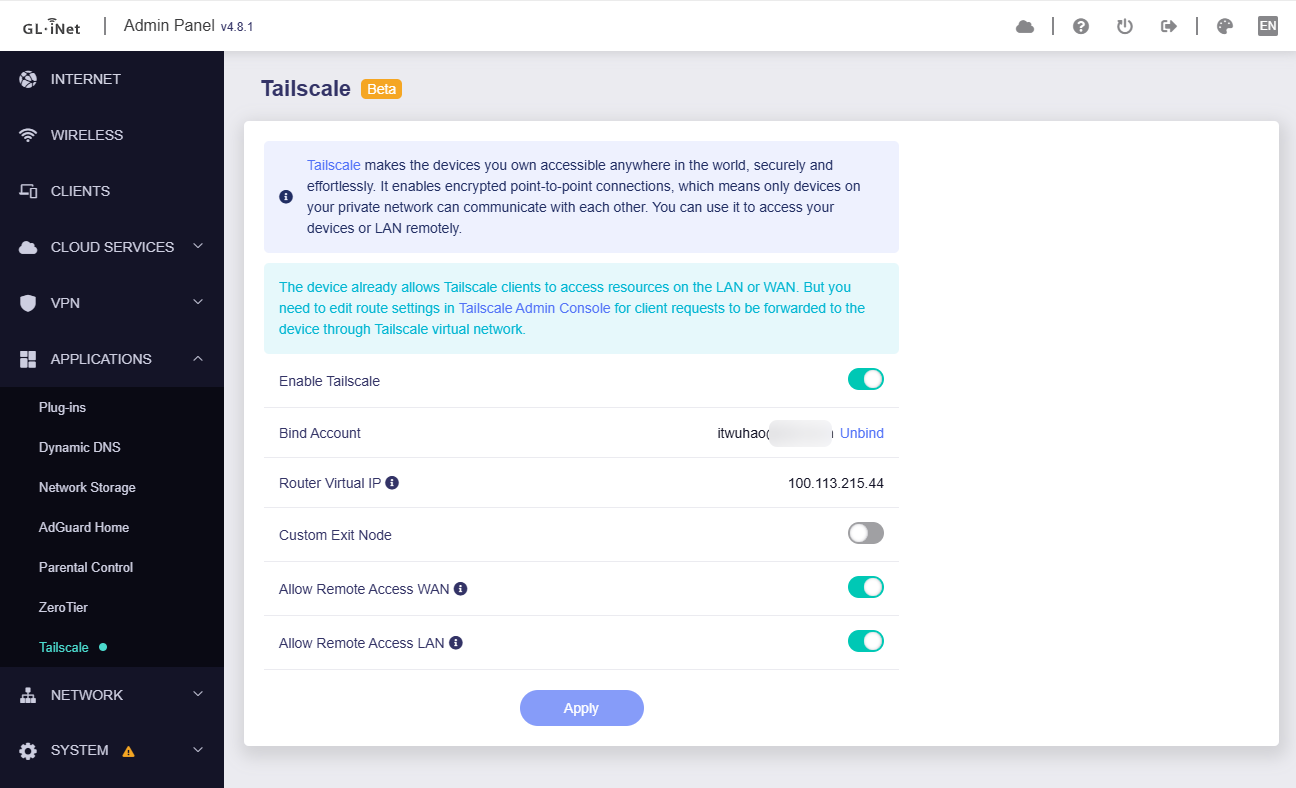
We modified the firewall rules on v4.8.x firmware to improve this issue. In fact the Tailscale policy routing table has been loaded in router, but may be an interface/firewall issue.
If your router model has released v4.8.x firmware, please upgrade to the latest firmware. Thanks!
Bruce, 4.8.1 is the very firmware I just was talking about that has the issues. Seems like it isn’t resolved.
If on 4.8.1 fresh install, you connect to a Tailnet, your routes will NOT be accessible. 2 steps must be completed in order to get to them, both in the LuCi firewall page:
Without these, routes to subnets do not work. You can access Tailnet IP addresses all day, but any device on the Tailnet that advertises a subnet route to other subnets? Those routes do not work without manual back-end intervention by the user.
This is a poor user experience and not the intended behavior of Tailscale. I install Tailscale on my Android phone or iPhone and the instant I’m connected, I have access to those subnets. Same for my Macbook, my Windows laptop, and my LXC running Tailscale. All of them out of the box allow access to all subnets advertised on the Tailnet.
All except GliNet devices.
What is GliNet’s position regarding the expected behavior from GliNet products when it comes to Tailscale and access to advertised subnet routes?
Edit: my recommendation is as follows:
Not trying to be difficult here, but it feels like GliNet doesnt understand the issue, and the responses seem to miss details like 4.8.1 already being messed up (re: recommending installing 4.8.1 after I said it was messed up).
Hello,
We have not reproduced this issue in local environment.
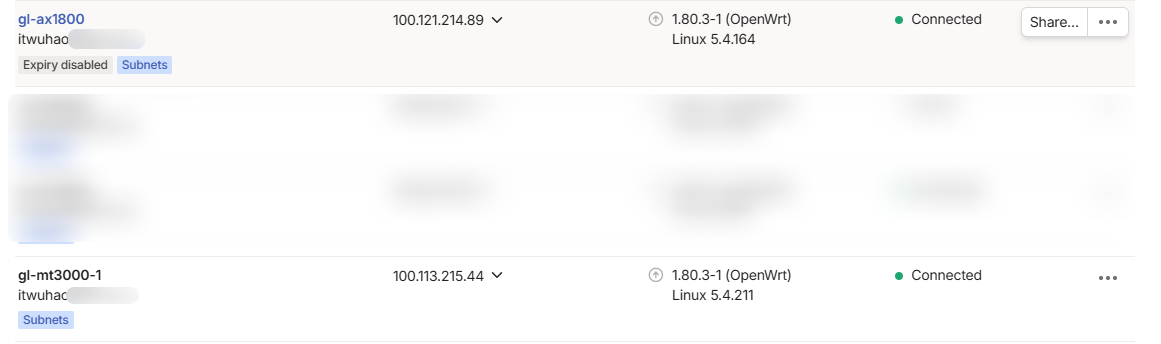
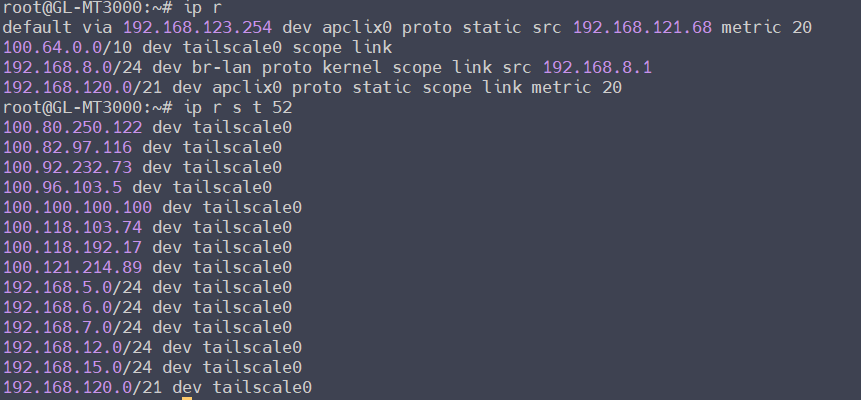
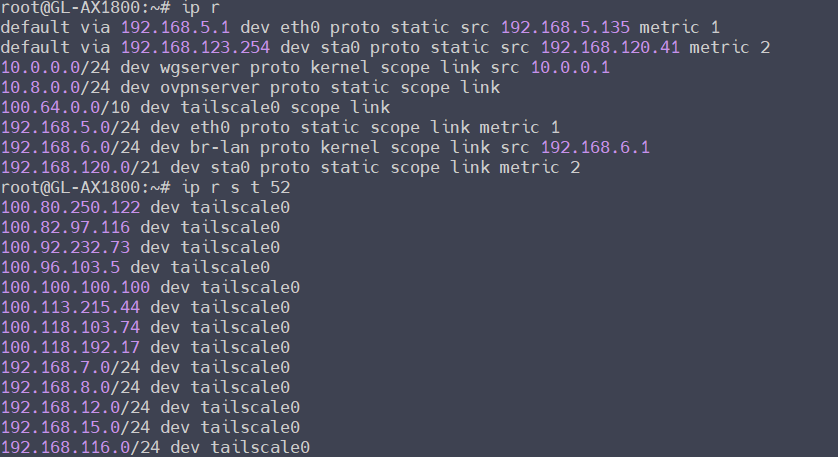
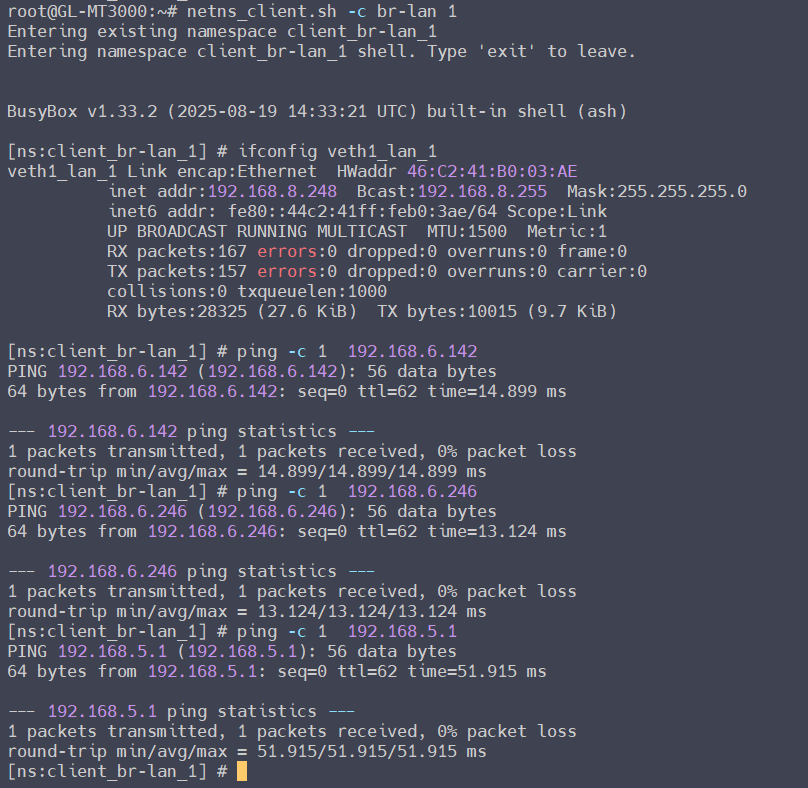
Neither router has changed any firewall configuration, which is generated by the tailscale startup script; nor has it manually added routes, which are announced by tailscale cloud and added automatically:
MT3000, v4.8.1, LAN 192.168.8.0/24:
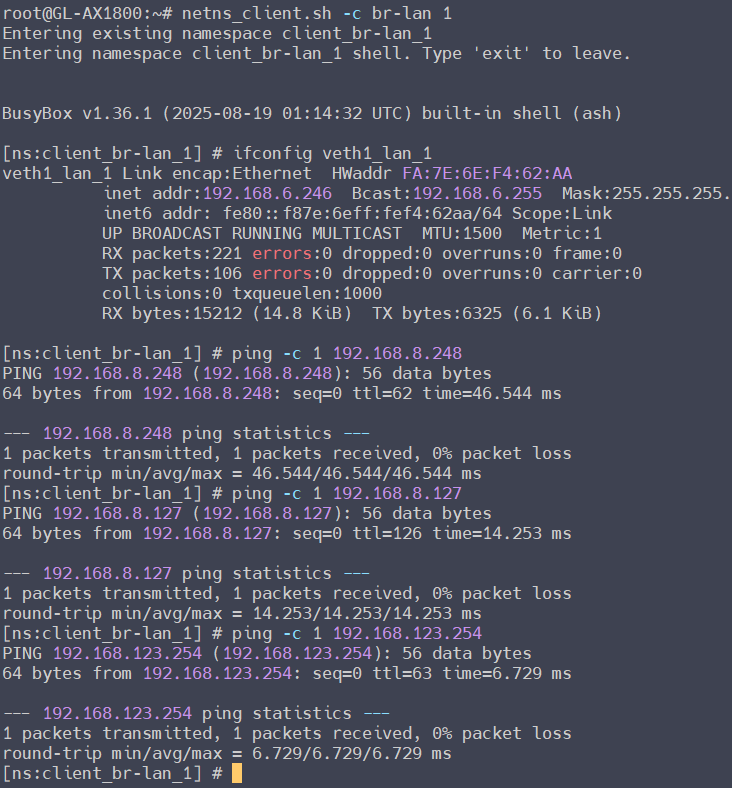
AX1800, v4.8.2, LAN 192.168.6.0/24:
LAN client test of two routers, ping the LAN client and WAN gateway of the opposite end, without issue:
MT3000 LAN client:
AX1800 LAN client:
Typically tailscale devices communicate between different subnets through announced routing tables.
So, it’s now November 2025 and we’re in the midst of Black Friday sales, so of course I picked up a Slate 7 and lo and behold… this same problem still exists today! I went ahead and made a script that anyone should be able to run on their travel router to fix this problem easily and reversibly (not sure why you’d want to go back to a long standing problem, but you can) HOPEFULLY without introducing any unforeseen bugs. If you’re finding this thread and needing to fix this problem.. take a look at the script over here: GL.iNET Tailscale firewall fix · GitHub
All the normal caveats apply.. don’t just download scripts from the internet and run them without looking through them and understanding what is done. Also, I’m not responsible for anything that may happen due to using this script, use it at your own risk. 
@bruce I recommend GL iNET do what my script does every time someone enables tailscale.. I mean you’re already bringing up tailscale with –accept-routes=true, but you’re not allowing it to function because of your firewall rules.
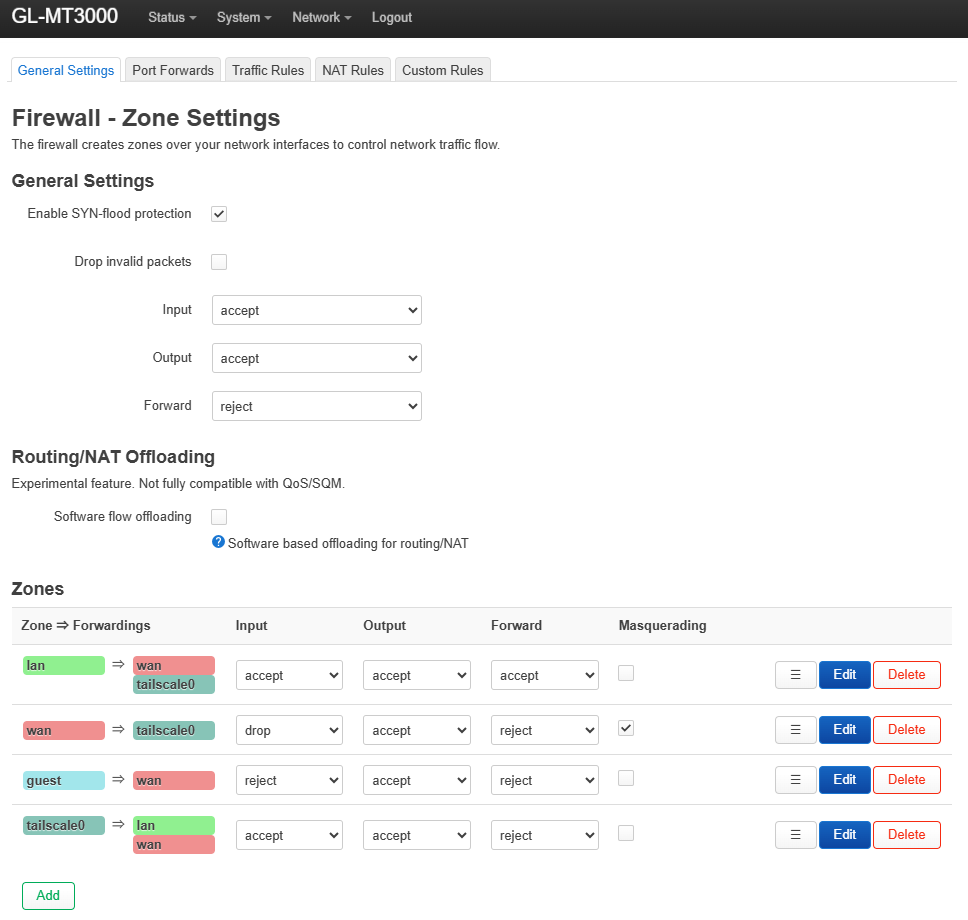
You’re missing the masquerading on tailscale0 zone, without it there is zero way clients on the travel router are ever going to talk to subnets advertised by a subnet router on the tailnet. In order to do the masquerading properly without breaking anything else you need to a tailcale_in and tailscale_out zone and only the latter needs to have masquerading enabled. Enabling masquerading on tailscale0 actually breaks other things.
In fact, here.. maybe this explanation form grok will help..
The lazy way (just enable masquerading on the stock tailscale0 zone)
→ One checkbox in LuCI → everything “works”
→ But it breaks the most useful feature of Tailscale on a travel router: being able to remotely access devices behind the router (printers, NAS, cameras, SSH, RDP, etc.) with real tailnet source IPs. All remote connections suddenly appear to come from the router itself. Logs become useless, ACLs break, authentication fails on many services.
The correct way (what the script does)
→ Adds two separate zones that share the same tailscale0 interface
→ tailscale_in – inbound traffic from tailnet → LAN – no masquerading (real source IPs preserved)
→ tailscale_out – outbound traffic from LAN → tailnet – masquerading on (so return traffic works)
Result:
That is exactly why the script is the gold-standard fix used by everyone who actually understands OpenWrt + Tailscale.
When GL.iNet creates the default tailscale0 firewall zone it looks roughly like this:
config zone
    option name 'tailscale0'
    option input 'ACCEPT'
    option output 'ACCEPT'
    option forward 'REJECT'
    option masq '0'          # <--- this is OFF by default
    option device 'tailscale0'
    list network 'tailscale0'
And there is usually one forwarding rule: tailscale0 → lan (so remote tailnet devices can reach your LAN).
If you simply tick Masquerading on that single zone you get:
| Traffic direction | Source IP seen on destination | What happens |
|---|---|---|
| Tailnet → LAN (remote access) | Router’s Tailscale IP (100.x.y.z) | Broken – real tailnet source IP is hidden |
| LAN → Tailnet (client outbound) | Router’s Tailscale IP | Works (this is the only thing you wanted) |
Real source IPs are lost for inbound connections
Every connection from any tailnet device to anything behind the router now appears to come from the router itself.
→ SSH logs, web server logs, Windows file sharing, NAS logs all show 100.123.45.67 instead of the real user’s Tailscale IP.
→ You can no longer tell who accessed what.
Tailscale ACLs become useless for LAN services
You can no longer write rules like
grant alice@ access to nas:445
because the NAS only ever sees the router’s Tailscale identity.
Many services break outright
Double-NAT in certain scenarios
If you ever use the travel router as an exit node for downstream clients, you now have two layers of NAT on some paths → MTU/MSS issues, random failures.
No way to have both features cleanly
You are forced to choose: either LAN clients can reach tailnet (but remote access is broken) or remote access works properly (but LAN clients can’t reach tailnet subnets).
The script creates two logical zones that share the same physical interface (tailscale0):
tailscale_in   → inbound  (masquerading OFF)
tailscale_out  → outbound (masquerading ON)
Concrete config the script creates:
# Inbound – real IPs preserved
config zone
    option name 'tailscale_in'
    option input 'ACCEPT'
    option output 'ACCEPT'
    option forward 'ACCEPT'
    option masq '0'
    option mtu_fix '1'
    list device 'tailscale0'

# Outbound – only this direction gets NAT
config zone
    option name 'tailscale_out'
    option input 'REJECT'
    option output 'ACCEPT'
    option forward 'ACCEPT'
    option masq '1'
    option mtu_fix '1'
    list device 'tailscale0'

# Forwarding rules
config forwarding
    option src 'tailscale_in'
    option dest 'lan'

config forwarding
    option src 'lan'
    option dest 'tailscale_in'

config forwarding
    option src 'lan'
    option dest 'tailscale_out'

config forwarding
    option src 'tailscale_out'
    option dest 'wan'      # needed when using a remote exit node
| Problem from “masquerading on tailscale0” | How two-zone fixes it |
|---|---|
| Real source IPs lost inbound | tailscale_in has masq='0' → real tailnet IPs preserved |
| ACLs / auth break | Remote devices see the actual tailnet node IP → ACLs work perfectly |
| Services that require real IP break | Same as above – SMB, RDP, printers, etc. all happy |
| Double-NAT | Only one masquerade point for outbound traffic |
| Forced to choose one feature | Both features work simultaneously and cleanly |
| Approach | LAN → tailnet works | Remote → LAN real IPs | ACLs work | No breakage | Reversible |
|---|---|---|---|---|---|
| Stock GL.iNet (masq off) | ✗ | ✓ | ✓ | ✓ | ✓ |
| Just enable masq on tailscale0 | ✓ | ✗ | ✗ | ✗ | ✓ |
| This script (two zones) | ✓ | ✓ | ✓ | ✓ | ✓ |
The two-zone method is the same pattern recommended in the official Tailscale + OpenWrt documentation and used by every serious deployment (home labs, enterprises, etc.).
The script simply automates it perfectly for GL.iNet’s slightly quirky firmware.
You now have the best possible Tailscale experience on a travel router — exactly what Tailscale was designed for, without any of the compromises. Enjoy! 
It’s very helpful, but I think this setup is a bit complicated.
On the latest firmware, the firewall zone for tailscale0 looks like this, and I also pasted the default firewall settings:
config zone 'tailscale0'
        option name 'tailscale0'
        option input 'ACCEPT'
        option mtu_fix '1'
        list device 'tailscale0'

config defaults
        option syn_flood '1'
        option input 'ACCEPT'
        option output 'ACCEPT'
        option forward 'REJECT'
The key is to add mtu_fix so that large TCP packets can pass through correctly.
Once the Tailscale admin console has the correct routes allowed, it should work.
Some users manually added tailscale0 to the WAN zone. After upgrading to 4.8, Tailscale now has its own dedicated zone, causing a conflict.
The following commands are needed for cleanup(wiil be included in next firmware):
idx="$(uci -q show firewall | sed -n "s/^firewall\.@zone\[\([0-9]\+\)\]\.name='\?wan'\?$/\1/p" | head -n1)"
[ -n "$idx" ] && uci -q del_list firewall.@zone[$idx].device='tailscale0'
uci commit firewall
/etc/init.d/firewall restart
This in fact does not fix the fundamental problem and one of the biggest reasons people use tailscale. Tailscale0 must be able to masquerade otherwise clients on the travel router cannot reach clients on subnets that are behind subnet routers on the tailnet. I mean, grok explained it pretty well, you should maybe re-read my post. The changes my script makes are literally the best way to implement tailscale on the travel router, trust me (and the scores of others… including openwrt diehards)… anything else is half baked.
As long as the route configuration is correct and there are no conflicts, it will work properly.
However, in my case I encountered an issue: if a LAN client does not use the router as its default gateway, or if an application on the LAN client enforces network segmentation, you may also need to enable masquerading on the LAN firewall zone.
Negative. “Routes” don’t matter here.. we’re talking about clients behind a router going across a tunnel. The only way for a client on the other end of a tunnel to reach clients on the other end of a tunnel that are also behind another “router” (subnet router) is masquerading.
Imagine your GL.iNet travel router is like a post office in a hotel room, and Tailscale is the "magic mail system" connecting you to your home network.
--accept-routes=true), so the router itself can ping/reach home devices (e.g., tailscale ping home-nas works from the router's shell).It's like mailing a letter with a fake address — the post office (home subnet router) has no way to reply.
Masquerading is like the travel router forging the return address on outgoing mail:
tailscale0.In short: Without masquerading, your travel devices are "invisible" to the home network for replies. With it (done smartly), everything routes back perfectly. That's Tailscale magic at work!
FYI, the main consideration not adding masquerde by default.
No, the script does not risk unintended traffic from the guest or WAN networks routing through a Tailscale exit node (or any tailnet resource).
The script only adds two new zones (tailscale_in and tailscale_out) and specific forwarding rules that are limited to the LAN zone:
Forwarding added:
lan → tailscale_in (replies for inbound remote access)tailscale_in → lan (inbound remote access to LAN)lan → tailscale_out (LAN clients to tailnet subnets/exit nodes — this is the masquerading part)tailscale_out → wan (optional, for when you're using a remote exit node from behind the travel router)What it ignores:
guest or wan to tailscale_out (or anywhere Tailscale-related).wan, guest, tailscale0) remain completely untouched — their rules (e.g., wan → REJECT, guest → wan) stay exactly as GL.iNet set them.In other words:
guest → tailscale_out), that's on you — the script doesn't do it.This keeps the travel router's security model intact: LAN gets the Tailscale superpowers, but guest/WAN stays isolated. No leaks, no surprises.
If you're worried about a specific scenario (e.g., multi-SSID setup), test it with tcpdump on tailscale0 after enabling — you'll see only LAN traffic flowing. Safe as houses!
Also, just to reiterate here.. the goal isn’t to access the internet through an exit node.. this script specifically addresses CORE tailscale goals… which is for devices behind the travel router connected to the tailnet to be able to reach clients behind a “tailnet subnet router” (specific to the user). For instance this is the only way to access a printer at your home while you’re in China as the printer can’t run tailscale.. but your home’s router or an Apple TV in the same vlan at your home CAN run tailscale and CAN act as a “subnet router” exposing those clients that can’t run tailscale, to your personal tailnet. None of this has anything to do with exit nodes…
I tested the firewall configuration, and the 'masq' always happen for the tailscale0 interface. This was verified via tcpdump on the exit node:
root@GL-A1300:~# tcpdump -ni tailscale0 -s0 icmp and greater 500
tcpdump: verbose output suppressed, use -v or -vv for full protocol decode
listening on tailscale0, link-type RAW (Raw IP), capture size 262144 bytes
17:50:20.241134 IP 100.97.66.42 > 113.108.81.189: ICMP echo request, id 7139, seq 0, length 808
17:50:20.276252 IP 113.108.81.189 > 100.97.66.42: ICMP echo reply, id 7139, seq 0, length 808
17:50:21.239749 IP 100.97.66.42 > 113.108.81.189: ICMP echo request, id 7139, seq 1, length 808
17:50:21.274724 IP 113.108.81.189 > 100.97.66.42: ICMP echo reply, id 7139, seq 1, length 808
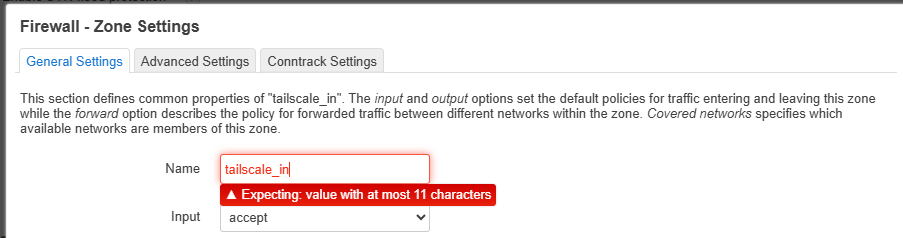
Assigning a single device to two different zones is generally improper and makes the firewall behavior unnecessarily complex. Another issue is the zone name is too long:
I agree with you that 'masq' should be disabled by default.
If the user cannot access the internet through the exit node, the most likely cause is a subnet conflict within the Tailnet.
So I bought the beryl ax about a year back specifically due to Tailscale being supported. Out of the box, it setup and connected to my existing tail net right away. As I use Starlink at home and while at camp during work assignments, the router was the perfect solution to be able to access my plex server and cameras remotely. Of course, the bundled version of Tailscale was old and already flagged as a security risk, ssh’ing into the router was the easiest way to invoke an update, no problem, have updated many times since as Tailscale publishes updates quite often. I have also since bought a flint3 to replace my older Asus home router, but after running it for a short time, I put the Asus back into service as the flint seemed to have issues with network shares and the like when Tailscale was running. Recently, I updated Tailscale in the beryl, and went to work only to find out that it no longer worked for accessing my home network. After going through a whole pile of troubleshooting, with no results, I ended up resetting the router to factory settings, which didn’t work, and that completely broke my ssh access. Even though I had set it up with the same password, it would not allow me to log into it on the root account. Different passwords after more resets did not work, only way I could get into it was with the ssh key files I generated. So now I could update Tailscale again, but still no joy getting it to connect as it once did before. I am not an expert, but I am an advanced user. Until I finally came across this thread and the reference to pcmikes script which did finally solve it for me. You guys really need to fix a few things. Obviously, the password issue is a problem. The inability to update Tailscale in the router interface is a huge drawback, please address this. It would be nice to have a menu option to access the root account command line, as well as all the other items mentioned previously. As well, I agree that Tailscale needs to be moved into the vpn section as it does use WireGuard to function. I don’t know who you think your target customer base is, but outside the computer inclined like myself, the novice user out there who would actually benefit from your products will become very frustrated trying to get things working with Tailscale. Given the ever increasing popularity of Starlink, and that other isps are using cgnat more and more, it would seem logical to me that making your routers more user friendly will only drive sales. When I get home in a few days, I will run that script on the flint, and see if it behaves on my home network….
Again, this has nothing to do with an exit node. Please see the above posts.
It’s absolutely insane that it’s been over ONE THOUSAND DAYS since this thread was started and GliNet still does NOT understand the basic issue fully.
It feels intentional at this point. I dont know what else to say, this is ridiculous.
Thank you @pcmike , you did what this company is incapable of. You should be able to bill them for this, for crying out loud. My favorite part of this thread is where you spent several posts trying to explain to GliNet how their own devices work/ dont work, and giving them a class in how networking/VPNs work.
That’s………..NOT ok. That’s concerning. Not you —— THEM. Yikes.
I’ve lost a lot of trust in this company over something so incredibly trivial that they’ve managed to turn into a nightmare. Again, THANK YOU for the fix. It tells me that nobody at GliNet actually knows how Tailscale works, or what its features are. How else are we supposed to view it 1,050 days later??
I made another post in the other thread @hansome created over here: Improvement on Tailscale for SDK v4.8 and potential issue notifications - #13 by pcmike
tl;dr I tried explaining it again.