I have 3 Gl.Inet routers - with Tailscale running on all of them - will, they were.
I have made several config updates which ended up with one of them (a Flint 2 GL-MT6000) now in a situation where I can not use Tailscale any more. Other aspects are (as far as I checked) working.
It was working with Tailscale using my user login to the tailnet, and I have used admon’s script to have an updated version of tailscale recently (sorry, can’t remember the exact version but I think it was around 1.88). It was all working without any issues.
I got to the place where I have made 3 changes, not entirely sure of the order any more:
- I have moved the device’s tailscale authentication from a user authenticated to a tagged device (note: I have done this on the other 2 devices, a Flint 3 and a Beryl - both work without issues)
- I have updated the tailscale version again using the admon script above (current 1.92.2 but not sure if this was the exact version that caused the symptoms described, see below)
- I have updated the firmware to v4.8.3 - I am fairly sure this was the point where my issues started occuring but can’t be 100% sure now
Symptom: when I am trying to bring up tailscale (starting tailscaled), it seems (on the web interface) as if it came up, but it keeps flicking off then on again.
At this point, after a lot of troubleshooting and steps that I took to try and fix it, it now flicks up the warning that I need to follow the link to authorise the device, but clicking on the link gives an error message - this is fully understandable because when I look in the logs it is clear that the tailscale daemon never comes up fully and just tries again every 3 seconds.
A relevant section of the log is below:
Fri Dec 12 21:45:46 2025 daemon.err tailscaled[13270]: 2025/12/12 21:45:46 logtail started
Fri Dec 12 21:45:46 2025 daemon.err tailscaled[13270]: 2025/12/12 21:45:46 Program starting: v1.92.2-t95a957cdd-tiny.by.admon.1098, Go 1.25.5: []string{"/usr/sbin/tailscaled", "--port", "41641", "--state", "/etc/tailscale/tailscaled.state"}
Fri Dec 12 21:45:46 2025 daemon.err tailscaled[13270]: 2025/12/12 21:45:46 LogID: 7f7686719d458b4f4e252171824dcf45543ed96bfd6ebbaa55555b7fa2101571
Fri Dec 12 21:45:46 2025 daemon.err tailscaled[13270]: 2025/12/12 21:45:46 logpolicy: using system state directory "/var/lib/tailscale"
Fri Dec 12 21:45:46 2025 daemon.err tailscaled[13270]: 2025/12/12 21:45:46 dns: [rc=unknown ret=direct]
Fri Dec 12 21:45:46 2025 daemon.err tailscaled[13270]: 2025/12/12 21:45:46 dns: using "direct" mode
Fri Dec 12 21:45:46 2025 daemon.err tailscaled[13270]: 2025/12/12 21:45:46 dns: using *dns.directManager
Fri Dec 12 21:45:46 2025 daemon.err tailscaled[13270]: 2025/12/12 21:45:46 cleanup: list tables: netlink receive: invalid argument
Fri Dec 12 21:45:46 2025 daemon.err tailscaled[13270]: 2025/12/12 21:45:46 wgengine.NewUserspaceEngine(tun "tailscale0") ...
Fri Dec 12 21:45:46 2025 daemon.notice netifd: Interface 'tailscale' is enabled
Fri Dec 12 21:45:46 2025 daemon.notice netifd: Network device 'tailscale0' link is up
Fri Dec 12 21:45:46 2025 daemon.notice netifd: Interface 'tailscale' has link connectivity
Fri Dec 12 21:45:46 2025 daemon.notice netifd: Interface 'tailscale' is setting up now
Fri Dec 12 21:45:46 2025 daemon.notice netifd: Interface 'tailscale' is now up
Fri Dec 12 21:45:46 2025 daemon.err tailscaled[13270]: 2025/12/12 21:45:46 dns: [rc=unknown ret=direct]
Fri Dec 12 21:45:46 2025 daemon.err tailscaled[13270]: 2025/12/12 21:45:46 dns: using "direct" mode
Fri Dec 12 21:45:46 2025 daemon.err tailscaled[13270]: 2025/12/12 21:45:46 dns: using *dns.directManager
Fri Dec 12 21:45:46 2025 daemon.err tailscaled[13270]: 2025/12/12 21:45:46 link state: interfaces.State{defaultRoute=eth1 ifs={br-guest:[192.168.9.1/24] br-lan:[192.168.15.10/24] eth1:[192.168.1.136/24]} v4=true v6=false}
Fri Dec 12 21:45:46 2025 daemon.err tailscaled[13270]: 2025/12/12 21:45:46 magicsock: disco key = d:561e08b20c556b82
Fri Dec 12 21:45:46 2025 daemon.err tailscaled[13270]: 2025/12/12 21:45:46 Creating WireGuard device...
Fri Dec 12 21:45:46 2025 daemon.err tailscaled[13270]: 2025/12/12 21:45:46 Bringing WireGuard device up...
Fri Dec 12 21:45:46 2025 daemon.err tailscaled[13270]: 2025/12/12 21:45:46 Bringing router up...
Fri Dec 12 21:45:46 2025 daemon.err tailscaled[13270]: 2025/12/12 21:45:46 router: portUpdate(port=41641, network=udp6)
Fri Dec 12 21:45:46 2025 daemon.err tailscaled[13270]: 2025/12/12 21:45:46 external route: up
Fri Dec 12 21:45:46 2025 daemon.err tailscaled[13270]: 2025/12/12 21:45:46 router: detect nftables rule: firewall mode "nftables" not supported: create nat table: get table: get tables: netlink receive: invalid argument
Fri Dec 12 21:45:46 2025 daemon.err tailscaled[13270]: 2025/12/12 21:45:46 router: nftables rule count: 0, iptables rule count: 228
Fri Dec 12 21:45:46 2025 daemon.err tailscaled[13270]: 2025/12/12 21:45:46 router: iptables is currently in use
Fri Dec 12 21:45:46 2025 daemon.err tailscaled[13270]: 2025/12/12 21:45:46 router: disabling tunneled IPv6 due to system IPv6 config: disable_ipv6 is set
Fri Dec 12 21:45:46 2025 daemon.err tailscaled[13270]: 2025/12/12 21:45:46 Clearing router settings...
Fri Dec 12 21:45:46 2025 daemon.err tailscaled[13270]: 2025/12/12 21:45:46 Starting network monitor...
Fri Dec 12 21:45:46 2025 daemon.err tailscaled[13270]: 2025/12/12 21:45:46 Engine created.
Fri Dec 12 21:45:46 2025 daemon.err tailscaled[13270]: 2025/12/12 21:45:46 pm: migrating "_daemon" profile to new format
Fri Dec 12 21:45:46 2025 daemon.err tailscaled[13270]: 2025/12/12 21:45:46 envknob: TS_DEBUG_FIREWALL_MODE="auto"
Fri Dec 12 21:45:46 2025 daemon.err tailscaled[13270]: 2025/12/12 21:45:46 logpolicy: using system state directory "/var/lib/tailscale"
Fri Dec 12 21:45:46 2025 daemon.err tailscaled[13270]: 2025/12/12 21:45:46 got LocalBackend in 68ms
Fri Dec 12 21:45:46 2025 daemon.err tailscaled[13270]: 2025/12/12 21:45:46 Start
Fri Dec 12 21:45:46 2025 daemon.err tailscaled[13270]: 2025/12/12 21:45:46 ipnext: active extensions: portlist
Fri Dec 12 21:45:46 2025 daemon.err tailscaled[13270]: 2025/12/12 21:45:46 router: portUpdate(port=41641, network=udp4)
Fri Dec 12 21:45:46 2025 daemon.err tailscaled[13270]: 2025/12/12 21:45:46 Backend: logs: be:7f7686719d458b4f4e252171824dcf45543ed96bfd6ebbaa55555b7fa2101571 fe:
Fri Dec 12 21:45:46 2025 daemon.err tailscaled[13270]: 2025/12/12 21:45:46 Switching ipn state NoState -> NeedsLogin (WantRunning=false, nm=false)
Fri Dec 12 21:45:46 2025 daemon.err tailscaled[13270]: 2025/12/12 21:45:46 blockEngineUpdates(true)
Fri Dec 12 21:45:46 2025 daemon.err tailscaled[13270]: 2025/12/12 21:45:46 wgengine: Reconfig: configuring userspace WireGuard config (with 0/0 peers)
Fri Dec 12 21:45:46 2025 daemon.err tailscaled[13270]: 2025/12/12 21:45:46 health(warnable=wantrunning-false): error: Tailscale is stopped.
Fri Dec 12 21:45:46 2025 daemon.err tailscaled[13270]: 2025/12/12 21:45:46 wgengine: Reconfig: configuring router
Fri Dec 12 21:45:46 2025 daemon.err tailscaled[13270]: 2025/12/12 21:45:46 wgengine: Reconfig: user dialer
Fri Dec 12 21:45:46 2025 daemon.err tailscaled[13270]: 2025/12/12 21:45:46 wgengine: Reconfig: configuring DNS
Fri Dec 12 21:45:46 2025 daemon.err tailscaled[13270]: 2025/12/12 21:45:46 dns: Set: {DefaultResolvers:[] Routes:{} SearchDomains:[] Hosts:0}
Fri Dec 12 21:45:46 2025 daemon.err tailscaled[13270]: 2025/12/12 21:45:46 dns: Resolvercfg: {Routes:{} Hosts:0 LocalDomains:[]}
Fri Dec 12 21:45:46 2025 daemon.err tailscaled[13270]: 2025/12/12 21:45:46 dns: OScfg: {}
Fri Dec 12 21:45:46 2025 user.notice firewall: Reloading firewall due to ifup of tailscale (tailscale0)
Fri Dec 12 21:45:46 2025 daemon.err tailscaled[13270]: 2025/12/12 21:45:46 tailscaled got signal terminated; shutting down
Fri Dec 12 21:45:46 2025 daemon.err tailscaled[13270]: 2025/12/12 21:45:46 control: client.Shutdown ...
Fri Dec 12 21:45:46 2025 daemon.err tailscaled[13270]: 2025/12/12 21:45:46 control: updateRoutine: exiting
Fri Dec 12 21:45:46 2025 daemon.err tailscaled[13270]: 2025/12/12 21:45:46 control: mapRoutine: exiting
Fri Dec 12 21:45:46 2025 daemon.err tailscaled[13270]: 2025/12/12 21:45:46 control: authRoutine: exiting
Fri Dec 12 21:45:46 2025 daemon.err tailscaled[13270]: 2025/12/12 21:45:46 control: Client.Shutdown done.
Fri Dec 12 21:45:46 2025 daemon.err tailscaled[13270]: 2025/12/12 21:45:46 ipnext: work queue shutdown failed: execqueue shut down
Fri Dec 12 21:45:46 2025 daemon.notice netifd: Network device 'tailscale0' link is down
Fri Dec 12 21:45:46 2025 daemon.notice netifd: Interface 'tailscale' has link connectivity loss
Fri Dec 12 21:45:46 2025 daemon.notice netifd: Interface 'tailscale' is now down
Fri Dec 12 21:45:46 2025 daemon.err tailscaled[13270]: 2025/12/12 21:45:46 monitor: ip rule deleted: {Family:2 DstLength:0 SrcLength:0 Tos:0 Table:254 Protocol:0 Scope:0 Type:1 Flags:0 Attributes:{Dst:<nil> Src:<nil> Gateway:<nil> OutIface:0 Priority:5210 Table:254 Mark:16711680 Pref:<nil> Expires:<nil> Metrics:<nil> Multipath:[]}}
Fri Dec 12 21:45:46 2025 daemon.err tailscaled[13270]: 2025/12/12 21:45:46 monitor: ip rule deleted: {Family:2 DstLength:0 SrcLength:0 Tos:0 Table:253 Protocol:0 Scope:0 Type:1 Flags:0 Attributes:{Dst:<nil> Src:<nil> Gateway:<nil> OutIface:0 Priority:5230 Table:253 Mark:16711680 Pref:<nil> Expires:<nil> Metrics:<nil> Multipath:[]}}
Fri Dec 12 21:45:46 2025 daemon.err tailscaled[13270]: 2025/12/12 21:45:46 monitor: ip rule deleted: {Family:2 DstLength:0 SrcLength:0 Tos:0 Table:0 Protocol:0 Scope:0 Type:7 Flags:0 Attributes:{Dst:<nil> Src:<nil> Gateway:<nil> OutIface:0 Priority:5250 Table:0 Mark:16711680 Pref:<nil> Expires:<nil> Metrics:<nil> Multipath:[]}}
Fri Dec 12 21:45:46 2025 daemon.err tailscaled[13270]: 2025/12/12 21:45:46 monitor: ip rule deleted: {Family:2 DstLength:0 SrcLength:0 Tos:0 Table:52 Protocol:0 Scope:0 Type:1 Flags:0 Attributes:{Dst:<nil> Src:<nil> Gateway:<nil> OutIface:0 Priority:5270 Table:52 Mark:0 Pref:<nil> Expires:<nil> Metrics:<nil> Multipath:[]}}
Fri Dec 12 21:45:46 2025 daemon.err tailscaled[13270]: 2025/12/12 21:45:46 RAW-STDERR: ***
Fri Dec 12 21:45:46 2025 daemon.err tailscaled[13270]: 2025/12/12 21:45:46 RAW-STDERR: *** Lines prefixed with RAW-STDERR below bypassed logtail and probably come from a previous run of the program
Fri Dec 12 21:45:46 2025 daemon.err tailscaled[13270]: 2025/12/12 21:45:46 RAW-STDERR: ***
Fri Dec 12 21:45:46 2025 daemon.err tailscaled[13270]: 2025/12/12 21:45:46 RAW-STDERR:
Fri Dec 12 21:45:46 2025 daemon.err tailscaled[13270]: 2025/12/12 21:45:46 RAW-STDERR: [
Fri Dec 12 21:45:46 2025 daemon.err tailscaled[13270]: 2025/12/12 21:45:46 flushing log.
Fri Dec 12 21:45:46 2025 daemon.err tailscaled[13270]: 2025/12/12 21:45:46 logger closing down
Fri Dec 12 21:45:46 2025 daemon.notice netifd: Interface 'tailscale' is disabled
Fri Dec 12 21:45:46 2025 user.notice firewall: Reloading firewall due to ifdown of tailscale ()
This more or less keeps repeating every 3 seconds.
What I have tried:
- I have tried downgrading the tailscale version and the updating again (see why I can’t remember the exact version)
- I have deleted /etc/tailscale/tailscaled.state (and the restarted etc)
- I have tried authenticating the machine manually through registering the node through ssh using an auth key (manually starting tailscaled then using the tailscale command etc) - this has made the device actually appear on the tailscale console, but made no difference really to the symptom as far as when I switched “on” tailscale on the web UI, it kept being in the startup loop. I eventually cleared the machine from the tailscale console, removed the state on the router again etc.
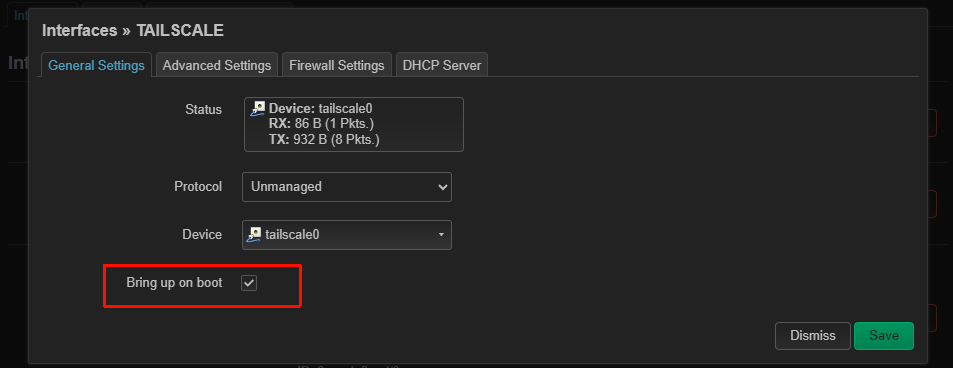
- I have looked at LUCI and compared the setup with a Flint 7, which is not a full match of course, and the tailscale device is actually up on the flint 7, but the only thing I could really see that was weird is that flint 7 has a tailscale0 device, whereas flint 6 has a tailscale interface (but no device). I have also manually set up a zone in the firewall on flint6 to be the same as flint 7 - just after suspecting the issue may be related to firewall (but I know the gl_tailscale script does play with firewall rules to a degree).
I am close to giving up.
Ideally, I’d like to avoid factory reset - partially because I am not physically with the router and I’d like to avoid needing to do something that needs me being there. Also to avoid having to re-configure everything as everything else but tailscale seems to be OK. I’m just trying to get to a point where tailscale would be back to as if it was never touched… Or fix forward, but it has not been successful so far of course.
I did not remove gl_tailscale and tailescale packages yet as I’ve not seen many success stories on this forum on that approach.
Any ideas would be appreciated.