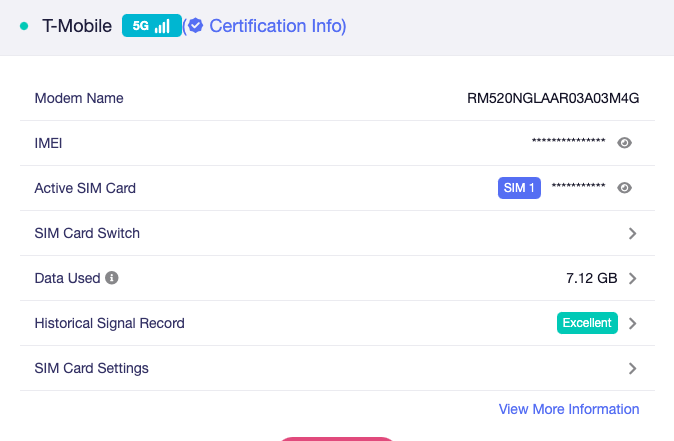
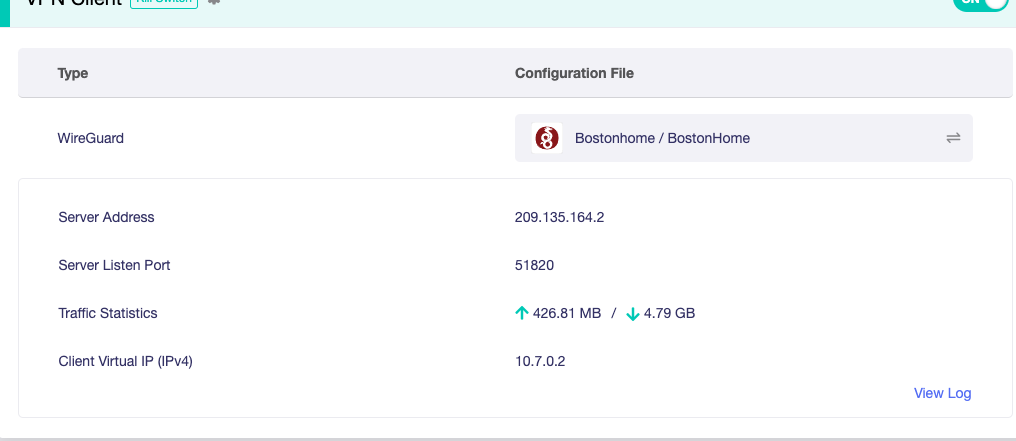
So I am on the latest beta and this was happening on the last one as well. Traffic stats on the main internet page are wildly off for some reason. I mean waaay off the longer I leave it alone the more off it becomes like actual use 2tb but the meter says 25tb. All my traffic goes through a VPN on my own VPS so I can verify the use there and on the GUI under VPN Dashboard. Any ideas?? The photos are from running just a couple hrs this morn.
Hello @woobs420 ,
Sorry for the problem. We are investigating this issue.
I wonder if you enable the IPv6 and the network acceleration mode on the router?
Neither I am IPV4 only. Also finding that sometimes after I am gone for a few hrs the counter on the GUI internet page has reset to zero and yes it is set to save on reboot while the VPN counter remains accurate. The resetting to zero is something new that only started with the latest beta. Also now the reset can happen in just moments and it freezes at zero unless I go in and reset the stats manually only to freeze again.
Hi, the issue might be related to the module. Please download and update the modem module to this version: https://drive.google.com/file/d/1ThNDYd_SI33VJXEMz1eLRFjEDTinWH7-/view?usp=sharing
FYI, refer to this link to update the built-in module
Thanks Cathy, I was running 01.201.01.201 prior. Install went fine and I swear my download speed has increased quite a bit. Could just be early morning low congestion as well. No problems so far and I will reply back in a day or so.
Okay 
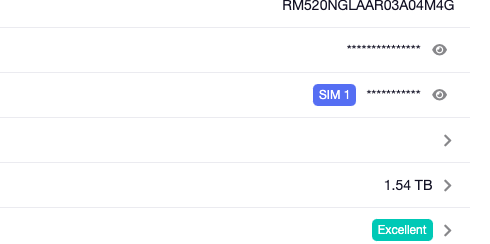
So unfortunately that did not work it’s back to the typical readings although it has not randomly reset it self yet. Also noticed a couple other issues. Happy to send log files or grant access whatever. All counters reset 24 hours ago and I have 1.54TB listed and actual usage about 26GB. Also when I try to open the VPN log file it’s blank after a while. Any suggestions?

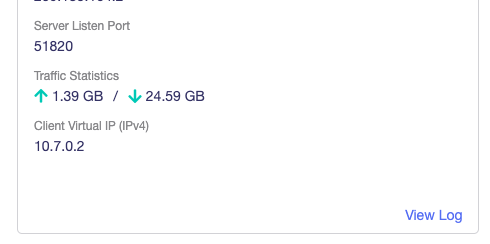
The VPN traffic statistics function only record usage during the current connection. If the VPN disconnects and reconnects, the statistics will be reset.
Can you get the traffic usage records from the operator? If so, you can compare the data usage in the “Cellular” section with the records of the operator to check if the statistics on the router are accurate.
The VPN log panel is blank because the VPN logs have been overwritten by other log entries. It will refresh when the VPN status updates, and new records will appear when the next VPN log event occurs.
Yes I know they will reset. At the moment the internet page is saying 2.44Tb in 2 days 1 hour and 10 mins. VPN throughput is at 42Gb. VPN has been on the entire time with no disconnects. Also I only have a 5Tb a month VPN plan and a 2Tb with the carrier I would have been shut down ages ago. The client list however is showing the correct numbers. Oh and I have always averaged about 20Gb a day. Which aligns with the pic from yesterday at 25ish and this morning with 42Gb.
Could you help to get some qlog to investigate? I will send you the guide later.
Got the guide I will do it at some point this morn.