We’ll be going on a MSC cruise next month, and I’m considering buying a GL.iNet travel router to share the internet connection across multiple devices.
However, I’ve read that MSC has recently started cracking down on the use of travel routers. They are actively blocking them or making it much harder to get them working. I’ve seen reports that MAC address cloning no longer works reliably, possibly due to tighter network restrictions like Deep Packet Inspection (DPI) or TTL enforcement.
Has anyone here recently managed to get a GL.iNet router working onboard an MSC ship? Are there any updated workarounds, maybe DPI evasion techniques, TTL spoofing etc?
As a fallback, I’m considering buying a cheap Android phone (like a Google Pixel) and using an app like Every Proxy to share the connection. From what I’ve seen, this approach seems to still be effective, can anyone confirm?
Would really appreciate hearing about any recent experiences or tips. Thanks in advance!
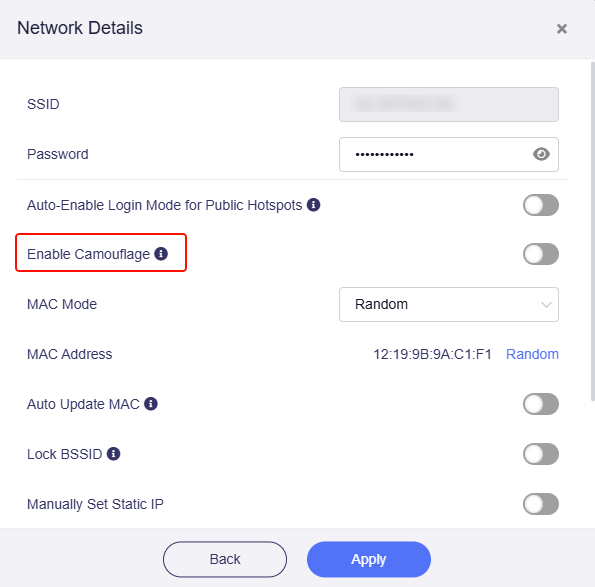
You can consider travel routers such as Slate AX, Beryl AX, Slate7, etc., and the "Enable Camouflage" function item improves the connection reliability of MSC portal WiFi.
Thank you for your reply!
Is enabling the Camouflage option enough to get it working?
Or do I need AmneziaWG which has more chance to work? Maybe I will go for the Beryl AX then.
I'm writing in this forum while seeking to solve another problem and paid attention to your post. I'm on a MSC cruise right now. I'm bringing with me a Beryl AX and I only paid 1 Internet connection. What I did to put all to work was this:
Enabled internet in my mobile (an iphone 11 pro max) with a mac address that is rotatory or virtual. Can`t tell right now the right wording but this is a virtual mac address.
Once enabled the internet, I changed mac address in iphone to real mac address to connect to the cruise wifi and use the MSC for Me app to chat with other people, make reservations, etc...
I took note of the virtual mac address used in the iphone and setup the beryl AX in repeater mode configuring in clone mode the mac address. All works as the mac address was the one used to register so no isses so far. Then share connection. And good luck.
The problem I was having is that I can connect to wifi in the cruise but my device seems not doing masquering properly. I enter in the beryl via ssh and can see I have dns and internet but fails on sharing it UNLESS i connect to a VPN. That works fantastic and this is what I´m doing, but obviously is shame a simple internet shaing is not working.
Anywayt, with a VPN I'm writting here and I can demonstrate it works.
Regards.
I just returned from an MSC cruise and the only way it will work is with a VPN at the router. It makes the MSC network think that all the traffic from the devices is coming from the router. Otherwise their network blocks internet access even though the router seems to be successfully connected.
My understanding of camouflage mode is not enough to successfully connect to MSC network. My router (MT1300) did not have this feature with the latest firmware but a VPN at the router works.
Thank you for sharing your solutions and experience!
For devices that have not supported camouflage mode, such as MT1300, A1300, MT300Nv2, etc., you can enable the VPN client, that is available to connect to the Internet. (Actually they are the same principle.)
According to KingJoke's previous sharing, NordVPN is used, which generally uses port 51820.
I think it should just work when the VPN client enabled, no need to care about the port.