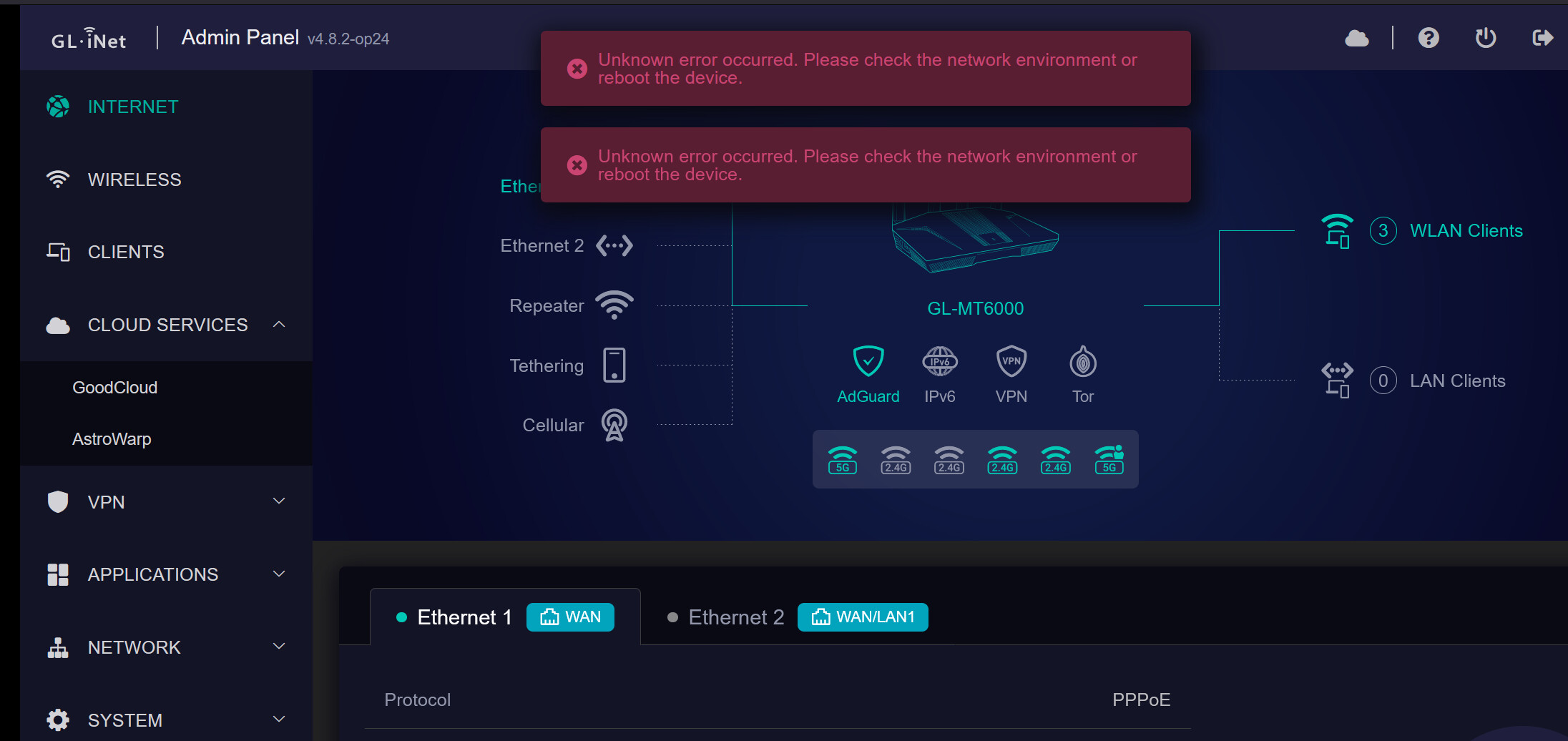
I have just updated my firmware from 4.6.6-op24 to 4.8.2-op24. In both the ‘Wireless’ and ‘Clients section of the GUI, I am getting the following error (also shown in the screenshot)
Unknown error occurred. Please check the network environment or reboot the device.
All other parts of the firmware seem to be working ok. I use Luci a lot and everything looks normal in there. I did try factory resetting and adding my settings manually but that didn’t seem to make any difference. Is there something I can do to fix this?
I believe the stable firmware 4.8.2 is still using an old version of OpenWRT (v21 ? ). I need op24 because I am using VLAN bridging on my Access Points and I guess it would make sense to have all OpenWRT devices on the same firmware version.
If the stock GUI is broken, should I remove it altogether and just go with pure OpenWRT?
I would always recommend pure OWRT on the Flint v2 for full flexibility if you're comfortable with/learning LuCI. Just make sure you only use their sysupgrade tagged images if/when you do.
Thanks. I’ve been thinking about doing that for a while now. I am ok with using Luci. That’s all I use on my APs anyway. Honestly, I am not really sure what I need from the stock GUI as you can do everything in Luci anyway. I haven’t yet used the VPN feature, but it seems that will work just fine in Luci.
My only stalling point is that I have several VLANS, custom interfaces, firewalls rules and multiple SSIDs (Guest, IOT etc). I am guessing it would be dumb of me to restore a backup with pure OpenWRT from Luci? IN which case, I could just manually copy each element of the config over to ensure it works.
One last question. Is it easy to update the OpenWRT firmware without losing any settings? This was always the issue I had with the stock firmware. The lack of security and bug fix updates.
Yeah but you're not exactly the 'target demographic' for the 'appliance' approach GL.iNet designs their SOHO/travel routers for, are 'ya?
I wouldn't try; you'd end up mixing in GL.iNet's customisations if going GL -> OWRT. I'd say the same OWRT -> GL; weird things can happen. That said (& to sound like I'm contradicting myself) re: VLANs, SSIDs, etc. See the following:
That HOWTO is for the Flint v3 but it should work just fine on your Flint v2 inc. on pure OWRT. Just modify it to account for whatever details like the name, interface you're attaching the VLAN to, etc. The HOWTO uses 192.168.8.1/24 for the LAN, 192.168.25.0/24 for the IOT VLAN. Change'em accordingly for your needs. Recall pure OWRT defaults to 192.168.1.1/24 for the LAN.
Technically yes but not without some initial work — but boy, oh, boy, is it worth the effort. The 'Using a uci-defaults script' section might be of extreme interest to you if you're running multiple OWRT devices:
I never really thought much about the GL.iNet customisations. The only thing I can think of that will be a bit troublesome to set up is AdGuard. I did set it up manually before, but I remember struggling with it a lot, but did manage to get there in the end!
Thanks! That’s really helpful and actually, it looks quite familiar. I spend a ridiculous amount of time setting up my network initially, hence the obvious shortcut desperation
I don’t know why this didn’t occur to me until you just said it. This is exactly what I use with my APs. I have x3 Linksys SPNMX56 (currently using 2 of them) set up as APs only. I can deploy them more or less within seconds, fully configured thanks to being able to use the script and build it right into the firmware before downloading it. Now if I could do the same with the Flint 2, well that would make it a no-brainer!
I agree that in the long run, this would be a much better idea. I can’t think why I must have the stock GUI as I never use it!
Many thanks for this. You’ve made some really helpful comments
Update: I’ve been on vanilla OpenWrt 24.10.2 for a few weeks now and it’s been working great! Wasn’t nearly as much work as I thought it was going to be to set it all up again. It’s been rock solid too. Really pleased I finally did it!