Unknown Error [User_Request]

Hi,
I am new to OpenWRT, informations:

  • Using Flint (GL-AX1800) with Glinets OpenWRT Fork, newest stable version

  • Fibre Modem from Vodafone Germany

After setting the Internet Connection/WAN to PPPOE I input user name and password. It tries to connect but stops at the Registering new address step. In Luci it shows the "Unknown Error [User_Request]
I found this post PPPoE connection fails occasionally, 'Unknown error (USER REQUEST)' - #3 by it49xck - Installing and Using OpenWrt - OpenWrt Forum but deleting the alias didn't seem to solve it for me.

User name I tried the simple username and the vodafone-ftth.komplett/username both didn't work. I contacted vodafone support and they told me simple username should be fine.

Any ideas how to solve this? Only idea I got is installing the beta firmware and see if that fixes it or completly switching to vanilla and trying it that way.

Best regards,
Drago

Hi

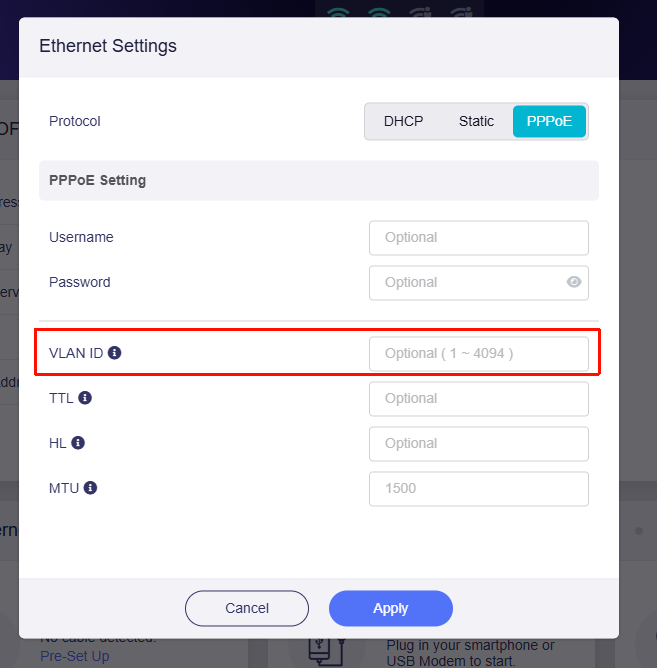
It appears that Vodafone Germany requires VLAN 7. Please try configuring it in the following location:

Refer:

1 Like

Thank you, where did you find that vodafone needs vlan 7?

It helped got a different error for now but progress :smiley:

I just did some searching on the forum and Google.

It seems that in some cases the VLAN might be 132, so you could also try that and see if it works. For reference: Glasfaser, eigener Router, Grundeinstellungen, VLA... - Vodafone Community

If the issue still persists, please export the logs and send them to us via private message so we can investigate further.

It would also be best to contact Vodafone to confirm the required configuration when using a third-party router. Typically, you should verify:

  1. Whether the connection supports PPPoE dialing
  2. The VLAN ID that needs to be configured.

How to export logs:

How to send private messages:

VLAN 7 is the default VLAN for DSL in Germany. Many providers use it.
But since we are talking about Fiber, it might be 132 instead. Depending on who owns the fiber.

But @will.qiu is right: Contact Vodafone, tell them you use your own router, and they should provide you all necessary information. It even might be possible that they need to whitelist the MAC of your custom router.

If you have any more trouble with them, feel free to send me a PM as well - I am in Germany and my native language is German :wink:

1 Like

Thank you both, as I wrote in my post I already contacted Vodafone support and asked them if there is any further settings needed…seems like I had bad luck with the person I reached… I will try again later and see if it works, had yesterday a popup that I need to login to use internet and then a message from vodafone that username or password is incorrect…gonna have to try the different writings of the username to check which is the correct one
Popup sounds weird to me. More like the guest Wi-Fi for everyone that Vodafone used in Kabel Deutschland and Unitymedia.

Eh popup is the wrong decription its the warning banner in the browser.

Even more weird. There should be NO popup at all.

A screenshot would be more descriptive of the problem you’re having.

Yeah, wanted to do one next time I try but havent found time yet

