Is there a way to use different APNs for IPv6 and IPv4?
With the QMI protocol on my old router there was an option to specify an “apn” as well as an “apnv6” but I do not seem to be able to activate the QMI protocol in the Spitz Plus. Right now I can’t access any IPv6.
Hello @bb02 X2000 shall support QCM protocol. The issue might not be related to the dialing protocol. You can click "Manual Setup", change the IP type to IPv4&IPv6. This will connect the connect the sim card via IPv4 and IPv6.
Thank you. I have IPv4&IPv6 turned on. But my carrier uses different APNs for public IPv4 and IPv6. So even with that option turned on I only get an IPv4 and can’t access any IPv6 server.
Is there a way to install the QMI protocol and use that instead?
Please enable the IPv6 function under the admin panel ->NETWORK menu and try it again.
The GL web GUI does not support changing to QMI protocol, but Luci can.
I tried a few things adding a separate QMI interface but it cant get a connection at all. Could you help me out, maybe send an example configuration? Thank you!
Could you reproduce the issue, and the export the system log with me to check?
Also, please execute the follow AT commands share the command out:
AT+QGMR
AT+QCFG="USBNET"
AT+QENG="servingcell"
AT+CGDCONT?
AT+CGPADDR
AT+CREG?
You can share the information via private message.
Spitz Plus Fall over failure somehow related to IPv6 in my setup,
I had a Spitz 750 (which I remember as only supported IPv4 and not IPv6) that was working great but wanted GB ports so upgraded to Spitz Plus X2000 (swapped SIM from Spitz 750).
Spitz Plus X2000 seemed to be working and showed both WAN1 (cable modem) and Cellular connected with different IP addresses.
Today had first real WAN1 outage and my remote Spitz Plus X2000 disappeared from the internet.
When WAN1 came back up, I logged into remote Spitz Plus X2000.
Here is I think relevant log:
Wed Nov 19 16:08:24 2025 daemon.notice netifd: modem_2_1 (1125): [11-19_16:08:24:585] trying to get ipv6 address
Wed Nov 19 16:08:24 2025 daemon.notice netifd: modem_2_1 (1125): [11-19_16:08:24:598] requestSetupDataCall QMUXResult = 0x1, QMUXError = 0xe
Wed Nov 19 16:08:24 2025 daemon.notice netifd: modem_2_1 (1125): [11-19_16:08:24:598] call_end_reason is 1
Wed Nov 19 16:10:24 2025 daemon.notice netifd: modem_2_1 (1125): [11-19_16:08:24:599] call_end_reason_type is 2
Wed Nov 19 16:10:24 2025 daemon.notice netifd: modem_2_1 (1125): [11-19_16:08:24:599] call_end_reason_verbose is 231
Wed Nov 19 16:10:24 2025 daemon.notice netifd: modem_2_1 (1125): [11-19_16:08:24:599] try to requestSetupDataCall 60 second later
Wed Nov 19 16:10:24 2025 daemon.notice netifd: modem_2_1 (1125): [11-19_16:08:24:599] your sim card may not support ipv6, please contact your carrier
Wed Nov 19 16:10:24 2025 daemon.notice netifd: modem_2_1 (1125): [11-19_16:08:24:599] check whether the sim card has obtained an ipv6 address. AT command 'AT+CGPADDR'
Note that this snippet with call_end error was repeated over a hundred times in the log file.
If I am reading this correctly, Spitz Plus tried to connect/fallover but the modem hung up because it could not get an IPv6 address.
This is confusing because:
The Spitz Plus GUI Admin Panel Network - IPv6 is NOT enabled.
Also Spitz Plus Cellular settings that was “automagically configured” shows when looking at Manual Cellular settings shows IP Type as IPv4 ONLY (not IPv6 or IPv4&IPv6).
My Wan1 to cellular failover, failed today and I am confused.
Suggestions?
Thank you
I applied the “manual cellular” settings to force IPv4 only.
Immediately I got new/additional log messages about not being able to obtain an IPv6 address.
Confused.
The IPv6-related logs are printed by the module. They do not actually affect the network connection. Future versions will optimize the display of these logs.
Regarding the Cellular network disconnection, do you have more logs that can used to check this issue?
More confusion.
This Spitz Plus is at a location remote to me.
The sim is a Google Fi Data SIM that registers “automagically” OK on TMobile Nework. Can see SpitzPlus showing Google Fi as “carrier” in GUI when connected. Months of showing connected.
After yesterday failover/failure after approximately 1 hour Wan1 outage and one hours worth of IPv6 error messages and 1 minute interval modem hangup/restart log messages. I forced manual cellular setup IPv4 only and now the cellular network is DOWN. No connection and I cant seem to get it back. This is the same SIM and local topology that worked for months.
Tried rebooting Spitz plus and using auto cell connection but still get “SIM card not registered.” This only thing that changed was that I forced manual IPv4 cellular. I have tried auto cell connection several times and it now always fails.
Here is the system log
Thank you
SpitzPlussystemlog.zip (8.9 KB)
Hi, the Google Fi sim card shall connect to internet via IPv4/IPv6. Please change the IP Type to IPv4&IPv6, and reboot the built-in modem to try. Please ignore the IPv6-related logs, these printing of logs don't affect the network connection.
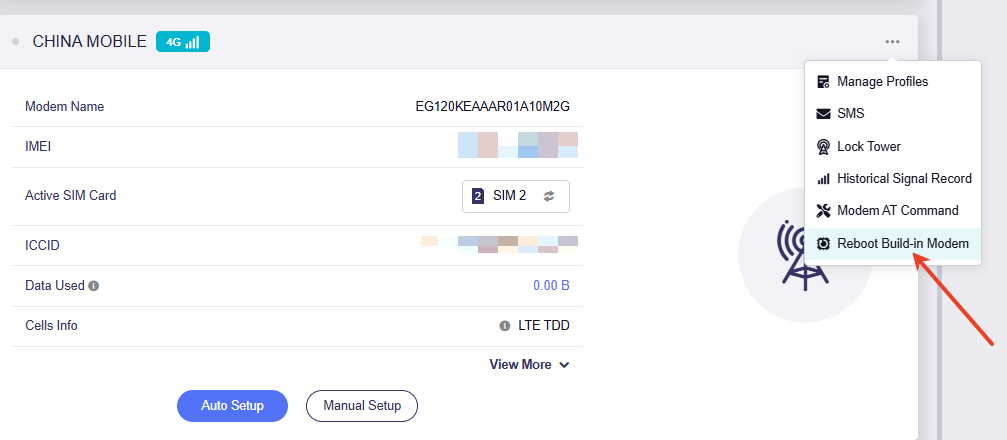
Additionally I noticed that sim cad is using APN "fast.metropcs.com". Is it the correct APN? Some users use h2g2 for Google Fi. You can change to this one to see if the connection is more stable.
Hi,
Thank you for your continued help with this. Cellular still not working, but the plot thickens.
I actually have TWO Spitz Plus GLX 2000 devices.
One in downtown Boston (lots of local cell towers and carriers), the other Northern NH. In my setting the Boston site is REMOTE, and the NH site is LOCAL. Each Spitz Plus has their own GoogleFi Sim card, both SIM cards are active on the same Goggle Fi account
Each site WAN1 is cable modem. Boston Xfinity, NH Spectrum,
Boston Cellular seems to be T Mobile and NH also seem to be T Mobile
-
NH Cellular SIM registered and IP address obtained. Always using “automagic” settings. Still working (for months and still active today) and can see APN as fast.metropcs.com and IPv4&IPv6.
-
Boston Cellular initially automagically connected/registered SIM and obtained IP for several months. However, after WAN outage this week, failure of cellular fail over, and IPv6 error messages in log, I manually forced cellular configuration to IPv4 and Boston celllular has never properly connected since (logs attached).
I have tried Boston manual cellular with h2g2 with IPv4 h2g2 IPv4&6 and fast.metropcs.com with IPv4 and IPv4&6
I now get SIM not registered but also, The interface is connected, but the Internet can't be accessed.
Boston Cellular is Broken but NH cellular is working with fast.metropcs.com and IPv4&6. Boston cellular no longer gets IP with any settings I have tried.
See attached log file
On a side note, I see a post above GL.iNet GL-X3000 won't connect to T-Mobile Home Internet - #30 by domc43 maybe related?
Thanks again for you help
Hi sir, could you share the Boston device with support team so that we can troubleshoot it remotely? We want to check the modem settings.
Sharing of Boston Spitz Plus GLX 2000 to GL.iNet Technical Support enabled now.
Device is online via WAN1.
Thank you
Hi,
New SIM card fixed the cellular problem! Thank you for all your troubleshooting and remote log in work.
WOW, I never had a SIM card fail before. This dead SIM card was never abused, it lived its entire life in a Spitz 750 then removed and placed in Spitz Plus. Was not dropped or scratched.
One observation, the replacement SIM card that works is actually older but has gold contact surfaces, the dead SIM card while newer has silver contact surfaces.
Anyway, all working OK now.
Thank you for your help
2 Likes