VLAN on Flint 2 does not assign correct IP over lan port

I’m trying to setup VLANs for my home network. I’m using bridge filtering and I was able to successfully create a separated IoT VLAN and it is working fine, but it is only a wireless VLAN. I encountered a problem when trying to use a wired VLAN - I wanted to move my server (which actually is an old laptop), from the default LAN to its separate VLAN connected via ethernet cable to the router.

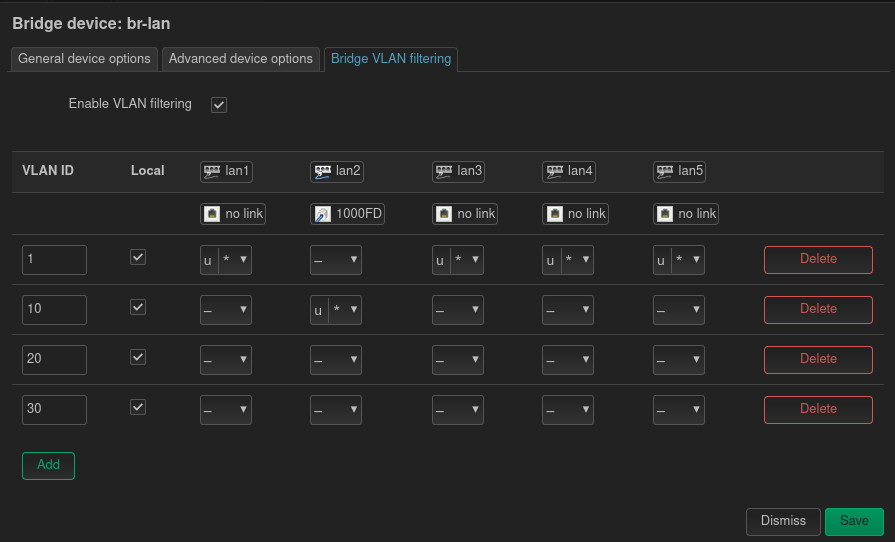
This is my bridge filtering on the main bridge br-lan:

VLAN 10 is designated as the “server” VLAN, while for example VLAN 20 is for the IoT devices.

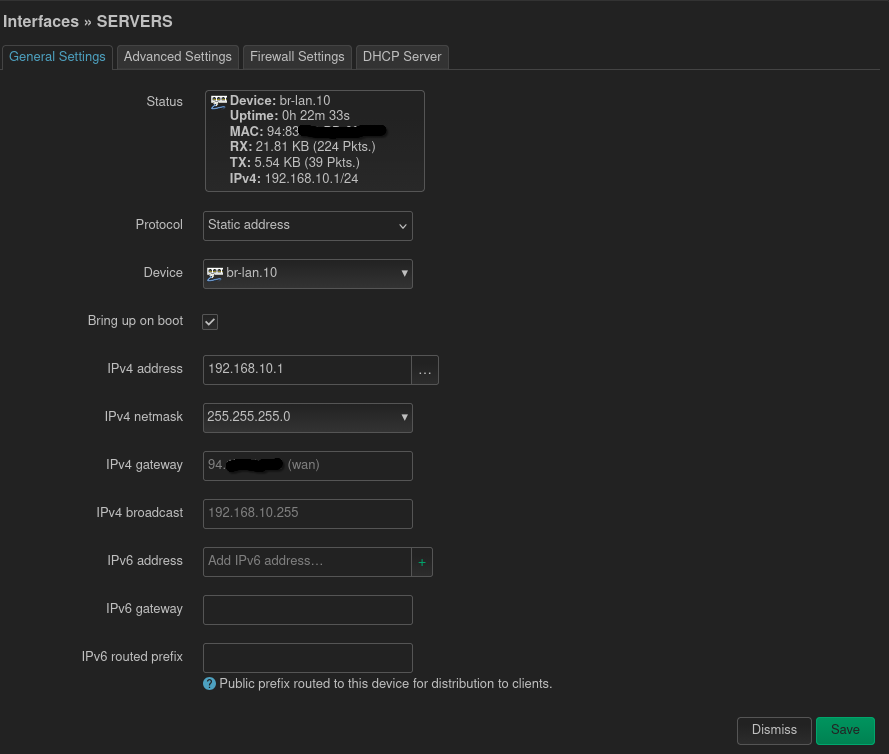
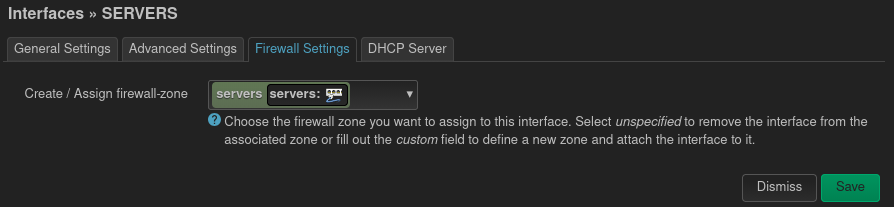
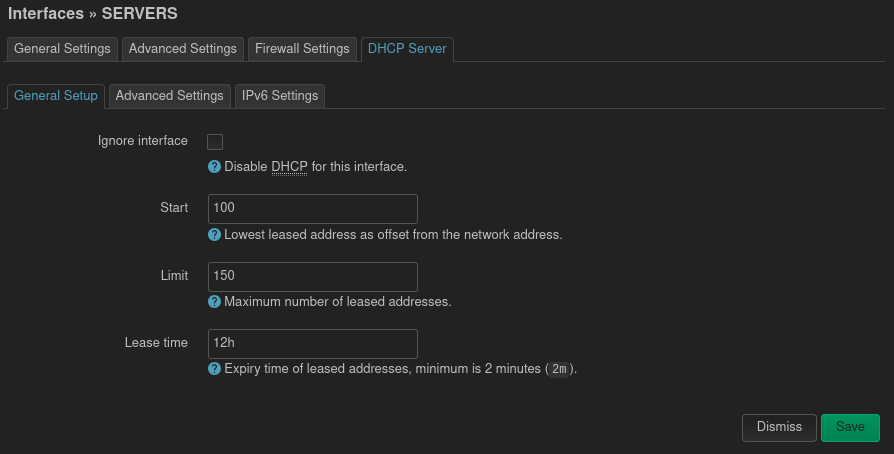
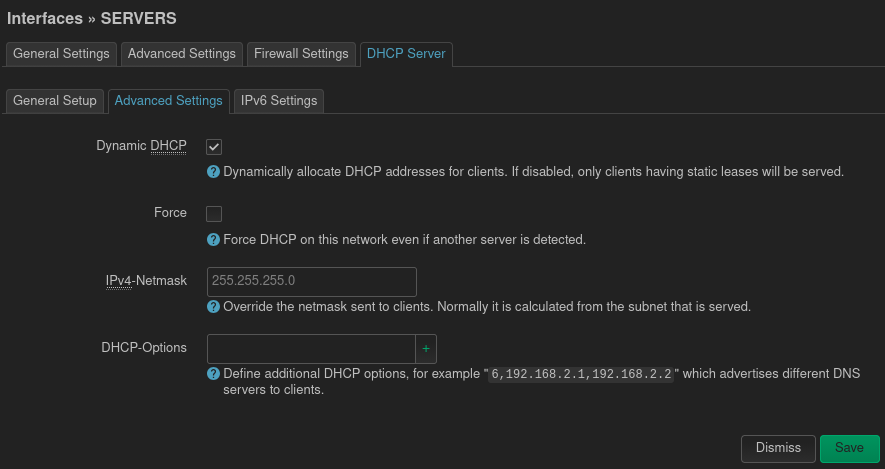
I created an interface for the VLANs and there are the settings for the server VLAN 10:

So to me it all looks fine. And the VLAN 20 which is configured in the same manner works without issues, I added proper firewall rules and specific traffic rules etc.

But for some reason when I plug the server laptop into the port 2 on my Flint2 it gets IP 192.168.0.220. The strange thing is that it does not match any DHCP server on the router. The default VLAN (and the default network on Flint 2 before I even added VLANs) is of course 192.168.8.x. All other VLANs have the 3 octet matching the VLAN ID.

I have no idea why it gets IP like that. It even kinda looks like it gets the IP from the ISP modem, not from the router? It is also currently connected to the WiFi and therefore the main VLAN - on the wifi connection it gets its IP in the 192.168.8.x and I’m able to SSH to this laptop thanks to wifi.

Could you please help me debug this issue and fix it?

Hello,

There are a few issues here, I'm curious looking to your vlan stanza and it is a wonder vlan 20 is working for you :slight_smile: , or was it on wifi?

Usually: if you want the pvid set, you choose untagged and after the port the vlan cease to exist.

Only one port can only have one untagged vlan, of course it is possible to be more but the pvid deals with that the others become more as a reservation but are ignored, tagged however means you combine a vlan with others or you pass it through.

I expected either a untag or tagged vlan :slight_smile:

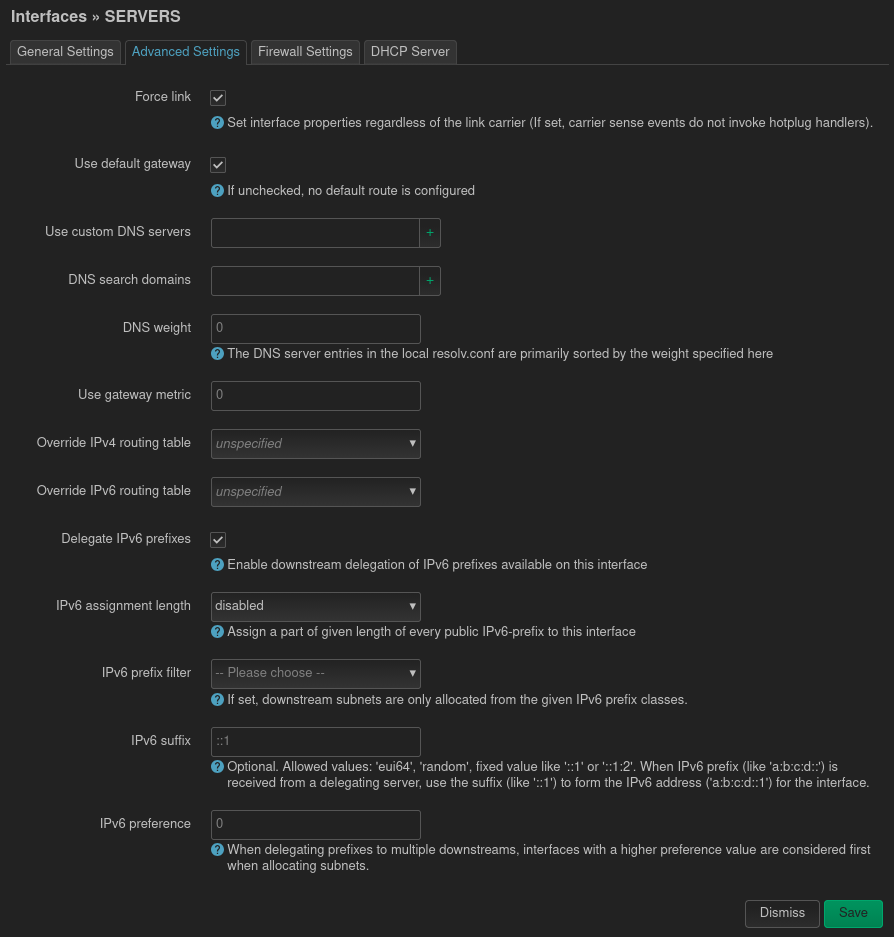
There is also another issue here, I see on each interface you create inside the advanced settings that you check default gateway.

Please uncheck this, because in OpenWrt terms this mean should the interface be treated as a wan like interface or not, in this case you don't want that, because it is possible a default route is being set to this interface rather than wan/wwan, this could theoretically explain why you see a different network.

As to why you see a network which isn't existing in your router, I'm confused, perhaps there is a router which tries to forces itself as main router?

I had a powerline adapter doing exactly that had to disable dhcp, it was a tp-link one, my logs where crowded that the dhcp server in openwrt could not start, kinda nuts implementation from tp :face_savoring_food:

Thanks for the response.

VLAN 20 works fine, but it is only over the wifi, I don't have any device connected via ethernet in that network, and therefore I didn't map any port to use that vlan.

I set PVIDs like that while trying to fix the issue. Originally I didn't have any pvids and it was behaving in the same manner.

But to be honest I didn't fully understood your comment. You are saying that this configuration of PVIDs or untagged ports is wrong? Could you try rephrasing it? How would I set it?

The default gateway was set like that by default. I tried deselecting it now but it seems it did nothing.

My Flint2 is connected to the ISP modem, and it is in modem mode, so the router part should be disabled. Is there a possibility that even in modem mode it will try assigning ip to my vlans?

This should be fine :+1:, don't worry about my explaination about vlans this can work.

however usually it won't be my first choice to use vlans if the networks are only inside the router not extending over to a vlan aware device, but there are some reasons why it is still needed like with multi psk/ppsk or maybe you readed a tutorial, typically for wifi you can also make empty bridges and assign these to interfaces, its still fine no worries.

Hmm, I'd guess you mean bridge mode?, it sound familiar.

What I know is that they often set the isp modem to a static ip for recovery purpose and then do some kind of dmz, so technically there is still a gateway to this modem, but as far as I know shouldn't be sending dhcp server things.

We can try to dig in this further, if you have access to ssh, can you type: ip route and paste it here?

You can also post contents of /etc/config/network and /etc/config/dhcp please remove mac addresses, and other sensitive information like wireguard keys and public ips.

Yes, I think it is bridge mode. But in the ISP modem interface it was called “modern mode”. I have Connect Box from UPC.

I wasn't sure if I should ran the commands on the router or the server laptop, so I ran it on both. Here is output from the laptop:

$ ip route
default via 192.168.8.1 dev wlp3s0 proto dhcp src 192.168.8.10 metric 600
172.17.0.0/16 dev docker0 proto kernel scope link src 172.17.0.1 linkdown
172.18.0.0/16 dev br-14ee650b410b proto kernel scope link src 172.18.0.1
192.168.0.0/24 dev enp4s0 proto kernel scope link src 192.168.0.220 metric 100
192.168.8.0/24 dev wlp3s0 proto kernel scope link src 192.168.8.10 metric 600

/etc/config was empty.

And here is the output from the router:

# ip route
default via 94.xxx.xxx.1 dev eth1 proto static src 94.xxx.xxx.xxx metric 10
94.xxx.xxx.0/23 dev eth1 proto static scope link metric 10
192.168.8.0/24 dev br-lan.1 proto kernel scope link src 192.168.8.1
192.168.10.0/24 dev br-lan.10 proto kernel scope link src 192.168.10.1
192.168.20.0/24 dev br-lan.20 proto kernel scope link src 192.168.20.1
192.168.30.0/24 dev br-lan.30 proto kernel scope link src 192.168.30.1
# cat /etc/config/network

config interface 'loopback'
        option device 'lo'
        option proto 'static'
        option ipaddr '127.0.0.1'
        option netmask '255.0.0.0'

config globals 'globals'
        option ula_prefix 'fxxxxxxxxxxx::/48'
        option packet_steering '1'

config device
        option name 'br-lan'
        option type 'bridge'
        list ports 'lan1'
        list ports 'lan2'
        list ports 'lan3'
        list ports 'lan4'
        list ports 'lan5'
        option macaddr '94:xxxxxxxxxxxx'

config device
        option name 'lan1'
        option macaddr '94:xxxxxxxxxxxxx'

config device
        option name 'lan2'
        option macaddr '94:xxxxxxxxxxxxx'

config device
        option name 'lan3'
        option macaddr '94:xxxxxxxxxxxxxx'

config device
        option name 'lan4'
        option macaddr '94:xxxxxxxzzxzzz'

config device
        option name 'lan5'
        option macaddr '94:xxxxxxxxxxxxxx'

config interface 'lan'
        option proto 'static'
        option ipaddr '192.168.8.1'
        option netmask '255.255.255.0'
        option ip6assign '60'
        option isolate '0'
        option device 'br-lan.1'

config device
        option name 'eth1'
        option macaddr '94:xxxxxxxxxxxx'

config interface 'wan'
        option device 'eth1'
        option proto 'dhcp'
        option force_link '0'
        option ipv6 '0'
        option classlessroute '0'
        option metric '10'

config interface 'wan6'
        option proto 'dhcpv6'
        option device '@wan'
        option disabled '1'

config interface 'guest'
        option force_link '1'
        option type 'bridge'
        option proto 'static'
        option ipaddr '192.168.9.1'
        option netmask '255.255.255.0'
        option ip6assign '60'
        option multicast_querier '1'
        option igmp_snooping '0'
        option isolate '0'
        option bridge_empty '1'
        option disabled '1'

config rule 'policy_relay_lo_rt_lan'
        option lookup '16800'
        option in 'loopback'
        option priority '1'

config interface 'tethering6'
        option device '@tethering'
        option proto 'dhcpv6'
        option disabled '1'

config interface 'wwan6'
        option device '@wwan'
        option proto 'dhcpv6'
        option disabled '1'

config interface 'wwan'
        option proto 'dhcp'
        option classlessroute '0'
        option metric '20'

config interface 'secondwan'
        option ipv6 '0'
        option proto 'dhcp'
        option metric '15'
        option force_link '0'
        option classlessroute '0'

config interface 'secondwan6'
        option proto 'dhcpv6'
        option device '@secondwan'
        option disabled '1'

config rule 'policy_default_rt_vpn'
        option mark '0x8000/0xc000'
        option lookup '8000'
        option priority '1101'
        option invert '1'

config rule6 'policy_default_rt_vpn6'
        option mark '0x8000/0xc000'
        option lookup '8000'
        option priority '1101'
        option invert '1'

config rule 'policy_default_rt_vpn_ts'
        option lookup 'main'
        option priority '1099'
        option mark '0x80000/0xc0000'
        option invert '0'

config rule 'novpn_to_main'
        option gl_vpn_rules '1'
        option mark '0x8000/0xf000'
        option priority '6000'
        option lookup 'main'
        option disabled '0'

config rule 'vpn_to_main'
        option gl_vpn_rules '1'
        option mark '0x0/0xf000'
        option priority '9000'
        option lookup 'main'
        option invert '1'
        option disabled '0'

config rule 'vpn_leak_block'
        option gl_vpn_rules '1'
        option mark '0x0/0xf000'
        option priority '9910'
        option action 'blackhole'
        option invert '1'
        option disabled '0'

config rule 'vpn_block_lan_leak'
        option gl_vpn_rules '1'
        option in 'lan'
        option priority '9920'
        option action 'blackhole'
        option disabled '0'

config rule 'vpn_block_guest_leak'
        option gl_vpn_rules '1'
        option in 'guest'
        option priority '9920'
        option action 'blackhole'
        option disabled '0'

config rule 'vpn_block_wgserver_leak'
        option gl_vpn_rules '1'
        option in 'wgserver'
        option priority '9920'
        option action 'blackhole'
        option disabled '0'

config rule 'vpn_block_ovpnserver_leak'
        option gl_vpn_rules '1'
        option in 'ovpnserver'
        option action 'blackhole'
        option disabled '0'
        option priority '9920'

config bridge-vlan
        option device 'br-lan'
        option vlan '1'
        list ports 'lan1:u*'
        list ports 'lan3:u*'
        list ports 'lan4:u*'
        list ports 'lan5:u*'

config bridge-vlan
        option device 'br-lan'
        option vlan '10'
        list ports 'lan2:u*'

config bridge-vlan
        option device 'br-lan'
        option vlan '20'

config bridge-vlan
        option device 'br-lan'
        option vlan '30'

config interface 'servers'
        option proto 'static'
        option device 'br-lan.10'
        option ipaddr '192.168.10.1'
        option netmask '255.255.255.0'
        option defaultroute '0'

config interface 'iot'
        option proto 'static'
        option device 'br-lan.20'
        option ipaddr '192.168.20.1'
        option netmask '255.255.255.0'
        option type 'bridge'

config interface 'cameras'
        option proto 'static'
        option device 'br-lan.30'
        option ipaddr '192.168.30.1'
        option netmask '255.255.255.0'

config rule 'main_static_net'
        option gl_vpn_rules '1'
        option suppress_prefixlength '0'
        option priority '800'
        option lookup '9910'
        option disabled '0'
# cat /etc/config/dhcp

config dnsmasq
        option domainneeded '1'
        option filterwin2k '0'
        option localise_queries '1'
        option rebind_localhost '1'
        option local '/lan/'
        option domain 'lan'
        option expandhosts '1'
        option nonegcache '0'
        option authoritative '1'
        option readethers '1'
        option leasefile '/tmp/dhcp.leases'
        option resolvfile '/tmp/resolv.conf.d/resolv.conf.auto'
        option nonwildcard '1'
        option localservice '1'
        option ednspacket_max '1232'
        option filter_aaaa '1'
        option confdir '/tmp/dnsmasq.d'
        option cachesize_old '1'
        option rebind_protection '1'
        option boguspriv_old '1'
        list server_old '127.0.0.1#5453'
        option noresolv_old '1'
        option localuse_old '1'
        option noresolv '1'
        list server '127.0.0.1#3053'
        option localuse '0'

config dhcp 'lan'
        option interface 'lan'
        option start '100'
        option limit '150'
        option leasetime '12h'
        option dhcpv4 'server'
        option force '1'
        list ra_flags 'none'

config dhcp 'wan'
        option interface 'wan'
        option ignore '1'

config dhcp 'guest'
        option interface 'guest'
        option start '100'
        option limit '150'
        option leasetime '12h'
        option dhcpv6 'disabled'
        option ra 'disabled'

config odhcpd 'odhcpd'
        option maindhcp '0'
        option leasefile '/tmp/hosts/odhcpd'
        option leasetrigger '/usr/sbin/odhcpd-update'
        option loglevel '4'

config domain
        option name 'console.gl-inet.com'
        option ip '192.168.8.1'

config domain
        option name 'console.gl-inet.com'
        option ip '::ffff:192.168.8.1'

config dhcp 'secondwan'
        option interface 'secondwan'
        option ignore '1'

config host
        option mac 'A0:xxxxxxxxxxxxx'
        option ip '192.168.8.174'

config host
        option mac '44:xxxxxxxxxxxxx'
        option ip '192.168.8.10'
        option tag 'serwer'

config dhcp 'servers'
        option interface 'servers'
        option start '100'
        option limit '150'
        option leasetime '12h'
        list ra_flags 'none'

config dhcp 'iot'
        option interface 'iot'
        option start '100'
        option limit '150'
        option leasetime '12h'
        list ra_flags 'none'

config dhcp 'cameras'
        option interface 'cameras'
        option start '100'
        option limit '150'
        option leasetime '12h'
        list ra_flags 'none'

I have adguard home enabled. But I'm not sure if it could have any impact.

Thanks again for the responses!

Strange, and you still see this ip appear on the flint lan port 2?

Its the flint 2 who gets the ip or the client?

Can you try and type that address in browser and see if it shows a web page or a common device?

Config seem ok.

Flint is accessible on normal ip 192.168.8.1. It is the laptop (my pseudo server) which gets wrong IP. Currently this laptop is connected both via wifi and ethernet cable.

From wifi it gets the IP 192.168.8.10, which I'm using to connect to it at the moment.

From cable connected to LAN2 it gets IP 192.168.0.220, and I'm unable to connect to that IP.

I'm thinking here, could it be you have set a static ip on one of the interfaces on the laptop?, maybe for u-boot and then been forgotten to turn it off?

I know that if you use ipconfig with a fixed ip you will get confused I have had this a few times.

I installed fresh Debian on this laptop and I didn’t set static IP on it.

I also tried creating separate network without using bridge filtering - I removed port 2 from the br-lan and created separate bridge and interface. It didn’t help. I also tried assigned the lan2 device directly to the interface also without any luck.

I suspect that the modem might be breaking my setup somehow. In bridge mode the ISP modem should have IP 192.168.100.1, but maybe it doesn’t for some reason. I didn’t check that yet.

I plan to go to that laptop and physically experiment a bit once I will have time. Maybe unplug Flint2 form the modem for a moment and check what happens then. Maybe I will also try connecting to the modem and check the optioons, but I doubt I will find anything useful.

1 Like

you could try another trick :slight_smile:

the interface on lan2, can you go to dhcp settings and check force dhcp?

this option is designed for when you have a concurent dhcp server somewhere in your network trying to override your existing dhcp server.