Vpn architecture steering

Hi all,I am planning to deploy a small metro site-to-site VPN between two sites using the following equipment and requirements. I'd appreciate a nudge on the architecture and what would work best from your perspective.

Network equipment

  • 2 × Flint 2 (v4.9)

  • 1 × Brume 2 (v4.7; willing to use beta firmware if required)

  • 1 × XVR with HTTPS/RTSP capabilities

  • 2 × Zyxel GS1900-8HP

  • 1 × Zyxel GS1200

  • 2 × surge protectors

  • UPS

  • HE.net DDNS

Requirements

  1. Site-to-site VPN primarily for managing the XVR and viewing/streaming video. Separate management and video access per user.

  2. 1–5 external/roaming users should have separate VPN tunnels/credentials and access the XVR remotely.

  3. External users should ideally be restricted to the XVR rather than having access to the rest of either site's LAN.

  4. If I make a mistake with the VPN/firewall configuration, I would strongly prefer not to have to travel to the remote site to recover it.

  5. I will normally be physically present at Site 1, while Site 2 is the less convenient site to visit.

Site 1

  • Flint 2

  • GS1900-8HP

  • PON: 600 Mbps down / 400 Mbps up

  • Currently behind CGNAT, but I can request a public IPv4 address

Site 2

  • Flint 2

  • GS1200 or GS1900-8HP

  • DOCSIS: 200 Mbps down / 40 Mbps up

  • Public IPv4 address

  • XVR with approximately 5 analogue cameras connected to it

The cameras themselves terminate at the XVR over coax; the network connection is only to the XVR.

What I would particularly appreciate advice on

  1. Where would you put the Brume 2 — Site 1 or Site 2 — and what overall topology would you use?

  2. Would you put the Brume 2 in front of a Flint 2, or behind it? Should the switch sit before or after the Flint?

  3. Is the classic arrangement of putting the Brume 2 at Site 2 in front of the XVR worth the additional travel/maintenance burden?

  4. Would you use the Brume 2 as the WireGuard server and one of the Flint 2s as the site-to-site client?

  5. Would you recommend separate WireGuard peers/tunnels for each user, with firewall rules allowing different users access to XVR management (HTTPS), video streaming (RTSP), or both?

  6. Is Tailscale a viable alternative here? If so, how would you arrange the transit/subnet routers and exit nodes, particularly for the XVR?

  7. Given the 40 Mbps upload at Site 2, are there any particular considerations for multiple simultaneous RTSP/sub-stream viewers?

My current priority is to get the XVR working reliably first, then finalize the physical/rack layout and implement the networking.

Thanks in advance for any suggestions or experience with a similar setup.
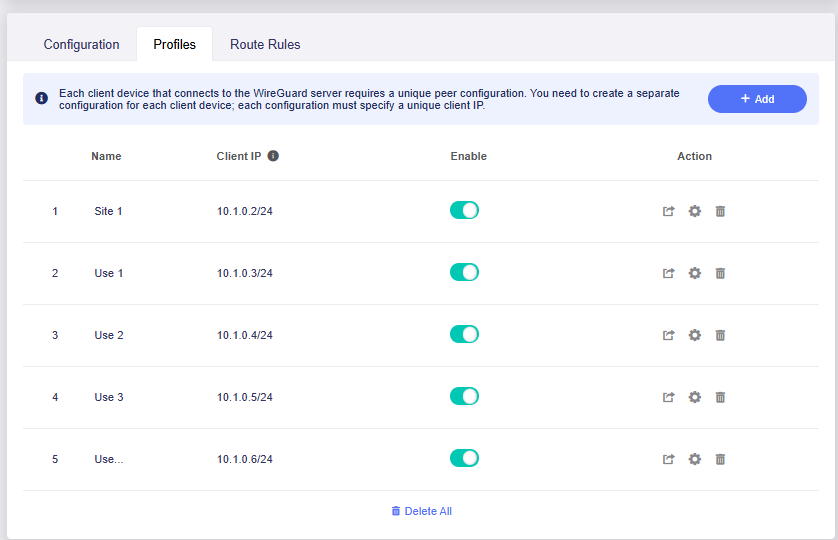
Hi,

Thank you for providing the detailed topology.

Based on your current setup, the Brume 2 does not appear to be strictly necessary for the initial deployment.
Since Site 2 already has a public IPv4 address and the XVR is located behind the Site 2 Flint 2, we would suggest using the Site 2 Flint 2 as the WireGuard Server .

A possible topology would be:

                        Internet
                            |
             +--------------+--------------+
             |                             |
      Site 1 Flint 2                Roaming Users
      WireGuard Peer                Individual WG Peers
             |                     User A / B / C...
             |                             |
             +--------------+--------------+
                            |
                     WireGuard Tunnels
                            |
                     Site 2 Flint 2
                     WireGuard Server
                            |
                     Firewall / ACL
                            |
                           XVR
                    HTTPS / RTSP

For devices at Site 1, the traffic path would be:

Site 1 LAN Device
        |
Site 1 Flint 2
        |
WireGuard Tunnel
        |
Site 2 Flint 2
        |
       XVR

For roaming users, they can connect directly to the Site 2 WireGuard Server instead of routing through Site 1.

Laptop / Phone
      |
Individual WG Peer
      |
Internet
      |
Site 2 Flint 2
      |
Firewall / ACL
      |
     XVR

The Site 1 Flint 2 can use one WireGuard profile for the site-to-site connection, while each roaming user can use a separate WireGuard profile.

The WireGuard profile defines the VPN connection, while the firewall rules on the Site 2 Flint 2 can be used to restrict each peer to the XVR and, if required, apply different management/video access permissions.

For example, the roaming-user profiles can be limited to the XVR. If bidirectional LAN access is also required between Site 1 and Site 2, the WireGuard connection can be configured for full site-to-site LAN access.

For reference, you may also refer to the following documentation and discussions:

WireGuard Server / Remote LAN Access:

Site-to-Site WireGuard configuration:

Restricting WireGuard users with firewall rules:

Hope this helps you.

Hi @charles2!

Thanks, this makes sense and I understand the simpler approach of using the Flint 2 directly as the WireGuard server.

A few additional considerations on my side:

  1. I can request a public IPv4 address for Site 1 as well. The ISP says this is a matter of roughly one day for processing, so both sites can have public IPv4 connectivity.

  2. I could put the Brume 2 at Site 1 and use it as the security gateway / primary gateway for the Site 1 network.

  3. I could connect a switch to the LAN side of the Brume 2 and put the Site 1 Flint 2 behind the Brume on one of the switch ports.

  4. The Flint 2 would then remain responsible for the internal Site 1 network, while the Brume 2 would provide the upstream security/VPN layer.

  5. For the VPN itself, I would follow your suggestion of using separate WireGuard peers/profiles for the roaming users.

  6. At the XVR/application layer, I would use its RBAC and user profiles for management/video permissions, while using firewall rules as the network-level boundary.

  7. I am mostly thinking about having separate profiles/policies for:

    • Site 1 → Site 2
    • Site 2 → Site 1
    • individual external users → XVR

    In particular, I don't necessarily want the site-to-site tunnel to automatically mean unrestricted bidirectional LAN access.

  8. Would there be any advantage to using the Brume 2 at Site 1 specifically as a security/VPN gateway in this architecture, given that I will normally be physically at Site 1? One of my concerns with putting the WireGuard server at Site 2 is recovery if I make a firewall/VPN configuration mistake and lose remote access to the Site 2 Flint 2.

  9. Both Flint 2 units are running the latest stable v4.9.x firmware.

  10. For the Brume 2, would you recommend sticking with the current v4.7 stable firmware, or would testing v4.9-beta make sense for this use case? I see some promising functionality backported from the v4.9 series.

  11. Can the Brume 2 run multiple simultaneous WireGuard tunnels and use policy-based routing to send different WireGuard peers/traffic through different site-to-site WireGuard tunnels?

I'm trying to balance the simplest topology with the operational advantage of having the VPN/security infrastructure at the site where I am physically present most of the time.

Keep the WireGuard server at Site 2, close to the XVR. A Brume 2 at Site 1 would not provide a recovery path if the Site 2 Flint 2 becomes unreachable, and placing the Site 1 Flint 2 in router mode behind it would add double NAT and routing complexity. Site 1 does not need a public IPv4 merely to initiate the tunnel. If you use the Brume 2 there, it is cleaner to make it the only primary router and use the Flint 2 as an access point; connect the managed switch to the primary router’s LAN side.

Use one site-to-site WireGuard peer and control direction and scope with routes and firewall rules—WireGuard being bidirectional does not require unrestricted bidirectional LAN access. Give every roaming user a unique peer/IP, then restrict that source IP to the XVR address and required HTTPS/RTSP ports. Keep the XVR’s RBAC as a second layer. For safer remote changes, back up the configuration, retain a separate management path such as GoodCloud where appropriate, apply firewall changes in small stages, and verify the existing session remains usable before disconnecting. True recovery from a router lockout requires an independent out-of-band path; moving the Brume 2 to Site 1 does not supply one for Site 2.

For production, keep the Brume 2 on the latest stable v4.7 release unless a specific v4.9 feature is required and you can test and recover locally. Firmware v4.9 supports multiple active VPN tunnel groups with source/destination policies, but that does not automatically mean incoming WireGuard-server peers can be assigned to different outgoing site-to-site tunnels by peer identity. Peer-specific access to the XVR is best enforced with firewall rules based on each peer’s WireGuard IP; more complex peer-to-tunnel forwarding may require custom OpenWrt policy routing rather than the standard GL.iNet interface.

This reply was generated by AI. Please verify its accuracy.

GL.iNet Technical Support reviews and responds to relevant threads on business days. Please allow time for a staff response.

@charles2, @AI_bot thank you for the responses.

I’m thinking of going forward in the following ways

                PRODUCTION
                   │
        ┌──────────┴──────────┐
        │                     │
   Site 1 NitroWall       Site 2 Flint 2
     OPNsense                v4.9
        │                     │
      Flint 2                 XVR
      v4.9


                LAB / TEST
                     │
                  Brume 2
                  v4.9
                     │
              experimental
           WG / PBR / tunnels

I have realized I have several hidden goals:

  1. I want to use all the dormant hardware i have ( including the NW678)
  2. Testing v4.9 on an idle Brume2 which has not been used is fine for me.
  3. at a later stage I can switch the brume 2 to be the primary router for site 2 and use the flint 2 there in AP-mode.
  4. As starters I can put the brume 2 in my site 1 and see how it goes. The critical path is below ( subject to testing)
WG peer A
   │
   ▼
Brume 2 WG server
   │
   │ policy
   ▼
WG tunnel A
   │
   ▼
destination


WG peer B
   │
   ▼
Brume 2 WG server
   │
   │ policy
   ▼
WG tunnel B
   │
   ▼
different destination