Hi,
Thank you for providing the detailed topology.
Based on your current setup, the Brume 2 does not appear to be strictly necessary for the initial deployment.
Since Site 2 already has a public IPv4 address and the XVR is located behind the Site 2 Flint 2, we would suggest using the Site 2 Flint 2 as the WireGuard Server .
A possible topology would be:
                        Internet
                            |
             +--------------+--------------+
             |                             |
      Site 1 Flint 2                Roaming Users
      WireGuard Peer                Individual WG Peers
             |                     User A / B / C...
             |                             |
             +--------------+--------------+
                            |
                     WireGuard Tunnels
                            |
                     Site 2 Flint 2
                     WireGuard Server
                            |
                     Firewall / ACL
                            |
                           XVR
                    HTTPS / RTSP
For devices at Site 1, the traffic path would be:
Site 1 LAN Device
        |
Site 1 Flint 2
        |
WireGuard Tunnel
        |
Site 2 Flint 2
        |
       XVR
For roaming users, they can connect directly to the Site 2 WireGuard Server instead of routing through Site 1.
Laptop / Phone
      |
Individual WG Peer
      |
Internet
      |
Site 2 Flint 2
      |
Firewall / ACL
      |
     XVR
The Site 1 Flint 2 can use one WireGuard profile for the site-to-site connection, while each roaming user can use a separate WireGuard profile.
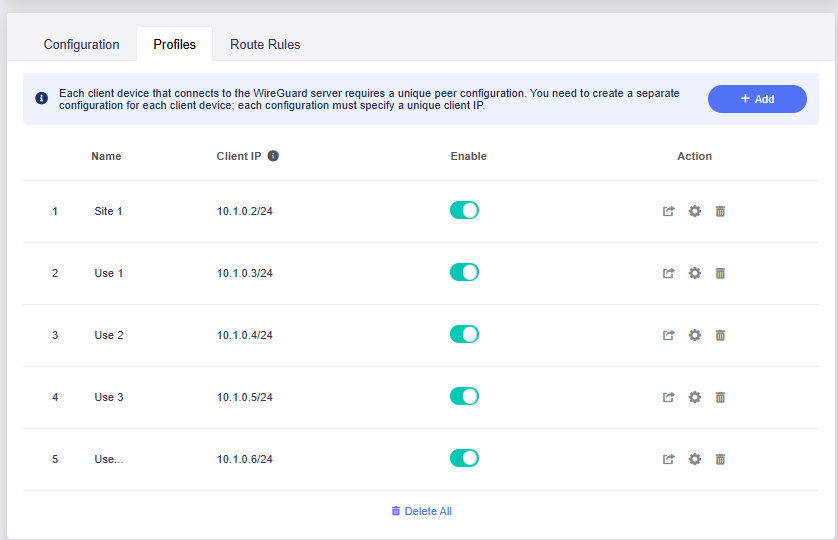
The WireGuard profile defines the VPN connection, while the firewall rules on the Site 2 Flint 2 can be used to restrict each peer to the XVR and, if required, apply different management/video access permissions.
For example, the roaming-user profiles can be limited to the XVR. If bidirectional LAN access is also required between Site 1 and Site 2, the WireGuard connection can be configured for full site-to-site LAN access.
For reference, you may also refer to the following documentation and discussions:
WireGuard Server / Remote LAN Access:
Site-to-Site WireGuard configuration:
Restricting WireGuard users with firewall rules:
Hope this helps you.