wireguard client vpn enabled - rules - website 1 uses country 1, website 2 uses country 2 - all other traffic runs as normal - tested and all working correctly
Tailscale exit node - tested on remote device and this is working correctly.
everything has been smooth sailing right up to this last point.
My issue - when use website 1 & 2 connected to tailscale exit node, this bypasses the wireguard client rule. AI says i can change something in the firewall so tailscale can forward the rule to wireguard but i have had no luck getting this to work, is there any way i can do this? If so can you share the steps with me please.
when i disconnect remote device and test on lan device, the wireguard rules works as it did before when connecting to website 1 & 2.
You may refer to the following guide for the basic configuration required to forward Tailscale traffic to a WireGuard Client tunnel:
The guide shows how to allow forwarding from tailscale0 to wgclient1 and route Tailscale traffic through that WireGuard tunnel. However, the routing rules in the guide are mainly intended to send all Tailscale internet traffic through one WireGuard tunnel.
For your required setup, the general routing logic would be: traffic from Tailscale to Website 1 uses the first WireGuard interface, traffic to Website 2 uses the second WireGuard interface, and all other Tailscale traffic uses the default WAN route.
A similar community configuration using luci-app-pbr to route different domains through different VPN interfaces here:
With luci-app-pbr, policies can be created using the Tailscale address range as the source, the required domains as the destinations, and wgclient1, wgclient2, or WAN as the corresponding interfaces. luci-app-pbr is an advanced community-based solution. Please note that domain-based routing may be affected if DNS requests bypass the router or if the website uses additional related domains. It may also conflict with the routing policies generated by the VPN Dashboard, so careful configuration and testing are required.
Thanks for the support and linking me to a guide but I could not get this working, too complicated.
I managed to use luci-app-pbr put in some rules and got the following:
root@GL-MT5000:~# /etc/init.d/pbr restart
Activating traffic killswitch [✓]
Removing routing for 'wan_ori/0.0.0.0' [✓]
Removing routing for 'secondwan/0.0.0.0' [✓]
Removing routing for 'wgclient1/10.14.0.2' [✓]
Removing routing for 'wgclient2/10.14.0.2' [✓]
Removing routing for 'wan/eth1/192.168.0.1' [✓]
Deactivating traffic killswitch [✓]
pbr 1.1.1-7 (iptables) stopped [✓]
Command failed: Not found
Activating traffic killswitch [✓]
Setting up routing for 'wan_ori/0.0.0.0' [✓]
Setting up routing for 'secondwan/0.0.0.0' [✓]
Setting up routing for 'wgclient1/10.14.0.2' [✓]
Setting up routing for 'wgclient2/10.14.0.2' [✓]
Setting up routing for 'wan/eth1/192.168.0.1' [✓]
WARNING: Variable 'tor' does not exist or is not an array/object
WARNING: Variable 'instances' does not exist or is not an array/object
WARNING: Variable 'instance1' does not exist or is not an array/object
Creating TOR redirects [✗]
Routing 'tw1' via wgclient2 [✓]
Routing 'tw2' via wgclient2 [✓]
Routing 'tw3' via wgclient2 [✓]
Routing 'tw4' via wgclient2 [✓]
Routing 'tb' via wgclient1 [✓]
Routing 'def' via wan [✓]
Restarting dnsmasq [✓]
Deactivating traffic killswitch [✓]
pbr 1.1.1-7 monitoring interfaces: wan wwan secondwan wan_ori wgclient1 wgclient2
Command failed: Invalid argument
pbr 1.1.1-7 (iptables) started with gateways:
wan_ori/0.0.0.0
secondwan/0.0.0.0
wgclient1/10.14.0.2
wgclient2/10.14.0.2
wan/eth1/192.168.0.1 [✓]
ERROR: Failed to set up 'tor/53->9053/80,443->9040'!
didn’t appear to work when testing website 2 for example, the packets for the wgclient2 were not moving, so no idea how you do it.
Thank you for trying the luci-app-pbr configuration and providing the logs.
From the output, it appears that PBR has started successfully and has detected both wgclient1 and wgclient2 interfaces. The rules for different policies also seem to have been created successfully.
However, since the traffic for Website 2 is not passing through wgclient2, we need to further check whether the domain rule is being matched correctly.
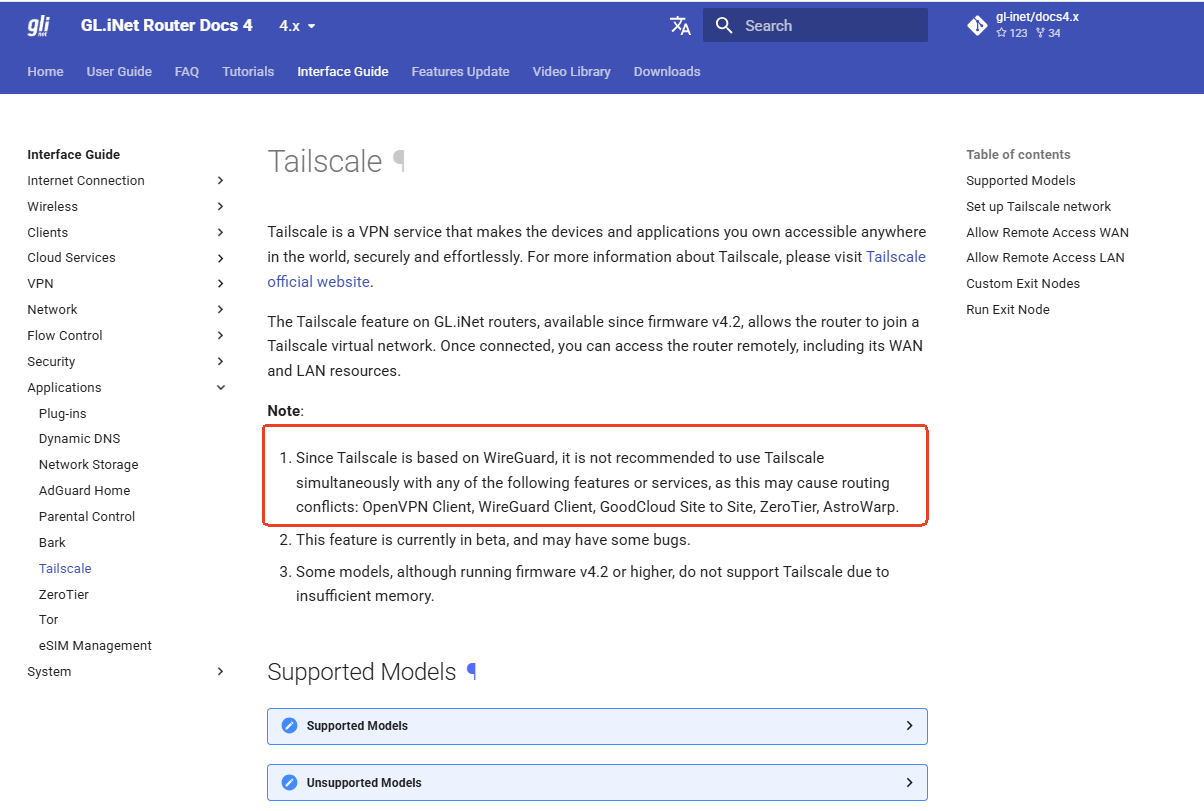
Please note that using Tailscale together with a WireGuard/OpenVPN Client is not recommended, as their routing rules may conflict with each other.
In addition, luci-app-pbr is a third-party advanced configuration rather than a standard GL.iNet feature, so we cannot guarantee its compatibility or stable operation with the VPN Dashboard.
We can review the information you provide and offer general troubleshooting suggestions.
Could you please send us the following information via private message for further checking?
A screenshot of the luci-app-pbr policy configuration page, the rules for Website 1 and Website
The output of the following command: pbr status
Please provide the DNS resolution results of the second domain from both the client device and the Brume 3 local DNS resolver. On the client device, please run and compare whether the returned IP addresses are the same.
nslookup your-domain.com
nslookup your-domain.com LAN IP (nslookup your-domain.com 192.168.8.1)
This information will help us confirm whether the issue is related to the PBR rule matching, DNS resolution, or the WireGuard interface routing.
I have private messaged you with your 3 requests. I could not attach all 3 in one message due to user limits that i could only embed 1 media at a time so i have just sent you all 3 medias seperately to get round the limit.