Wed Nov 19 21:46:15 2025 daemon.notice netifd: Network device 'wgclient' link is down
Wed Nov 19 21:46:15 2025 user.notice firewall: Reloading firewall due to ifdown of wgclient ()
Wed Nov 19 21:46:15 2025 daemon.notice netifd: Interface 'wgclient' is now down
Wed Nov 19 21:46:15 2025 daemon.notice netifd: Interface 'wgclient' is setting up now
Wed Nov 19 21:46:36 2025 daemon.notice netifd: Network device 'wgclient' link is up
Wed Nov 19 21:46:36 2025 daemon.notice netifd: Interface 'wgclient' is now up
I have been running into this problem quite often the last few days. I am using a double GLINet Slate AXT1800 setup (one client and one server) and a Wireguard VPN. My internet intermittently cuts out and I see the above in the logs. It lasts for between a few seconds and several minutes before service is restored.
The disruption doesn’t appear to be regarding to my local internet connection as that always is working fine even when my VPN is down. Nor am I experiencing any power issues in my local site that might cause such an issue.
I understand it is difficult to debug issues like this from afar - but just wondering what, if any, steps I should take to try to understand what the problem is here? Thanks in advance for the help.
Edit #1: I have been using this setup for about two months without any issues, in the last few days is the first time I've had this issue. As far as I know, neither the config and properties of the networks have changed
Edit #2: I also captured the following more extended output from the logread output:
Wed Nov 19 21:46:15 2025 daemon.info dnsmasq[6676]: exiting on receipt of SIGTERMWed Nov 19 21:46:15 2025 daemon.notice netifd: Network device 'wgclient' link is downWed Nov 19 21:46:15 2025 user.notice firewall: Reloading firewall due to ifdown of wgclient ()Wed Nov 19 21:46:15 2025 daemon.notice netifd: Interface 'wgclient' is now downWed Nov 19 21:46:15 2025 daemon.notice netifd: Interface 'wgclient' is setting up nowWed Nov 19 21:46:15 2025 daemon.err dnsmasq[4163]: failed to send packet: Operation not permittedWed Nov 19 21:46:36 2025 daemon.notice netifd: Network device 'wgclient' link is upWed Nov 19 21:46:36 2025 daemon.notice netifd: Interface 'wgclient' is now upWed Nov 19 21:46:36 2025 user.notice wgclient-up: env value:T_J_V_ifname=string J_V_address_external=1 USER=root ifname=wgclient ACTION=KEYPAIR-CREATED N_J_V_address_external=address-external SHLVL=3 J_V_keep=1 HOME=/ HOTPLUG_TYPE=wireguard T_J_V_interface=string J_V_ifname=wgclient T_J_V_link_up=boolean LOGNAME=root DEVICENAME= T_J_V_action=int TERM=linux SUBSYSTEM=wireguard PATH=/usr/sbin:/usr/bin:/sbin:/bin CONFIG_LIST_STATE= J_V_interface=wgclient K_J_V= action ifname link_up address_external keep interface J_V_link_up=1 J_V_action=0 T_J_V_address_external=boolean N_J_V_link_up=link-up T_J_V_keep=boolean PWD=/ JSON_CUR=J_V CONFIG_SECTIONS=global AzireVPN Mullvad FromApp group_3404 group_2722 group_5689 group_941 peer_4525 CONFIG_cfg030f15_ports=Wed Nov 19 21:46:36 2025 user.notice firewall: Reloading firewall due to ifup of wgclient (wgclient)Wed Nov 19 21:46:37 2025 daemon.info dnsmasq[9560]: Connected to system UBusWed Nov 19 21:46:37 2025 daemon.info dnsmasq[9562]: started, version 2.85 cache disabledWed Nov 19 21:46:37 2025 daemon.info dnsmasq[9562]: DNS service limited to local subnetsWed Nov 19 21:46:37 2025 daemon.info dnsmasq[9562]: compile time options: IPv6 GNU-getopt no-DBus UBus no-i18n no-IDN DHCP DHCPv6 no-Lua TFTP conntrack ipset auth cryptohash DNSSEC no-ID loop-detect inotify dumpfileWed Nov 19 21:46:37 2025 daemon.info dnsmasq[9562]: UBus support enabled: connected to system busWed Nov 19 21:46:37 2025 daemon.info dnsmasq-dhcp[9562]: DHCP, IP range 192.168.8.100 -- 192.168.8.249, lease time 12hWed Nov 19 21:46:37 2025 daemon.info dnsmasq[9562]: using only locally-known addresses for domain testWed Nov 19 21:46:37 2025 daemon.info dnsmasq[9562]: using only locally-known addresses for domain onionWed Nov 19 21:46:37 2025 daemon.info dnsmasq[9562]: using only locally-known addresses for domain localhostWed Nov 19 21:46:37 2025 daemon.info dnsmasq[9562]: using only locally-known addresses for domain localWed Nov 19 21:46:37 2025 daemon.info dnsmasq[9562]: using only locally-known addresses for domain invalidWed Nov 19 21:46:37 2025 daemon.info dnsmasq[9562]: using only locally-known addresses for domain bindWed Nov 19 21:46:37 2025 daemon.info dnsmasq[9562]: using only locally-known addresses for domain lanWed Nov 19 21:46:37 2025 daemon.info dnsmasq[9562]: using nameserver 64.6.64.6#53Wed Nov 19 21:46:37 2025 daemon.info dnsmasq[9562]: read /etc/hosts - 4 addressesWed Nov 19 21:46:37 2025 daemon.info dnsmasq[9562]: read /tmp/hosts/dhcp.cfg01411c - 3 addressesWed Nov 19 21:46:37 2025 daemon.info dnsmasq-dhcp[9562]: read /etc/ethers - 0 addresses

Hi
Intermittent WireGuard disconnections that recover on their own are usually caused by brief network instability.
Please perform a continuous ping test to confirm whether ping failures coincide with VPN disconnections:
-
Verify that the connection between the WireGuard client and server is stable:
# On Client side
# For Windows
ping -t [WireGuard server public IP address]
# For MacOS/Linux
ping [WireGuard server public IP address]
-
Confirm that both the client and server have a stable internet connection:
# On both side
# For Windows
ping -t 8.8.8.8
# For MacOS/Linux
ping 8.8.8.8
Thanks @will.qiu
Could you help me with a couple of basic follow up questions?
- How can I find the public IP of the server?
- How can i ssh into the server from remote (not physically near it) to run the ping test?
Really appreciate the help.
Hi will,
I have just experienced the disconnection and have run the tests as you suggested.
When pinging the public IP of the server, I am able to connect.
When pinging 8.8.8.8, the request times out.
So it seems like the connection between client and server is stable but there is no Internet on the server side?
Did the Ping to 8.8.8.8 fail on the server side?
If so, then your understanding is correct.
Additionally, I forgot to mention one point before: on the client side, since all traffic is transmitted through the WG VPN by default, you need to SSH into the router to perform the Ping.
Hi @will.qiu
Sorry for the delayed response.
Yes, the ping failed on the server side. I am convinced that the WG connection between GLInet server and client devices is fine and the issue is with the internet connection providing connectivity to the server.
I just experienced a nearly 7 minute outage for which the logs are below. I am using an Xfinity internet connection (not in bridge mode). During this time I confirmed that the internet connection was fine in the home where my server is (meaning that the issue is likely not the connection itself but the interface between the home internet and the GLInet server).
I have tried restarting the Xfinity router which seems to have temporarily helped but after a few days the problem resurfaced.
Are there any settings within the Xfinity admin panel that I should be looking at? I’m quite new to this kind of networking and not sure where I should be looking from here.
Logs from long outage:
Mon Nov 24 21:39:26 2025 daemon.notice netifd: Interface 'wgclient' is setting up now Mon Nov 24 21:41:10 2025 user.notice wireguard-debug: USER=root ifname=wgclient ACTION=REKEY-GIVEUP SHLVL=2 HOME=/ HOTPLUG_TYPE=wireguard LOGNAME=root DEVICENAME= TERM=linux SUBSYSTEM=wireguard PATH=/usr/sbin:/usr/bin:/sbin:/bin PWD=/ Mon Nov 24 21:41:10 2025 daemon.notice netifd: Interface 'wgclient' is now down Mon Nov 24 21:41:10 2025 daemon.notice netifd: Interface 'wgclient' is setting up now Mon Nov 24 21:41:10 2025 user.notice firewall: Reloading firewall due to ifdown of wgclient () Mon Nov 24 21:42:56 2025 user.notice wireguard-debug: USER=root ifname=wgclient ACTION=REKEY-GIVEUP SHLVL=2 HOME=/ HOTPLUG_TYPE=wireguard LOGNAME=root DEVICENAME= TERM=linux SUBSYSTEM=wireguard PATH=/usr/sbin:/usr/bin:/sbin:/bin PWD=/ Mon Nov 24 21:42:56 2025 daemon.notice netifd: Interface 'wgclient' is now down Mon Nov 24 21:42:56 2025 daemon.notice netifd: Interface 'wgclient' is setting up now Mon Nov 24 21:42:56 2025 user.notice firewall: Reloading firewall due to ifdown of wgclient () Mon Nov 24 21:44:42 2025 user.notice wireguard-debug: USER=root ifname=wgclient ACTION=REKEY-GIVEUP SHLVL=2 HOME=/ HOTPLUG_TYPE=wireguard LOGNAME=root DEVICENAME= TERM=linux SUBSYSTEM=wireguard PATH=/usr/sbin:/usr/bin:/sbin:/bin PWD=/ Mon Nov 24 21:44:43 2025 daemon.notice netifd: Interface 'wgclient' is now down Mon Nov 24 21:44:43 2025 daemon.notice netifd: Interface 'wgclient' is setting up now Mon Nov 24 21:44:43 2025 user.notice firewall: Reloading firewall due to ifdown of wgclient () Mon Nov 24 21:46:01 2025 daemon.notice netifd: Interface 'wgclient' is now down Mon Nov 24 21:46:01 2025 user.notice firewall: Reloading firewall due to ifdown of wgclient () Mon Nov 24 21:46:05 2025 daemon.notice netifd: Interface 'wgclient' is setting up now Mon Nov 24 21:47:23 2025 daemon.notice netifd: Network device 'wgclient' link is up Mon Nov 24 21:47:23 2025 daemon.notice netifd: Interface 'wgclient' is now up Mon Nov 24 21:47:23 2025 user.notice wgclient-up: env value:T_J_V_ifname=string J_V_address_external=1 USER=root ifname=wgclient ACTION=KEYPAIR-CREATED N_J_V_address_external=address-external SHLVL=3 J_V_keep=1 HOME=/ HOTPLUG_TYPE=wireguard T_J_V_interface=string J_V_ifname=wgclient T_J_V_link_up=boolean LOGNAME=root DEVICENAME= T_J_V_action=int TERM=linux SUBSYSTEM=wireguard PATH=/usr/sbin:/usr/bin:/sbin:/bin CONFIG_LIST_STATE= J_V_interface=wgclient K_J_V= action ifname link_up address_external keep interface J_V_link_up=1 J_V_action=0 T_J_V_address_external=boolean N_J_V_link_up=link-up T_J_V_keep=boolean PWD=/ JSON_CUR=J_V CONFIG_SECTIONS=global AzireVPN Mullvad FromApp group_3404 group_2722 group_5689 group_941 peer_4525 CONFIG_cfg030f15_ports= Mon Nov 24 21:47:23 2025 user.notice firewall: Reloading firewall due to ifup of wgclient (wgclient)
I should also probably mention that I'm using a Xfinity gateway modem/router combo not in bridge mode, with a port forward set up. I wonder if this is introducing a double NAT situation that might be the cause of this issue?
Based on the information so far, it appears there may be an issue with the connection between the AXT1800 WireGuard server and the Xfinity modem.
How is the WireGuard server currently connected to the Xfinity modem?
- If it is using Wi-Fi, try switching to a wired connection, as this is generally more stable.
- If it is already wired, try a different Ethernet cable or another LAN port on the Xfinity modem.
If the port forwarding rule is correct, double NAT is typically not the cause.
Still, testing in bridge mode may be worthwhile.
If the issue continues, please export the log from the AXT1800 acting as the server and send it to us via private message so we can investigate further.
Thanks for your response @will.qiu !
A couple more details in response to your comments:
- the server is using a wired connection to the Xfinity gateway router/modem combo, not WIFI
- the setup had been working fine for over two months, and only in the last couple of weeks has started to fail
Question: I am not currently geographically near my server nor will I be for the next month. I had not set up GoodCloud ahead of time, which I now regret. Is there anyway that I can access the server logs from afar, or do I need to wait until I am physically there / have someone in the home where the server is located get them for me?
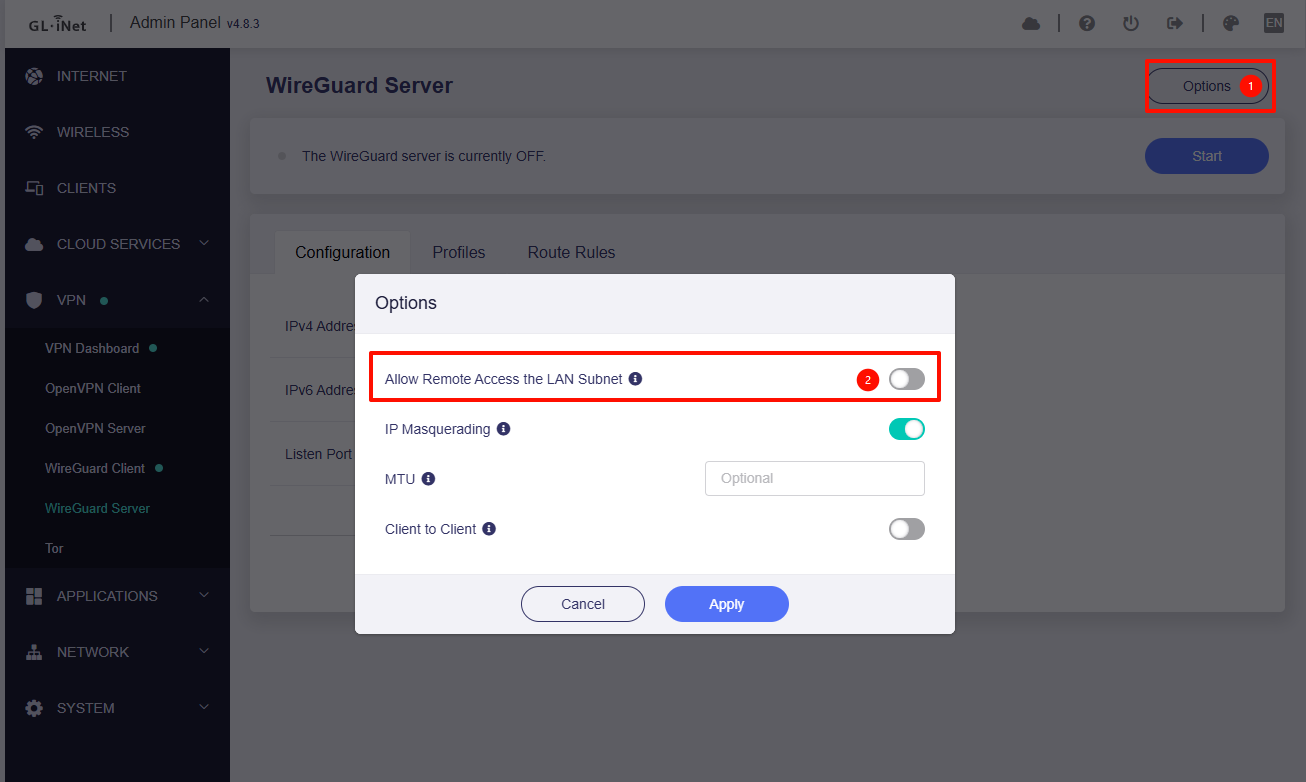
If you have enabled the 'Allow Remote Access the LAN Subnet' option, you can use the WG address or its LAN address to access the admin panel remotely while the WG is running.
However, if neither GoodCloud nor remote access is enabled, you will need to wait until you are physically present at the location of the server or have someone to access it.
Thanks. Sorry for asking such obvious questions, but how do I find the address of the server?
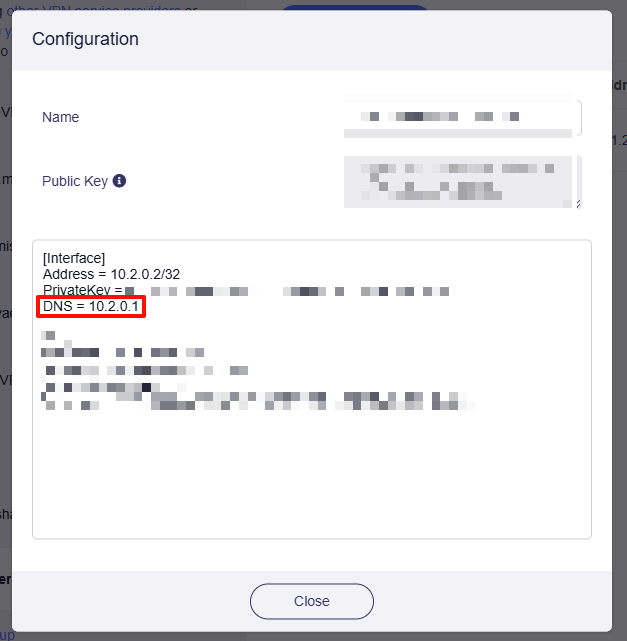
I tried 10.20.0.1 and it did not load. I think that most likely I did not enable the remote access but would like to be sure as this would be really helpful in debugging.
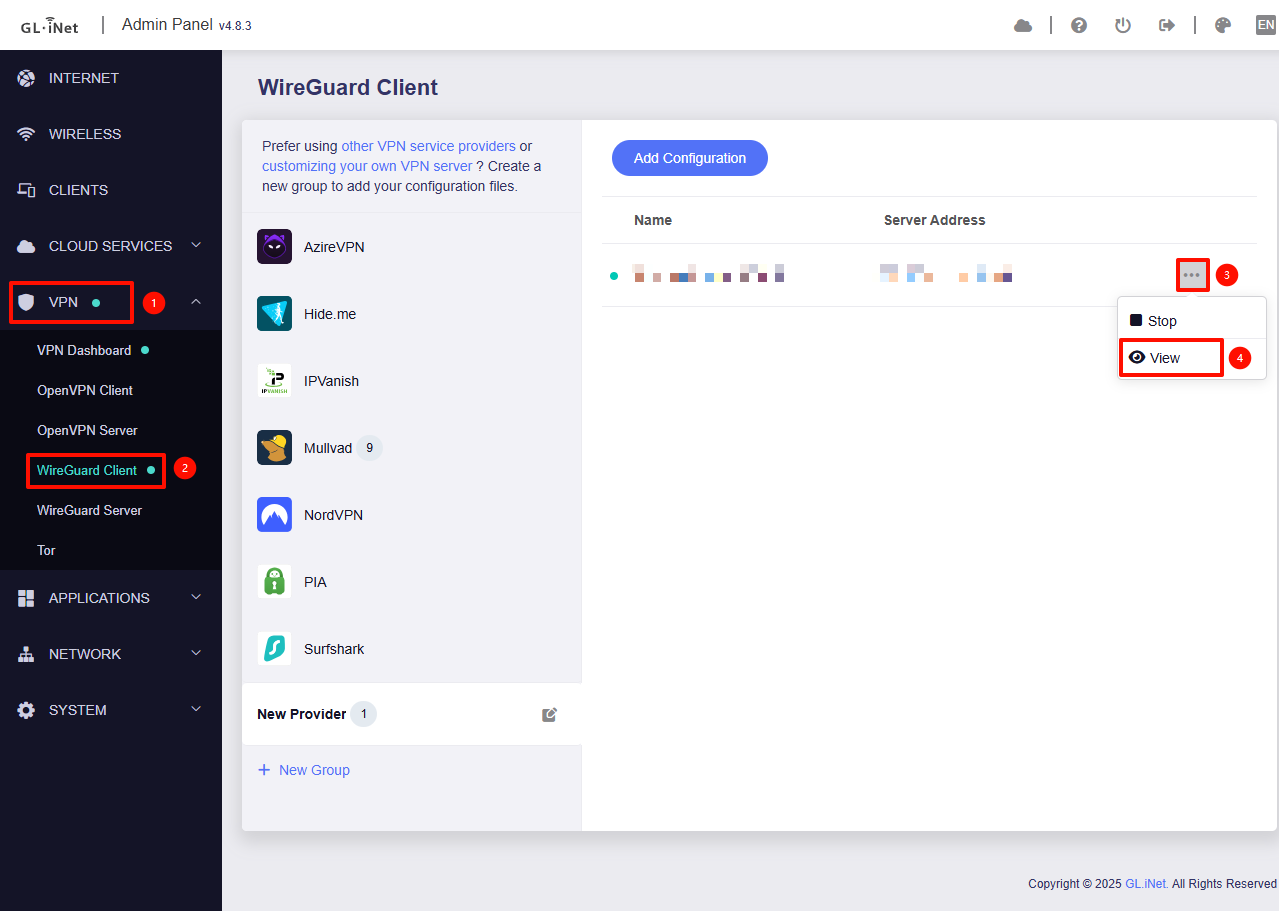
If the client configuration file hasn't been modified, the server address should be found in the DNS field.
If the page doesn't load, remote access likely isn't enabled.
Thank you. I am working on having somebody export the log files from the server side and will send it to you via DM when I have received it.
OK, wait for your update.
For those who might be following this thread, I updated the firmware of my client from 4.6 to 4.8 and I haven’t seen this issue since then.
@will.qiu any ideas what might have been included in the new release to solve this? It seems like it may have been a client side error after all…
It is not entirely clear whether the issue was related.
In version 4.8, we implemented a significant update to the VPN module, which may have resolved the related problem.
Another possibility is that the server-side network conditions have recently improved, resulting in the issue no longer occurring.
As you mentioned, your current configuration has been running for the past two months without problems.
Hi Will,
Thanks for your comments. I truly find it very unlikely that a server side issue was resolved at the exact moment that I updated the client firmware. The change was drastic before and after the update, from dropping for 1-2 minutes every hour to not dropping at all since the update. I remain convinced that the firmware update is the cause of the improved performance.
With that said, it does strike me as odd to experience the kind of performance degradation over time as I did. While I'm happy the issue is resolved for now, I'd like to better understand what may have possibly caused this to happen, given what we now know about the effect the firmware update had on the situation.
Given the limited information available, it is difficult to determine the exact cause at this stage.
As mentioned earlier, WireGuard sessions that recover automatically are often triggered by network conditions—such as carrier-side fluctuations, misconfigurations causing intermittent disconnects, or in some cases a software issue.
Since the jump from version 4.6 to 4.8 includes substantial internal changes, it is challenging to identify which component may be involved.
For now, we recommend continuing to monitor the status. If the issue reappears, we can then conduct targeted troubleshooting to isolate the root cause.
Thanks for your help! Will reach out again if the issue resurfaces. I understand it is very difficult to determine an exact cause given limited information.
1 Like