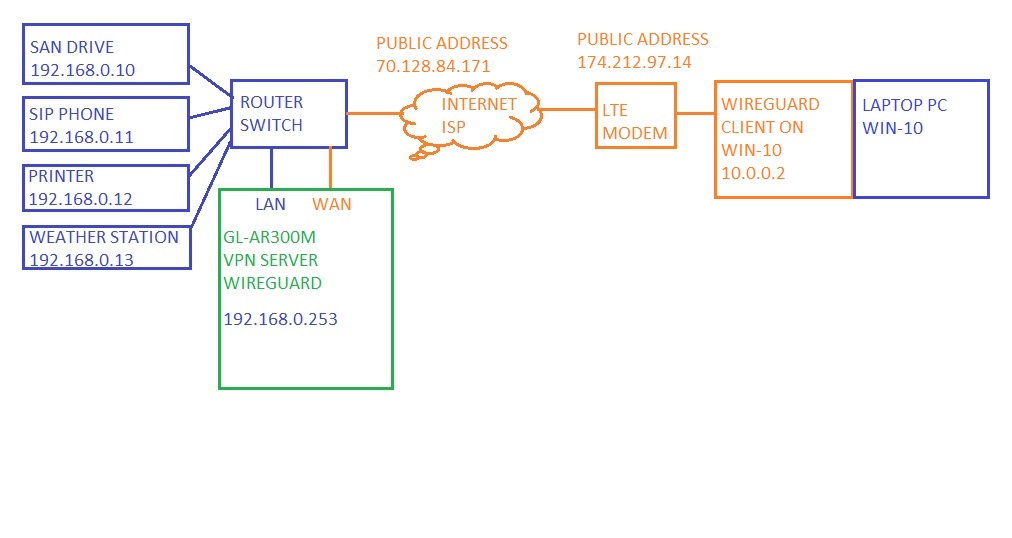
What is the difference between the Options in the Wireguard Server settings and the VPN Dashboard Cascading Tunnel Options? They say the same thing but you can have differing settings at the same time. I can have Allow Remote Access the Lan Subnet selected in the Wireguard Server Options and deselected in the Cascading Tunnel (connection type Wireguard Server) Options. Which one actually controls access to the LAN for VPN peers? There’s also duplicate IP Masquerading settings for instance, very confusing.
Your Slate is connecting to the Flint and normally will appear with the IP Adress of your Flint
If you switch on cascading, the Slate will get the IP-Adress of the VPN or WireGuard of the VPN the Flint is using.
Imaging it like this
Slate (Dubai) → WireGuard or VPN Server on Flint (US) → Slate will appear with US-IP
If you switch on Cascading and the Flitn in the US is connected to an VPN or WireGuard ENDPOINT in Germany, also the Slate (Dubai) will appear with German IP-Adress
Thanks, I think I understand what the Cascading tunnel does, i.e. policy based routing through VPN or WAN for traffic from VPN-server clients.
But I don’t understand why there is a “Allow Remote Access the LAN Subnet” there and in the Wireguard Server Options? Which one should I use?
I’m allowing LAN access in the Wireguard Server Options now and that seems to override not allowing it in the Tunnel, or doesn’t the tunnel affect traffic destined for the LAN at all? The “To” drop down is set to “All targets” and “Via” is set to “Not Use VPN” which could be interpreted as all (even LAN) traffic from VPN clients are run through this tunnel and LAN access would then not be allowed, or it is assumed this is only affecting traffic to public IP:s (since the alternative to Not Use VPN is to use a VPN. Though I mean that could be any VPN tunnel and doesn’t have to be for public IP:s.
I’m confused.
Is this just a case of poor GUI where they left all settings in even if they don’t do anything for the particular tunnel?
The “Services from GL-iNet use VPN” setting is available on all tunnels. Is there a conflict if it’s enabled on more than one?
Allow Remote Access the LAN Subne
Its bout allowing the Slate (Dubai) to access the Flint-Router-Settings or f.e. printers or other Ressources in the LAN of the Flint
Allow Remote Access the LAN Subne
Its bout allowing the Slate (Dubai) to access the Flint-Router-Settings or f.e. printers or other Ressources in the LAN of the Flint
The Wireguard Server Options setting or the VPN Dashboard Cascading Tunnel Options setting? It’s available at multiple places.