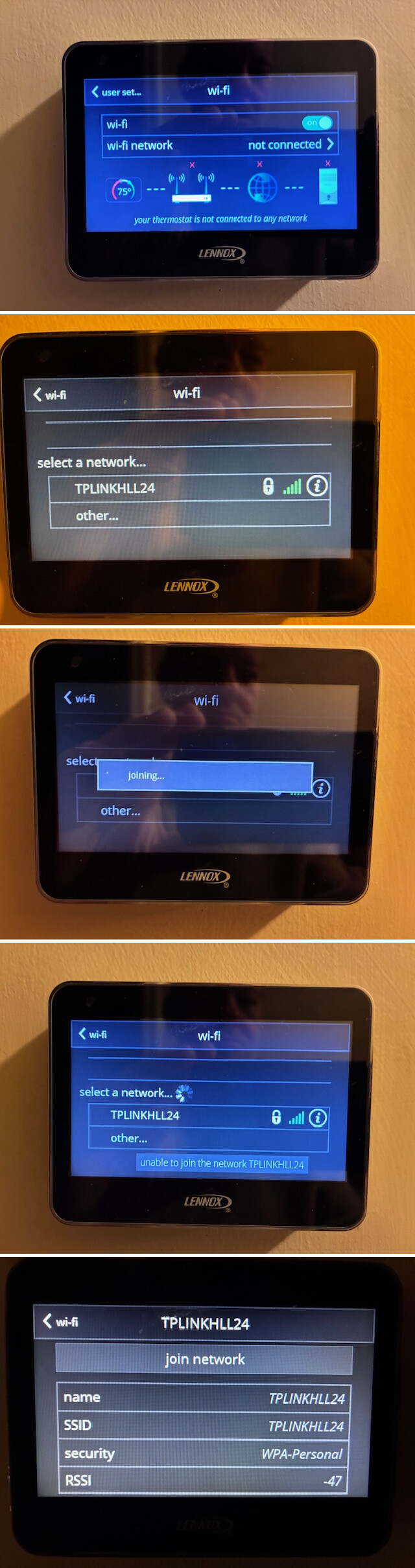
Sorry, but I had trouble exporting the log and sending it as a private message so I used the process through the admin page accessing customer support. Hope that’s OK.
But date is slightly newer than what a sent a little while ago.
Mon Apr 27 09:48:08 2026 kern.warn kernel: [142279.771212] 7986@C08L2,ap_peer_disassoc_action() 3645: ASSOC - 1 receive DIS-ASSOC request
Mon Apr 27 09:48:08 2026 kern.warn kernel: [142279.779597] 7986@C01L2,wifi_sys_disconn_act() 1002: wdev_idx=0
Mon Apr 27 09:48:08 2026 kern.notice kernel: [142279.785918] 7986@C08L3,hw_ctrl_flow_v2_disconnt_act() 172: wdev_idx=0
Mon Apr 27 09:48:08 2026 kern.warn kernel: [142279.793010] 7986@C13L2,MacTableDeleteEntry() 1938: Del Sta:88:da:1a:xx:xx:xx
Mon Apr 27 09:48:09 2026 kern.debug kernel: [142281.201184] entrytb_aid_aquire(): found non-occupied aid:11, allocated from:8
Mon Apr 27 09:48:09 2026 kern.warn kernel: [142281.208422] 7986@C13L2,MacTableInsertEntry() 1577: New Sta:88:da:1a:xx:xx:xx
Mon Apr 27 09:48:09 2026 kern.notice kernel: [142281.218828] 7986@C08L3,ap_cmm_peer_assoc_req_action() 1714: Recv Assoc from STA - 88:da:1a:xx:xx:xx
Mon Apr 27 09:48:09 2026 kern.notice kernel: [142281.228316] 7986@C08L3,ap_cmm_peer_assoc_req_action() 2241: ASSOC Send ASSOC response (Status=0)...
Mon Apr 27 09:48:09 2026 kern.notice kernel: [142281.237503] 7986@C01L3,wifi_sys_conn_act() 1115: wdev idx = 0
Mon Apr 27 09:48:09 2026 kern.notice kernel: [142281.243641] 7986@C08L3,hw_ctrl_flow_v2_connt_act() 215: wdev_idx=0
Mon Apr 27 09:48:09 2026 kern.notice kernel: [142281.373966] 7986@C15L3,WPABuildPairMsg1() 5310: <=== send Msg1 of 4-way
Mon Apr 27 09:48:10 2026 kern.notice kernel: [142282.393984] 7986@C15L3,WPABuildPairMsg1() 5310: <=== send Msg1 of 4-way
Mon Apr 27 09:48:10 2026 kern.notice kernel: [142282.400744] 7986@C15L3,PeerPairMsg2Action() 6303: ===>Receive msg 2
Mon Apr 27 09:48:10 2026 kern.notice kernel: [142282.407465] 7986@C15L3,WPABuildPairMsg3() 5595: <=== send Msg3 of 4-way
Mon Apr 27 09:48:10 2026 kern.notice kernel: [142282.414205] 7986@C15L3,PeerPairMsg4Action() 6734: ===>Receive msg 4
Mon Apr 27 09:48:10 2026 kern.warn kernel: [142282.425760] 7986@C15L2,PeerPairMsg4Action() 7098: AP SETKEYS DONE(ra0) - AKMMap=WPA2PSK, PairwiseCipher=AES, GroupCipher=AES, wcid=4 from 88:da:1a:xx:xx:xx
Mon Apr 27 09:48:10 2026 kern.warn kernel: [142282.425760]
Mon Apr 27 09:48:23 2026 kern.warn kernel: [142294.658903] IN=br-lan OUT= MAC=94:83:c4:xx:xx:xx:24:4c:e3:xx:xx:xx:08:00 SRC=192.168.8.238 DST=192.168.8.1 LEN=84 TOS=0x00 PREC=0x00 TTL=64 ID=10713 DF PROTO=ICMP TYPE=8 CODE=0 ID=56026 SEQ=28087
Mon Apr 27 09:48:27 2026 kern.warn kernel: [142299.245484] IN=br-lan OUT= MAC=94:83:c4:xx:xx:xx:18:74:2e:xx:xx:xx:08:00 SRC=192.168.8.106 DST=192.168.8.1 LEN=84 TOS=0x00 PREC=0x00 TTL=64 ID=40921 DF PROTO=ICMP TYPE=8 CODE=0 ID=56026 SEQ=19447
Mon Apr 27 09:48:28 2026 kern.warn kernel: [142299.945253] IN=br-lan OUT= MAC=94:83:c4:xx:xx:xx:38:f7:3d:xx:xx:xx:08:00 SRC=192.168.8.208 DST=192.168.8.1 LEN=84 TOS=0x00 PREC=0x00 TTL=64 ID=50100 DF PROTO=ICMP TYPE=8 CODE=0 ID=56026 SEQ=15389
Mon Apr 27 09:48:32 2026 kern.warn kernel: [142303.557872] IN=br-lan OUT= MAC=94:83:c4:xx:xx:xx:88:71:e5:xx:xx:xx:08:00 SRC=192.168.8.129 DST=192.168.8.1 LEN=84 TOS=0x00 PREC=0x00 TTL=64 ID=14935 DF PROTO=ICMP TYPE=8 CODE=0 ID=56026 SEQ=982
Mon Apr 27 09:48:43 2026 kern.debug kernel: [142315.373804] entrytb_aid_aquire(): found non-occupied aid:26, allocated from:8
Mon Apr 27 09:48:43 2026 kern.warn kernel: [142315.381040] 7986@C13L2,MacTableInsertEntry() 1577: New Sta:c8:fe:0f:xx:xx:xx
Mon Apr 27 09:48:43 2026 kern.notice kernel: [142315.399746] 7986@C08L3,ap_cmm_peer_assoc_req_action() 1714: Recv Assoc from STA - c8:fe:0f:xx:xx:xx
Mon Apr 27 09:48:43 2026 kern.notice kernel: [142315.409134] 7986@C08L3,ap_cmm_peer_assoc_req_action() 2241: ASSOC Send ASSOC response (Status=0)...
Mon Apr 27 09:48:43 2026 kern.notice kernel: [142315.418307] 7986@C01L3,wifi_sys_conn_act() 1115: wdev idx = 0
Mon Apr 27 09:48:43 2026 kern.notice kernel: [142315.424464] 7986@C08L3,hw_ctrl_flow_v2_connt_act() 215: wdev_idx=0
Mon Apr 27 09:48:44 2026 kern.notice kernel: [142315.553692] 7986@C15L3,WPABuildPairMsg1() 5310: <=== send Msg1 of 4-way
Mon Apr 27 09:48:44 2026 kern.notice kernel: [142315.568301] 7986@C15L3,PeerPairMsg2Action() 6303: ===>Receive msg 2
Mon Apr 27 09:48:44 2026 kern.notice kernel: [142315.574983] 7986@C15L3,WPABuildPairMsg3() 5595: <=== send Msg3 of 4-way
Mon Apr 27 09:48:44 2026 kern.notice kernel: [142315.581684] 7986@C15L3,PeerPairMsg4Action() 6734: ===>Receive msg 4
Mon Apr 27 09:48:44 2026 kern.warn kernel: [142315.593287] 7986@C15L2,PeerPairMsg4Action() 7098: AP SETKEYS DONE(ra0) - AKMMap=WPA2PSK, PairwiseCipher=AES, GroupCipher=AES, wcid=19 from c8:fe:0f:xx:xx:xx
Mon Apr 27 09:48:44 2026 kern.warn kernel: [142315.593287]
Mon Apr 27 09:48:44 2026 daemon.info dnsmasq-dhcp[22025]: DHCPDISCOVER(br-lan) c8:fe:0f:xx:xx:xx
Mon Apr 27 09:48:44 2026 daemon.info dnsmasq-dhcp[22025]: DHCPOFFER(br-lan) 192.168.8.131 c8:fe:0f:xx:xx:xx
Mon Apr 27 09:48:44 2026 daemon.info dnsmasq-dhcp[22025]: DHCPREQUEST(br-lan) 192.168.8.131 c8:fe:0f:xx:xx:xx
Mon Apr 27 09:48:44 2026 daemon.info dnsmasq-dhcp[22025]: DHCPACK(br-lan) 192.168.8.131 c8:fe:0f:xx:xx:xx
Mon Apr 27 09:48:56 2026 kern.warn kernel: [142327.896497] 7986@C01L2,wifi_sys_disconn_act() 1002: wdev_idx=0
Mon Apr 27 09:48:56 2026 kern.notice kernel: [142327.902766] 7986@C08L3,hw_ctrl_flow_v2_disconnt_act() 172: wdev_idx=0
Mon Apr 27 09:48:56 2026 kern.warn kernel: [142327.909856] 7986@C13L2,MacTableDeleteEntry() 1938: Del Sta:c8:fe:0f:xx:xx:xx
Mon Apr 27 09:48:56 2026 kern.notice kernel: [142327.917168] 7986@C08L3,ap_peer_deauth_action() 437: AUTH - receive DE-AUTH(seq-5) from c8:fe:0f:xx:xx:xx, reason=3