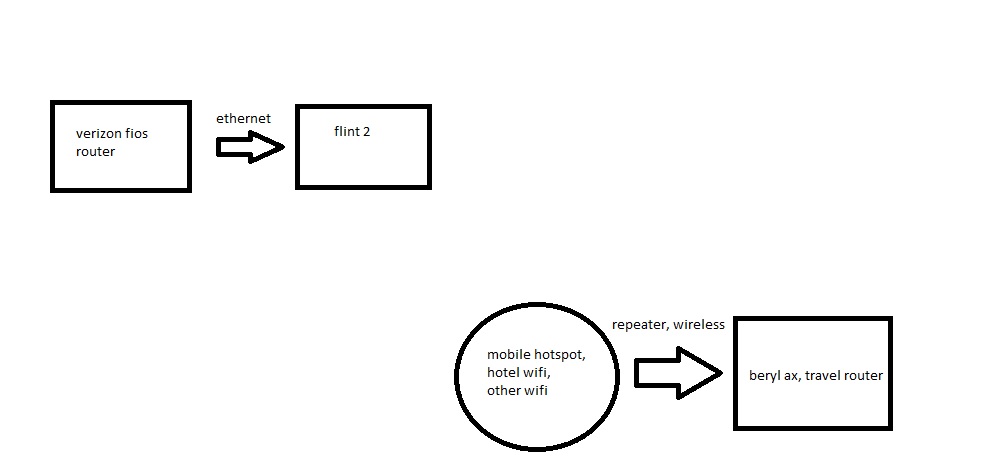
I have a very basic setup, I am trying to create a wireguard server and client. The purpose would be to bring my beryl ax router with me, and any device connected to it will have my home ip address.
Devices:
Flint 2 (GL-MT6000, this is attached to my verizon fios router) - firmware - 4.8.3
Problem:
My beryl ax says its connected to my wireguard server on the flint 2, everything says online and connected, but I cannot get on the internet. I have tried using proton vpn inside of my beryl ax and that works fine, but accessing my home internet does not work. I have followed this guide, I have the port forwarded on my verizon router using udp and 51820, and tried reinserting a new config file in my beryl ax.
How do I fix this so that my beryl ax can connect to my home ip address?
these are the logs on the wireguard server on the flint 2 router connected to my verizon fios modem/router
Sun Oct 19 18:27:15 2025 daemon.notice netifd: wgserver (12657): Try `ip6tables -h' or 'ip6tables --help' for more information.
Sun Oct 19 18:27:15 2025 daemon.notice netifd: wgserver (12657): ip6tables: No chain/target/match by that name.
Sun Oct 19 18:27:15 2025 daemon.notice netifd: wgserver (12657):    ! Failed with exit code 1
Sun Oct 19 18:27:15 2025 daemon.notice netifd: Interface 'wgserver' is now up
Sun Oct 19 18:27:15 2025 daemon.notice netifd: Network device 'wgserver' link is up
Sun Oct 19 18:27:15 2025 user.notice firewall: Reloading firewall due to ifup of wgserver (wgserver)
Sun Oct 19 18:27:15 2025 user.notice nat6: Firewall config="wgserver" zone="wgserver" zone_masq6="1".
Sun Oct 19 18:27:15 2025 user.notice nat6: Found firewall zone_name="wgserver" with zone_masq6="1" zone_masq6_privacy="1".
Sun Oct 19 18:27:15 2025 user.notice nat6: Setting up masquerading nat6 for zone_name="wgserver" with zone_masq6_privacy="1"
Sun Oct 19 18:27:15 2025 user.notice nat6: Ensuring ip6tables chain="zone_wgserver_postrouting" contains our MASQUERADE.
Sun Oct 19 18:27:15 2025 user.notice nat6: Ensuring ip6tables chain="zone_wgserver_input" contains our permissive DNAT rule.
Sun Oct 19 18:27:15 2025 user.notice nat6: Ensuring ip6tables chain="zone_wgserver_forward" contains our permissive DNAT rule.
Sun Oct 19 18:27:15 2025 user.notice nat6: Done setting up nat6 for zone="wgserver" on devices:
Sun Oct 19 18:27:16 2025 user.notice nat6: Firewall config="wgserver" zone="wgserver" zone_masq6="1".
Sun Oct 19 18:27:16 2025 user.notice nat6: Found firewall zone_name="wgserver" with zone_masq6="1" zone_masq6_privacy="1".
Sun Oct 19 18:27:16 2025 user.notice nat6: Setting up masquerading nat6 for zone_name="wgserver" with zone_masq6_privacy="1"
Sun Oct 19 18:27:16 2025 user.notice nat6: Ensuring ip6tables chain="zone_wgserver_postrouting" contains our MASQUERADE.
Sun Oct 19 18:27:16 2025 user.notice nat6: Ensuring ip6tables chain="zone_wgserver_input" contains our permissive DNAT rule.
Sun Oct 19 18:27:16 2025 user.notice nat6: Ensuring ip6tables chain="zone_wgserver_forward" contains our permissive DNAT rule.
Sun Oct 19 18:27:16 2025 user.notice nat6: Done setting up nat6 for zone="wgserver" on devices:
Does the Beryl AX VPN Dashboard show WireGuard Connected?
If not, please check whether Verizon has provided you a public IP address and troubleshoot according to this guide: How to troubleshoot WireGuard
If it shows connected, please run the following commands on the device connected to Beryl AX for further troubleshooting:
nslookup google.com

# For Windows CMD
tracert 8.8.8.8

# For macOS/Linux
traceroute 8.8.8.8
This has been resolved, I was able to hop on a call with you guys (gl.inet support team member) and fix it.
I factory reset my beryl ax router, re-installed the config file from my flint 2 and it worked instantly.
More than likely the reason it was not working is because I had some sort of bad setting from trying to figure it out, so a factory reset from my beryl ax, I was able to connect to my flint 2 immediately!