Greetings,
I have a Beryl 7, and have been tweaking the wireguard server functionality. Recently I added a route via the UI as follows:
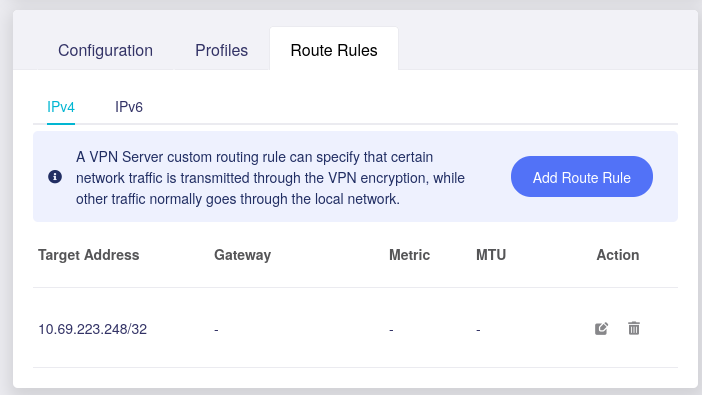
And verified in the router config it was going through the right interface:
root@GL-MT3600BE:~# ip route get 10.69.223.248
10.69.223.248 dev wgserver table 9910 src 10.1.0.1 uid 0
cache
However, after a day with no restart or upgrade, connection stopped working, when I went in to check, route had reset and was going to the wrong interface
root@GL-MT3600BE:~# ip route get 10.69.223.248
10.69.223.248 via 38.80.102.97 dev eth0 src 38.80.102.103 uid 0
cache
I had to re-apply the same setting in the wireguard server Route Rules tab, which triggered a server restart and the rule was back to normal.
I assume this is a bug, not sure what would cause the route to disappear or change since I don’t think I changed it and left it working yesterday night.
Hi,
Thank you for the information.
When the issue occurred, could you please confirm whether the WireGuard Server was still running normally?
Also, was the Route Rule you added (10.69.223.248/32) still shown on the Route Rules page but no longer taking effect, or had the rule disappeared from the page completely?
Could you also export the System Log and send it to us via private message so we can check whether there were any related events around the time the route changed?
Thank you for your understanding and support.
Wireguard server was running normally when the issue happened, and I confirm the rule was still visible in the Route Rules page but no longer taking effect.
I have sent the exported system log via private message.
Hi,
Thank you for providing the system logs.
According to the logs you provided, the Nginx log shows that wg-server.set_route was called at approximately 23:11 on August 13, while the available system log only begins at 05:24 on August 14. And the WireGuard status still includes 10.69.223.248/32 in the corresponding peer’s AllowedIPs.
However, we did not find any clear error or related event in the available logs that would allow us to determine the exact cause of the routing issue.
If the issue occurs again, could you please export and send us the system logs while the problem is still present, preferably before re-applying the Route Rule or restarting the WireGuard Server?
Thank you for your support and understanding.
I don’t think I have a way to replicate this, so I’ll have to wait for a next occasion when it happens.
I think we can close this, I’ll open another one when the time comes.
Hi,
Thank you for the update.
No problem, if the issue happens again in the future, please feel free to open a new topic and share the details with us, and we will be happy to take another look.