Hello, I have a strange VPN issue. It was working before, but after I had to reset my Flint2 device, I haven’t been able to configure it again.
I successfully set up my Mullvad VPN account on the router. In fact, if I create a policy like “from all devices” to “all destinations,” it works without any problems.
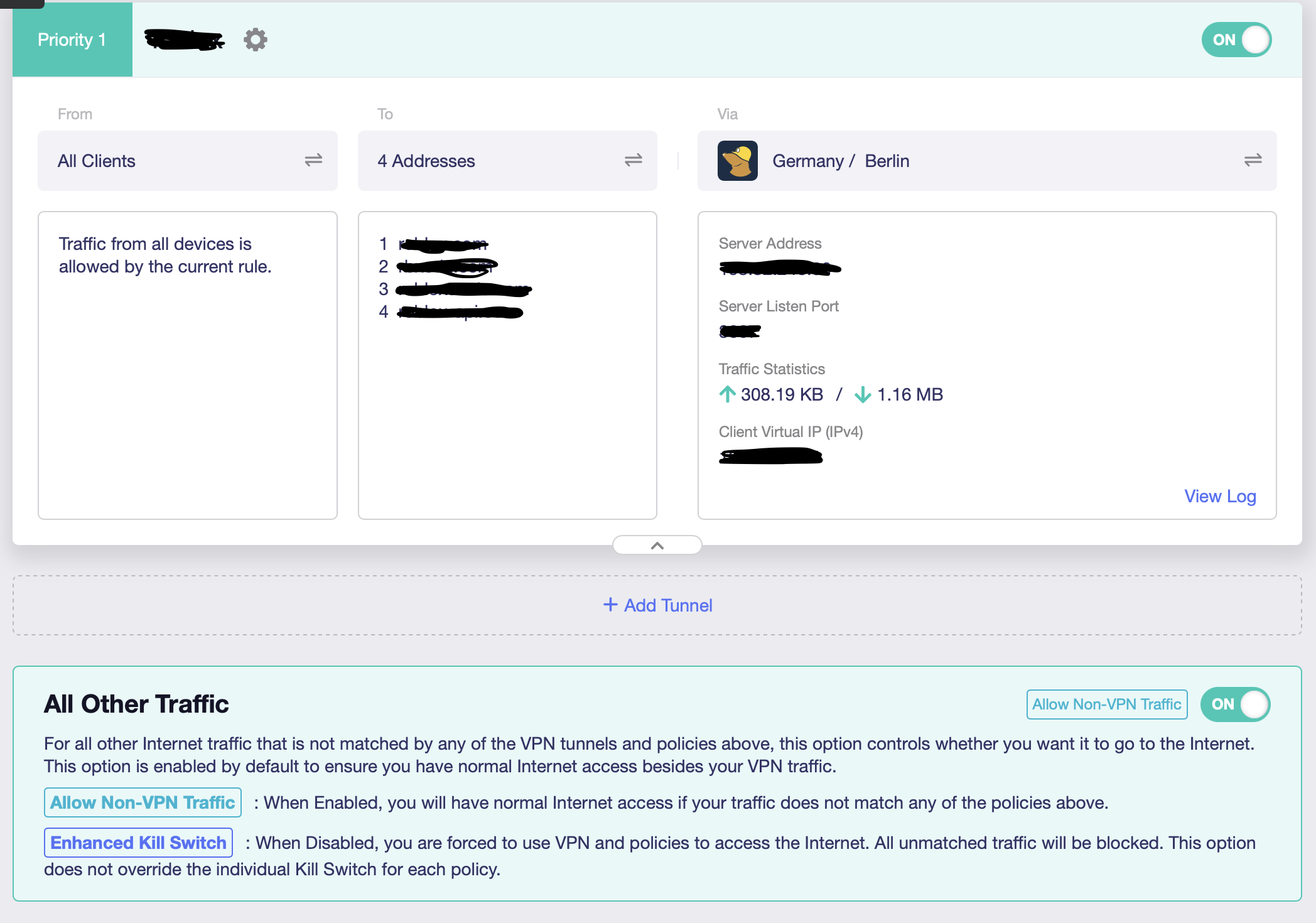
However, what I want to do is enable the VPN service only for “all devices” to “specific domain addresses.” When one of the domains on the list is accessed, the VPN should activate; in all other cases, traffic should continue without VPN. The rule I created is below, but I can’t get it to work at all.
What could be the reason for this? I tried turning the “kill switch” off and on, and I also toggled the “All Other Traffic – Allow Non-VPN Traffic” option at the bottom on and off, but it still didn’t work. Am I missing something, or could this be a software issue? The version I’m using appears to be 4.8.3.
Thank you in advance for your support.