Much appreciated for your feedback!!! That's perfect news ! 
It's very very ( I would say life changing) important feature for me and I’m sure many others!
Thank you GL inet Team !
Much appreciated for your feedback!!! That's perfect news !
It's very very ( I would say life changing) important feature for me and I’m sure many others!
Thank you GL inet Team !
Great  Thank you!
The Camera does not work for me when I connect using the app on my MAC silicon, it basically doesn’t show up on the list to allow camera for the KVM app on my security settings. However it works fine on the browser
We've only supported browsers so far; once beta is complete, the app will support it even faster.
Yes,we noticed that too, our development team is working on it.
Is your RM10 on Ethernet? Mine is on wifi and I havent had a good experience with the camera or the mic passthrough so far (Windows host → RM10PE → Macbook Pro)
Hi guys,
Just wanted to reach out and say thanks for the video pass through beta!
As I am woking via Chrome the whole day, while occasionally video call seems buggy and lag a lot, I tried to switch from 5G wifi to ethernet, but the browser seems to cap the Real-time Bitrate to around 4mb, which is a bit restricting my ability when sharing screen during video call and stuff. Any recommendations on this? Should I be considering using your app? Would that be more stable and using up the 20mb real time bitrate as what I saw in the forum?
Thanks!
No, it is connected via WI-FI 6. I had a friend with some video issues - he fixed this by turning off HDR settings in Windows display settings - check that settings too. We are both on version: V1.10.0 beta2
Cam will be supported at the next version of MacOS client app.
Hmm. Thats great. I wish I had your luck because my camera feed on the Mac is a pixelated mess and atleast a second or two lag. Also the sound quality from my mic is worse on FEC than WebRTC native. but holding out hope that it will get better in the next version
Amazing news! Can’t wait for the beta to be available for the RM1v2
Ok so i played around and this seems to be an allocated bandwidth issue. I used OBS to force downgrade my camera output and the lag and the smearing improved. The current bitrate is too low even for 720p30. Can we have an option to test higher bandwidth and bitrate?
hello hope you can help!
I upgraded to V1.10.0 beta2(RM1)
but I dont see the webcam option on the sidebar,
I plug in my webcam and teams dont see the webcam, what am I doing wrong? thanks
RM1 do not support webcam
hey thanks for your reply that was helpful 
which one supports webcam? the GL-RM10?
also will RM1 support webcam in the future?
thank you
I don't know; it depends on when we figure out how the generic UVC driver should be used, or how RK's built-in special UVC driver should be used.
Currently, aside from RM1 and RMQ1, all are supported.
I’ve been eagerly awaiting this for my RM1PE…. some day, some day. 
Hi guys!
Thanks for adding this crucial feature!
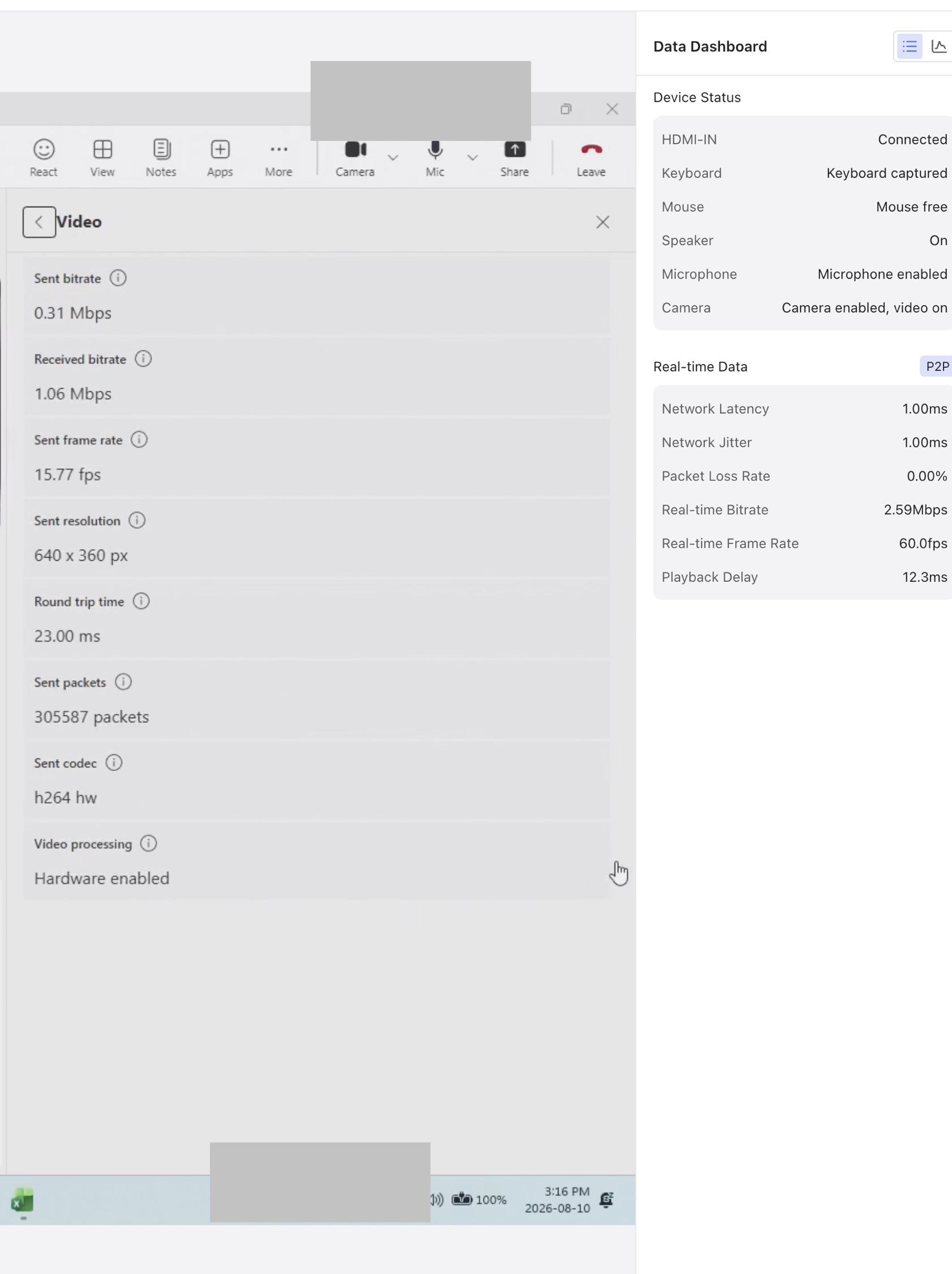
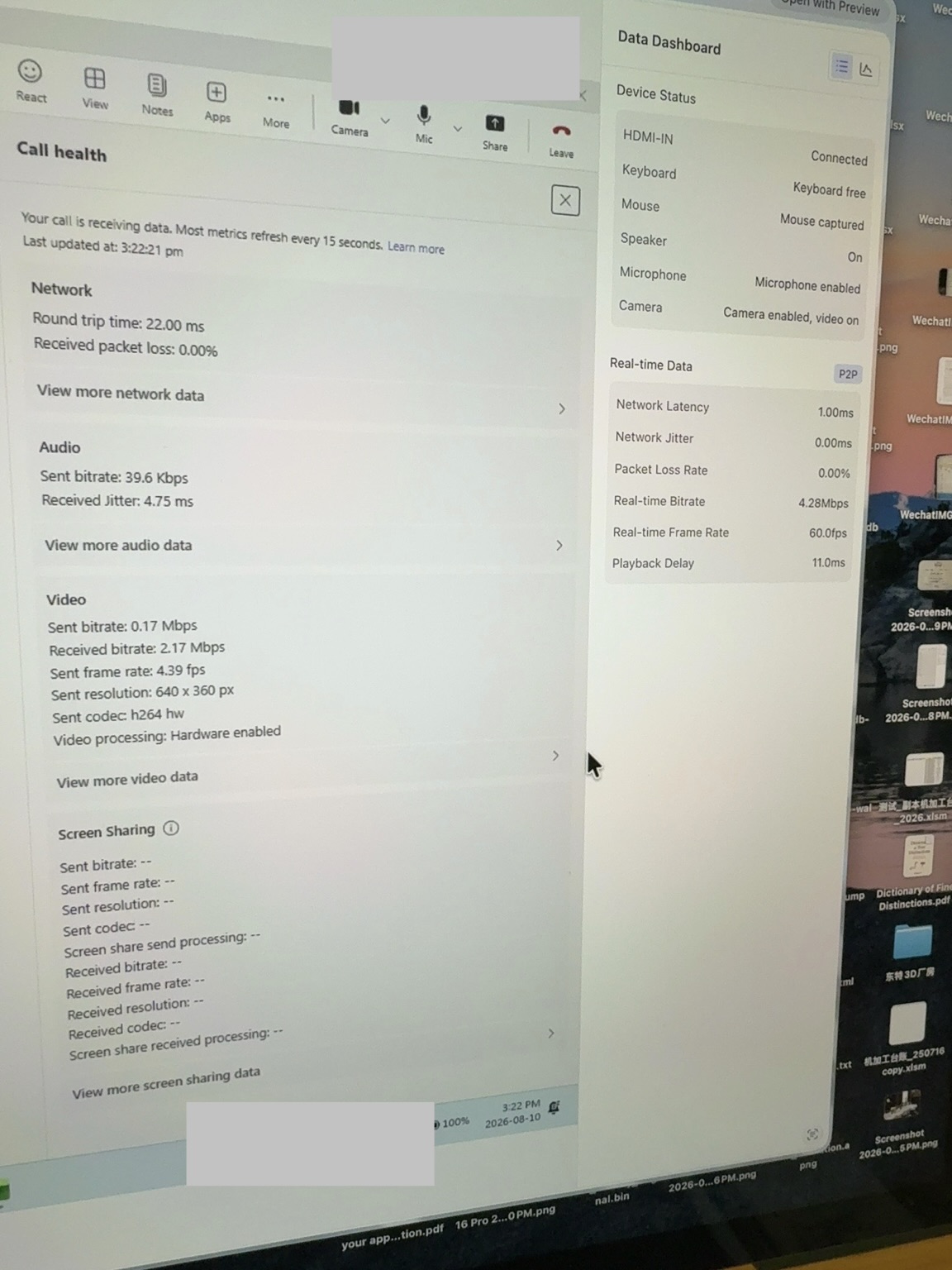
During my test with real world situations, I’ve tested for a 1 hour meeting, all equipment wired up with gigabit Ethernet, using chrome latest version, controlling from MacBook Pro to Dell Pro Max 16 plus.
It seems Comet’s reverse-camera WebRTC/UVC pipeline can’t maintain encoding/transmission when frame complexity suddenly rises. And I’ve been cutting out completely sometime during the later session after I shared my screen. During sharing screen on teams it was okay, right after I stopped sharing, my own image seems cut off frequently and coming back after a few seconds before being cutting out again.
Is this something that you guys can fix?
Detailed images below:
Thanks!
Ren
If the camera is turned off, will the screen lag stop?
It stays like that, tried different background filter for teams too, not helping much