When I updated one of the packages, I lost access to the UI.
Excuse my English.
Do you remember which one you updated?
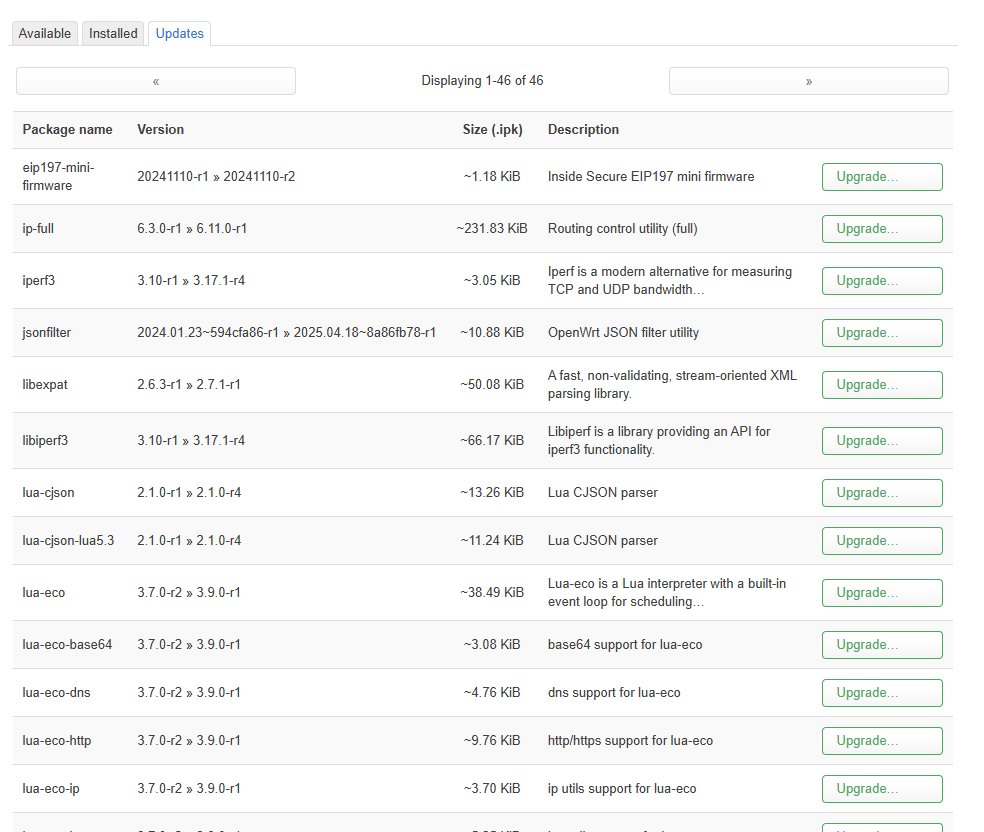
I updated to the new build of 4.7.5 op24, so far everything seems to be working fine.
Great to see the latest build of 4.7.5 op24!
I am experiencing some problem with port forwarding, means it simply doesn't work when I add something. Also noticed the error in luci "Legacy rules detected" appears, whenever i change something on the port forwarding. Is the GL Port forwarding app probably not yet migrated to nftables?
Only below v4.4 used this rule, and the black/white list of 4.7.5-op24 does not use this rule.
Enable the VPN server will mark VPN traffic with VPN_SER_POLICY chain.
Just check this rule again, and re-enable the VPN server and this rule will add again. This is not necessary to remove it. nft will also be used to add same rule according to the iptables. The two has not conflict and no effect each other.
Ok, so I let it be alone 
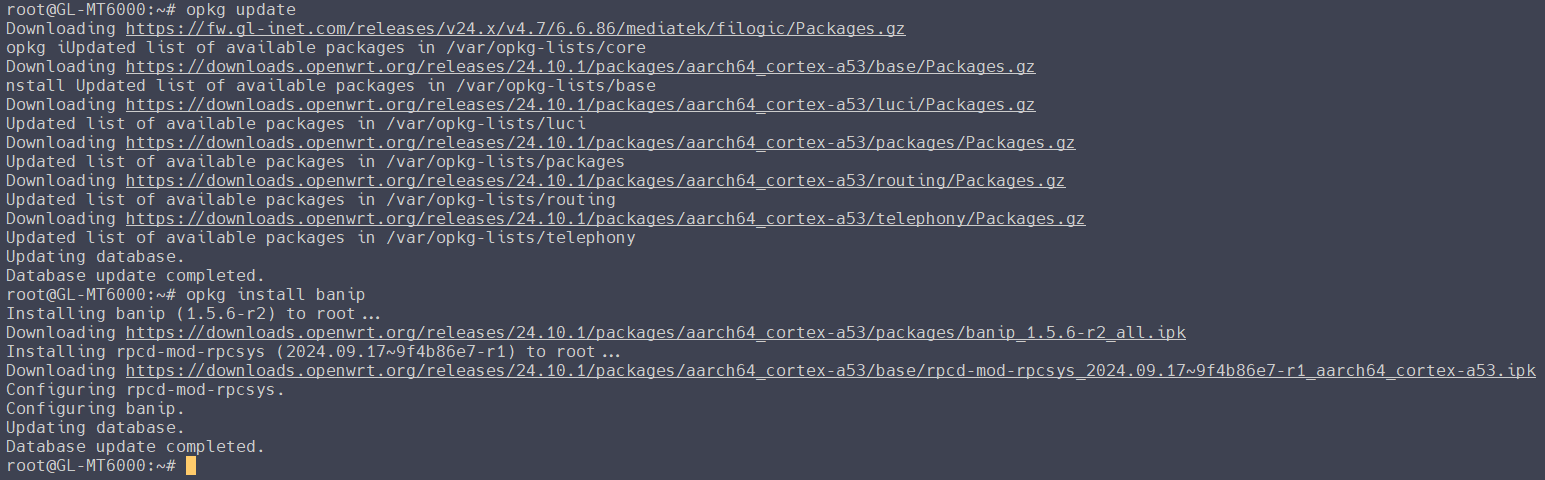
I wanted to install banip... but I get an error:
root@GL-MT6000:~# opkg update && opkg install banip
Downloading https://fw.gl-inet.com/releases/v24.x/v4.7/6.6.86/mediatek/filogic/Packages.gz
Updated list of available packages in /var/opkg-lists/core
Downloading https://downloads.openwrt.org/releases/24.10.1/packages/aarch64_cortex-a53/base/Packages.gz
Updated list of available packages in /var/opkg-lists/base
Downloading https://downloads.openwrt.org/releases/24.10.1/packages/aarch64_cortex-a53/luci/Packages.gz
Updated list of available packages in /var/opkg-lists/luci
Downloading https://downloads.openwrt.org/releases/24.10.1/packages/aarch64_cortex-a53/packages/Packages.gz
Updated list of available packages in /var/opkg-lists/packages
Downloading https://downloads.openwrt.org/releases/24.10.1/packages/aarch64_cortex-a53/routing/Packages.gz
Updated list of available packages in /var/opkg-lists/routing
Downloading https://downloads.openwrt.org/releases/24.10.1/packages/aarch64_cortex-a53/telephony/Packages.gz
Updated list of available packages in /var/opkg-lists/telephony
Updating database.
Database update completed.

Installing banip (1.5.6-r2) to root...
Downloading https://downloads.openwrt.org/releases/24.10.1/packages/aarch64_cortex-a53/packages/banip_1.5.6-r2_all.ipk
Collected errors:
 * opkg_install_pkg: Checksum or size mismatch for package banip. Either the opkg or the package index are corrupt. Try 'opkg update'.
 * opkg_install_cmd: Cannot install package banip.
I do several opkg update and I always get this error.
Is this normal?
Can it be fixed if not?
Policy based routing seems broken. Have a domain based rule all Hulu.com through WireGuard. 4.7.5 fails. Otherwise I love it. Went back till resolved
Log being spammed with this:
Thu May 22 19:19:27 2025 daemon.err eco[5616]: call wifi.get_config fail with http code: 302
Thu May 22 19:19:29 2025 daemon.err eco[5648]: call wifi.get_config fail with http code: 302
Thu May 22 19:19:31 2025 daemon.err eco[5693]: call wifi.get_config fail with http code: 302
Thu May 22 19:19:33 2025 daemon.err eco[5725]: call wifi.get_config fail with http code: 302
Thu May 22 19:19:35 2025 daemon.err eco[5751]: call wifi.get_config fail with http code: 302
Thu May 22 19:19:37 2025 daemon.err eco[5783]: call wifi.get_config fail with http code: 302
Thu May 22 19:19:39 2025 daemon.err eco[5801]: call wifi.get_config fail with http code: 302
Thu May 22 19:19:41 2025 daemon.err eco[5834]: call wifi.get_config fail with http code: 302
Thu May 22 19:19:44 2025 daemon.err eco[5855]: call wifi.get_config fail with http code: 302
I can confirm
Thanks, it works fine now.
I don't use it for now. I have to solve what I describe bellow.
edit : I notice a strange behavior with the VPN servers on my Flint2.
-
Wireguard: with the same configuration as before, I can't anymore connect to my Asustor Nas when I share my iPhone data mobile... I don't know why only him can't be joined with its address IP... All my other services can be joined with their IP adress.
I choose to use a subnet different from my LAN one:- LAN = 192.168.2.x
- Wireguard VPN = 192.168.12.x. For my mac it is 192.168.12.3.
I already check my Asustor firewall to see that it has already a rule for allowing those IP.
-
OpenVPN: I can't connect anymore to the server on the Flint2 when I share my iPhone's data mobile with my macbook, or on my iPhone directly in 5G data. But on both (iPhone and macbook) when I'm on a wifi (at work), I can connect with OpenVPN.
Like for Wiregard, I choose to have 192.168.11.x for subnet for OpenVPN.
Before flashing the 24.10 build on my Flint2, everything was working fine.
Precision : I can't test Wireguard from wifi at work, because it's been filtered, and can't work at all, as always, even before the 24.10 update.
When I use wifi at work, I use the OpenVPN, and when I use my mobile data, I use Wireguard. But I want OpenVPN working with data mobile, and Wireguard allow me to connect to my NAS.
What's very strange, I also have a backup Wireguard server on my Home Assistant OS, set up to use 192.168.12.16 IP for my mac.
And with this connection, I can connect to my Asustor IP adress...
I don't know what's different betwenn the two servers, but it's odd.
Anyone can help me?
Thanks in advance.
Hi,
I have a problem here that I can't quite understand.
The log shows these entries every 30 seconds or so.
I then removed all connected clients from the network until none were online.
The entries still appear in the log file.
Is it possible that this is...
Sat May 24 11:43:49 2025 kern.info kernel: [ 2080.437589] banIP/pre-udp/drop: IN=eth1 OUT= MAC=01:00:5e:7f:ff:fa:f8:1d:0f:2f:21:82:08:00 SRC=192.168.254.252 DST=239.255.255.250 LEN=441 TOS=0x00 PREC=0x00 TTL=2 ID=0 DF PROTO=UDP SPT=50533 DPT=1900 LEN=421
Sat May 24 11:43:49 2025 kern.info kernel: [ 2080.456170] banIP/pre-udp/drop: IN=eth1 OUT= MAC=01:00:5e:7f:ff:fa:f8:1d:0f:2f:21:82:08:00 SRC=192.168.254.252 DST=239.255.255.250 LEN=480 TOS=0x00 PREC=0x00 TTL=2 ID=0 DF PROTO=UDP SPT=50533 DPT=1900 LEN=460
Sat May 24 11:43:49 2025 kern.info kernel: [ 2080.474751] banIP/pre-udp/drop: IN=eth1 OUT= MAC=01:00:5e:7f:ff:fa:f8:1d:0f:2f:21:82:08:00 SRC=192.168.254.252 DST=239.255.255.250 LEN=512 TOS=0x00 PREC=0x00 TTL=2 ID=0 DF PROTO=UDP SPT=50533 DPT=1900 LEN=492
Sat May 24 11:43:50 2025 kern.info kernel: [ 2080.649959] banIP/pre-udp/drop: IN=eth1 OUT= MAC=01:00:5e:7f:ff:fa:f8:1d:0f:2f:21:82:08:00 SRC=192.168.254.252 DST=239.255.255.250 LEN=480 TOS=0x00 PREC=0x00 TTL=2 ID=0 DF PROTO=UDP SPT=50533 DPT=1900 LEN=460
Sat May 24 11:43:50 2025 kern.info kernel: [ 2080.668548] banIP/pre-udp/drop: IN=eth1 OUT= MAC=01:00:5e:7f:ff:fa:f8:1d:0f:2f:21:82:08:00 SRC=192.168.254.252 DST=239.255.255.250 LEN=500 TOS=0x00 PREC=0x00 TTL=2 ID=0 DF PROTO=UDP SPT=50533 DPT=1900 LEN=480
Sat May 24 11:43:50 2025 kern.info kernel: [ 2080.687138] banIP/pre-udp/drop: IN=eth1 OUT= MAC=01:00:5e:7f:ff:fa:f8:1d:0f:2f:21:82:08:00 SRC=192.168.254.252
In the admin panel under Network Storage, DLNA is set to off.
Unfortunately, the log entries remain.
Maybe someone has an idea.
Otherwise, I've only discovered minor issues so far, some of which have already been resolved.
Hello,
Today I performed a factory reset and, after reconfiguring my device, tested WireGuard—only to encounter the same issues. I’m unable to access my Asustor via its LAN IP address. More troubling, I can only reach it using a local domain name intended solely for LAN use. This is puzzling because my reverse proxy is set to allow only the LAN range (192.168.2.xxx) and the VPN range (192.168.12.xxx), and every other service works perfectly using either its IP address or its local domain name.
I hope these details help shed light on this peculiar behavior.
For comparison, I also run another WireGuard server on Home Assistant on a different port. That server works flawlessly—allowing me to connect to my Asustor using its IP address without issue. It’s baffling why only the Flint2 WireGuard server is acting this way.
I’m considering reaching out to Asustor support. In the meantime, can anyone help explain what differences might exist between the Flint2 WireGuard server and the one running on Home Assistant?
Thanks for any help.
Miles
P.S. I haven’t had time to test OpenVPN yet—perhaps tomorrow.
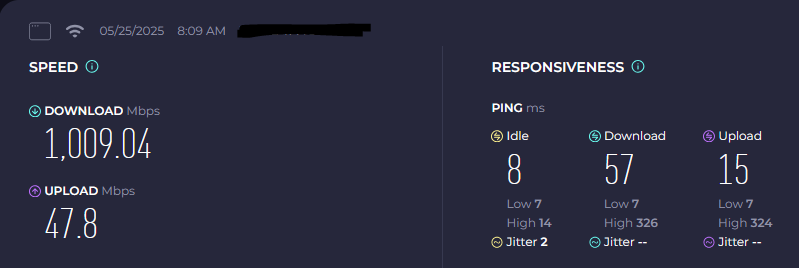
I'd like to share my current upload and download speed results. The MT-6000 has received another performance boost with OpenWRT 24.10.1, and I’m genuinely impressed by this device’s performance. Wi-Fi is completely disabled, and there is an active WireGuard connection to a VPN server in Frankfurt am Main. All devices are connected via the 2.5 Gbit LAN port.
So far, I’ve never managed to exceed 1000 Mbps download speed on any other router — until now. My current maximum download speed is 1140 Mbps, and my upload speed peaks at 55 Mbps. I'm curious to see what the successor to the MT-6000 will be capable of in this regard.
@bruce: KUDOS to the developers of the latest OP24 firmware release for the MT6000!
4 Likes
I just did some speedtest, with ethernet cable, and they are very good form my internet connection.
My ISP gives me 2000 DL / 900 UP, and yere a speedtest done several minutes ago:
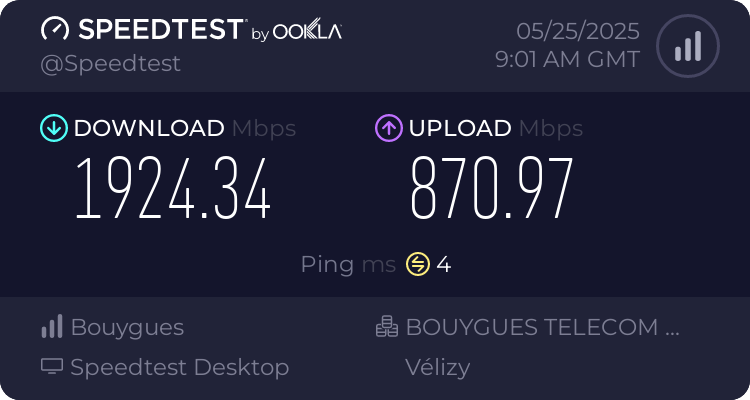
I'm not connected through a VPN provider.
I'm not sure I did a speedtest with 4.7.5 op21 to compare...
OT: the ISP speed is interesting, since DL bandwidth is far less then UL. 
What is the gateway set on the asustor?
If you have 2 different gateways for VPN how have you setup the routing?
Hmm, is this the last router in your network before it goes over the isp?
If so please assist checking on the routers samba share settings, and ensure it isn't listening on wan or if avahi is active force avahi to not listen on wan.
This configuration can be found here:
/etc/avahi/avahi-daemon.conf
And you need:
deny-interfaces=wan,pppoe-wan under the [server] prefix.
Also note but slightly off topic: that some lists provided by banip should only listen on input, on the banip wiki it shows exactly which chains to use per list.
But hence, its never good to see a multicast/igmp subscription group being sourced from lan to wan, it could mean the isp is able to use this group and manage the broadcasted device, the only few exceptions are for things like iptv you want to allow this.
Maybe samba isn't really closed?, can you try via the cli ? /etc/init.d/smbd stop
Hi, can you confirm that the traffic statistics under client are totally wrong?