some time ago I had to do business at a company, they provided WiFi with voucher.
The strange thing was:
connecting with smartphone or laptop to WiFi resulted in opening a browser window where I had to enter the voucher. The URL had some strange string in it, presumable some unique string.
connecting using the Beryl router resulted in no capture portal, no redirect, nothing. Opening neverssl resulted in a blank page. Pasting the URL from before resulted in an error of the capture portal which leads me to believe this unique string is some sort of fingerprint.
I expected the Beryl would open the capture portal site but did not do so...
The company is a rather small one so I cannot rule out the possibility of this being set up in a wrong way, making a router inoperable but not devices. I do not believe they have a very capable IT department, they could have outsourced it.
I cannot test anymore because this company is now thousands of kilometers away.
Does anybody have a clue what could have this been?
Is there a way to connect using the Beryl? I ended up not using the Beryl but my devices directly. What would I have to do next time to get more information why the Beryl would not connect.
Problems with captive portals (hotels, cruise ships, flights...etc.), some possible workarounds and a substantial number of unresolved problems are probably some of the most reported issues on these fora since the inception of GL.iNET routers. Credit to the developers here for trying to overcome some of these difficulties in the newest devices and firmware versions but they have also been incredibly slow in trying to completely address these issues (for example the lack of a basic built-in browser that can be used to login to captive portals, something that a lot of us have been calling for for ages). A quick search here should get you endless reports on similar issues.
I'd really re-title this thread as '[Beryl AX] Captive portal detection fails'. I'd also include the firmware version (GL GUI -> System -> Upgrade -> Current Firmware) in the post if not the title.
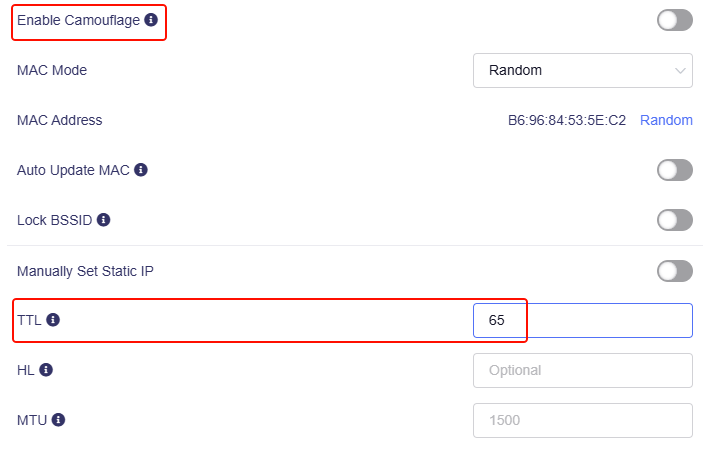
A TTL of 128 will spoof the default on a Windows machine. 64 is typical of OSX & Linux:
uci batch <<- __EOF
	add firewall rule
	rename firewall.@rule[-1]='custom_ttl'
	set firewall.custom_ttl.name='Set TTL to 128'
	set firewall.custom_ttl.src='wan'
	set firewall.custom_ttl.proto='ip'
	set firewall.custom_ttl.target='ACCEPT'
	set firewall.custom_ttl.ttl='128'
	reorder firewall.custom_ttl='1'
	set firewall.custom_ttl.enabled='1'
__EOF
uci commit firewall && service firewall restart