Thanks for your detailed response and above-and-beyond effort to help!
I have Imgur blocked; it is a web site known to be privacy invasive. You can directly embed images into your post using the 'upload' next to the 'bullet point' formatting icon on toolbar when composing.
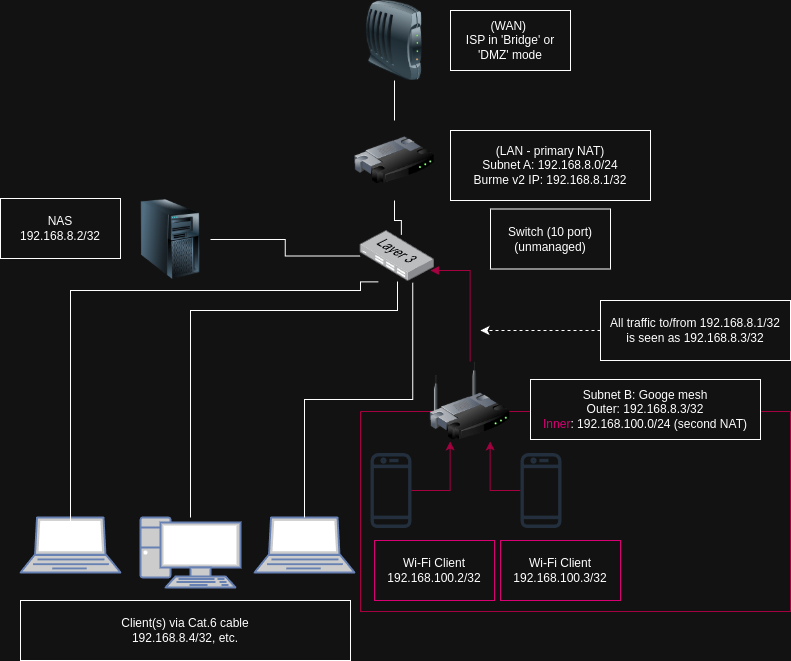
I edited the prior post to embed a link to my flow chart diagram. Thanks for introducing me to draw.io - however, I spent time using Lucid Chart to make what I've added above, so next time!
Provided the GL device's LAN port limitations are kept in mind it seems ideal. You may need to grab a switch to expand out Network A's LAN.
Are the limitations you are referring to above solely about the number of ports? It is a shame that the Brume 2 has no additional ports. Is 55 Mbps a meaningful speed difference? I'm embarrassed to say I'm not truly sure. In any event, it seems like the Brume 2 will be what I go with. I am really and royally peeved that Google's Mesh requires that the Google router maintain control of DHCP leasing - had this not been the case, I think running the Brume 2 as another device on Network B in the diagram with a drop-in gateway would have so elegantly solved the issue. That's what I get for buying Google, but I really didn't know any better. I had such a hellish time trying to setup of a mesh with ASUS routers I had flashed back from gimped T-Mobile hotspots ($60 for three AC68Us was a damned good deal I thought) and loaded up with Merlin's latest firmware, I just wanted something that was simple (and, as I now know, feature-poor). Hopefully, this thread helps future people in my situation - do NOT buy Google WiFi products! I'm waiting for when they force these into obsolescence like they did with the first version of their WiFi offering by simply disabling them from the Google Home app. Simply unconscionable, but I digress...
You're correct; just jumping onto a SSID to manage the GL GUI is a helluva lot easier than bothering to set up port forwarding from within Network B to reach out to a Burme v2 on Network A but...
If you want Network B clients to access Network A's NAS you'll need to set some sort of port forwarding on Network B's Google gear. The specific ports are dependent on what services/daemons you have running on your NAS that you'd like to expose to Network B. There is no risk in port forwarding Network B -> Network A as that's only occurring on the second/'inner' NAT. Network A still filters the WAN on that device's (the 'outer'/primary/absolutely-must-be-in-place-or-omg-wtf-are-you-doing-staph-it-now-you-fool) NAT & firewall.
This is an excellent point. I will most definitely want access to the NAS on Network A from devices attached to Network B (and will need to figure out what ports to forward). And thank you for confirming (in a very hilarious way, I might add!) that I am still protected from the big bad internet when port-forwarding from Network B to A, which now makes sense and is a silly question in retrospect, given that Network A would provide all the protection any router would even if a Network B didn't exist!
Unsolicited advice: Most, if not all, retailers have a 30 day return policy (eg: AMZN). I'd grab a Burme v2, a switch & set that up. If you find the port forwarding can't be done (eg: GL GUI if not NAS access) I'd exchange it for a Beryl AX... if not a Flint v2 (I really like the Flint v2!).
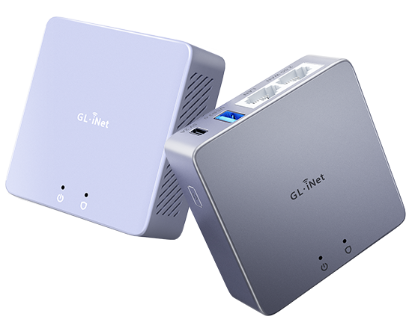
I actually purchased the 2 Beryl AXs and a Brume 2 (the aluminum one) a bit more than a month ago from GL-iNET directly since they had a nice promo, so I'm "stuck" with them. Given how exciting this all is -- I'm sensing a new "hobby" here --I'm sure I'll find some use for all 3. One will be a travel router for sure, the Brume 2 will be my Network A router and the remaining Beryl AX might just be something to tinker with in learning how to make subnets and adjacent LANs and all that fun stuff. I might even permanently put it at the parents' house so I can tunnel home without lugging a router around when visiting.
Last couple questions (at the risk of wearing out my welcome):
- Is there any way at all in this setup to allow for split tunneling such that I could preserve the ability to control which of my devices on Network B gets the VPN from Network A and which can go through without encryption? I know you mentioned that this would likely not be possible, but I'm wondering if there is some adjustment that could be made -- perhaps some fancy split tunneling to done on the Brume 2 with fancy port-forwarding on the Google Router create two "paths", for lack of a better word? Or perhaps a slight hardware rearrangement. I'm envisioning a scenario where there may be a need to simply not have encryption for whatever reason (perhaps a pesky site like a bank that simply won't allow log-ins, or what have you). Again, if Google played nicely with ceding DHCP control, I think a drop-in gateway may have done the trick.
THANK YOU so much for your help!