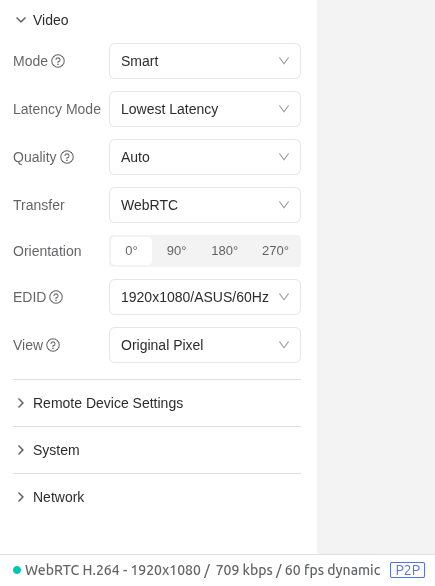
I've got my RM10RC connected to a Linux PC that's in headless, text-only mode (VT, not KDE), 1920x1200@60Hz. I'm looking at the stats on the bottom of the glkvm.com page and that static, text-only image easily takes > 1MBit/sec (and as high as 5MBit/sec!) in any of the selectable video modes even with no new text on the screen.
Isn't there any kind of RLE(?) compression being used? I would think a screen like that should use a few Kbits/sec at most. I was hoping to use a SIM with a limited amount of data as the 5G backup, but I could easily see blowing thru a few GBytes in just an hour
I've tried that and all the various options and combinations ... look at this screenshot ... what's on the screen is 240x67 plain VT text that's not moving- why does that need ~8mbit/sec of bandwidth?
Please run this command record a video and send it to us. We will analyze your video to see what was happening. It will save a video record in virtual media named myvideo.mp4.
OK, I have the output file (had to actually start a session to get the video to start, I deleted my previous reply). There's nothing sensitive in it, but it's ~71Mbytes; how should I send it to you?
What's interesting is when I view it in vlc, it appears to ... pulse(?) once per second- maybe this is the reason for the high bitrate?
I see what your problem is. Your video shows a strong breathing effect. Essentially, this chip is designed for cameras. It is not good at handling such high-definition computer screens. The breathing effect causes its bitrate to never decrease.
This type of issue usually requires support from the chip manufacturer, and there is a very high probability that the answer is no.
... um, whaaaaa? Isn't the entire point of the Comet (5G, et al.) to "handle such high-definition computer screens"?! I'm even using 1080p (vs. one of the 4K options your firmware offers even) to keep the bitrate down
... so now I wonder if it's some sort of pixel-synchronization error?
At least now I know my Comet is capable of doing static images at low bitrates ... now I just need to see if I can figure out what causes it to go apesh-t high-bitrate

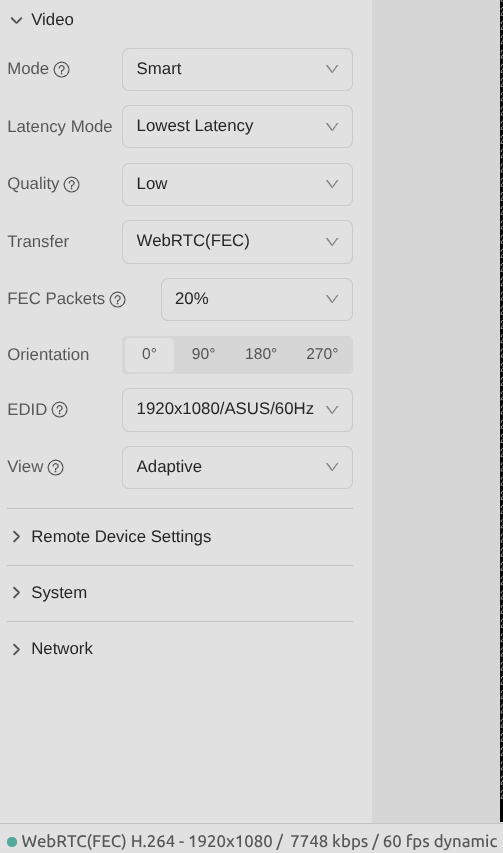

 Alternatively, you can try normal mode and select a lower quality.