First they throttled then they blocked the unlimited data SIM card after a few months. I’m hoping AmneziaWG will be better than Wireguard.
Wait so Beryl AX (MT3000) won’t be getting 4.9 in the first batch?
I’ve been testing it and it seems to be working fine with the current beta.
The Beryl AX (MT3000) v4.9 release is expected to be part of the second rollout batch.
If you’re mainly looking to use AmneziaWG, the current beta version should already meet your needs.
We’ve also released a new beta firmware with AmneziaWG 2.0 support, which you may want to try as well.
3 Likes
Nice! How about AXT1800?
I think the v4.9 release for the AXT1800 will likely be in the third batch.
1 Like
We released the 4.8.3 beta firmware for the AXT1800 today, which adds support for AmneziaWG.
If you’re interested, feel free to download it and give it a try.
DL Link: GL.iNet download center
Upgrade Guide: Upgrade - GL.iNet Router Docs 4
2 Likes
Wow this is great news! I am still on 4.6.11 but I have a spare to test.
@bruce I already have AWG 2.0 running in client production for 7 different GL models.
I’d be happy to provide reference code, but there seems to fundamental misunderstanding about how this protocol works. To make it function for country-level DPI bypass, it has to be tuned for the situation. Anything GL releases at scale with params will be functionally non-useful because the state actors running the DPI will take your “mass released” params as a roadmap to easily fingerprint.
AWG2 with “random” params is useless. It has to be tuned to the decoy protocol that you’re trying to mimic to be effective.
Proper DPI evasion is a boutique service, crafted for the situation. Any implementation done at scale will get blocked at scale. It’s the same reason the “out of the box” bypass protocols and VPN services only last a few months before getting blocked.
https://www.reddit.com/r/GlInet/comments/1rynnty/comment/obfy66t/
4 Likes
Very good point.
Is there any tutorial about how to get those parameters in an easy way?
1 Like
Key points:
- I1-I5 sent only if configured
- Junk packets always sent before handshake
- S1/S2 apply to handshake packets
- S3 applies to cookie reply (rarely, only under load)
- S4 applies to EVERY data packet (your main traffic)
- H1-H4 with ranges - each packet gets a unique header
CPS - traffic masking language
What is CPS in simple words
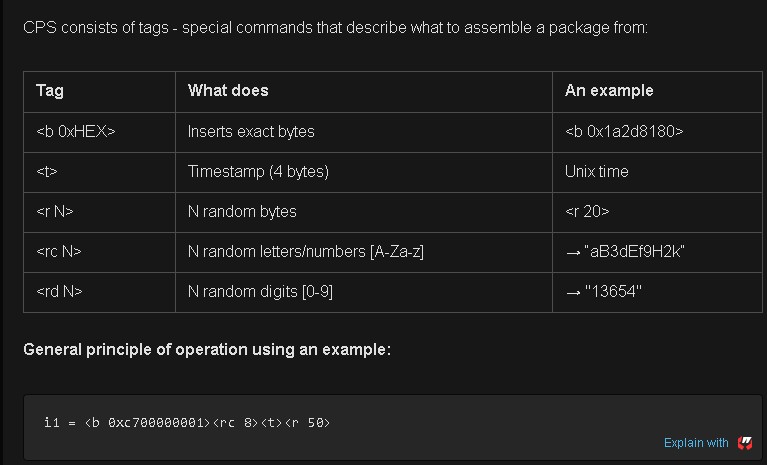
CPS (Custom Protocol Signature) is a special format for describing what signature packets (I1-I5) should look like. You could say it's a "constructor"for creating fake packages.
Analogy from life:
Imagine a theatrical performance. Your VPN traffic is an actor that must get past the guard (DPI system). CPS is the script and the costume. You write: "put on a police uniform, show your badge with the number, say 'patrol number 47'". The security guard sees the policeman and lets him through without checking what is under the uniform.
Available CPS Tags
CPS consists of tags - special commands that describe what to assemble a package from:
How does this work:
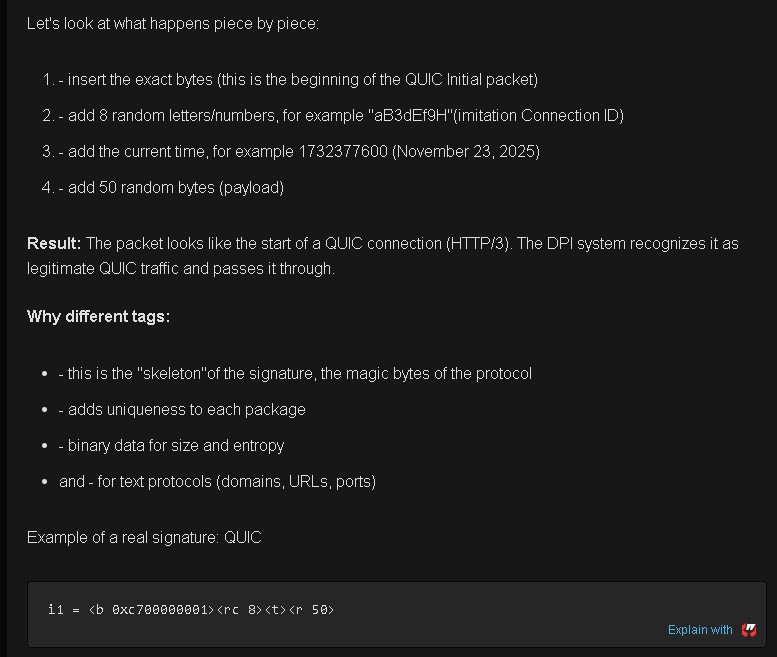
The DPI system looks at the beginning of the packet (the first 50-200 bytes) and looks for familiar protocol patterns. If it sees, for example, the beginning of a DNS request, it passes it through as legitimate traffic. The real WireGuard handshake comes next, after our "mask".
What's going on here:
- beginning of the QUIC package:
- 0xc7 - packet type (QUIC Initial)
- 0x00000001 - version QUIC v1
- 0x0 - the beginning of the Connection ID
-
8 random characters for Connection ID
Each connection will look different: "aB3dEf9H", "xY7zK2mN", "pQ9rS4tU" -
timestamp (different for each handshake)
-
50 random bytes payload
Why it works:
- DPI sees the first bytes 0xc7 0x00000001 - characteristic of QUIC
- Connection ID looks real thanks to
- The packet size is adequate (~70-80 bytes)
- Wireshark defines this as the "QUIC"protocol
- DPI passes both HTTP/3 traffic
read here the rest AmneziaWG 2.0: от маскировки трафика к полной мимикрии / Хабр
note: use capital for I1-I5 letters
2 Likes
@Renato Nothing posted that’s precise.. but that’s for good reason. For example, getting some of my clients behind the Russia’s MTS DPI took me a full day of automated testing to find the right combos to get through. That’s with test routers on each end (Russia>US), cycling through dozens of different port & protocol combos until I found the right decoy. Each of these test requires a full reconfig of both the server and client ends.
Now I have something that works, but if I publish the params, then Roskomnadzor could easily pick up that info and use it to fingerprint - then both blocking the DPI and be able to trace back to the Russian IPs using it.
Kinda like fight club.. you talk about it, it’s ruined for all.
2 Likes
@Tagor great example there.. and it will get through on several of the landline carriers, but MTS has already plugged that for mobile and for everyone in Moscow center on the new rolling test days.
It’s easy to get the first QUIC handshake packets through, but the subsequent WG payload sizes won’t match QUIC RFC packet sizing and get dropped (regardless of the QUIC header).. you’ll get a “green” handshake, but then zero data following.
Hi, I can’t see any download links. It looks like this version has not been published yet.
Please check your network and try using a different browser or incognito mode. It’s working normally on our end.
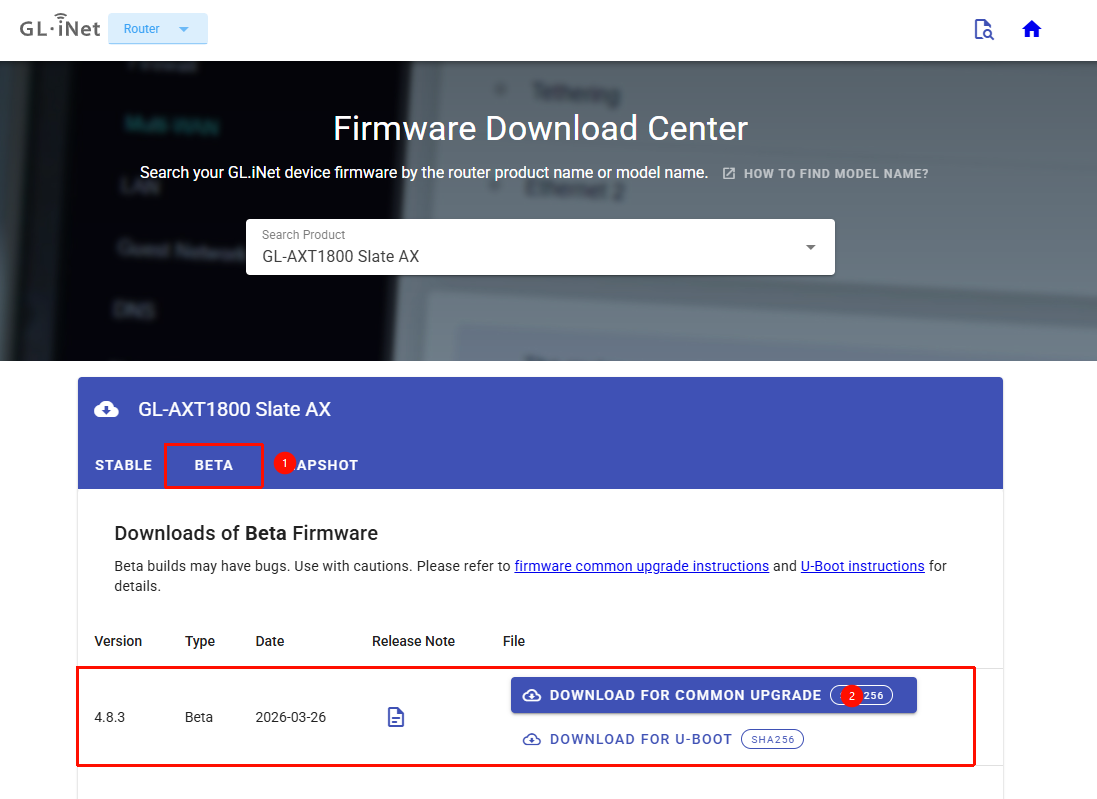
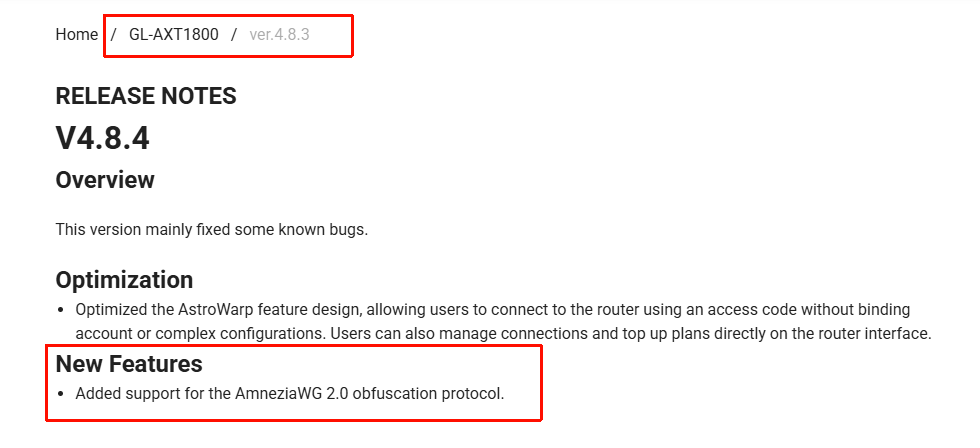
Hi, I mean that you mentioned firmware version 4.8.4 earlier, but only 4.8.3 is currently available on the server.
Oh, I made a typo. The v4.8.3 beta is the correct version.
Thanks for pointing that out. I’ve corrected it.
1 Like
Hello everyone,
I am looking for a router recommendation to run Amnezia with the best possible native support.
I currently own a GL-E750 for travel purposes, but I believe it may not be the ideal choice for a permanent home setup. I would appreciate your suggestions based on the following requirements:
-
24/7 Operation: The device should be stable for continuous use.
-
Client Load: Around 5–10 Wi-Fi clients (mostly Smart Home/IoT), with 2–3 active users consuming high-bandwidth video traffic.
-
Connectivity: The internet source will be a primary router via Ethernet (or occasionally via Wi-Fi).
-
LAN Ports: At least one Ethernet port to connect a wired client.
-
Power: A battery is not required (stationary use).
-
Usability: Ease of setup is a top priority for me.
Could you please suggest a model that fits this profile and works seamlessly with Amnezia? Thank you in advance for your help!
@will.qiu . I just downloaded 4.8.3 for eval.. FYI. You guys built against v1.0.20260210, which has significant jp_spec memory corruption, race condition, and deadlock bugs (aka, very good chance to crash/deadlock the router on tunnel setup/teardowns). Just fixed in upstream last week.
4 Likes
Which one does the GLiNet MT3000 use because it works fine
That’s AmenizaWG1.0. Works fine where is the question? If you’re not crossing a DPI firewall with blocking, then just regular wireguard works - no need to even use obsfucation.
1 Like