We need beta for AX1800/AXT1800 too
1 Like
you can run this as I do
Hi
Since our previous local testing did not reveal any issues, could you please follow the guide below and share your device with us via GoodCloud so that we can investigate it remotely?
Kindly send us the router's MAC address and admin password via private message so that we can access it.

Thank you for the detailed explanation of your use case.
We have noted it and will forward it to the product team for consideration.
Yes. Currently, you can create up to five tunnel groups. One of these can be configured with the No Use VPN routing method to exclude specific IP addresses or domains from the VPN.
For detailed configuration steps, please refer to:
https://forum.gl-inet.com/t/how-to-configure-a-not-use-vpn-policy-on-firmware-v4-9/69074/4
We use ARP and MAC addresses to identify IP addresses and display devices in the Clients list. This approach provides a reliable representation of the devices that are physically connected to the router.
Using Layer 4 methods such as netstat to identify connected devices may not reliably distinguish between locally connected devices and devices reachable through VPN tunnels or other routed connections.
Understood — your request is for bandwidth limits on a per-network basis, rather than per-client limits.
Thank you for the suggestion. We will discuss it further with the product team.
To clarify, we were referring specifically to the fact that SIMPoYo SIM cards and the default profiles provided with the SIMPoYo physical eSIM do not support IPv6.
The router itself supports IPv6. Therefore, if IPv6 is important for your use case, you may want to consider either:
- Using a SIM card from a carrier that supports IPv6, or
- Downloading an IPv6-capable eSIM profile to the SIMPoYo physical eSIM and using that instead.
For information on enabling IPv6 on the router, please refer to:
Thank you for the additional report.
Regarding the SQM issue:
It appears that the error message is caused by some kernel modules not being pre-installed. However, these modules are only used by certain legacy SQM scripts that are not utilized by the SQM implementation in the GL UI, so this should not affect the normal operation of SQM through the GL interface.
We have asked the development team to investigate whether these modules can be pre-installed in future firmware releases, or made available in the package repository for users who need them.
Regarding the Y-axis issue in Data Statistics:
We have not been able to reproduce it locally. In our testing, the graph appears to correctly reflect the relationship between Total Bandwidth and Data Usage:
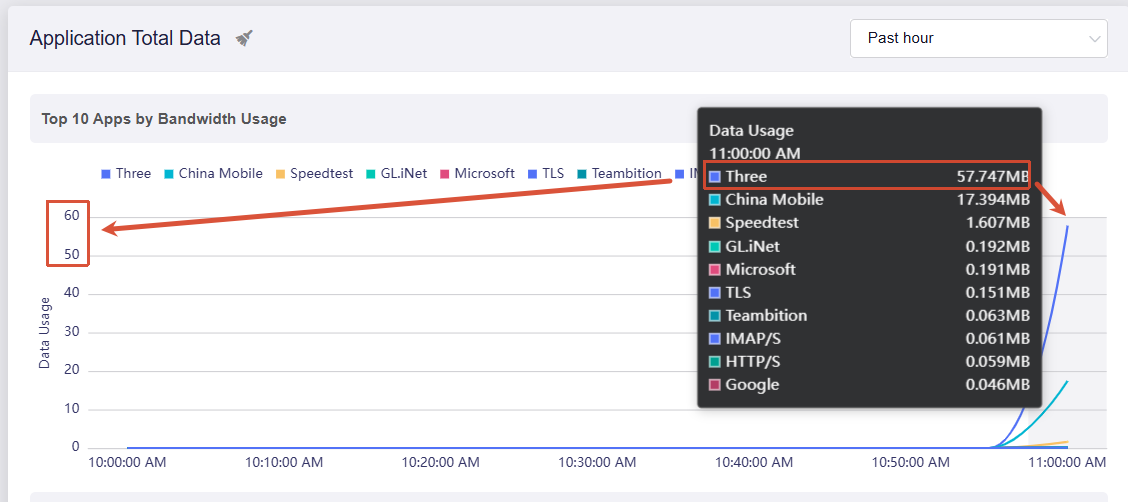
Could you provide some additional details about the issue you are seeing?
Forgot to ask, but is DoH3 supported? I'm already very happy that DoQ is supported, but it feels incomplete without DoH3.
Thanks, @will - I know the router itself supports IPv6. That’s one of the features that drew me to it. The EIOT eSIM itself lacks IPv6 support. I’ve asked them directly and they’ve told me that they “hope to support IPv6 in the future.”
I was hoping that you guys might help “motivate” them…
It seems that you’re correct - I don’t know what I thought I was seeing…
Understood.
We'll try to get the relevant teams together to discuss it further.
1 Like
Does anybody have the same problem with the new netify service within 4.9.0. Maybe there´s only a parameter to set in a conf file.
Is it possible to have two lists working simultaneously — one for addresses that should go through the tunnel, and another for addresses that must never go through the tunnel?
- Do you know when 4.9.x will support eSIM? I have to stay on 4.8.3 to use my traveling Spitz.
- Data Statistics: Top 10 Apps display seems to be reasonably accurate (now that I know how to read the graph
 ), but
-
the Past Day only only shows a set of concentric humps for that day, centered on 2300 (11PM)
-
the Past Week shows only a flat line that slowly slopes up to the current day
-
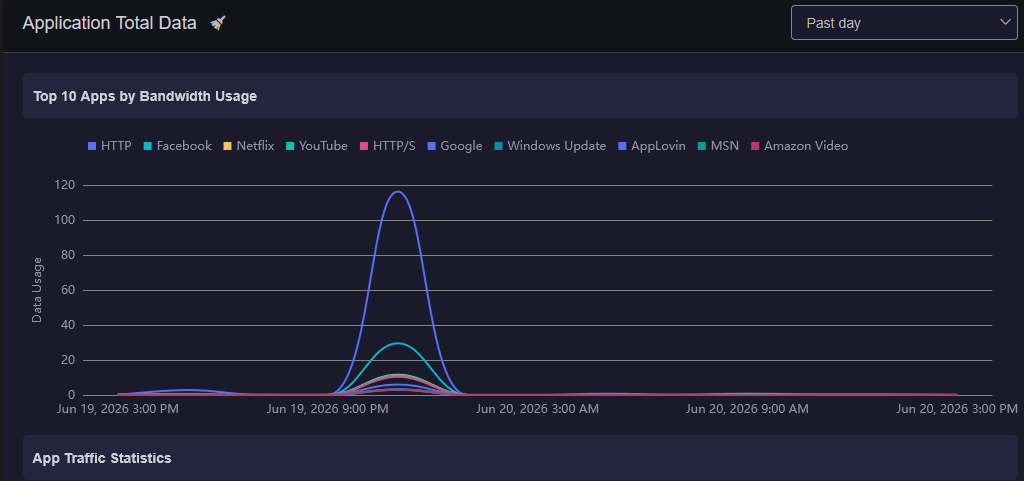
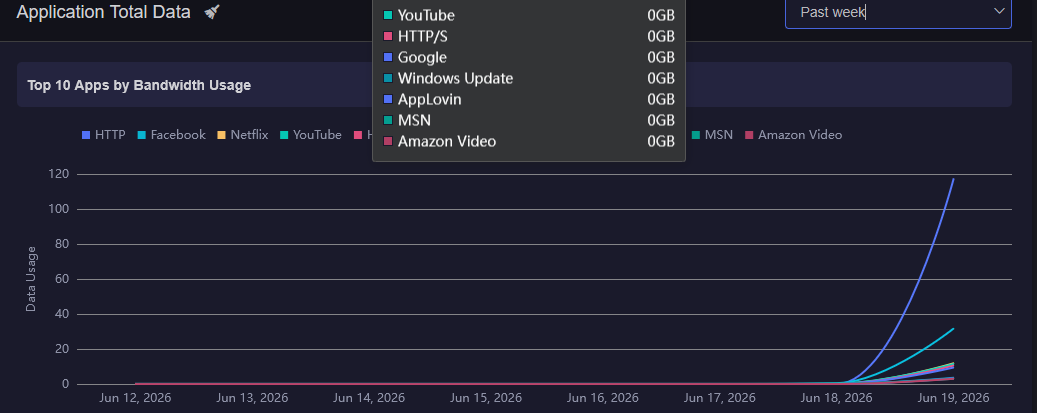
In either case, I’d have expected to see the max of each app for that day, joined by lines.
This has been running for more than a week, so the data should be there…
Any news on the Flint 3e 4.9.0 beta?
3 Likes
I'm still waiting for news on the Mudi 7 and the Slate 7 Pro.
3 Likes
It doesn’t work when connecting to the router via Tailscale. Can access the main network but not the IoT network. It’s not even advertised to Tailscale. Cannot view my IP cameras, control my Tapo smart switches, my Dreo fans, or my Lutron hub/switches. Half-baked firmware. I should have waited.
I would of thought “ working as intended” then, The IoT is supposed to be fully isolated from the main network, and as such Tailscale on the main network cant see anything on it.
It’s a feature of Isolated IoT networks, if you need to be able to cross talk then they need to be on a restricted guest network, or find a way to have tailscale on the IoT Network. (not that it should see anything as the devices should be isolated from each other and unable to see anything but the internet)
2 Likes
It would help if you describe the configuration you defined. Contrary to the best efforts of networking device designers and developers, no part of networking is plug-n-pray.
I should have included the fact that I had the appropriate firewall rule in place so that I could initiate a connection to the IoT network (192.168.10.0/24) but it could not initiate contact with the main network (192.168.1.0/24). I could access my devices locally but not remotely though Tailscale.
Both Grok, Gemini and ChatGPT deduced it is a flaw in the firmware, after working all weekend on it. I’m no expert though.
But IoT networks prevent client to client communication, I checked in Luci to make sure

If you are editing out the IoT features, and making bridges, its no longer the private secure place it was, might as well roll up a custom Guest network for them.
In essence an IoT network device should ONLY see an internet connection and believe it is alone on the network.
1 Like