It’s good hardware let down by terrible software, there isn’t much else within this same price range that has similar specs. I came from Asus (using Merlin) and still have my old router, but it’s a few years old now and doesn’t have WiFi 6 or 2.5Gb ethernet etc. I’d need to spend $500 to get another Asus, and this Flint 2 cost me $220. I’m talking in AUD so it might sound expensive, but it’s not.
bonez,
I have to admit I don’t use the WiFi much other than some testing with a laptop. My network is completely ethernet branching out to all rooms which includes 7 switches in total branching out from there. The wifi testing I did do with a couple of laptops at first only the one would connect but it seems that something changed less than two weeks ago and now the problematic laptop is able to connect fine on 2.4Ghz with 40 Mhz Forced. I never had a problem with either of those two laptops on 5Ghz which worked fine from the start. I haven’t used the 160Mhz setting on 5Ghz as although my neighbors are all at least 500ft. from my house I see the overlapping of signals and do not wish to add to the conglomeration…I prefer ethernet connections as you know you should get the full potential of the ethernet connection (whether that’s gigabit or 2.5 gigabit) vs. the variances you will always get with wifi due to interference (walls, electrical inteference, other devices, neighbor wifi, etc.). But in recent testing the 2.4 Ghz issue seems to have been resolved for me on the problematic laptop using forced 40Mhz.
But of course wifi is VERY variable dependent highly on the particular device and as mentioned any interference that may occur.
Quick question regarding this, if I add luci to the package build process, does this bring up the web interface at 1st boot? I tried OpenWrt but couldn’t get my PPPoE interface up as it needs some custom settings that are easy to find in the GUI.
Yes…Here’s what I add to mine in the Customize Installed Packages box…
curl ethtool-full nano-full openvpn-openssl luci-app-openvpn wireguard-tools kmod-wireguard luci-proto-wireguard pbr luci-app-pbr luci-compat luci-theme-material irqbalance attendedsysupgrade-common luci-app-attendedsysupgrade luci-app-statistics
1 Like
BTW should the open-wrt comup up without LUCI you can simply ssh into the router and issue this command via ssh…
opkg update
opkg install luci
That will install LUCI…
Thank you, the struggle was getting internet connectivity to install lucid though 
“Compiled” my own build using the OpenWRT online builder, and after messing about for an hour got 6RD working. DNS over TLS working with stubby. So yeah, agree with you. The hardware from GLI is amazing, but their firmware leave some room for improvement. OpenWRT is definitely not easy to configure if you have specific functions you need, but doable. Getting the Firewall correct for Guest Network is also a pain with OpenWRT, but fully handled by the GLI GUI. So if GLI could give us a thin GUI without SW update intrusion, that would be great.
I tried OpenWRT myself and couldnt get used to it, for instance, although its easy to get the network up and running, I couldnt name devices that were connected to the network, like smart devices and PC’s etc, it was just a bunch of mac addresses, which is no good to me if I want to see if someone is stealing my password and jacked in on my router (currently 1 blocked device which I cant identify on my network although everything I own “33 devices” are all working fine). that for me that alone was enough to go back to the GL.iNet firmware, I only have IoT devices on the 2.4ghz network, everything else runs through a switch or is directly connected to LAN or the 5ghz which is working fine.
Goose280672,
You could set Static IP Leases in Luci (DHCP AND DNS) for all your devices using the MAC Address of each device…That way they always get the same IP you’ve assigned and you can see a list of your devices under DHCP and DNS in LUCI…That’s one way to do that…I have several done that way for mine…
There’s probably other ways to do it with plugins…But in the end you have to decide what is important to you dependent upon your network setup and your devices…With wifi it’s always a crapshoot because its so varied dependent upon the devices themselves, interference, etc.
OpenWRT is more time consuming to configure than using the GL.iNet GUI. But the OpenWRT build is really fast, the wireless drivers seems to work well. And as I need 6RD for my ISP, which is not supported on the GL.iNet builds, I had to move to OpenWRT. 6RD works great with OpenWRT, although it did take some fiddling to get the configuration to work. OpenWRT seems most complicated around the firewall rules which seem to make or break everything in their firmware. Yes, I wish OpenWRT had a quick user interface like the GL.iNet GUI. I am using the Material GUI on top of LUCI which at least looks more modern. The kernel is 6.1.86, which is much later than the stable 23.05 and way more current than GL.iNet v4.58 OpenWRT 21.02. The router under load is running at 48 degrees C, which also is really good. The only bug I have seen is that the channel analysis on the 5 GHz band only shows my radio. The channel analysis on the 2.4 GHz band shows me + everyone else. Have backed up my settings as they work and will create some command files and notes so I don’t forget the configuration as it absolutely takes some brain cells to figure it out for more complex setups.
2 Likes
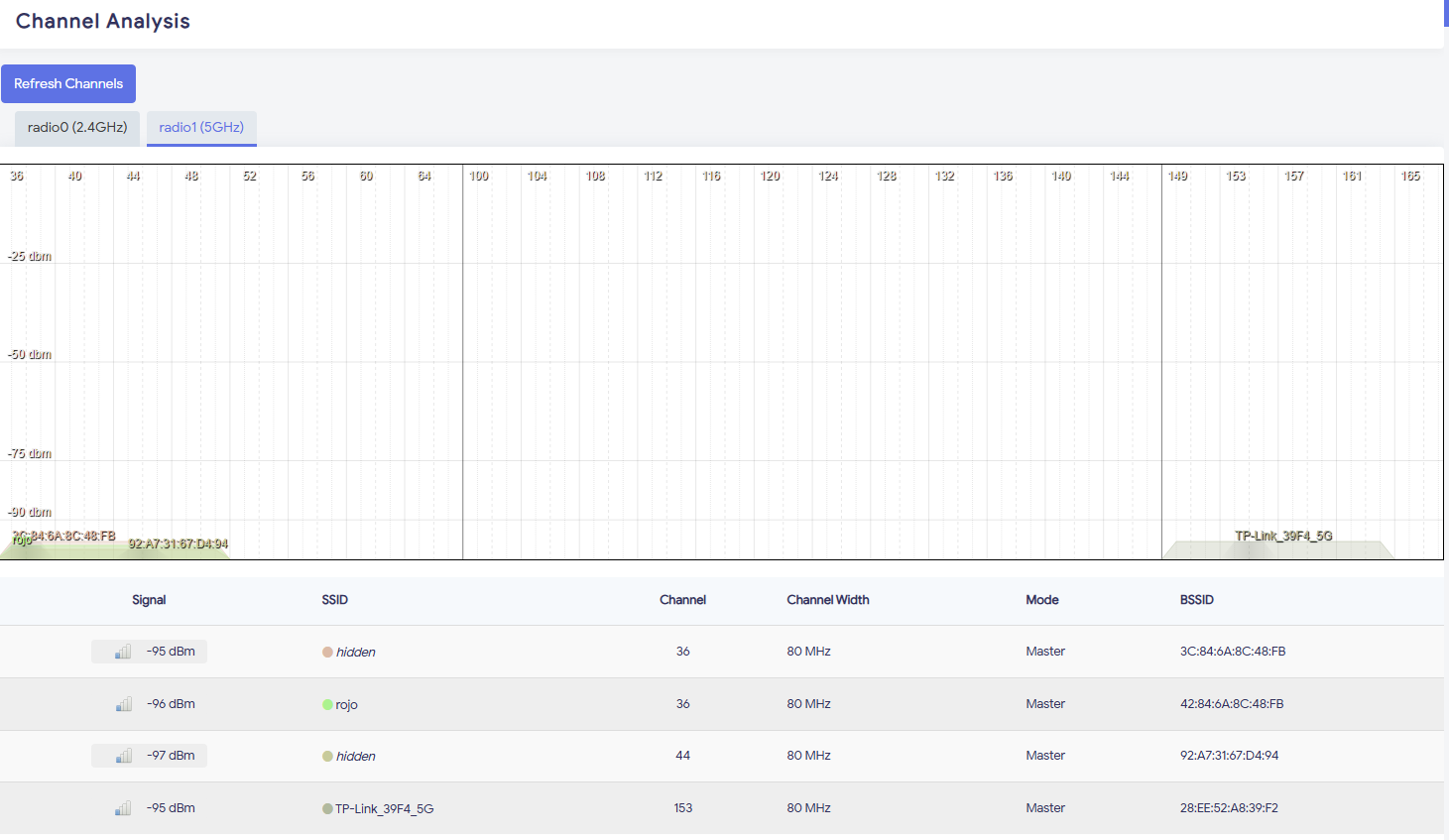
You are right, the channel analysis function is working as designed. I am using 160 MHz channel width, that is why the function only shows me as I am the only one around here using 160 MHz channels. When I change my channel width to 80 MHz, I can see all the other devices in the area using 80 MHz.
1 Like
with openwrt build works like a charm, with gl-inet build doesn’t work
1 Like
I’ll check it out with Material GUI, although I wonder if anyone tried to port GL.iNet gui on the latest OpenWRT port (I don’t know if permission from GL is needed due to copyright?)
I would also be interested in doing the same thing as the GL GUI speeds up configuration in OpenWRT. Only “issue” is that if you look at the SW packages with the GL builds, there are many closed source packages. Maybe GL can let us know on this forum if they would support this idea, they actually used to support the creation of your own builds.
I agree with you. The open source WIFI drivers on the OpenWRT build seem to work pretty well. All the functions actually work, including 6RD for IPv6 in my case. Not sure how GL could mess it up so much for their proprietary builds. The OpenWRT snapshot builds are stable and fast. The only minus for OpenWRT is that configuration is a real pain and requires a lot of playing around and testing. Sure you can back up your settings and create command files. But the initial setup is terrible the first time you set up your OpenWRT router.
2 Likes
Can anyone help me setup USB sharing via Samba in OpenWRT, its simple to do in the GL.iNet firmware.
I guess this link can help:
https://openwrt.org/docs/guide-user/services/nas/usb-storage-samba-webinterface
1 Like
I doubt GL.inet would offer up what is the main attraction of the GL.iNet routers which is the GL.iNet GUI to be open source. BUT…If they were to make the GL.iNet addon GUI install package only install on GL.iNet routers by identifying the chipset…Then I could actually see this as being advantageous to GL.iNet. Here’s what I mean…If ALL GL.iNet routers ran on true Open-WRT and the GL.iNet gui was made to be an add on…Then this would relieve the software developers from having to do all the constant testing,scripting, driver compatibility testing,etc. All that would be done before hand in conjunction with the Open-WRT development community. Then all the GL.iNet developers would need to do is make sure that the GL.iNet GUI interface works with the current Open-WRT version. The GL.inet GUI could actually just be an addon that could be installed or uninstalled. For anything that fell outside the scope of the GL.iNet GUI then users could still use the Open-WRT configuration as it is done now. Again the GL.iNet GUI would only install on genuine GL.iNet routers by identifying the chipset during installation.
The only drawback with this is it would put GL.iNet dependent upon whether there was interest in certain of the GL.iNet products by the Open-WRT development community (But of course free products to those developers could be an attaction) and this would relieve a lot of burden off of the GL.iNet developers as they then would just have to make sure the GL.iNet Addon GUI worked with the current Open-WRT Builds for all their routers. But I doubt it would happen because it would make GL.iNet dependent upon whether the Open-WRT developer community had interest in a particular product (or not).
7 Likes
When are we getting the 4.6.0 beta version for the Flint 2? I tried it on my Beryl and now I can finally block YouTube ads and run AdGuard Home at the same time, sweet. AdGuard doesn’t override the VPN Client DNS anymore.
1 Like